Hey guys,
We are trying to learn and figure this out on the go, but I suspect someone may have the answer nice and easy, and it may not be even possible.
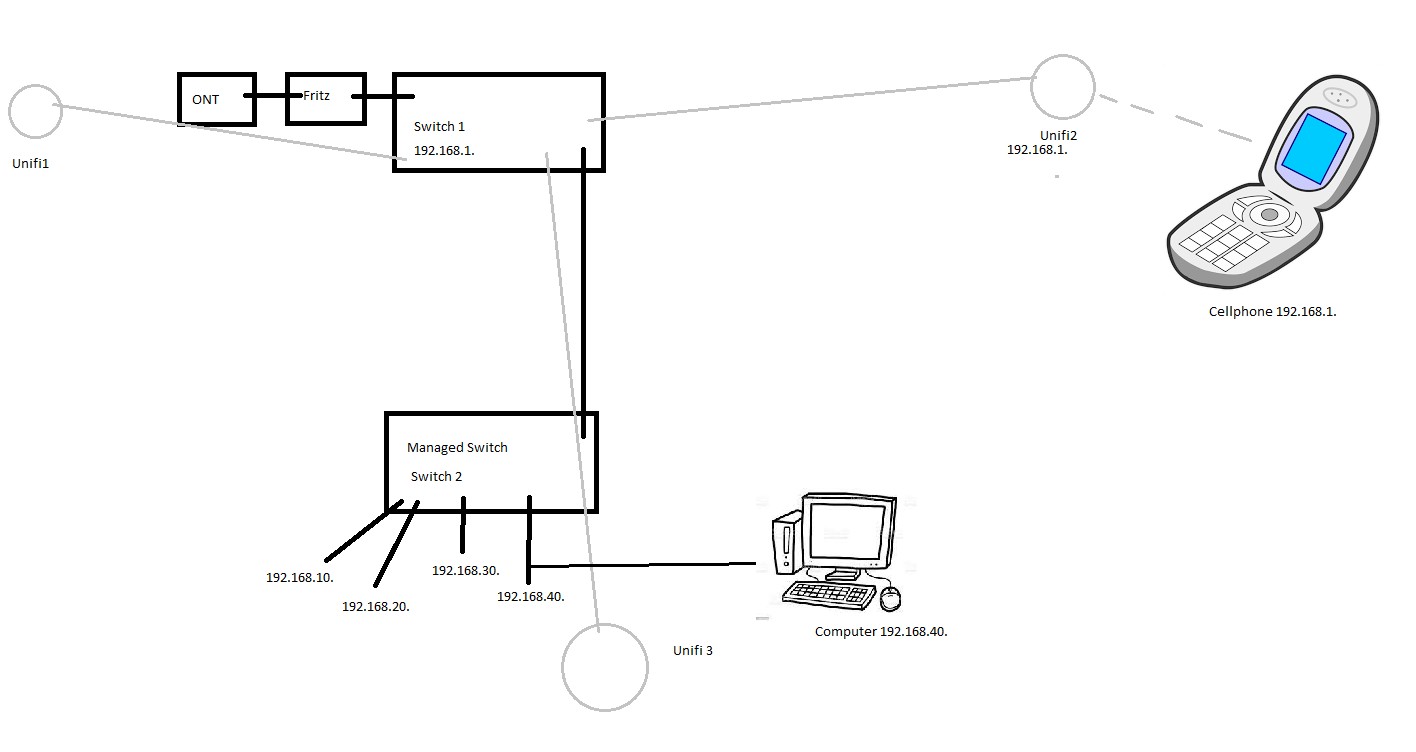
We have just received some new gear at our church, and included was a managed switch in the control room. There are multiple Vlans as there is AVoIP, Control screen faces, NDI cameras etc, all separated.
Our main Presentation PC is currently plugged into 192.168.40. so as to be able to access the NDI system. The software has a remote for phones, and my phone on the wifi, which is connected to the unmanaged switch and on 192.168.1. Due to this, when I open the app and try connect, it cannot find the software (there is no option to manually type an IP). However if I use the audio mixer app and type the 192.168.40. ip of the mixer, it connects.
This also applies to the NDI camera app, if I open if on my phone, the OBS computer cannot see my stream.
I have attempted to set an IP on my phone as 192.168.40. but didn't work, not that I expected it to. And don't get me wrong, we're good with tech but this Vlan stuff is all something any of us have played with before.
Is there anything specific we can do to achieve this? The SSID on the unifi is our tech one, so we can configure it as needed.
Or is this a bigger beast than we were anticipating.