Geekzone: technology news, blogs, forums
Guest
Welcome Guest.
You haven't logged in yet. If you don't have an account you can register now.


magicman

13 posts

Geek

ID Verified

#302276 11-Nov-2022 23:32
Send private message

I am at my wits end...


I have had following set up:


OG Setup | ONT -> USG -> USW-LITE-16 -> LAN


There were certain sites www.trademe.co.nz being one, that I was literally unable to access.  When I attempted to navigate it gives me a timed out error.  There wereother sites as well, such as accessing my ASB Bank feed on my Xero site.  It as annoying as anything.


Now I decided a couple of months ago to change the set up and use the Megatel Router provided by Megatel.


ONT -> Megatel Supplied TP-LINK -> USG -> USW-LITE-16 -> LAN


Now this set up cause NO problems and trademe was well and truly accessible.  I decided to give the TP-Link a 10.1.1.1 address, the USG a 10.1.1.100 address, and then have the USG dish out 192.168.1.X addresses to the LAN.  This was working perfectly until... it didn't.


One of sites I'm a member of requires a certain port to be open, and as such I needed to install a port forwarding rule on the TP-LINK.  Unfortunately TP-LINK will not let me forward any ports to an IP address that does not match the TP-LINK addresses.  So I was therefore stuck.  I have since gone back to my OG setup.


This OG setup has then reminded me why it is frustrating that this doesn't work like it should.


Anyone have any advice? I've attached the tracert to www.trademe.co.nz and www.stuff.co.nz for some comparison.


Any help - I've checked DNS and every DNS I can see is 8.8.8.8.


As I write this I have briefly toyed about having the TP-LINK be responsible for allocating all the IP addresses and then perhaps that will work.  But I really feel like the USG should be able to do this.


Any help and guidance would be much appreciated.


-----


C:\Users\pohfamily>tracert www.trademe.co.nz


Tracing route to www.trademe.co.nz [151.101.130.137]
over a maximum of 30 hops:


  1     1 ms    <1 ms    <1 ms  192.168.1.1
  2     3 ms     2 ms     2 ms  49.50.228.116
  3     *        *        *     Request timed out.
  4    20 ms    19 ms    19 ms  38.110.164.81
  5     *        *        *     Request timed out.
  6    18 ms    30 ms    19 ms  as54113.akl.ix.nz [43.243.21.63]
  7    18 ms    17 ms    18 ms  151.101.130.137


Trace complete.


C:\Users\pohfamily>tracert www.stuff.co.nz


Tracing route to e14449.dscx.akamaiedge.net [23.212.169.182]
over a maximum of 30 hops:


  1    <1 ms    <1 ms    <1 ms  192.168.1.1
  2     2 ms     2 ms     3 ms  49.50.228.116
  3     *        *        *     Request timed out.
  4    18 ms    18 ms    18 ms  38.110.164.81
  5    52 ms   221 ms   212 ms  as20940.akl.ix.nz [43.243.21.53]
  6    18 ms    19 ms    18 ms  a23-212-169-182.deploy.static.akamaitechnologies.com [23.212.169.182]


Trace complete.



Create new topic
fe31nz
1303 posts

Uber Geek
+1 received by user: 430


  #2994947 12-Nov-2022 00:17
Send private message

Those traceroutes look fine - they go to the same addresses that mine go to, and I have normal access to those sites.


What ISP are you using?  Have you tried using your ISP's DNS servers?  That usually works best when dealing with sites that are using CDNs as you will preferentially get connected to any CDNs that are hosted on your ISP's network.


You may need to install Wireshark and get it to provide a dump of the packets when a connection fails.  That should give you decent clues as to what is going wrong.


Spyware
3826 posts

Uber Geek
+1 received by user: 1374

Lifetime subscriber

  #2994955 12-Nov-2022 06:51
Send private message

MTU


Spark Max Fibre using Mikrotik CCR1009-8G-1S-1S+, CRS125-24G-1S, Unifi UAP, U6-Pro, UAP-AC-M-Pro, Apple TV 4K (2022), Apple TV 4K (2017), iPad Air 1st gen, iPad Air 4th gen, iPhone 13, SkyNZ3151 (the white box). If it doesn't move then it's data cabled.


magicman

13 posts

Geek

ID Verified

  #2995094 12-Nov-2022 13:05
Send private message

Will check MTU and Wireshark and report.


magicman

13 posts

Geek

ID Verified

  #2995096 12-Nov-2022 13:11
Send private message

Hi Noob Question...


What do I exactly do with Wireshark?


fe31nz:


Those traceroutes look fine - they go to the same addresses that mine go to, and I have normal access to those sites.


What ISP are you using?  Have you tried using your ISP's DNS servers?  That usually works best when dealing with sites that are using CDNs as you will preferentially get connected to any CDNs that are hosted on your ISP's network.


You may need to install Wireshark and get it to provide a dump of the packets when a connection fails.  That should give you decent clues as to what is going wrong.


Spyware
3826 posts

Uber Geek
+1 received by user: 1374

Lifetime subscriber

  #2995098 12-Nov-2022 13:27
Send private message


Spark Max Fibre using Mikrotik CCR1009-8G-1S-1S+, CRS125-24G-1S, Unifi UAP, U6-Pro, UAP-AC-M-Pro, Apple TV 4K (2022), Apple TV 4K (2017), iPad Air 1st gen, iPad Air 4th gen, iPhone 13, SkyNZ3151 (the white box). If it doesn't move then it's data cabled.


insane
3329 posts

Uber Geek
+1 received by user: 1009

ID Verified
Trusted
2degrees
Subscriber

  #2995104 12-Nov-2022 14:22
Send private message

Using with the ISP supplied router and a USG together is not ideal. You only need one router.

Perhaps disable as many security features as you can on the USG, and hardcode in your ISPs DNS servers as my USG had issues automatically picking up my ISPs ones. Once it's working you can turn on more security features again to try identify which one could ge causing as issue.

As as mentioned above, MTU issues do fit the bill, but so to could devices that have their clocks / time more than 5 minutes out.


Shop now on Samsung phones, tablets, TVs and more (affiliate link).
magicman

13 posts

Geek

ID Verified

  #2995110 12-Nov-2022 14:42
Send private message

Hi,


I actually can't visit the first site (https://forums.clavister.com/viewtopic.php?t=11915) because it is timing out.  What does it say?


Spyware:


https://forums.clavister.com/viewtopic.php?t=11915


https://www.youtube.com/watch?v=lb1Dw0elw0Q


yitz
2277 posts

Uber Geek
+1 received by user: 608


  #2995342 13-Nov-2022 02:50
Send private message

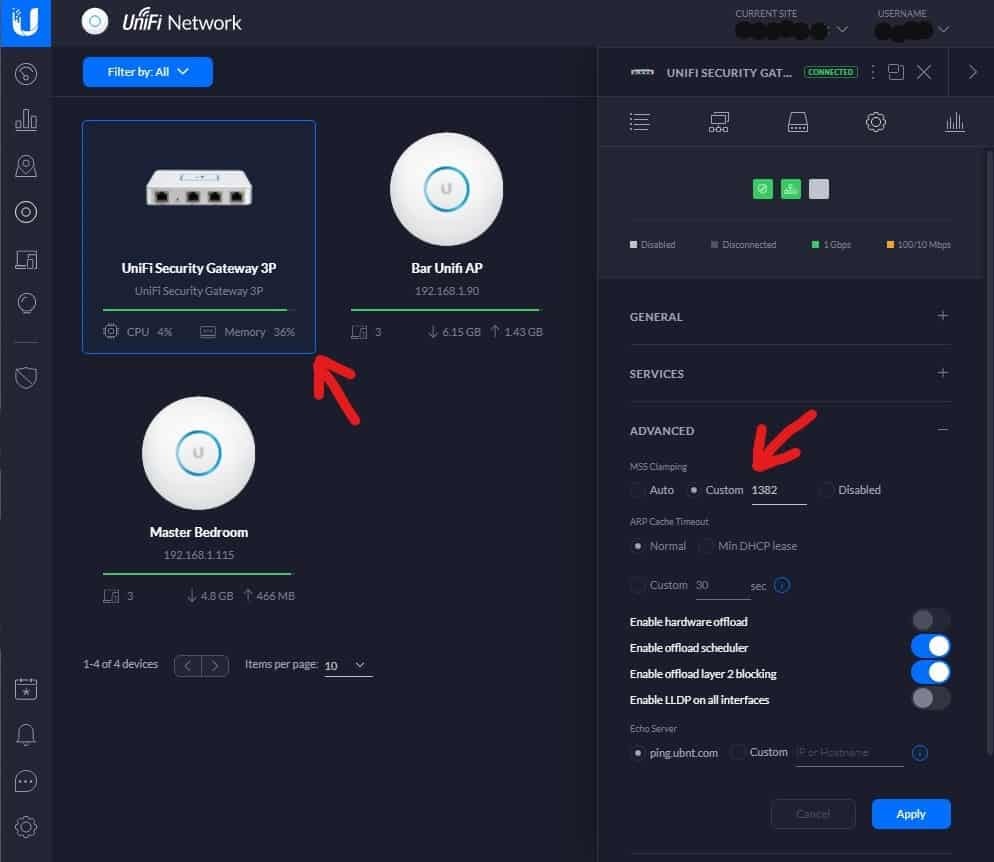
On your Unifi gateway enable TCP MSS clamping to 1452 bytes (PPPoE interface set to 1492 bytes =  1452 + 40 bytes of IP + TCP header)


A quick ping -f -l shows Trade Me (Fastly CDN) doesn't reply to fragmented packets over 1500 bytes but Stuff (Akamai) does.


image from: https://hometechtime.com/ubiquiti-usg-some-websites-not-loading-correctly-or-not-at-all/ 


ProbablyAGeek
26 posts

Geek
+1 received by user: 8


  #2996049 14-Nov-2022 14:42
Send private message

Remove that TP-Link, you only need one router. 


You can plug your USG directly into the ONT, just make sure to setup the WAN settings as they want https://www.megatel.co.nz/broadband/router (no VLAN tagging with PPPoE and their username and password).


Set the MTU correctly and you shouldn't need to play with the MSS clamping settings. 


Create new topic


Geekzone Live »

Try automatic live updates from Geekzone directly in your browser, without refreshing the page, with Geekzone Live now.


Are you subscribed to our RSS feed? You can download the latest headlines and summaries from our stories directly to your computer or smartphone by using a feed reader.