Geekzone: technology news, blogs, forums
Guest
Welcome Guest.
You haven't logged in yet. If you don't have an account you can register now.


Renick07

7 posts

Wannabe Geek


#30282 3-Feb-2009 18:26
Send private message

I just bought a new internet connection from Telecom and have received their standard Thomson TG585 v7 ADSL modem with wireless and 4 port router. I already have a similar Netgear DG834G modem/router that is connected to my working internet connection.
Where I live is like a big flat, with dorm-style rooms off a corridor and a seperate communal living area. The Netgear modem however, doesn't seem to have the range for a strong signal in the living area (it's installed in the corridor so that the rooms get good signal).
I want to "piggyback" one modem off the other to increase the wireless zone. Is this possible through the switch of each device? Or do I need to run another ADSL line? (The switch is physically the easiest option as there is wiring already installed).

I know a bit about PCs and ethernet LANs but not much about wireless networks- Help and advice would be much appreciated.


Create new topic
Ragnor
8279 posts

Uber Geek
+1 received by user: 585

Trusted

  #193870 4-Feb-2009 01:18
Send private message

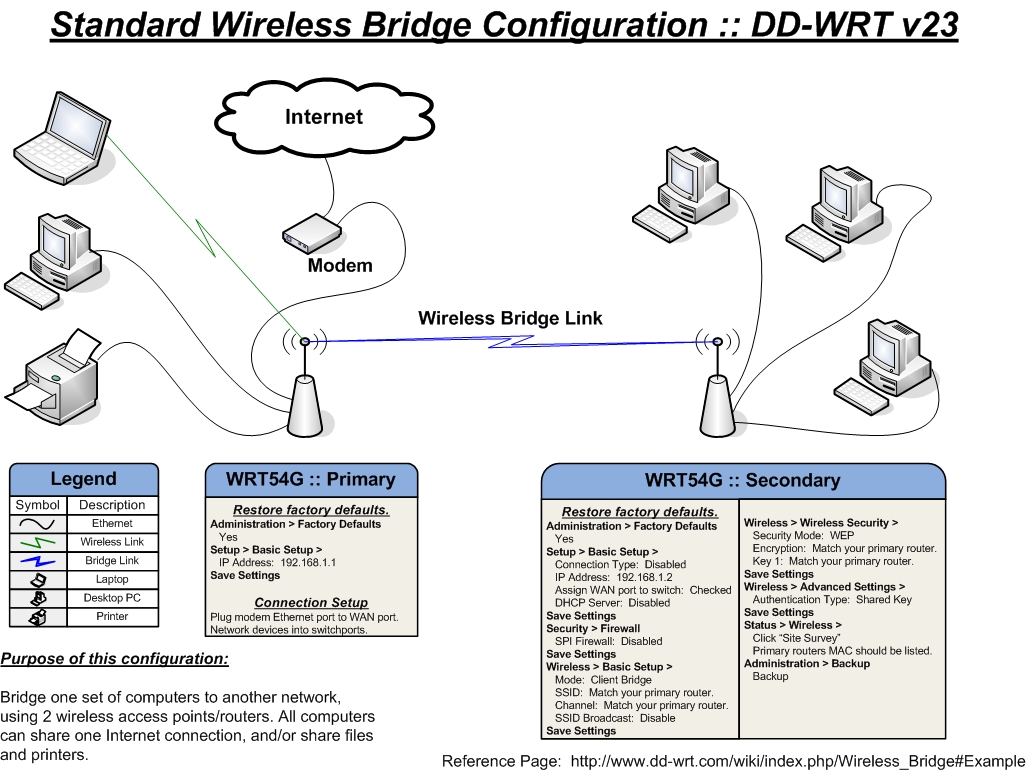
Look for the wireless mode option in both routers, you need to bridge them.  You should be able to run the router connected to the phone line as an AP (access point) and the other router as client bridge.  You will need to disable DCHP, firewall etc on the client bridge router.

Something similar to this:


Renick07

7 posts

Wannabe Geek


  #193971 4-Feb-2009 12:51
Send private message

Brilliant!
I'll give this a try after work.

alikat
405 posts

Ultimate Geek
+1 received by user: 40

Trusted

  #194020 4-Feb-2009 15:22
Send private message

I'd be keen to hear how you got on as Telecom are sending me one of those new routers for free (without having to be a new customer... ) and I would like to do a similar arrangement with my DLink G604T-Gen II.


Ragnor
8279 posts

Uber Geek
+1 received by user: 585

Trusted

  #194036 4-Feb-2009 15:50
Send private message

Just be aware the image above is specific to Linksys WRT54GL's running DD-WRT, the settings will probably be named slightly differently in your routers ui but the concept is the same.

trig42
5893 posts

Uber Geek
+1 received by user: 2099

ID Verified

  #194660 7-Feb-2009 16:25
Send private message

Another, simpler, way of doing it is to run a cable between the two routers, and use the second one as a plain Access Point. Just run a LAN cable between two of the switch ports on the routers.
You may have to configure the second router's wireless to have a different SSID and Channel.

davidcole
6099 posts

Uber Geek
+1 received by user: 1465

Trusted

  #194669 7-Feb-2009 18:09
Send private message

To do it via wire, you normally plugin the second router to the first via lan ports (i.e. don't use the wan port onthe second router).  If you don't to it this way, or if  your second router cannot turn off it's routing/fireall capabilities, then you'll effectively have two networks.

I run two wrt54gs in this manner, and will be running one of them and the thomson 585 come the 19th on Feb.  The wrt I'm running it dd-wrt so I'll making it into a access point and dhcp server..  The thomson will be running as router/port forwarder.


Previously known as psycik

Home Assistant: Gigabyte AMD A8 Brix, Home Assistant with Aeotech ZWave Controller, Raspberry PI, Wemos D1 Mini, Zwave, Shelly Humidity and Temperature sensors
Media:Chromecast v2, ATV4 4k, ATV4, HDHomeRun Dual
Server
Host Plex Server 3x3TB, 4x4TB using MergerFS, Samsung 850 evo 512 GB SSD, Proxmox Server with 1xW10, 2xUbuntu 22.04 LTS, Backblaze Backups, usenetprime.com fastmail.com Sharesies Trakt.TV Sharesight 


Shop now for Dyson appliances (affiliate link).
Renick07

7 posts

Wannabe Geek


  #195633 12-Feb-2009 21:45
Send private message

The wireless to wireless seemed a bit out of my league, so I tried running lan between them. Initially they both worked, allbeit on two different networks (I couldn't seem to get them to merge into one- maybe down to incompatibility, but I'm not sure). This was ok for a couple of hours, but then DISASTER! The internet dropped out when both wireless networks were operational, interestingly the internet still ran fine through the lan to my pc... Now this is what I get as standard.

LAN (through switch) with internet works fine
Dual wireless networks, but no internet

               OR

LAN (through switch) with internet works fine
Single wireless network with internet, but reduced range for what I want


In addition the Thomson gateway that previously gave me status of that device now asks for a username & password to access it, I've tried everything I can think of but am still geting a "not authorised" message. This might be a completely side issue but it appeared not long after I connected the two units so I'll post it here.


Comments/Tips welcome

Create new topic


Geekzone Live »

Try automatic live updates from Geekzone directly in your browser, without refreshing the page, with Geekzone Live now.


Are you subscribed to our RSS feed? You can download the latest headlines and summaries from our stories directly to your computer or smartphone by using a feed reader.