Geekzone: technology news, blogs, forums
Guest
Welcome Guest.
You haven't logged in yet. If you don't have an account you can register now.


Castlvaniafan

97 posts

Master Geek
+1 received by user: 15


#311054 10-Dec-2023 18:45
Send private message

I picked up a Synology WRX560 today since my router 2Degrees provides doesn't have enough parentel control and security options. I'm having trouble even just setting it up. 2Degrees provides some very basic information when bringing your own device (BYOD). Below is what they provide me:


WAN Connection Type: DHCP (Automatic IP/Dynamic IP/IP over Ethernet) **


802.1Q: Enabled


VLAN ID (802.1Q): 10


802.1P (Priority): 0


IP Version: IPv4 or IPv6


MTU Size: 1492 or 1500


NAT: Enabled

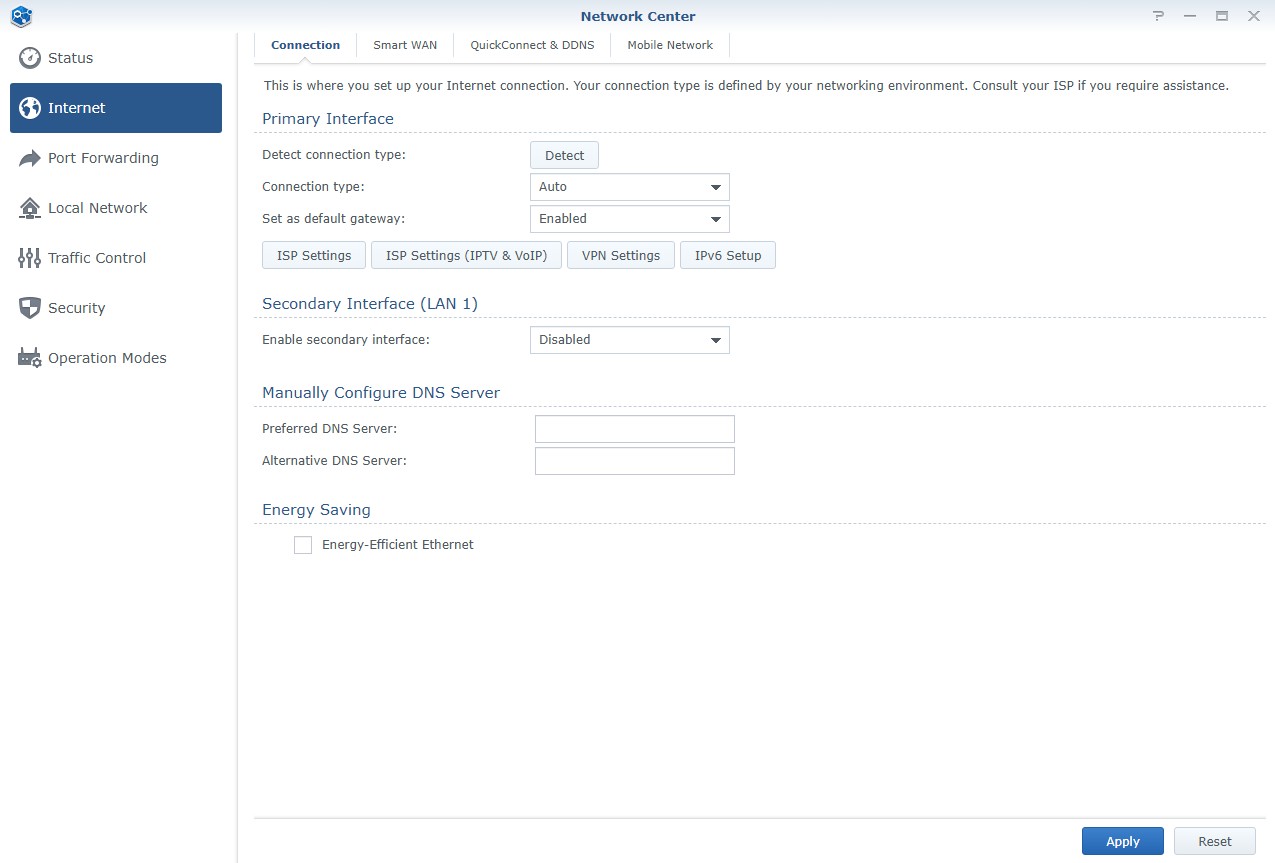
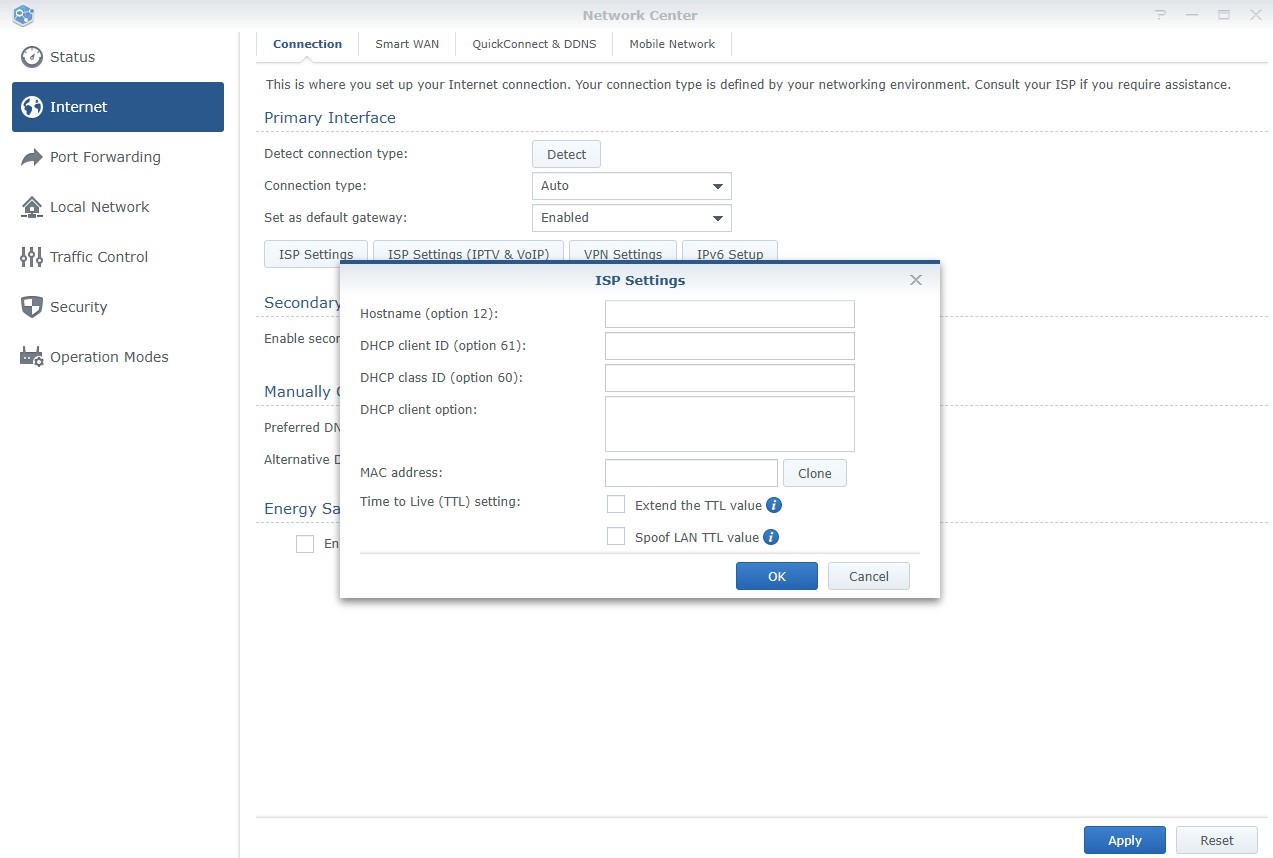
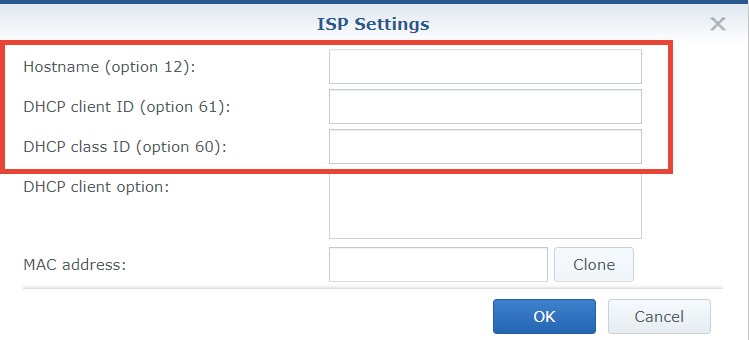
In Synology settings to setup DHCP, I need full information like their Hostname etc. See below. Bit confused at what to do here and was wondering if anyone else might have done this yet.


Synology settings:


Filter this topic showing only the reply marked as answer View this topic in a long page with up to 500 replies per page Create new topic
 1 | 2
SomeoneSomewhere
1882 posts

Uber Geek
+1 received by user: 1086

Lifetime subscriber

  #3170399 10-Dec-2023 19:06
Send private message

You should be able to leave all that stuff blank I believe. 


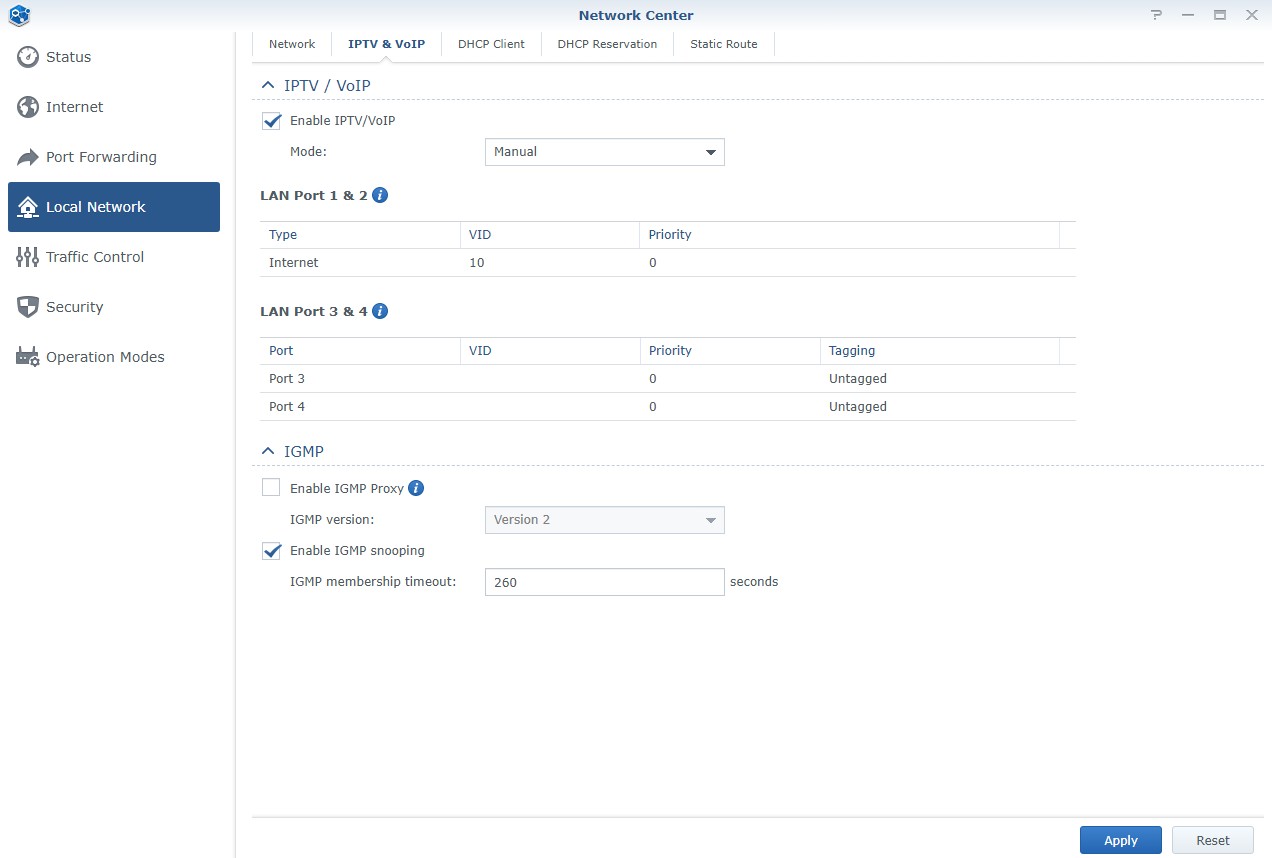
As long as you set VLAN 10 and DHCP, it should get everything else from 2D - that's the point of DHCP.


Castlvaniafan

97 posts

Master Geek
+1 received by user: 15


  #3170401 10-Dec-2023 19:14
Send private message

SomeoneSomewhere:


You should be able to leave all that stuff blank I believe. 


As long as you set VLAN 10 and DHCP, it should get everything else from 2D - that's the point of DHCP.


Ok, thanks. I've come across this VLAN 10 reccomendation when doing some research on fixing my issue. I need to find where this option is located in the Synology dashboard..


RunningMan
9184 posts

Uber Geek
+1 received by user: 4834


  #3170402 10-Dec-2023 19:19
Send private message

Castlvaniafan:I've come across this VLAN 10 reccomendation when doing some research on fixing my issue. 


It's not a reccomendation. It's a neccessary part of the configuration. That, and DHCP enabled for the WAN is pretty much all you should need to get connected.


Castlvaniafan

97 posts

Master Geek
+1 received by user: 15


  #3170403 10-Dec-2023 19:28
Send private message

RunningMan:


Castlvaniafan:I've come across this VLAN 10 reccomendation when doing some research on fixing my issue. 


It's not a reccomendation. It's a neccessary part of the configuration. That, and DHCP enabled for the WAN is pretty much all you should need to get connected.


Ok, I'll look around the Synology dashboard for VLAN 10 and enabling DHCP (althought I just see the connection type as mostly Auto as an option..) and report back.


RunningMan
9184 posts

Uber Geek
+1 received by user: 4834


  #3170404 10-Dec-2023 19:30
Send private message

Auto will almost certainly mean DHCP.


freitasm
BDFL - Memuneh
80647 posts

Uber Geek
+1 received by user: 41030

Administrator
ID Verified
Trusted
Geekzone
Lifetime subscriber

  #3170422 10-Dec-2023 19:56
Send private message

I have been using Synology routers for years on 2degrees. Will take screenshots when home.


Referral links: Quic Broadband (free setup code: R587125ERQ6VE) | Samsung | AliExpress | Wise | Sharesies 


Support Geekzone by subscribing (browse ads-free), or making a one-off or recurring donation through PressPatron.


Want to support Geekzone and browse the site without the ads? Subscribe to Geekzone now (monthly, annual and lifetime options).
Castlvaniafan

97 posts

Master Geek
+1 received by user: 15


  #3170423 10-Dec-2023 20:07
Send private message

freitasm: I have been using Synology routers for years on 2degrees. Will take screenshots when home.


Thank you, that would be wonderful. I can use that as a shortcut to get my internet up and running. Then I plan to research Networking a bit to learn these things. 


freitasm
BDFL - Memuneh
80647 posts

Uber Geek
+1 received by user: 41030

Administrator
ID Verified
Trusted
Geekzone
Lifetime subscriber

  #3170450 10-Dec-2023 22:38
Send private message


Referral links: Quic Broadband (free setup code: R587125ERQ6VE) | Samsung | AliExpress | Wise | Sharesies 


Support Geekzone by subscribing (browse ads-free), or making a one-off or recurring donation through PressPatron.


Castlvaniafan

97 posts

Master Geek
+1 received by user: 15


  #3170469 11-Dec-2023 05:49
Send private message

Legend! Worked for me. Wow went form 99 up / 99 down with the Fritz box to 500 up / 500 down on this Synology. What a difference this is going to make. And I can't wait to run some ethernet wires to hardware some of my other components.


RunningMan
9184 posts

Uber Geek
+1 received by user: 4834


  #3170718 11-Dec-2023 15:00
Send private message

99 up/down on the Fritz is almost certainly it running in green power saving mode. It reduces the ethernet port speed to 100 Mb/s.


Shop now for Lenovo laptops and other devices (affiliate link).
freitasm
BDFL - Memuneh
80647 posts

Uber Geek
+1 received by user: 41030

Administrator
ID Verified
Trusted
Geekzone
Lifetime subscriber

  #3170722 11-Dec-2023 15:25
Send private message

Castlvaniafan:


Legend! Worked for me. Wow went form 99 up / 99 down with the Fritz box to 500 up / 500 down on this Synology. What a difference this is going to make. And I can't wait to run some ethernet wires to hardware some of my other components.


Do you need the IPv6 configuration at all or are you good?


Referral links: Quic Broadband (free setup code: R587125ERQ6VE) | Samsung | AliExpress | Wise | Sharesies 


Support Geekzone by subscribing (browse ads-free), or making a one-off or recurring donation through PressPatron.


Castlvaniafan

97 posts

Master Geek
+1 received by user: 15


  #3177234 3-Jan-2024 08:42
Send private message

freitasm:


Castlvaniafan:


Legend! Worked for me. Wow went form 99 up / 99 down with the Fritz box to 500 up / 500 down on this Synology. What a difference this is going to make. And I can't wait to run some ethernet wires to hardware some of my other components.


Do you need the IPv6 configuration at all or are you good?


Thanks for the help here. Yes, I could use the IPv6 configuration. 

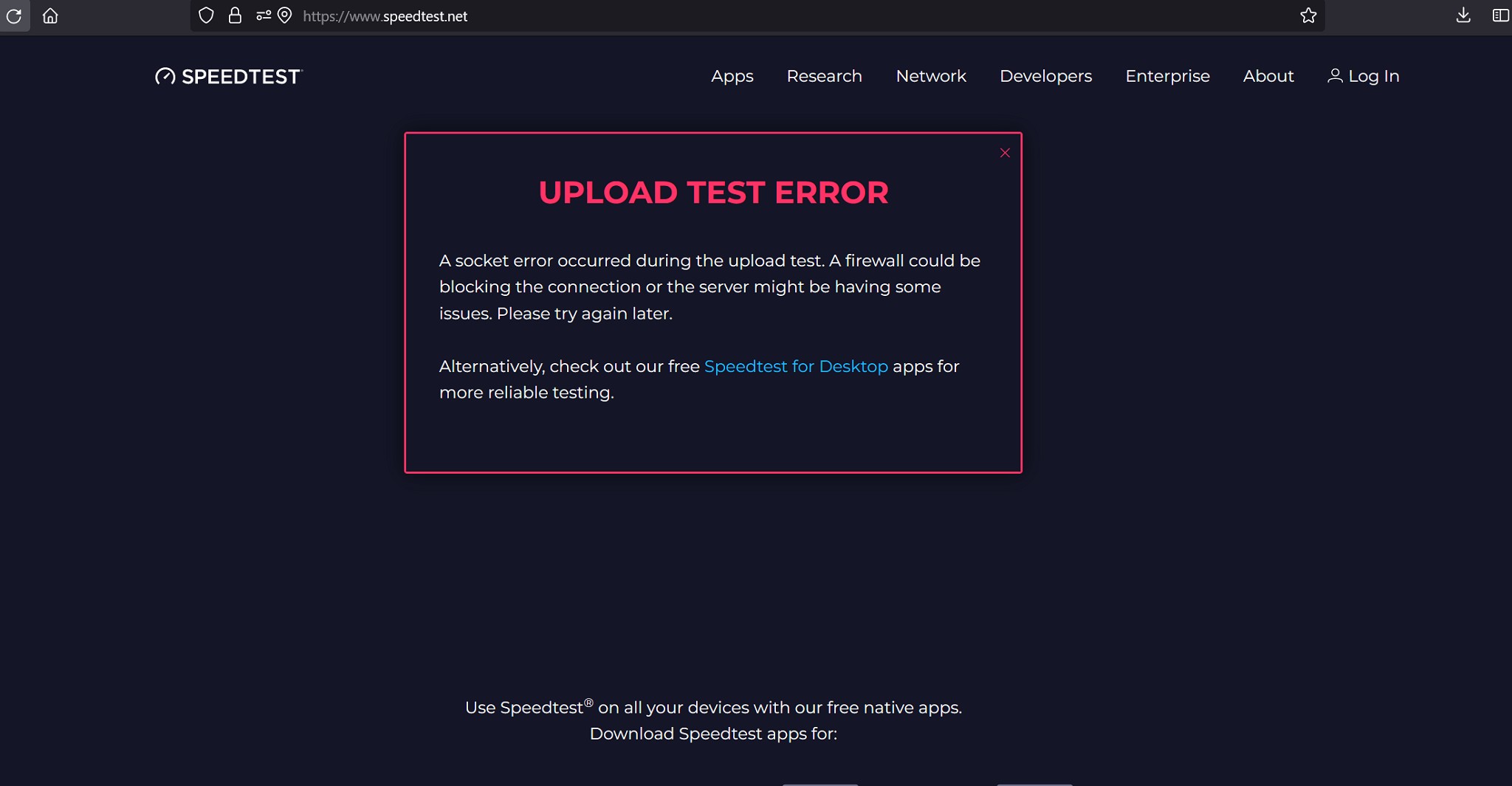
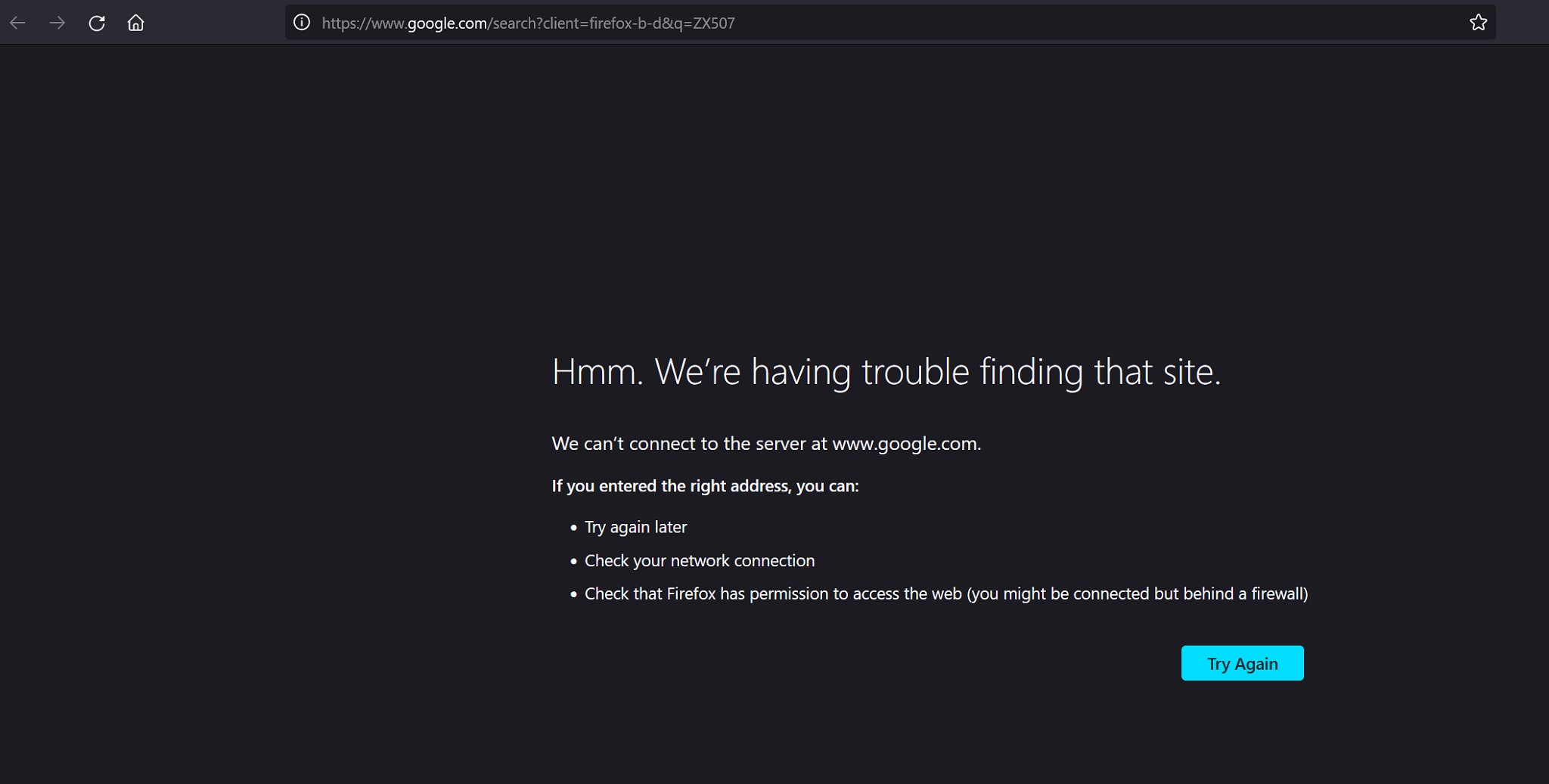
Hey just a question too, I get odd errors when webrowsing on wifi and connected via ethernet. Fairly often the website won't load giving the below attached error. Along with this upload error while testing speed on connected ethernet sometimes.

Thanks for the help.


Castlvaniafan

97 posts

Master Geek
+1 received by user: 15


  #3177236 3-Jan-2024 08:57
Send private message

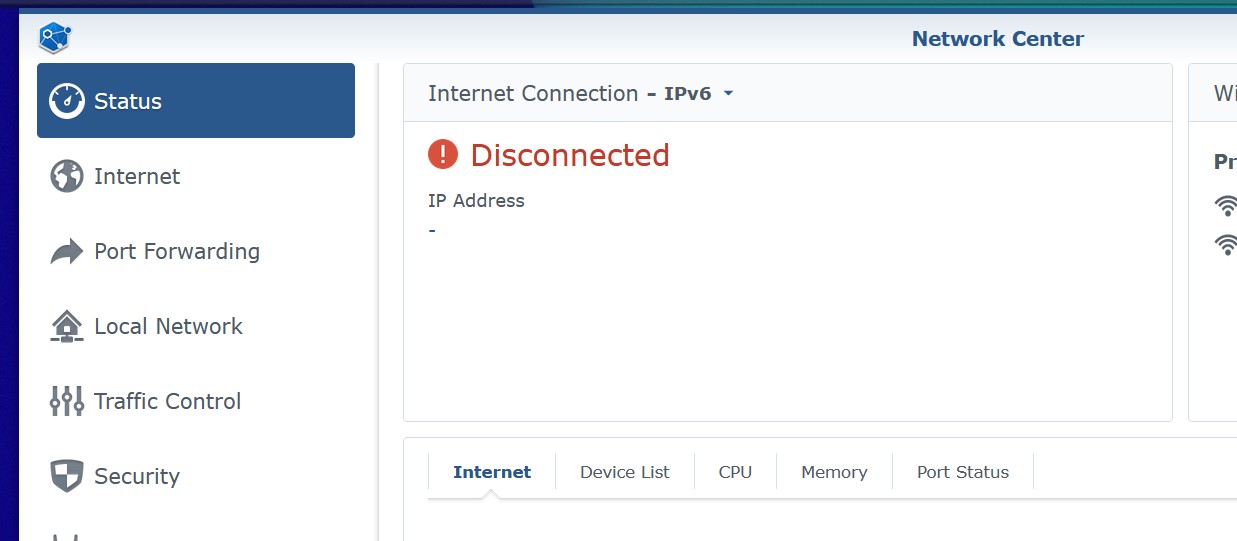
Maybe this is my problem:


freitasm
BDFL - Memuneh
80647 posts

Uber Geek
+1 received by user: 41030

Administrator
ID Verified
Trusted
Geekzone
Lifetime subscriber

  #3177244 3-Jan-2024 09:23
Send private message

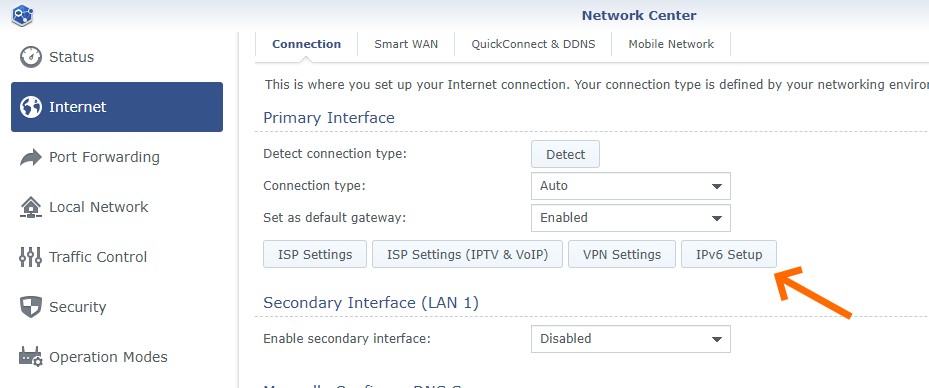
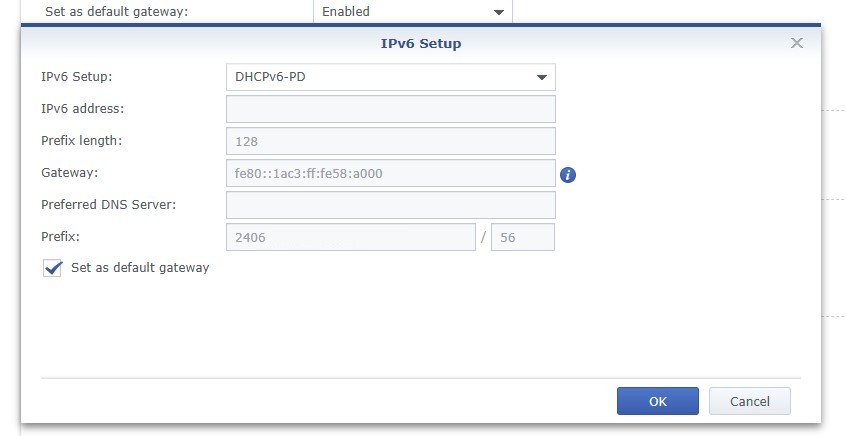
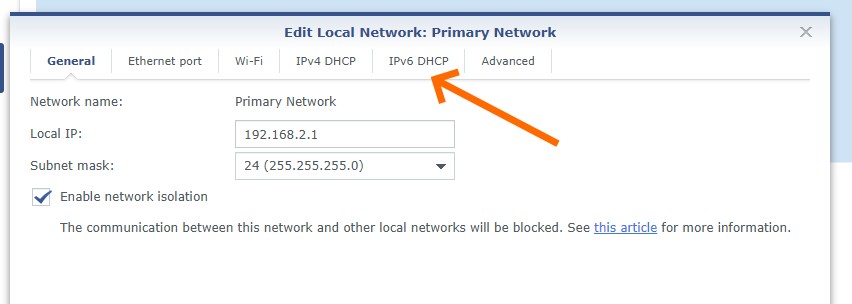
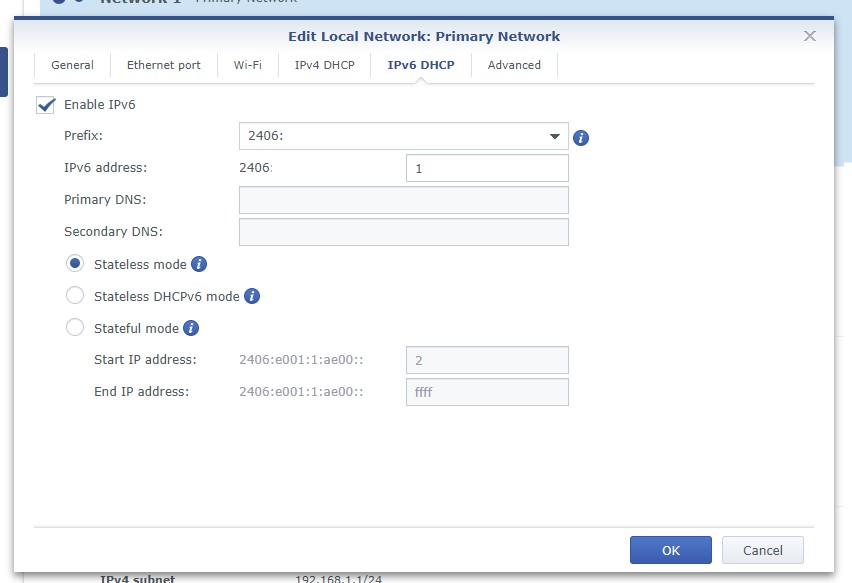
I have removed the IPv6 addresses from the screenshots. Assuming you only have the default network you can enable IPv6 following these images (and selecting the first IPv6 address suggested). If you have more than one network, use the next IPv6 address as the start for each one.


Referral links: Quic Broadband (free setup code: R587125ERQ6VE) | Samsung | AliExpress | Wise | Sharesies 


Support Geekzone by subscribing (browse ads-free), or making a one-off or recurring donation through PressPatron.


 1 | 2
Filter this topic showing only the reply marked as answer View this topic in a long page with up to 500 replies per page Create new topic


Geekzone Live »

Try automatic live updates from Geekzone directly in your browser, without refreshing the page, with Geekzone Live now.


Are you subscribed to our RSS feed? You can download the latest headlines and summaries from our stories directly to your computer or smartphone by using a feed reader.