Geekzone: technology news, blogs, forums
Guest
Welcome Guest.
You haven't logged in yet. If you don't have an account you can register now.


xlinknz

1141 posts

Uber Geek
+1 received by user: 168

Trusted

#311291 3-Jan-2024 16:43
Send private message

Hi


It appears both our ISP provided routers (Asus RT-AC59U and Noka Beacon 2) do not have url or web site visited logging (or use loggings)


We're keen to check (in addition to education) what our kids have been visiting without installing software on their devices i.e. monitor from a 3rd devices (PC or router)


What have others here done?


What routers do people have that do show detailed url visited i.e. not just the domain of youtube.com and source address?


I briefly tried Wireshark (on my own PC and not the whole network) but I want something simplier otherwise I'll need it to somehow capture all traffic from the router



Create new topic
marpada
487 posts

Ultimate Geek
+1 received by user: 182


  #3177356 3-Jan-2024 16:54
Send private message

Not easily doable, (fortunately) most traffic these days uses TLS/SSL so you might be able to see the domain they connect to but not the URLs or payload.


Big orgs like government or bank work-around this by installing a "magic" root certificate so a proxy can decrypt/encrypt TLS traffic on the fly, but quite an overkill for a home network, plus it opens a whole can of worms in terms of security.


A simple solution that does not involve installing agents on devices connected to the network might be DNS blocking with PiHole or similar, again you can see/block the domain, but not get any visibility on the actual URL. It will work until kids find out how to set up alternative DNS like Cloudflare though.


SirHumphreyAppleby
2939 posts

Uber Geek
+1 received by user: 1862


  #3177357 3-Jan-2024 16:56
Send private message

HTTPS doesn't permit the router to see what URLs are accessed. Technically, it is possible, provided your computer trusts the certificate chain, but I wouldn't trust any device which does such inspection.


As an aside... Many years ago the development manager announced in one of our staff meetings that HTTPS content inspection would be turned on. I immediately went back to my desk and routed all Web traffic through my own VPS. In the end, they never turned the feature on, but I never went back to browsing directly even after he left.


nzkc
1634 posts

Uber Geek
+1 received by user: 1041


  #3177358 3-Jan-2024 17:12
Send private message

Its been a while since I dabbled with this solution but I think it'd work if you really want to go this route...


You could set up a proxy, e.g Squid Cache, and then configure the router to _only_ allow access to the internet from the proxy. You'll then need to configure the web browsers to use the cache which is a bit of a pain from memory. I think I had it being auto detected somehow (but honestly I forget).


Then you can just have Squid log all the requests that go through it.


Basically you have to jump through a lot of hoops and need some hardware to support it (e.g. a router where you have more control over the firewall than most support)


However; word of caution... all that'll happen is the "clients" will find another way to get to the content they want (without you seeing). Something like a VPN or just jump onto cellular data.


Edit: Here's how you get the browsers to auto detect: https://stackoverflow.com/questions/191023/how-does-windows-actually-detect-lan-proxy-settings-when-using-automatic-confi I was using a pihole (on a raspberry pi) to solve a lot of this.


BarTender
3629 posts

Uber Geek
+1 received by user: 2572

ID Verified
Trusted
Lifetime subscriber

  #3177380 3-Jan-2024 18:07
Send private message

As the parent to three older teenager daughters and I never installed content filtering on any of their devices or investigated DNS / MITM or Transparent proxy inspection. Instead I had frequent conversations with them about what was acceptable online and the sort of content they should avoid, and that posting any photos to the internet could haunt them in the future so I highly recommended against them posting anything their grandparents wouldn't want to see.


So far that worked really effectively. My parents had no idea what I got up to when I was younger so I didn't think that just because technology allowed me to surveil my kids that I should actively investigate implementing it.


I do however make sure they had VPNs to get out of the school network back into my home network and not use all sorts of dodgy VPNs that can bypass school filtering even though one of them still uses it much to my dismay.


If I had son's then I would have had far more complicated but even more important conversations about the dearth of online p0rn, what constitutes a healthy relationship and the vital importance of consent as there is just so much vile that can very easily be found online.


But that is just my personal view about how pointless content filtering / monitoring is as it creates a whack-a-mole competition with underlying distrust between you and your (pre)teen when you REALLY need ongoing open lines of communications between everyone involved.


SirHumphreyAppleby
2939 posts

Uber Geek
+1 received by user: 1862


  #3177383 3-Jan-2024 18:42
Send private message

BarTender:


If I had son's then I would have had far more complicated but even more important conversations about the dearth of online p0rn, what constitutes a healthy relationship and the vital importance of consent as there is just so much vile that can very easily be found online.


"Keep it legal and share. Daddy likes..."


I think the most important thing is keeping everything in context. Growing up, I had parents who told us what was real and fake in TV shows or movies. Screen time was more family time, not a way to entertain kids for hours without any effort - it's not, nor should it be. I was permitted to watch some stuff that would shock parents today, including movies with a little full frontal nudity. It didn't do any harm. It probably made me less interested in seeking out that stuff as I got older.


My "kids" movies included Stripes (1981) and Revenge Of The Nerds (1984).


The only thing I wasn't allowed to watch was Dracula Sucks. I wanted a Dracula movie and my father asked the people at the video store to put one aside for us. Well, that one is apparently softcore porn. Reviews suggest it's not really worth watching, but if I stumble across a copy, curiosity will no doubt get the better of me.


Lias
5655 posts

Uber Geek
+1 received by user: 3978

ID Verified
Trusted
Lifetime subscriber

  #3177393 3-Jan-2024 19:27
Send private message

As an IT engineer I've always argued very strongly against the implementation of HTTPS interception in the workplace because I believe it's morally and ethically wrong. I don't believe employers (or parents) need that level of visibility of what is being done, especially when it can only be done by deliberately breaking security.


I mostly agree with Bartender that the main tool in your arsenal is talking to them.. that said I use DNS to block porn/malware and I also use a third party paid tool (qustodio) to stop my kids playing on their devices at 2am which does some basic blocking and reporting without being overly invasive (but did lead to a convo when Mr 13 was trying to browse porn and it got flagged lol)


I'm a geek, a gamer, a dad, a Quic user, and an IT Professional. I have a full rack home lab, size 15 feet, an epic beard and Asperger's. I'm a bit of a Cypherpunk, who believes information wants to be free and the Net interprets censorship as damage and routes around it. If you use my Quic signup you can also use the code R570394EKGIZ8 for free setup. Opinions are my own and not the views of my employer.


Shop on-line at New World now for your groceries (affiliate link).
Lias
5655 posts

Uber Geek
+1 received by user: 3978

ID Verified
Trusted
Lifetime subscriber

  #3177394 3-Jan-2024 19:28
Send private message

SirHumphreyAppleby:


My "kids" movies included Stripes (1981) and Revenge Of The Nerds (1984).


I love those movies but would 100% consider them soft porn lol


I'm a geek, a gamer, a dad, a Quic user, and an IT Professional. I have a full rack home lab, size 15 feet, an epic beard and Asperger's. I'm a bit of a Cypherpunk, who believes information wants to be free and the Net interprets censorship as damage and routes around it. If you use my Quic signup you can also use the code R570394EKGIZ8 for free setup. Opinions are my own and not the views of my employer.


xlinknz

1141 posts

Uber Geek
+1 received by user: 168

Trusted

  #3177400 3-Jan-2024 19:55
Send private message

Thank you all for your replies


I agree (as NetSafe also say) education is the key rather than technological controls, besides he has his own mobile data...


I was simply keen to see what our child refuses admit too so education can be more targetted. I am more concerned with grooming/social engineering 'threats' than what he 'sees' but I'll explain all that too him, children unlike us adults can be far more trusting?


Good Points too on the contraints on visibility when dealing with https


I did setup before I posted an OpenDNS account to try out and which allows useful category blocking and limited logging. The issue I realised is that many sites support IPv6 and getting our router to honor OpenDNS or similar DNS like 1.1.1.* (I'll try that one too) IPv6 servers has bene problemtic but worse case I can disable IPv6 for a while


wellygary
8811 posts

Uber Geek
+1 received by user: 5288


  #3177402 3-Jan-2024 20:12
Send private message

Lias:


SirHumphreyAppleby:


My "kids" movies included Stripes (1981) and Revenge Of The Nerds (1984).


I love those movies but would 100% consider them soft porn lol


So Its just like the entertainment and "lifestyle"sections of news.com.au then :)  


Ruphus
469 posts

Ultimate Geek
+1 received by user: 181


  #3177453 3-Jan-2024 21:38
Send private message

Pi-hole or Adguard will do this. I'm currently running Adguard on my home network from within OPNsense but both of these can be setup on a Raspberry Pi or similar. Then search for block lists for either system, and then monitor.


michaelmurfy
meow
13580 posts

Uber Geek
+1 received by user: 10912

Moderator
ID Verified
Trusted
Lifetime subscriber

  #3177458 3-Jan-2024 22:18
Send private message

Instead of OpenDNS have a look into NextDNS - https://nextdns.io 


Michael Murphy | https://murfy.nz
Referral Links: Quic Broadband (use R122101E7CV7Q for free setup)

Are you happy with what you get from Geekzone? Please consider supporting us by subscribing.
Opinions are my own and not the views of my employer.


Shop now for Dell laptops and other devices (affiliate link).
BadCo
109 posts

Master Geek
+1 received by user: 29


  #3177484 4-Jan-2024 08:00
Send private message

DNS over HTTPS also makes this difficult

https://en.m.wikipedia.org/wiki/DNS_over_HTTPS

MadEngineer
4591 posts

Uber Geek
+1 received by user: 2570

Trusted

  #3177957 5-Jan-2024 12:50
Send private message

Use Microsoft family if you’ve got windows devices.

This will pretty much be set and forget saving you from having to play helicopter parents.


You're not on Atlantis anymore, Duncan Idaho.

NZMks
14 posts

Geek
+1 received by user: 1


  #3200732 28-Feb-2024 10:09
Send private message


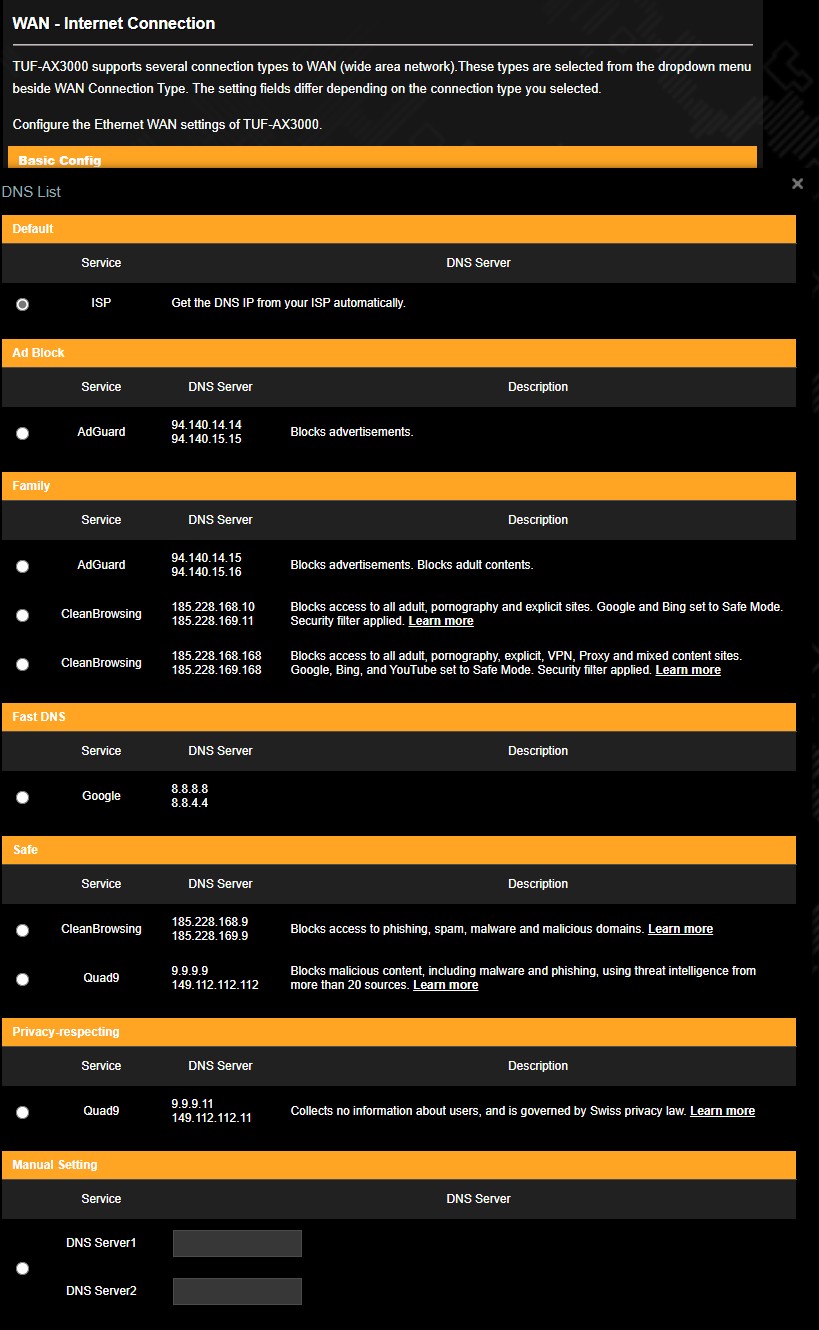
My Router has these DNS pre-programmed.  Testing Adguard currently


Goosey
3016 posts

Uber Geek
+1 received by user: 871

Subscriber

  #3212208 30-Mar-2024 08:35
Send private message

We use "Google Family Link"


Does what we need...  Ive set it to "ask for permission" when a url is selected so I can get to know what they want to search (however allow a few standard URLs like stuff and nz herald, known kids sites and wikipedia etc etc etc). 


the app is a bit tedious to use, its like it has two "arms" to go down when you wanna adjust settings etc but generally makes sense on what you want it to do. 


I trust the school to implement their controls to which I dont have any control of.


The family link app works on the personal logins of the childrens devices.


  • Said kid already figured out whats what on each login....   
  • You can control individual applications too 

Create new topic


Geekzone Live »

Try automatic live updates from Geekzone directly in your browser, without refreshing the page, with Geekzone Live now.


Are you subscribed to our RSS feed? You can download the latest headlines and summaries from our stories directly to your computer or smartphone by using a feed reader.