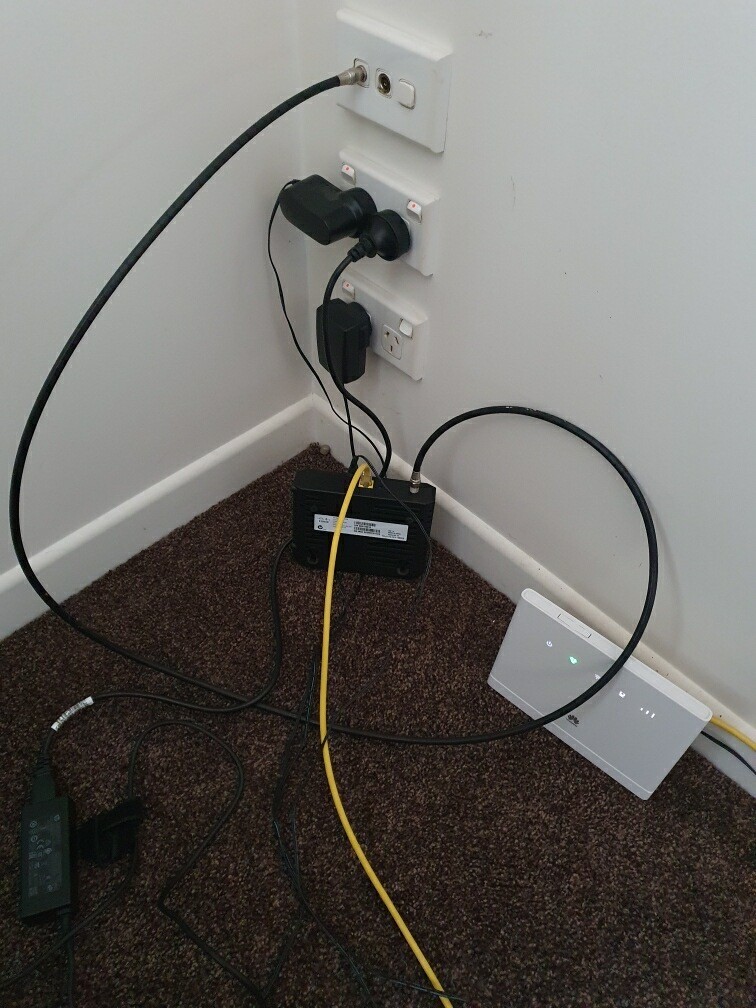
I am trying to work out what setup the previous owners of my house were using for internet. Can anyone tell me what equipment is in the photo especially the black box?
|
|
|
One NZ HFC cable modem
Technicolor TC4400
I'm guessing HFC Cable https://one.nz/broadband/ultra-fast-hfc/
Edit.
Only supplied by One NZ and only in a few areas.
yitz:
One NZ HFC cable modem
Technicolor TC4400
djtOtago:
I'm guessing HFC Cable https://one.nz/broadband/ultra-fast-hfc/
Edit.
Only supplied by One NZ and only in a few areas.
I had thought that, but the previous owner told me they were with Spark. Could it be VDSL?
Maybe the white Huawei was the Spark service with 4G/5G FWA used by previous owner and the HFC (the black box) was the owner previous to that?
mcarans:
I had thought that, but the previous owner told me they were with Spark. Could it be VDSL?
It's not VDSL. The previous owner might have misunderstood and thought you asked about their cell phone service provider.
What lights are on, on both the black and white boxes?
Does the yellow cable plug into the socket labeled WAN on the white box?
Did the previous owners give you the wifi password?
People hear what they see. - Doris Day
mcarans:
I had thought that, but the previous owner told me they were with Spark. Could it be VDSL?
Nope,
VDSL is a copper product that arrives in a twister pair of thin wires, not a great big fat Coax with F connectors
Any views expressed on these forums are my own and don't necessarily reflect those of my employer.
A coax to ethernet is only needed for HFC.
As mentioned above, it looks like it came with the house. The previous owner used another provider but kept the box there. Possibly didn't even know who to call to remove it.
Referral links: Quic Broadband (free setup code: R587125ERQ6VE) | Samsung | AliExpress | Wise | Sharesies
Support Geekzone by subscribing (browse ads-free), or making a one-off or recurring donation through PressPatron.

freitasm:
A coax to ethernet is only needed for HFC.
As mentioned above, it looks like it came with the house. The previous owner used another provider but kept the box there. Possibly didn't even know who to call to remove it.
If it is HFC, the strange thing is if I go to the One NZ website and enter the address, HFC is not shown as an option. (I used HFC at my previous house so am familiar with it).
TOBE: I thought the photo was of the previous setup.
The white modem looks to be wireless 4g and they are using a coax converter to get wired internet to somwhere else in the house.
Aha, this sounds promising. There are ethernet sockets throughout the house and I have not been able to find a central distribution point. The former owners tell me all the ethernet sockets are working but I can't work out what they connect to. Is it possible for a coax socket to be connected to all the ethernet sockets?
Not without another coax converter. If there was ethernet it would have made more sense to use those with a wireless router.
But the coax and ethernet should/could terminate in a central hub. The garage would be my first investigation point.
mcarans: ... There are ethernet sockets throughout the house and I have not been able to find a central distribution point. The former owners tell me all the ethernet sockets are working but I can't work out what they connect to. ...
The white box is definitely a FWA / RBI modem.
Disconnect the yellow cable & see if the other Ethernet ports throughout the house loose their internet connectivity?
Garage, office, Harry Potter type cupboard under the stairs of a HWC cabinet are likely places for the central Coax connection. If you are unlucky, it might even be in the roof.
Please keep this GZ community vibrant by contributing in a constructive & respectful manner.
|
|
|
