Geekzone: technology news, blogs, forums
Guest
Welcome Guest.
You haven't logged in yet. If you don't have an account you can register now.


iamsammajor

379 posts

Ultimate Geek
+1 received by user: 27

Lifetime subscriber

#315659 4-Aug-2024 09:40
Send private message

Hi all,


im desperated for some help wiht my router set up, i had followed the Edgerouter tutorial and ran the following,


set interfaces ethernet eth0 vif 10 pppoe 0 ipv6 enable
edit interfaces ethernet eth0 vif 10 pppoe 0 dhcpv6-pd pd 0
set prefix-length /56
set interface eth1 host-address ::1
set interface eth1 prefix-id :0
set interface eth1 service slaac
top
set interfaces ethernet eth0 vif 10 pppoe 0 dhcpv6-pd prefix-only
commit
save


within my edgerouter page i can see there are some ipv6 address appear and it looks like a global ge80 address, but when i try "https://ipv6test.google.com/" it says "You don’t have IPv6, but you shouldn’t have problems on websites that add IPv6 support."
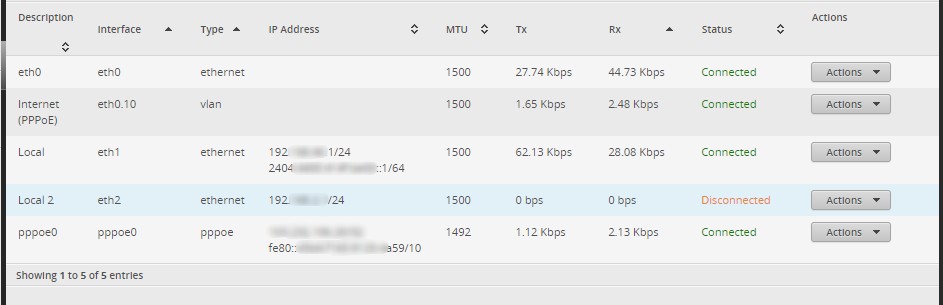


i had no luck with ipv6 ever and no care as much, but I have an iptv app only support ipv6, would be good to get this going, 


any help would be awesome


TIA,


Sam


Create new topic
mentalinc
3384 posts

Uber Geek
+1 received by user: 1023

Trusted

  #3267947 4-Aug-2024 10:12
Send private message

Suggest you read the last few pages here:


https://www.geekzone.co.nz/forums.asp?forumid=66&topicid=205740&page_no=57


I'm not on 2degrees anymore but lots of working configs pasted there and things to check.


can you ping6 from your router?


have you rebooted the windows device (restart not shutdown)?


Tried from a android device or iphone?


Pretty sure you're missing a few steps in the config


CPU: AMD 5900x | RAM: GSKILL Trident Z Neo RGB F4-3600C16D-32GTZNC-32-GB | MB:  Asus X570-E | GFX: EVGA FTW3 Ultra RTX 3080Ti| Monitor: LG 27GL850-B 2560x1440


Quic: https://account.quic.nz/refer/473833 R473833EQKIBX 


iamsammajor

379 posts

Ultimate Geek
+1 received by user: 27

Lifetime subscriber

  #3337694 31-Jan-2025 13:20
Send private message

mentalinc:


Suggest you read the last few pages here:


https://www.geekzone.co.nz/forums.asp?forumid=66&topicid=205740&page_no=57


I'm not on 2degrees anymore but lots of working configs pasted there and things to check.


can you ping6 from your router?


have you rebooted the windows device (restart not shutdown)?


Tried from a android device or iphone?


Pretty sure you're missing a few steps in the config


i tried all of the above, still no luck with IPv6, yet if i plug the orbi, ipv6 works perfectly fine,


every post i find online mentioned Edgerouter is abit iffy with ipv6


KiwiSurfer
1722 posts

Uber Geek
+1 received by user: 993

ID Verified
Lifetime subscriber

  #3337721 31-Jan-2025 14:40
Send private message

I have the EdgeRouter and it's fine with IPv6 and have used it on the Slingshot/Vocus/2degrees network in the past. It is also paired with an Orbi which simply passes through everything to the EdgeRouter -- hopefully you're not double-NAT-ing by any chance?


Also, have you tried using DHCP/IPoE instead? I never used PPPoE for IPv6 when I was on their network in the past -- IIRC it wasn't supported on PPPoE for quite sometime when they first introduced IPv6. I believe these days I believe both DHCP and PPPoE is supported for IPv6 -- but I would probably go with DHCP anyway.


To set up my EdgeRouter, I just reset it and then used the built in wizard for DHCP/IPoE (sorry can't recall the name the EdgeRouter use for this particular configuration but it'll be either DHCP or IPoE, and not PPPoE). Made sure to tick the box for IPv6 and just leave everything else at default settings. It worked fine with default settings so I would try that as a starting point.


I would recommend the wizard anyway as it also loads several firewall entries for IPv6 which you must have anyway -- your config above doesn't seem to include any IPv6 firewall entries.


I currently use the EdgeRouter on Quic with DHCP/vlan10 (same as 2degrees I believe) with no day to day issue. Only fix I had to apply was the manual config change needed to fix a long standing EdegRouter bug -- see the last FAQ on Quic's support page. Also as noted works fine with Orbi -- making sure it is not configured to do its own DHCP.


iamsammajor

379 posts

Ultimate Geek
+1 received by user: 27

Lifetime subscriber

  #3337722 31-Jan-2025 14:46
Send private message

KiwiSurfer:


I have the EdgeRouter and it's fine with IPv6 and have used it on the Slingshot/Vocus/2degrees network in the past. It is also paired with an Orbi which simply passes through everything to the EdgeRouter -- hopefully you're not double-NAT-ing by any chance?


Also, have you tried using DHCP/IPoE instead? I never used PPPoE for IPv6 when I was on their network in the past -- IIRC it wasn't supported on PPPoE for quite sometime when they first introduced IPv6. I believe these days I believe both DHCP and PPPoE is supported for IPv6 -- but I would probably go with DHCP anyway.


To set up my EdgeRouter, I just reset it and then used the built in wizard for DHCP/IPoE (sorry can't recall the name the EdgeRouter use for this particular configuration but it'll be either DHCP or IPoE, and not PPPoE). Made sure to tick the box for IPv6 and just leave everything else at default settings. It worked fine with default settings so I would try that as a starting point.


I would recommend the wizard anyway as it also loads several firewall entries for IPv6 which you must have anyway -- your config above doesn't seem to include any IPv6 firewall entries.


I currently use the EdgeRouter on Quic with DHCP/vlan10 (same as 2degrees I believe) with no day to day issue. Only fix I had to apply was the manual config change needed to fix a long standing EdegRouter bug -- see the last FAQ on Quic's support page. Also as noted works fine with Orbi -- making sure it is not configured to do its own DHCP.


thats a good point, i think im still using PPPOE, i might give it a try on DHCP tonight, only pain resetting it is to set up all the static ip again but oh well


will post update XD


KiwiSurfer
1722 posts

Uber Geek
+1 received by user: 993

ID Verified
Lifetime subscriber

  #3337726 31-Jan-2025 14:55
Send private message

Please also check your Orbi settings. Check the IP addresses -- if your Orbi is on a different IPv4 subnet than your EdgerRouter it would point to your Orbi not being set up corretly. If it's that then that's an easier fix and you might be able to leave the EdgeRouter as it is.


michaelmurfy
meow
13581 posts

Uber Geek
+1 received by user: 10914

Moderator
ID Verified
Trusted
Lifetime subscriber

  #3337784 31-Jan-2025 16:05
Send private message

The tutorial was updated for Vocus/2degrees IPv6…


Suggest following that. Have that configuration used in a few places now. 


Michael Murphy | https://murfy.nz
Referral Links: Quic Broadband (use R122101E7CV7Q for free setup)

Are you happy with what you get from Geekzone? Please consider supporting us by subscribing.
Opinions are my own and not the views of my employer.


Shop now on AliExpress (affiliate link).
iamsammajor

379 posts

Ultimate Geek
+1 received by user: 27

Lifetime subscriber

  #3337791 31-Jan-2025 16:26
Send private message

michaelmurfy:


The tutorial was updated for Vocus/2degrees IPv6…


Suggest following that. Have that configuration used in a few places now. 


I should try it with IPoE bit rather than PPPoE?


michaelmurfy
meow
13581 posts

Uber Geek
+1 received by user: 10914

Moderator
ID Verified
Trusted
Lifetime subscriber

  #3337809 31-Jan-2025 16:43
Send private message

Yep correct. PPPoE with 2degrees is supported, but not the main protocol. 


Michael Murphy | https://murfy.nz
Referral Links: Quic Broadband (use R122101E7CV7Q for free setup)

Are you happy with what you get from Geekzone? Please consider supporting us by subscribing.
Opinions are my own and not the views of my employer.


iamsammajor

379 posts

Ultimate Geek
+1 received by user: 27

Lifetime subscriber

  #3337901 31-Jan-2025 21:03
Send private message

i follow both tips that posts above, and can ping6 google.com from edgerouter now, however when i tested through https://ipv6-test.com/


it has these result,


DNS4 + IP6 Reachable


DNS6 + IP4 Unreachable


DNS6 + IP6 Unreachable


KiwiSurfer
1722 posts

Uber Geek
+1 received by user: 993

ID Verified
Lifetime subscriber

  #3337913 31-Jan-2025 21:26
Send private message

That site seems broken. IPv6 definitely works for me, but that site says IPv6 is broken.


Can you try:


https://test-ipv6.com/


iamsammajor

379 posts

Ultimate Geek
+1 received by user: 27

Lifetime subscriber

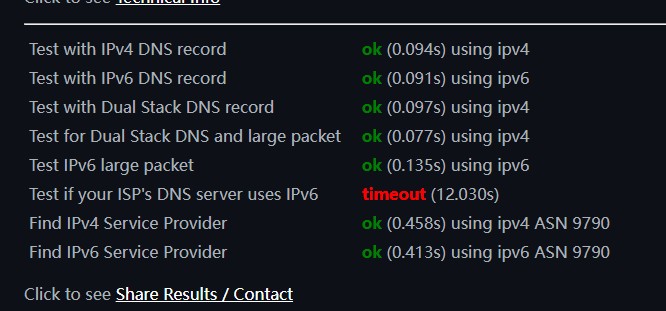
  #3337934 31-Jan-2025 22:34
Send private message


Shop on-line at New World now for your groceries (affiliate link).
iamsammajor

379 posts

Ultimate Geek
+1 received by user: 27

Lifetime subscriber

  #3338017 1-Feb-2025 12:17
Send private message


looks like something is changed over night, this morning i finally see this green ipv6 lol


thank you again for all your help


YAY


Create new topic


Geekzone Live »

Try automatic live updates from Geekzone directly in your browser, without refreshing the page, with Geekzone Live now.


Are you subscribed to our RSS feed? You can download the latest headlines and summaries from our stories directly to your computer or smartphone by using a feed reader.