Geekzone: technology news, blogs, forums
Guest
Welcome Guest.
You haven't logged in yet. If you don't have an account you can register now.


Here4thetea

4 posts

Wannabe Geek


#315706 8-Aug-2024 11:33
Send private message

Righto folk, Loosing my mind here, and I'm hoping I'm just missing something. 


I've been trying to get skinny fibre setup at home on a BYO router so limited support from them. 


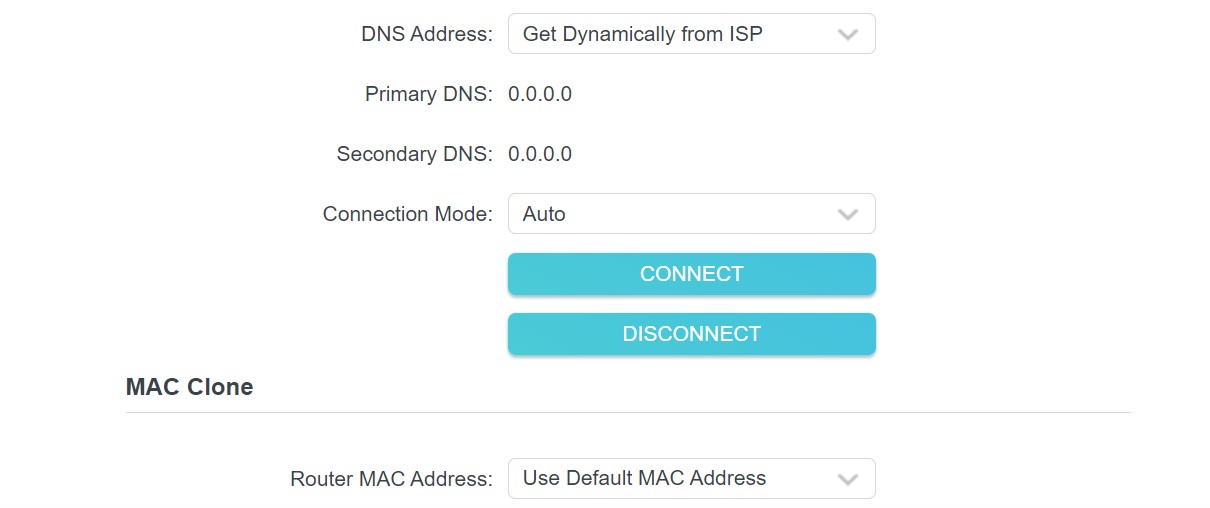
Images of setting on TP Link - https://imgur.com/a/8MzYlOW


I've used all the setting for skinny and checked them against the PB tech suggestion (but with disabled VLAN). I've tried different cables. tried differnt lan ports on the ONT (only one lights up green when plugged in). Tried a different router ASUS one (used same setting). But I just keep coming up agains the Disconnected/not plugged in properly problem. 


I'd love some help.


Create new topic
mrgsm021
1538 posts

Uber Geek
+1 received by user: 310

ID Verified
Trusted

  #3269457 8-Aug-2024 11:49
Send private message

Try factory resetting the TP Link and start over?


Here4thetea

4 posts

Wannabe Geek


  #3269460 8-Aug-2024 12:28
Send private message

Yeah, tried the a couple times on both routers. but might as well go for another round.


farcus
1626 posts

Uber Geek
+1 received by user: 437


  #3269464 8-Aug-2024 13:03
Send private message

Here4thetea:


Righto folk, Loosing my mind here, and I'm hoping I'm just missing something. 


I've been trying to get skinny fibre setup at home on a BYO router so limited support from them. 


Images of setting on TP Link - https://imgur.com/a/8MzYlOW


I've used all the setting for skinny and checked them against the PB tech suggestion (but with disabled VLAN). I've tried different cables. tried differnt lan ports on the ONT (only one lights up green when plugged in). Tried a different router ASUS one (used same setting). But I just keep coming up agains the Disconnected/not plugged in properly problem. 


I'd love some help.


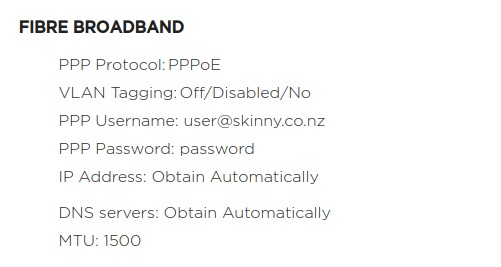
These are the settings from their website that i use in my fritzbox.
Work without issue


Here4thetea

4 posts

Wannabe Geek


  #3269467 8-Aug-2024 13:16
Send private message

Thanks. Those are the settings I have used on both routers. still no luck


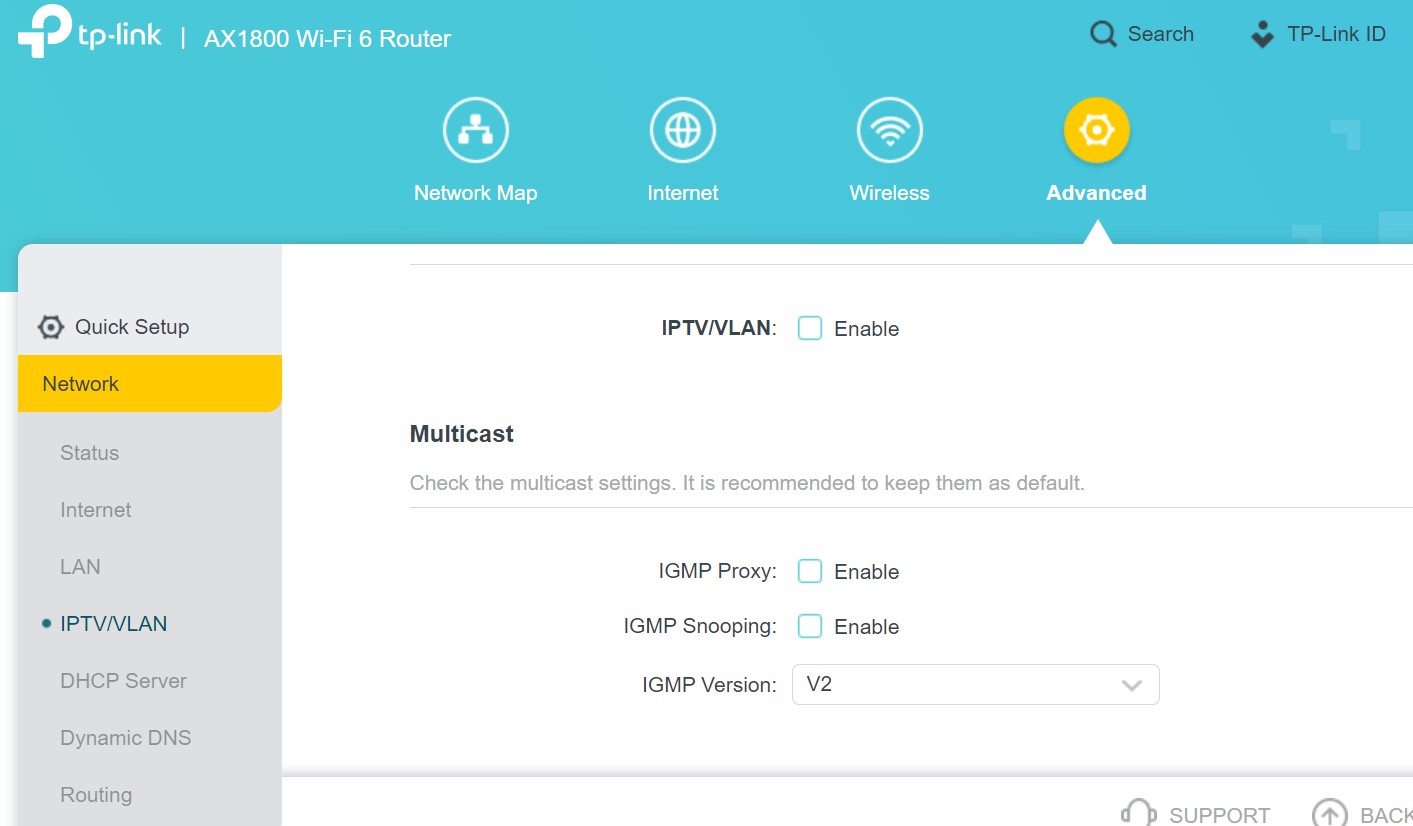
Here's the setting and error im getting


mrgsm021
1538 posts

Uber Geek
+1 received by user: 310

ID Verified
Trusted

  #3269468 8-Aug-2024 13:19
Send private message

Not sure if it'll make a difference but maybe also try having the username in an email format, i.e. user@skinny.co.nz, instead of just skinny?


Here4thetea

4 posts

Wannabe Geek


  #3269470 8-Aug-2024 13:23
Send private message

Tried it different users. no luck.


Shop now on Samsung phones, tablets, TVs and more (affiliate link).
OldGeek
989 posts

Ultimate Geek
+1 received by user: 409

ID Verified
Lifetime subscriber

  #3269526 8-Aug-2024 15:48
Send private message

I have an AX50 and the IPTV tab shows an ability to select an ISP profile.  I have 'New Zealand-UFB' selected and there are other settings that allow VLANID and VLAN priority to be set (amongst others).  If you can find ISP profile settings then you should be able to choose VLAN settings.


-- 

OldGeek.


Quic referal code: https://account.quic.nz/refer/581402 and use this code for free setup: R581402E48MJA


Asteros
363 posts

Ultimate Geek
+1 received by user: 189


  #3269530 8-Aug-2024 15:55
Send private message

Have you tried plugging into port LAN 2 on your ONT?


robjg63
4161 posts

Uber Geek
+1 received by user: 1427

Subscriber

  #3269534 8-Aug-2024 16:24
Send private message

Asteros:


Have you tried plugging into port LAN 2 on your ONT?


If the Asus doesnt work either then it maybe indicates there isnt any fibre enabled or as above - try the second port on the ONT.


Usually the service is enabled on port one - but sometimes it can be set up on port two when a changeover is coming up and the old ISP then turns port one off.


Dumb question - but your ONT is defintely on and LEDs lit up?


You could try checking with Skinny that the service is definitely live.


Nothing is impossible for the man who doesn't have to do it himself - A. H. Weiler


robjg63
4161 posts

Uber Geek
+1 received by user: 1427

Subscriber

  #3269537 8-Aug-2024 16:27
Send private message

You do have the router connected to the WAN port and the other end of the cable into the ONT port dont you?


Nothing is impossible for the man who doesn't have to do it himself - A. H. Weiler


trig42
5889 posts

Uber Geek
+1 received by user: 2094

ID Verified

  #3269538 8-Aug-2024 16:31
Send private message

Do any lights come up on either the Router or the ONT when you connect the cable? 


The router is saying there isn't a connection between Router and ONT. I'd get to the bottom of that issue first.


Tried a different cable?


Shop on-line at New World now for your groceries (affiliate link).
kiwiharry
1064 posts

Uber Geek
+1 received by user: 476

ID Verified
Subscriber

  #3269542 8-Aug-2024 16:51
Send private message

Here4thetea:


Thanks. Those are the settings I have used on both routers. still no luck


Here's the setting and error im getting


Think you need to enable IPTV/VLAN and ensure NZ country profile is selected.


If you can't laugh at yourself then you probably shouldn't laugh at others.


robjg63
4161 posts

Uber Geek
+1 received by user: 1427

Subscriber

  #3269551 8-Aug-2024 17:07
Send private message

kiwiharry:


Think you need to enable IPTV/VLAN and ensure NZ country profile is selected.


When you are going through setup, you can click the dropdown against "Special settings", then click the arrow against "Custom" and pick NZ-UFB.


I seem to recall I set that option when I installed my TP-Link Deco M4 (on Bigpipe - same network settings as Skinny) and it just worked.


I dont think I specifically had to disable VLAN.


I do recall that after I saved the settings on the M4, it didnt connect. So I rebooted and waited around a minute then away it went.


Nothing is impossible for the man who doesn't have to do it himself - A. H. Weiler


Create new topic


Geekzone Live »

Try automatic live updates from Geekzone directly in your browser, without refreshing the page, with Geekzone Live now.


Are you subscribed to our RSS feed? You can download the latest headlines and summaries from our stories directly to your computer or smartphone by using a feed reader.