Geekzone: technology news, blogs, forums
Guest
Welcome Guest.
You haven't logged in yet. If you don't have an account you can register now.


harlansmart

447 posts

Ultimate Geek
+1 received by user: 59


#315730 10-Aug-2024 11:33
Send private message

Hey GZ'rs,


As per title, asking (much) more learned folk for guidance please.


Having difficulty logging into TP-Link Pharos Control 'Centralised Management System' which (should) be on default IP 192.168.0.254 after reset via both CPE710 on roof / POE Injector:


Normal Setup


StarLink


StarLink Router - 192.168.1.1


StarLink Ethernet Adapter


NetGear GS108 GigaBit Switch


Apple 5th Gen. AirPort Time Capsule - 192.168.1.29


TP-Link POE Injector


TP-Link CPE710 - Default 192.168.0.254


Hardwired Direct for Pharos Access


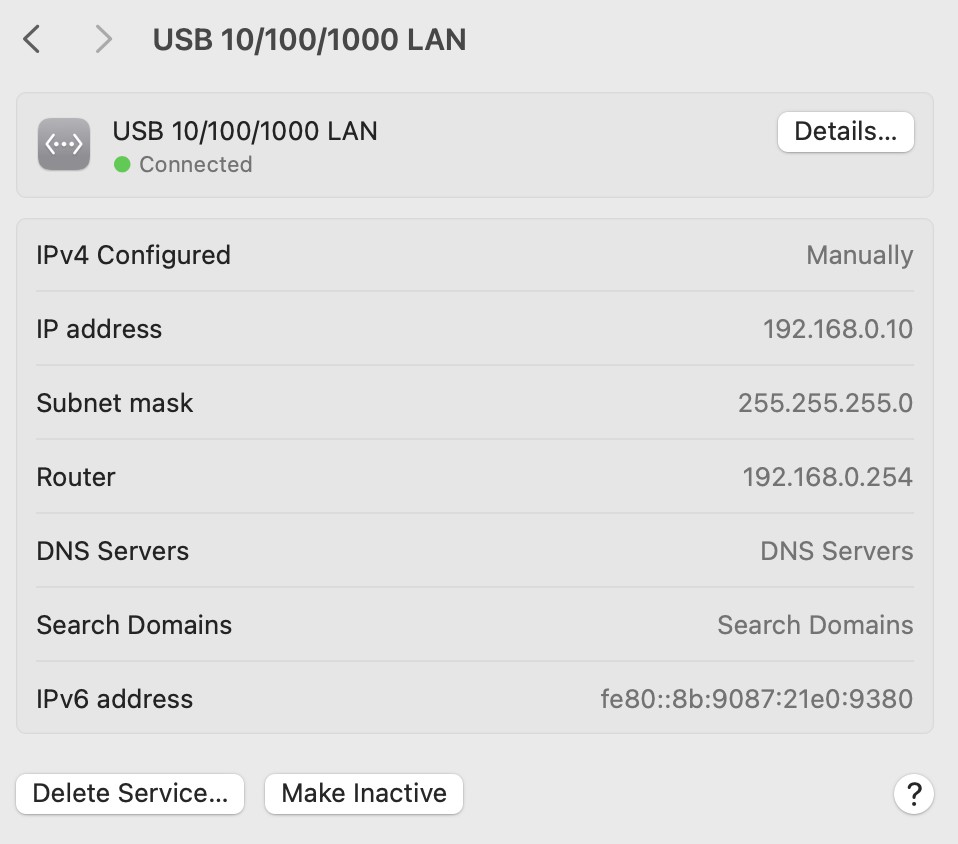
MS Surface Studio TB4 / MacBook Pro TB3 on 192.168.0.10/11 with Wi-Fi OFF


DELL K20A TB4 Dock


POE Injector LAN Port


POE Injector POE Port


Roof Mounted CPE710 / default reset 192.168.0.254


------------------------------------------------------------


Hardwire all CAT 6 or ThunderBolt 4.


Somehow, initial setup, done wirelessly, allowed CPE710 Pharos access via MS Surface Studio, 'Operation Mode' selection, SSID labelling etc and for Netflix to be played, no issue, no buffering in shed 50 odd metres away.


Soon afterward, setup failed, now Pharos can't be accessed via TP-Link POE Injector brick LAN Port cabled to DELL dock and laptops on static IP 192.168.0.10/11 etc... can't PING CPE either on its default IP


There is no second CPE710 in shed acting as client, just the single CPE710 Access Point for the (ever) hopeful (TV, iPhone etc) clients.


CPE610/710 etc suit P2P bridge setups etc but can be used as per the TP-Link online instructions below in 'Repeater' Operation Mode to extend/create a network.


Can anyone please point out how we can access this Pharos please, get Wi-Fi back to the shed?


TIA


----------------


TP-Link CPE Setup Instructions


TP-Link CPE Extender / Repeater Operation Mode Setup


Filter this topic showing only the reply marked as answer View this topic in a long page with up to 500 replies per page Create new topic
 1 | 2 | 3

saf

saf
221 posts

Master Geek
+1 received by user: 533

ID Verified
Trusted
Vetta Group
Subscriber

  #3270250 10-Aug-2024 11:38
Send private message

If I'm reading your flow correctly, your Surface Studio is getting DHCP from the Starlink router on 192.168.1.1, guessing in a /24 subnet of 192.168.1.0/24.


If the TP-Link is on 192.168.0.254, this is outside of this subnet, so unless you have some static routing internally, your network isn't going to know how to reach it.


If you're wanting to use the TP-Link as an AP, my suggestion would be to have it get DHCP from your 192.168.1.0/24 network and stop it handing out its own addressing as a router in 192.168.0.0/24, as alongside this you could end up in a world of pain with multiple DHCP servers, double NAT just to name a couple.


If you want to access the TP-Link as it stands now, you'd need to be behind the TP-Link's network/connected directly to it.


My views are as unique as a unicorn riding a unicycle. They do not reflect the opinions of my employer, my cat, or the sentient coffee machine in the break room.


harlansmart

447 posts

Ultimate Geek
+1 received by user: 59


  #3270258 10-Aug-2024 11:50
Send private message

Thanks very much for the hyper fast reply saf,


Are we not hardwired directly to the TP-Link CPE?


From the laptops we're cabled via the DELL dock to the indoors POE Injector LAN Port and in turn it is cabled via the POE Injector POE Port to the CPE710 on the roof, the laptop is on static IP 192.168.0.10/11 with Wi-Fi OFF


We're not connected to the houses 192.168.1.xx network, Wi-Fi is off, we're (we think) hardwired directly & only to the rooftop mounted CPE710


Shouldn't need to Power OFF StarLink and the Apple Access Points or anything like that, surely ?


Still, issue is we can't even PING the CPE on (assumedly) its default let alone bring up the Pharos interface.


Ah, will try to fix that setup flow chart, it is confusing, apologies.


RunningMan
9186 posts

Uber Geek
+1 received by user: 4840


  #3270260 10-Aug-2024 11:58
Send private message

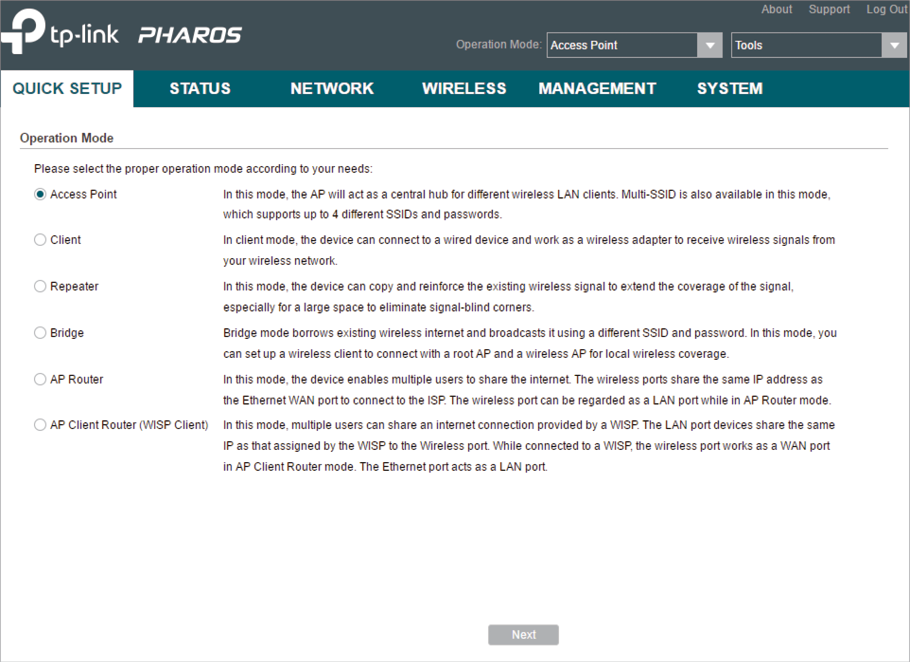
Did you change the default IP address of the Pharos when you did the initial setup via WiFi?


If the Pharos is in AP mode (i.e. wifi bridged to ethernet) then it should have an address in the same subnet as your main router (192.168.1.1/24).


If you had changed the Pharos to AP router mode (i.e. it would use NAT to share one address to many wifi clients, but this isn't the mode shown in your screenshot above) then it could keep it's address in the 192.168.0.1/24 subnet.


I'd suggest if you have it configure in AP mode as per the screenshot then it has picked up a new IP address in the 192.168.1.1/24 range dished out by the starlink router.


Can you log into the starlink router and see DHCP leases? If so that would tell you what address is now allocated to the Pharos.


harlansmart

447 posts

Ultimate Geek
+1 received by user: 59


  #3270265 10-Aug-2024 12:11
Send private message

Hey RunningMan and thanks,


That screenshot is not of our Pharos Interface, we cannot access Pharos or see it - that is an internet sourced screenshot.


The person who did the setup, does not know what they did, as it's probably very unusual for the CPE's Pharos to be able to be accessed OOTB wirelessly AFAIK... and, certainly now, accessing the Pharos cannot even be done cabled.


The blasted StarLink Web interface is gone burgers, they seemingly deprecated it 3-4 months ago now the only access is via the very limited and basic App, which even hides half the client MAC addresses, but, even though, we are pretty sure none of the 12 IP's currently given out are the TP-Link which weirdly, has no MAC address sticker on the dish (box was thrown out unfortunately, and there's seemingly no Monthly Reports getting emailed, so no way to tell what the CPE710 MAC address is yet.


The TP-Link CPE710 has just again (and again lol) been reset on the roof, and at the reset button on the POE Injector indoors, which is cabled to the DELL dock and a laptop, the laptop has Wi-Fi OFF and is set to a static IP 192.168.0.10


How could the CPE710 be on the local 192.168.1.xx network, its reset, it has no way of seeing anything except the laptop surely ?


harlansmart

447 posts

Ultimate Geek
+1 received by user: 59


  #3270269 10-Aug-2024 12:33
Send private message

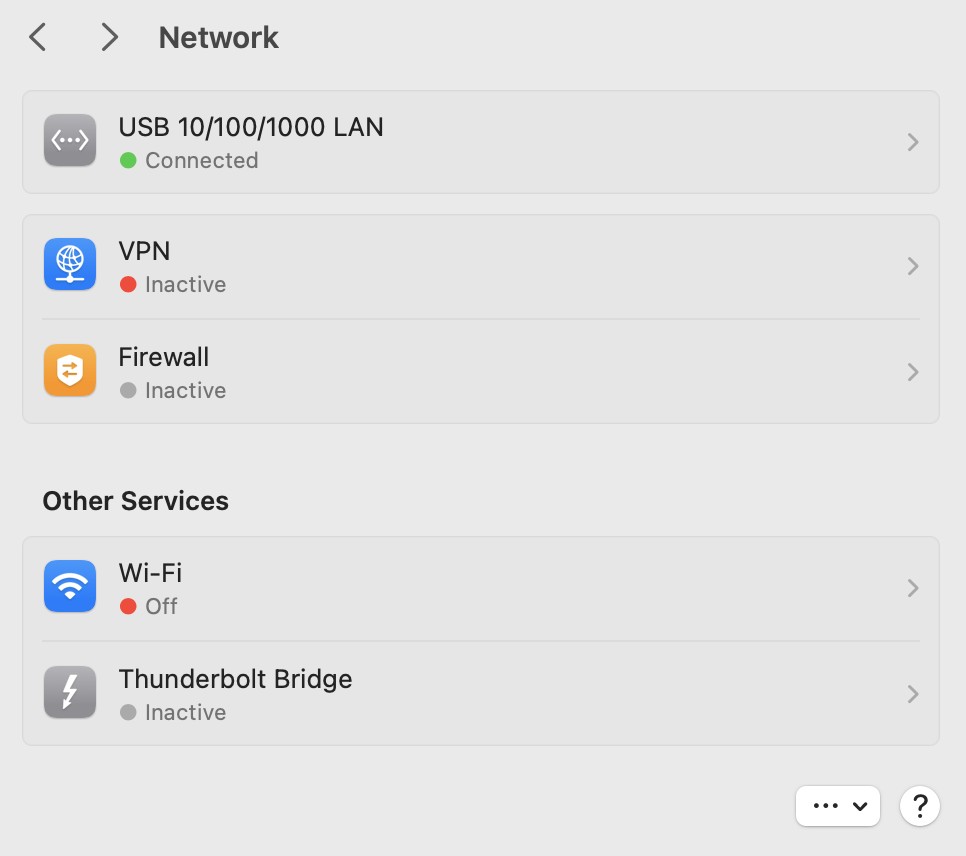
In Mac's Network Settings though, maybe it should be connecting to the Pharos interface of the CPE710 on the roof via Thunderbolt Bridge vs. USB... this is what we have at the moment whilst trying to access the CPE's Pharos on 192.168.0.254


Spyware
3818 posts

Uber Geek
+1 received by user: 1366

Lifetime subscriber

  #3270273 10-Aug-2024 12:38
Send private message

Set the MacBook's network to 169.254.x.y/16 and scan that network with IP scanner.


Spark Max Fibre using Mikrotik CCR1009-8G-1S-1S+, CRS125-24G-1S, Unifi UAP, U6-Pro, UAP-AC-M-Pro, Apple TV 4K (2022), Apple TV 4K (2017), iPad Air 1st gen, iPad Air 4th gen, iPhone 13, SkyNZ3151 (the white box). If it doesn't move then it's data cabled.


Shop now at Mighty Ape (affiliate link).
RunningMan
9186 posts

Uber Geek
+1 received by user: 4840


  #3270276 10-Aug-2024 12:41
Send private message

If it's reset and cabled to the laptop then correct, there should be no link to your primary network. With a static IP address on the laptop of 192.168.0.10/24 then you should be able to access the TP Link at 192.168.0.254 - according to their support at https://www.tp-link.com/us/support/download/cpe710/ 


However, the initial diagram had it cabled through the airport base station to the starlink, and the most obvious (but not only...) setup in that case would be for it to get an address via DHCP from starlink in that same subnet.


harlansmart

447 posts

Ultimate Geek
+1 received by user: 59


  #3270279 10-Aug-2024 12:48
Send private message

3 Unknown Devices show in StarLink App:


At #207 / 92:8F:BB:xx:xx:xx


Can ping 207 but not access in browser...


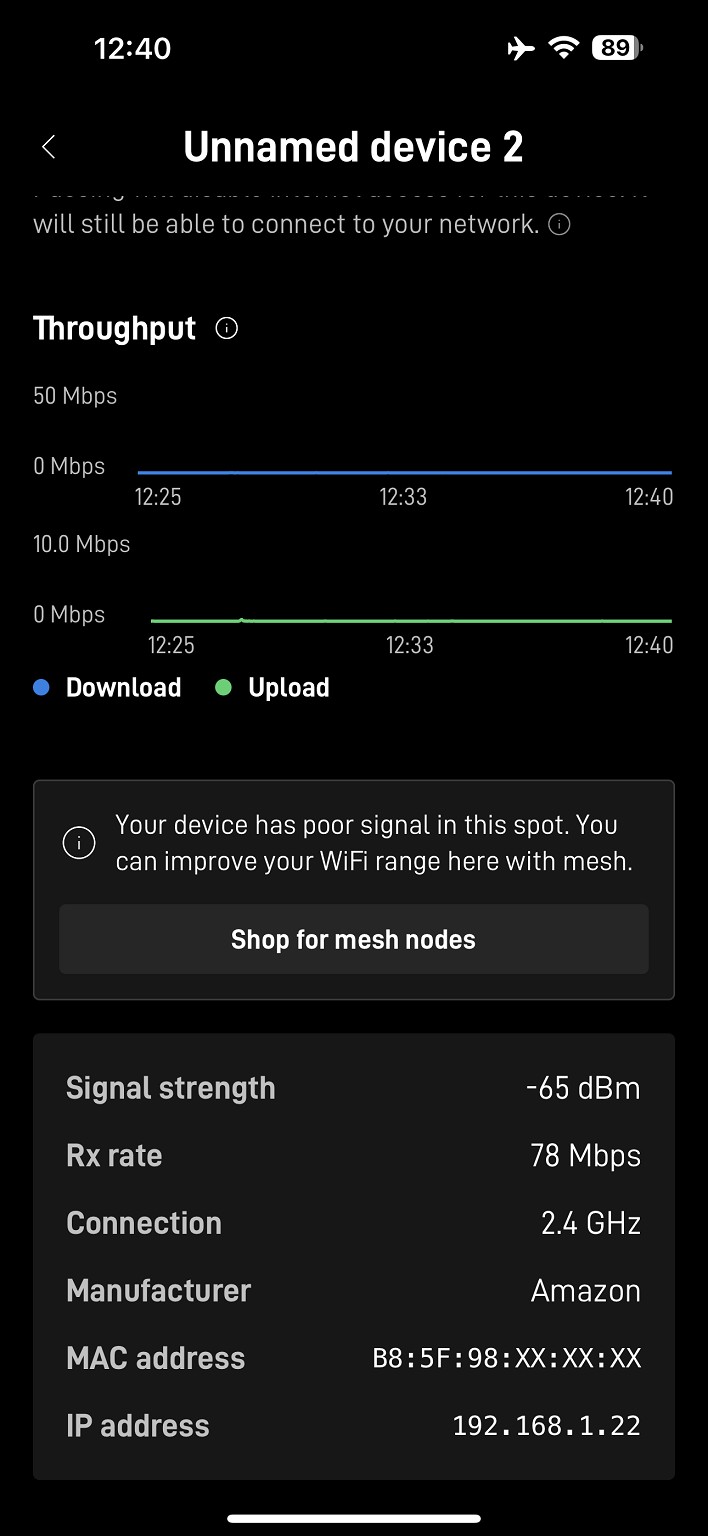
At #22 / B8:5F:98:xx:xx:xx 'Manufacturer Amazon'


Cannot ping 22 nor access in browser...


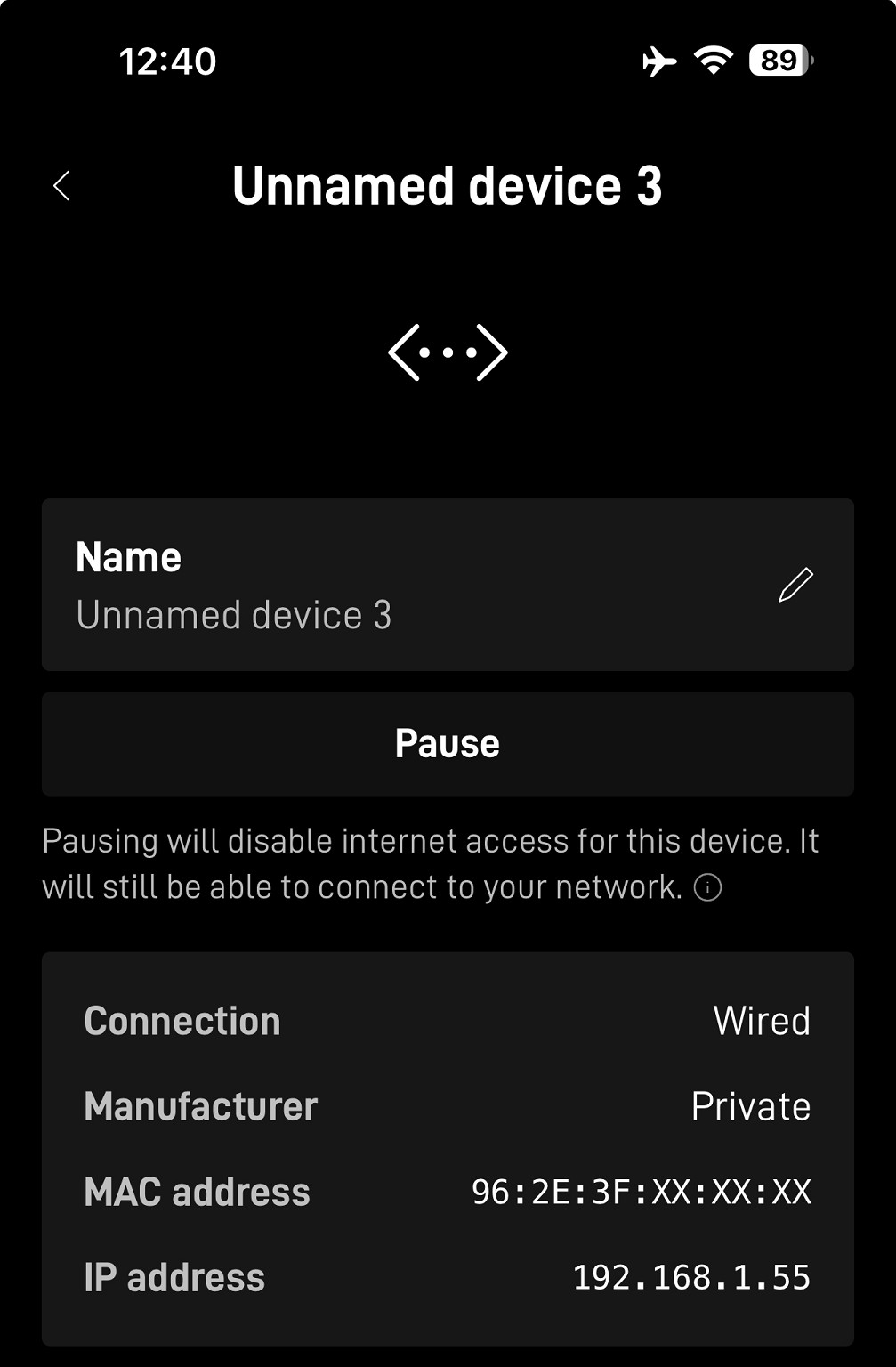
At #55 / 96:2E:3F:xx:xx:xx


Cannot ping 55 nor access in browser...


harlansmart

447 posts

Ultimate Geek
+1 received by user: 59


  #3270283 10-Aug-2024 13:05
Send private message

Yep - sitting typing on a MacBook Pro that's connected to the homes Wi-Fi on 192.168.1.xx with another MacBook Pro with cleared Firefox / Safari / Opera etc browser caches and FireWall OFF and Wi-Fi OFF and set to static IP 192.168.0.10 (as per above) and plugged by TB4 cable into the DELL TB4 dock that goes via CAT 6 to POE Port on POE Injector that is cabled with CAT 6 from its LAN Port to the Ethernet Port under the CPE710 on the roof. 


RunningMan:


If it's reset and cabled to the laptop then correct, there should be no link to your primary network. With a static IP address on the laptop of 192.168.0.10/24 then you should be able to access the TP Link at 192.168.0.254 - according to their support at https://www.tp-link.com/us/support/download/cpe710/ 


However, the initial diagram had it cabled through the airport base station to the starlink, and the most obvious (but not only...) setup in that case would be for it to get an address via DHCP from starlink in that same subnet.


DELL K20A Dock is 04:BF:1B:3D:8F:E3


Spyware
3818 posts

Uber Geek
+1 received by user: 1366

Lifetime subscriber

  #3270285 10-Aug-2024 13:10
Send private message

Assuming the reset isn't working and the TP Link was in DHCP client mode then set MacBook to 169.254.x.y/16 and scan that network.


Spark Max Fibre using Mikrotik CCR1009-8G-1S-1S+, CRS125-24G-1S, Unifi UAP, U6-Pro, UAP-AC-M-Pro, Apple TV 4K (2022), Apple TV 4K (2017), iPad Air 1st gen, iPad Air 4th gen, iPhone 13, SkyNZ3151 (the white box). If it doesn't move then it's data cabled.


harlansmart

447 posts

Ultimate Geek
+1 received by user: 59


  #3270287 10-Aug-2024 13:22
Send private message

Hang on, trying to do that, this, as you suggested, right now on the other MBP 13" thats wired to the jolly CPE.. scan in terminal.... have set the MBP to Static 169.254.1.10 and am trying to ipconfig (enter) arp - a (enter) its giving me pretty much zilch, no IP addresses ?


? (224.0.0.251) at 1:0:5e:0:0:fb on en6 ifscope permanent [ethernet]


Doing this wrong.. can you give me a sceen grab, or a link, to some help to aid us properly 'set MacBook to 169.254.x.y/16 and scan that network.'


Spyware:


Assuming the reset isn't working and the TP Link was in DHCP client mode then set MacBook to 169.254.x.y/16 and scan that network.


-------------


Notes:


Wi-Fi'd MBP 15" on homes usual network 192.168.1.103 gets from ipconfig ENTER arp -a ENTER


#1


#28


#29


#34 (h-14 (iPhone))


#180 (Apple TV) 


h-mini@h-m15 ~ % ipconfig


usage: ipconfig <command> <args>


where <command> is one of waitall, getifaddr, ifcount, getoption, getiflist, getsummary, getpacket, getv6packet, getra, getdhcpduid, getdhcpiaid, set, setverbose


h-mini@h-m15 ~ % arp -a


? (192.168.1.1) at 74:24:9f:d4:9b:6d on en0 ifscope [ethernet]


? (192.168.1.28) at d0:3:4b:d1:65:18 on en0 ifscope [ethernet]


? (192.168.1.29) at 1c:36:bb:3:f2:88 on en0 ifscope [ethernet]


? (192.168.1.34) at da:46:b4:65:68:41 on en0 ifscope [ethernet]


? (192.168.1.180) at d0:3:4b:d1:65:18 on en0 ifscope [ethernet]


mdns.mcast.net (224.0.0.251) at 1:0:5e:0:0:fb on en0 ifscope permanent [ethernet]


HP


Shop now for HP laptops and other devices (affiliate link).
harlansmart

447 posts

Ultimate Geek
+1 received by user: 59


  #3270290 10-Aug-2024 13:52
Send private message

Plugging POE Injector LAN Port into back of Apple Access Point gives:


h-mini@h-m15 ~ % ipconfig


usage: ipconfig <command> <args>


where <command> is one of waitall, getifaddr, ifcount, getoption, getiflist, getsummary, getpacket, getv6packet, getra, getdhcpduid, getdhcpiaid, set, setverbose


h-mini@h-m15 ~ % arp -a


lounge.local (169.254.131.97) at d0:3:4b:d1:65:18 on en0 [ethernet]


bedroom.local (169.254.151.22) at 1c:36:bb:3:f2:88 on en0 [ethernet]


? (192.168.1.1) at 74:24:9f:d4:9b:6d on en0 ifscope [ethernet]


? (192.168.1.22) at b8:5f:98:f2:4d:93 on en0 ifscope [ethernet]


? (192.168.1.28) at d0:3:4b:d1:65:18 on en0 ifscope [ethernet]


? (192.168.1.29) at 1c:36:bb:3:f2:88 on en0 ifscope [ethernet]


? (192.168.1.33) at 5c:96:66:70:66:fb on en0 ifscope [ethernet]


? (192.168.1.34) at da:46:b4:65:68:41 on en0 ifscope [ethernet]


? (192.168.1.55) at 96:2e:3f:9:c8:7c on en0 ifscope [ethernet]


? (192.168.1.57) at 6c:a1:0:5d:d2:bc on en0 ifscope [ethernet]


? (192.168.1.103) at f4:5c:89:bc:3c:d on en0 ifscope permanent [ethernet]


? (192.168.1.180) at d0:3:4b:d1:65:18 on en0 ifscope [ethernet]


? (192.168.1.196) at 50:14:79:42:d3:c6 on en0 ifscope [ethernet]


all-systems.mcast.net (224.0.0.1) at 1:0:5e:0:0:1 on en0 ifscope permanent [ethernet]


mdns.mcast.net (224.0.0.251) at 1:0:5e:0:0:fb on en0 ifscope permanent [ethernet]


? (225.255.255.255) at 1:0:5e:7f:ff:ff on en0 ifscope permanent [ethernet]


--------


Seeing if any of these can be accessed via browser... but only 22 is unknown...


1 (starlink Gen 2) 74:24:9f:d4:9b:6d


22 (???) b8:5f:98:f2:4d:93 (UND 2)


28 (Apple AP lounge) d0:3:4b:d1:65:18


29 (Apple AP bedroom) 1c:36:bb:3:f2:88


33 (PS5) 5c:96:66:70:66:fb


34 (h-14) da:46:b4:65:68:41


55 (a-pad) 96:2e:3f:9:c8:7c


57 (a-surface studio) 6c:a1:0:5d:d2:bc


89 (???) 2A:FA:7A:xx:xx (UND7)


103 (h-m15) f4:5c:89:bc:3c:d


126 (???) E2:1E:12:A4:20:2B (UND 4)


131 (arlo) A4:11:62:xx:xx:xx


165 (???) EA:75:2E:xx:xx:xx


180 (atv) d0:3:4b:d1:65:18


196 (iRobot) 50:14:79:42:d3:c6


202 (m-pad) AE:BE:AE:A6:37:72


207 (???) 92:8F:BB:xx:xx: (UND 1)


237 (h-m13) 90:9C:4A:CF:15:CA


What's this..


xxx.xxx.x.xxx / 92:8F:BB:70:F1:FE


------------


Notes:


--- 192.168.0.254 ping statistics ---
76 packets transmitted, 0 packets received, 100.0% packet loss
h-m13@h-m13 ~ % ping 192.168.0.254
PING 192.168.0.254 (192.168.0.254): 56 data bytes
Request timeout for icmp_seq 0
Request timeout for icmp_seq 1
Request timeout for icmp_seq 2
Request timeout for icmp_seq 3
ping: sendto: No route to host
Request timeout for icmp_seq 4
ping: sendto: Host is down
Request timeout for icmp_seq 5
ping: sendto: Host is down
.
.
.
ping: sendto: Host is down
Request timeout for icmp_seq 12
ping: sendto: Host is down
Request timeout for icmp_seq 13
^C
--- 192.168.0.254 ping statistics ---
15 packets transmitted, 0 packets received, 100.0% packet loss
h-m13@h-m13 ~ % ipconfig
usage: ipconfig <command> <args>
where <command> is one of waitall, getifaddr, ifcount, getoption, getiflist, getsummary, getpacket, getv6packet, getra, getdhcpduid, getdhcpiaid, set, setverbose
h-m13@h-m13 ~ % arp -a
? (192.168.0.254) at (incomplete) on en6 ifscope [ethernet]
? (224.0.0.251) at 1:0:5e:0:0:fb on en6 ifscope permanent [ethernet]
h-m13@h-m13 ~ %


That’s with the MBP13 cabled > CPE710 following the standard TP-Link instructions, that’s the 1st time that the default reset IP 192.168.0.254 has shown in a scan....


Is this some kind of minutae progress ?


harlansmart

447 posts

Ultimate Geek
+1 received by user: 59


  #3270291 10-Aug-2024 13:54
Send private message

Can anyone point to some more complete assistance on how to do this properly, please, don't think for 1 moment we're carrying this out correctly...


Set the MacBook's network to 169.254.x.y/16 and scan that network with IP scanner. - Spyware


harlansmart

447 posts

Ultimate Geek
+1 received by user: 59


  #3270302 10-Aug-2024 15:00
Send private message

1 (starlink Gen 2) 74:24:9f:d4:9b:6d


22 (???) b8:5f:98:f2:4d:93 (UND 2)


28 (Apple AP lounge) d0:3:4b:d1:65:18


29 (Apple AP bedroom) 1c:36:bb:3:f2:88


33 (PS5) 5c:96:66:70:66:fb


34 (h-14) da:46:b4:65:68:41


55 (a-pad) 96:2e:3f:9:c8:7c


57 (a-surface studio) 6c:a1:0:5d:d2:bc


89 (???) 2A:FA:7A:BA:10:42 (UND 7)


103 (h-m15) f4:5c:89:bc:3c:d


126 (???) E2:1E:12:A4:20:2B (UND 4)


131 (arlo) A4:11:62:xx:xx:xx


165 (???) EA:75:2E:xx:xx:xx


180 (atv) d0:3:4b:d1:65:18


196 (iRobot) 50:14:79:42:d3:c6


202 (m-pad) AE:BE:AE:A6:37:72


207 (???) 92:8F:BB:70:F1:FE (UND 1)


237 (h-m13) 90:9C:4A:CF:15:CA


harlansmart

447 posts

Ultimate Geek
+1 received by user: 59


  #3270303 10-Aug-2024 15:05
Send private message

Since it (seems) that the MBP13 cabled to the CPE710 can see the CPE710 at 192.168.0.254 trying to work out why we can't get to the interface at that address via a browser... what are we doing wrong.


Still cannot PING the CPE710 but ipconfig shows it there


h-m13@h-m13 ~ % ipconfig
usage: ipconfig <command> <args>
where <command> is one of waitall, getifaddr, ifcount, getoption, getiflist, getsummary, getpacket, getv6packet, getra, getdhcpduid, getdhcpiaid, set, setverbose
h-m13@h-m13 ~ % arp -a
? (192.168.0.254) at (incomplete) on en6 ifscope [ethernet]
? (224.0.0.251) at 1:0:5e:0:0:fb on en6 ifscope permanent [ethernet]


 1 | 2 | 3
Filter this topic showing only the reply marked as answer View this topic in a long page with up to 500 replies per page Create new topic


Geekzone Live »

Try automatic live updates from Geekzone directly in your browser, without refreshing the page, with Geekzone Live now.


Are you subscribed to our RSS feed? You can download the latest headlines and summaries from our stories directly to your computer or smartphone by using a feed reader.