Geekzone: technology news, blogs, forums
Guest
Welcome Guest.
You haven't logged in yet. If you don't have an account you can register now.


bfam55

4 posts

Wannabe Geek


#315744 12-Aug-2024 08:57
Send private message

Hi all,

I am looking at getting an ASUS RT-AX88U/86U Pro. However I cannot find them for sale in NZ, only pb tech have the non pro version, however I ideally want the Guest Network Pro feature which looks like only the Pro of that model has.

Only place I can really find it for sale is Amazon US. Will buying it from there and using a power adapter be fine for use in NZ on normal fibre? So far my research shows that the USA channels are identintical to NZ across all the bands apart from 2.4ghz it is only 1-11 whereas NZ allows 1-13.

Has anyone purchased a router overseas like this and run any issues into getting it working in NZ? Does the 1-11 band have any limitation here or would it be unnoticed?


Cheers

Create new topic
Dynamic
4037 posts

Uber Geek
+1 received by user: 1862

ID Verified
Trusted
Lifetime subscriber

  #3270718 12-Aug-2024 09:11
Send private message

While it's not ideal, we have bought some Wi-Fi devices in from the USA for our own use and have had no hassles.  We have had some devices warn (in their web portal) that they are operating outside of their designed region but this has not prevented them working.


The only time I've seen this actually cause a problem in the past was when a client's router was set to automatically assign itself a channel (based on scanning the area and picking a channel with the lease congestion) and it would sometimes pick Channel 13.  This became a problem when the client bought a laptop from a popular local computer retailer that had been parallel imported from the USA and the Wi-Fi radio was firmware limited to channels 1-11.  Once we finished scratching our heads and worked out what the issue was, we fixed their router to a channel in the 1-11 range and everyone moved on with their lives.


There was a cost to the client as it involved two chargeable site visits to solve that little mystery.  This would have been in the region of 8-12 years ago.


“Don't believe anything you read on the net. Except this. Well, including this, I suppose.” Douglas Adams


michaelmurfy
meow
13664 posts

Uber Geek
+1 received by user: 11069

Moderator
ID Verified
Trusted
Lifetime subscriber

  #3270734 12-Aug-2024 10:01
Send private message

What are you wanting to achieve that other solutions, eg, Ubiquiti with their routers can't offer?


I personally never rated ASUS as making great routers.


Have a look at this: https://www.pbtech.co.nz/product/NETUBI2207/Ubiquiti-UniFi-Express-UX-Compact-UniFi-Cloud-Gate then perhaps pair it with another UniFi access point if you wanted more coverage. That platform is far better and feature rich than Asus and can do what you're after.


Or, have a look at the Synology range of routers (eg: https://www.pbtech.co.nz/product/NETSYN6600/Synology-RT6600AX-Router-11AX---25Gbps-Backhaul ) that can do that also.


Michael Murphy | https://murfy.nz
Referral Links: Quic Broadband (use R122101E7CV7Q for free setup)

Are you happy with what you get from Geekzone? Please consider supporting us by subscribing.
Opinions are my own and not the views of my employer.


nztim
4069 posts

Uber Geek
+1 received by user: 2782

ID Verified
Trusted
TEAMnetwork
Subscriber

  #3270740 12-Aug-2024 10:25
Send private message

USA ISM bands have less 5GHZ airspace than NZ so you are actually shooting yourself foot, 6GHZ has more than NZ allows so you are at risk of getting a door knock from Radio Spectrum Management


Any views expressed on these forums are my own and don't necessarily reflect those of my employer. 


richms
29251 posts

Uber Geek
+1 received by user: 10361

Trusted
Lifetime subscriber

  #3270747 12-Aug-2024 10:51
Send private message

nztim:


USA ISM bands have less 5GHZ airspace than NZ so you are actually shooting yourself foot, 6GHZ has more than NZ allows so you are at risk of getting a door knock from Radio Spectrum Management


Any records of a door knock for wifi? I only know about the dect phone issues from a few years back that got them out of the office to visit.


Richard rich.ms

bfam55

4 posts

Wannabe Geek


  #3270749 12-Aug-2024 11:01
Send private message

michaelmurfy:

What are you wanting to achieve that other solutions, eg, Ubiquiti with their routers can't offer?


I personally never rated ASUS as making great routers.


Have a look at this: https://www.pbtech.co.nz/product/NETUBI2207/Ubiquiti-UniFi-Express-UX-Compact-UniFi-Cloud-Gate then perhaps pair it with another UniFi access point if you wanted more coverage. That platform is far better and feature rich than Asus and can do what you're after.


Or, have a look at the Synology range of routers (eg: https://www.pbtech.co.nz/product/NETSYN6600/Synology-RT6600AX-Router-11AX---25Gbps-Backhaul ) that can do that also.


I am looking at upgrading my existing home network. I have started adding a few smart devices and looks like the network is getting overloaded especially from the IP Cameras (running a homebridge setup which uses local RTSP streams off 3 cameras). Ideally I would like to create another network to offload these IOT/Cameras, I am partially doing that now with the current router on a basic guest network.

I currently have an ASUS AC58 router which does not look that flash at all compared to AX routers.

No reason in particular I am looking at ASUS just purely as thats what I am familiar with now and the Guest Network Pro seems to be suitable for what I need however will look into different options.

michaelmurfy
meow
13664 posts

Uber Geek
+1 received by user: 11069

Moderator
ID Verified
Trusted
Lifetime subscriber

  #3270751 12-Aug-2024 11:02
Send private message

"Guest Network Pro" is nothing fancy. The Synology / UniFi can both do this also.


I'd actually recommend the Synology over ASUS and it's available in NZ too, and even Hyperfibre capable.


Michael Murphy | https://murfy.nz
Referral Links: Quic Broadband (use R122101E7CV7Q for free setup)

Are you happy with what you get from Geekzone? Please consider supporting us by subscribing.
Opinions are my own and not the views of my employer.


Shop now at Mighty Ape (affiliate link).
richms
29251 posts

Uber Geek
+1 received by user: 10361

Trusted
Lifetime subscriber

  #3270806 12-Aug-2024 11:24
Send private message

If you are using cheap IP cameras with a 2.4GHz single chain radio on it, then no amount of fancy routers will solve the fact that the band is overused and not suitable for high bandwidth things like streaming video.


IMO you are better to get a separate 2.4GHz radio for your cameras so their channel hogging doesn't affect your other 2.4GHz IOT gear, and stick one network on ch1, and the other on ch11.


If you go for unifi gear, you get more control over things like minimum RSSI which can help with it seeing weak neighbour networks and holding off transmission rather than just trampling over them.


Richard rich.ms

bfam55

4 posts

Wannabe Geek


  #3270822 12-Aug-2024 12:22
Send private message

richms:

If you are using cheap IP cameras with a 2.4GHz single chain radio on it, then no amount of fancy routers will solve the fact that the band is overused and not suitable for high bandwidth things like streaming video.


IMO you are better to get a separate 2.4GHz radio for your cameras so their channel hogging doesn't affect your other 2.4GHz IOT gear, and stick one network on ch1, and the other on ch11.


If you go for unifi gear, you get more control over things like minimum RSSI which can help with it seeing weak neighbour networks and holding off transmission rather than just trampling over them.


Okay, I am very new to the UniFi world. What exactly devices would you recommend to have this setup? Those above gateways, 1 or 2 + Extra AP?

With the original listed gateway, does that function as a router and be plugged into the ONT box? Or am I needing something else?

michaelmurfy
meow
13664 posts

Uber Geek
+1 received by user: 11069

Moderator
ID Verified
Trusted
Lifetime subscriber

  #3270841 12-Aug-2024 12:51
Send private message

@bfam55 If you're just wanting a more basic setup (eg, just a router) then just go with the Synology router linked above.


Else, with UniFi you can expand it however you want. The above UniFi router has built in WiFi then you can add a UniFi switch, and additional access points if required. We don't really know your setup so can't recommend past what you're really asking for with the OP.


Michael Murphy | https://murfy.nz
Referral Links: Quic Broadband (use R122101E7CV7Q for free setup)

Are you happy with what you get from Geekzone? Please consider supporting us by subscribing.
Opinions are my own and not the views of my employer.


freitasm
BDFL - Memuneh
80944 posts

Uber Geek
+1 received by user: 41698

Administrator
ID Verified
Trusted
Geekzone
Lifetime subscriber

  #3270853 12-Aug-2024 14:44
Send private message

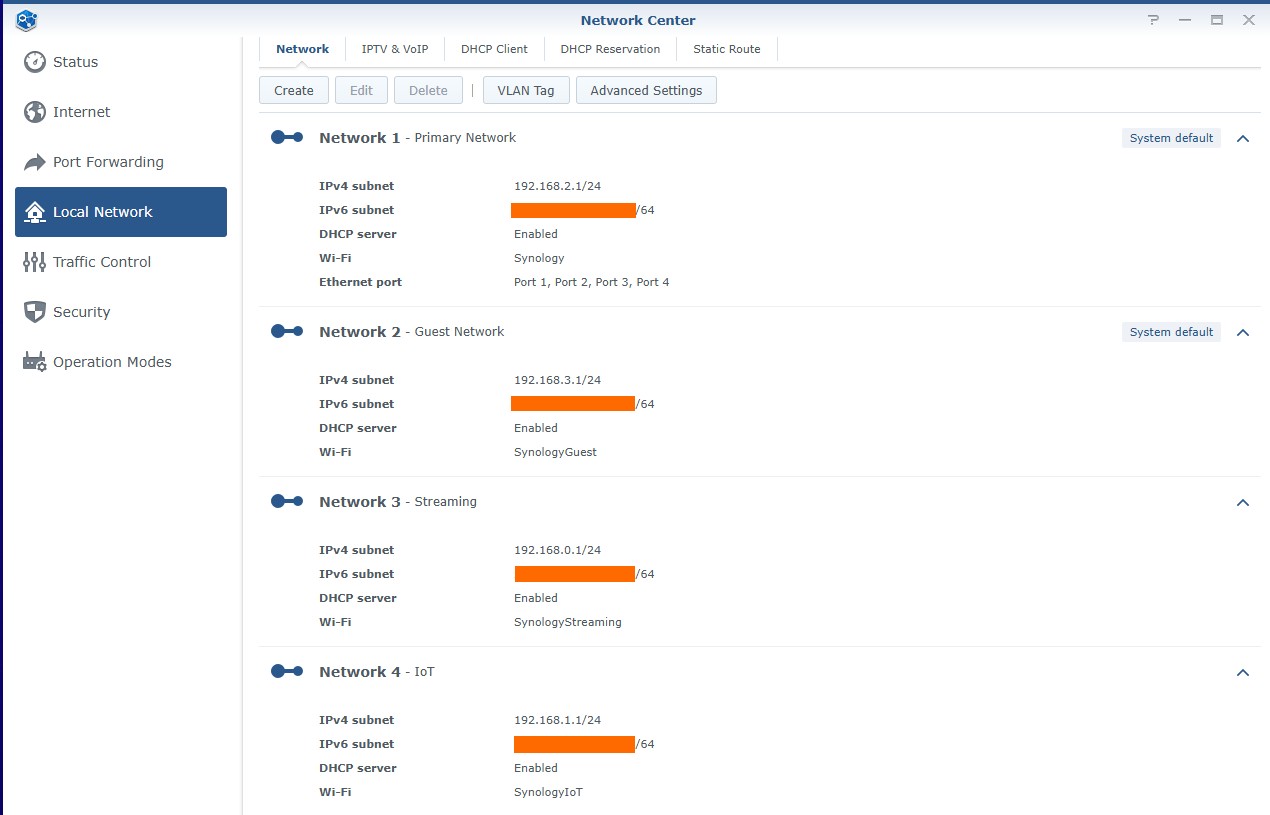
The Synology is very easy to use. Your system can have up to five different networks with up to 15 different Wi-Fi SSIDs (for a total of 200 clients).


Referral links: Quic Broadband (free setup code: R587125ERQ6VE) | Samsung | AliExpress | Wise | Sharesies 


Support Geekzone by subscribing (browse ads-free), or making a one-off or recurring donation through PressPatron.


bfam55

4 posts

Wannabe Geek


  #3270871 12-Aug-2024 16:28
Send private message

freitasm:


The Synology is very easy to use. Your system can have up to five different networks with up to 15 different Wi-Fi SSIDs (for a total of 200 clients).


What sort of devices do you have connected to your 'Streaming network'. Any RTSP Cameras etc, if so how many? Any issues with conjestion?


Shop on-line at New World now for your groceries (affiliate link).
nztim
4069 posts

Uber Geek
+1 received by user: 2782

ID Verified
Trusted
TEAMnetwork
Subscriber

  #3270873 12-Aug-2024 16:36
Send private message

richms:


nztim:


USA ISM bands have less 5GHZ airspace than NZ so you are actually shooting yourself foot, 6GHZ has more than NZ allows so you are at risk of getting a door knock from Radio Spectrum Management


Any records of a door knock for wifi? I only know about the dect phone issues from a few years back that got them out of the office to visit.


Wi-Fi 6E is too new and probably little to no parallel imported gear in NZ


However, The Wi-Fi 6E standard is 5925-7125MHZ but RSM in New Zealand has only opened up 5925-6425MHZ meaning gear not officially sold in NZ is possible to run on frequencies outside the allowed range, this could/might/maybe lead to an RSM inspector knocking at the door.


Any views expressed on these forums are my own and don't necessarily reflect those of my employer. 


freitasm
BDFL - Memuneh
80944 posts

Uber Geek
+1 received by user: 41698

Administrator
ID Verified
Trusted
Geekzone
Lifetime subscriber

  #3270875 12-Aug-2024 16:38
Send private message

bfam55:

What sort of devices do you have connected to your 'Streaming network'. Any RTSP Cameras etc, if so how many? Any issues with conjestion?


The Streaming network is for content requests only - Amazon Fire TV, Chromecast with Google TV, Xbox, Panasonic TV. It's separate because it uses a different DNS 😉.


The IoT network is used by Ring cameras, Philips Hue lights and plugs, D-Link cameras and plugs, Amazon Echo devices, outdoor Wi-Fi lights and Amazon Kindle devices.


The Primary network is for laptops, desktops, phones and NAS.


Referral links: Quic Broadband (free setup code: R587125ERQ6VE) | Samsung | AliExpress | Wise | Sharesies 


Support Geekzone by subscribing (browse ads-free), or making a one-off or recurring donation through PressPatron.


Create new topic


Geekzone Live »

Try automatic live updates from Geekzone directly in your browser, without refreshing the page, with Geekzone Live now.


Are you subscribed to our RSS feed? You can download the latest headlines and summaries from our stories directly to your computer or smartphone by using a feed reader.