Geekzone: technology news, blogs, forums
Guest
Welcome Guest.
You haven't logged in yet. If you don't have an account you can register now.


tcabw

72 posts

Master Geek
+1 received by user: 27


#315755 13-Aug-2024 17:08
Send private message

We have a holiday house in a remote location.
At present it has Wireless internet which has incoming port 80 and 443 blocked which is a bit of a nuisance as I have a Synology Diskstation acting as a webserver to display weather station information among other things.
I've overcome this problem through a third party.... however I am considering Starlink, but before shelling out for all the equipment, I want to be sure that my webserver can be seen from the outside world.
As half the time the internet connection is only servicing the Diskstation, I only want to pay the $75 per month fee, so obtaining an IP4 address is out of the question.


Doing an internet search , Tailscale appears to be software which can assist access through cgnat gateways and I installed it on the Diskstation, but I can't figure out how it all works with my domain name. Has anyone successfully got a Synology Diskstation to publish a website behind the latest Starlink hardware. If so can you detail how they have done it?  


Any help would be appreciated. I'm heading to my 4 score years of age, so the brain isn't as sharp as it used to be.



Tony C


Cheviot NZ

Create new topic
Jiriteach
1139 posts

Uber Geek
+1 received by user: 373

ID Verified
Trusted
Lifetime subscriber

  #3271164 13-Aug-2024 17:24
Send private message

Starlink use CGNAT so you will have the same issue with no access incoming.


Use a NGROK tunnel (there is a free version) or Cloudflare (Zero Trust/Access) (which is free as well but requires your domain name setup on their DNS servers). 
Tailscale could work as well but its a pita to setup.


I use Cloudflare and its simple and easy. Theres also a cloudflared package for Synology.


-- opinions expressed by me are solely my own. ie - personal


freitasm
BDFL - Memuneh
80653 posts

Uber Geek
+1 received by user: 41045

Administrator
ID Verified
Trusted
Geekzone
Lifetime subscriber

  #3271193 13-Aug-2024 21:08
Send private message

Cloudflare Tunnel with Cloudflare Zero Trust for access control. No inbound connections, only outbound.

Cloudflare can run in Synology NAS as a package or container.


Referral links: Quic Broadband (free setup code: R587125ERQ6VE) | Samsung | AliExpress | Wise | Sharesies 


Support Geekzone by subscribing (browse ads-free), or making a one-off or recurring donation through PressPatron.


tcabw

72 posts

Master Geek
+1 received by user: 27


  #3271204 13-Aug-2024 22:40
Send private message

Jiriteach:


Starlink use CGNAT so you will have the same issue with no access incoming.
I use Cloudflare and its simple and easy. Theres also a cloudflared package for Synology.


I'm well aware of the CGNAT issue... which is the reason for the post


Are you saying that if I set up my Diskstation with a Cloudflare account under my existing wireless provider, it will plug straight into a Starlink router and be recognised without further intervention, or would I need to start again after the change?   I found a Youtube on Cloudfare which seems simple enough to set up with the existing server if it's the the former.


The purpose of my post is to find someone who has gone down the same path, ie moving their Synology Diskstation from an IP4 internet provider and connecting it to Starlink. What detailed steps were taken to achieve the desired result to produce a connection to it from the outside world whether it be through Cloudfare, Tailscale or whatever.........   Googling has not produced for me any clear instructions so far either on Youtube or on-line!


Tony C


Cheviot NZ


freitasm
BDFL - Memuneh
80653 posts

Uber Geek
+1 received by user: 41045

Administrator
ID Verified
Trusted
Geekzone
Lifetime subscriber

  #3271205 13-Aug-2024 22:47
Send private message

A Cloudflare Tunnel will work on any ISP, CGNAT or not.


Referral links: Quic Broadband (free setup code: R587125ERQ6VE) | Samsung | AliExpress | Wise | Sharesies 


Support Geekzone by subscribing (browse ads-free), or making a one-off or recurring donation through PressPatron.


Jiriteach
1139 posts

Uber Geek
+1 received by user: 373

ID Verified
Trusted
Lifetime subscriber

  #3271265 14-Aug-2024 05:31
Send private message

tcabw:


Jiriteach:


Starlink use CGNAT so you will have the same issue with no access incoming.
I use Cloudflare and its simple and easy. Theres also a cloudflared package for Synology.


I'm well aware of the CGNAT issue... which is the reason for the post


Are you saying that if I set up my Diskstation with a Cloudflare account under my existing wireless provider, it will plug straight into a Starlink router and be recognised without further intervention, or would I need to start again after the change?   I found a Youtube on Cloudfare which seems simple enough to set up with the existing server if it's the the former.


The purpose of my post is to find someone who has gone down the same path, ie moving their Synology Diskstation from an IP4 internet provider and connecting it to Starlink. What detailed steps were taken to achieve the desired result to produce a connection to it from the outside world whether it be through Cloudfare, Tailscale or whatever.........   Googling has not produced for me any clear instructions so far either on Youtube or on-line!


Theres tons of examples online. Google - "cloudflare setup synology"
https://www.crosstalksolutions.com/cloudflare-tunnel-easy-setup/


This works regardless if you have a static ip or not and regardless of who your ISP is. Cloudflare makes outgoing connections from the tunnel and then usese that same tunnel for incoming. Blog post details this.


Only one downside to Cloudflare tunnels is that uploads are capped at 100mb for any one file. Meaning no one file can be more then 100mb else it will discard the traffic else everything else is unlimited but this shouldnt be an issue with most. Depends on your intended usage.


-- opinions expressed by me are solely my own. ie - personal


raytaylor
4076 posts

Uber Geek
+1 received by user: 1296

Trusted

  #3273025 17-Aug-2024 20:12
Send private message

tcabw:


We have a holiday house in a remote location.
At present it has Wireless internet which has incoming port 80 and 443 blocked which is a bit of a nuisance as I have a Synology Diskstation acting as a webserver to display weather station information among other things.


Why not just run it on another port?
Eg. external 8080 or 8443 being translated by the router to internal 80 and 443?


Ray Taylor

There is no place like localhost

Spreadsheet for Comparing Electricity Plans Here


Shop now on Samsung phones, tablets, TVs and more (affiliate link).
Jiriteach
1139 posts

Uber Geek
+1 received by user: 373

ID Verified
Trusted
Lifetime subscriber

  #3273030 17-Aug-2024 21:07
Send private message

raytaylor:

tcabw:


We have a holiday house in a remote location.
At present it has Wireless internet which has incoming port 80 and 443 blocked which is a bit of a nuisance as I have a Synology Diskstation acting as a webserver to display weather station information among other things.


Why not just run it on another port?
Eg. external 8080 or 8443 being translated by the router to internal 80 and 443?


Connection behind CGNAT does not allow incoming connections. You would need a static ip or an ISP that doesn’t run CGNAT.


-- opinions expressed by me are solely my own. ie - personal


timmmay
20858 posts

Uber Geek
+1 received by user: 5350

Trusted
Lifetime subscriber

  #3273036 17-Aug-2024 22:07
Send private message

I use CloudFlare Tunnels with zero trust to serve traffic from a R.Pi on a home internet connection, very low volume family photos website. It works well. I happen to have a static IP but that's irrelevant. I have a docker-compose file I could share if anyone needs it, but there's probably dozens online.


tcabw

72 posts

Master Geek
+1 received by user: 27


  #3273038 17-Aug-2024 22:32
Send private message

Consider this correspondence closed.
I've bit the bullet and purchased a Starlink kit and will solve my own problems by trial and error...........


Thank you to any respondents.


TC


Tony C


Cheviot NZ

Behodar
11099 posts

Uber Geek
+1 received by user: 6082

Trusted
Lifetime subscriber

  #3273047 18-Aug-2024 07:46
Send private message

Jiriteach:
raytaylor:


Why not just run it on another port?
Eg. external 8080 or 8443 being translated by the router to internal 80 and 443?


Connection behind CGNAT does not allow incoming connections. You would need a static ip or an ISP that doesn’t run CGNAT.


It's unclear from the post whether the current provider uses CGNAT.


freitasm
BDFL - Memuneh
80653 posts

Uber Geek
+1 received by user: 41045

Administrator
ID Verified
Trusted
Geekzone
Lifetime subscriber

  #3273050 18-Aug-2024 08:03
Send private message

I will go back to the start of this thread:


tcabw:


At present it has Wireless internet which has incoming port 80 and 443 blocked which is a bit of a nuisance as I have a Synology Diskstation acting as a webserver to display weather station information among other things.


I have a Synology DiskStation and lots of services that can be used through it. But I would never, in my wildest dreams, give Internet users direct access to services on that box without security. 


Doing so is asking to have it compromised.


The secure way of doing it is to have a Cloudflare Tunnel. If you want the site to be public I would just create a Tunnel.


If you need the sub-domain or parts of it to be private, just create Zero Trust Applications rules. 


In any case, create Caching rules to ensure resources are cached, or risk some bot (the Internet is full of it, search engines, AI crawlers, SEO services) using all the bandwidth you have, and even using all the CPU resources on your box. 


You can create the tunnel in two ways:


  • Docker
  • Synology package from the Syno Community repository

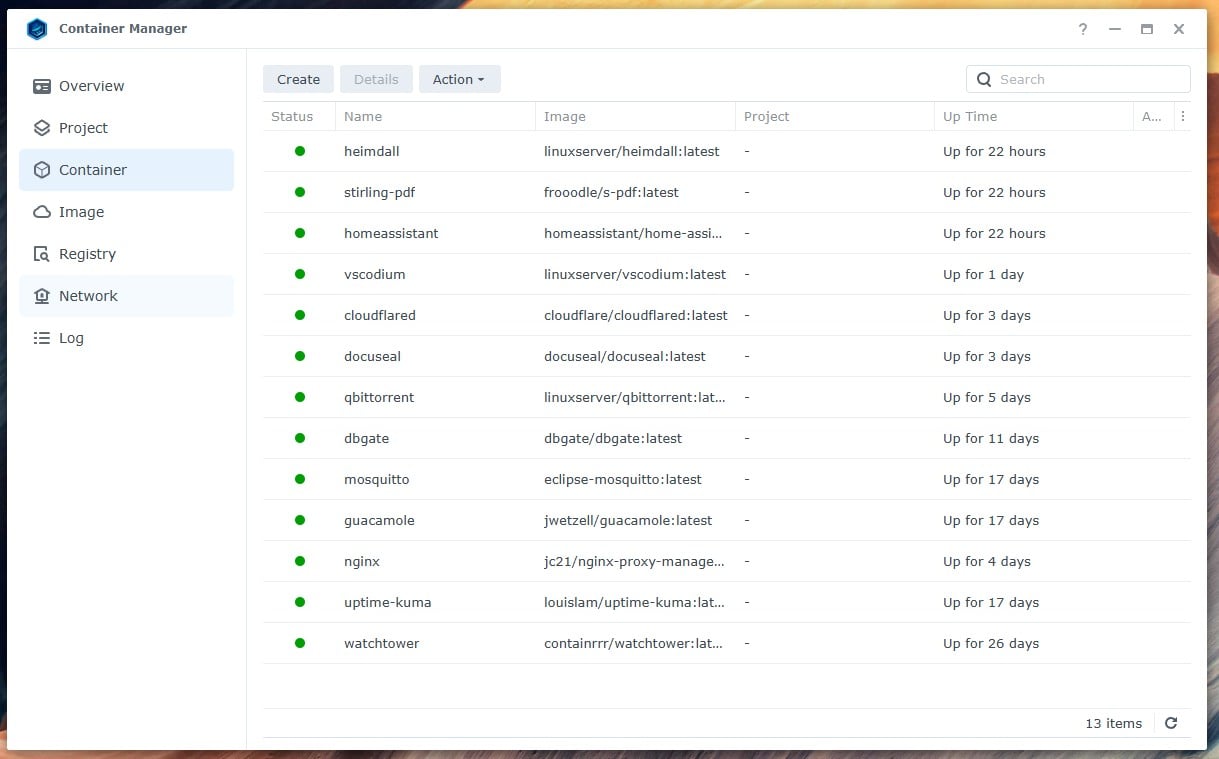
These are services I have on my NAS:


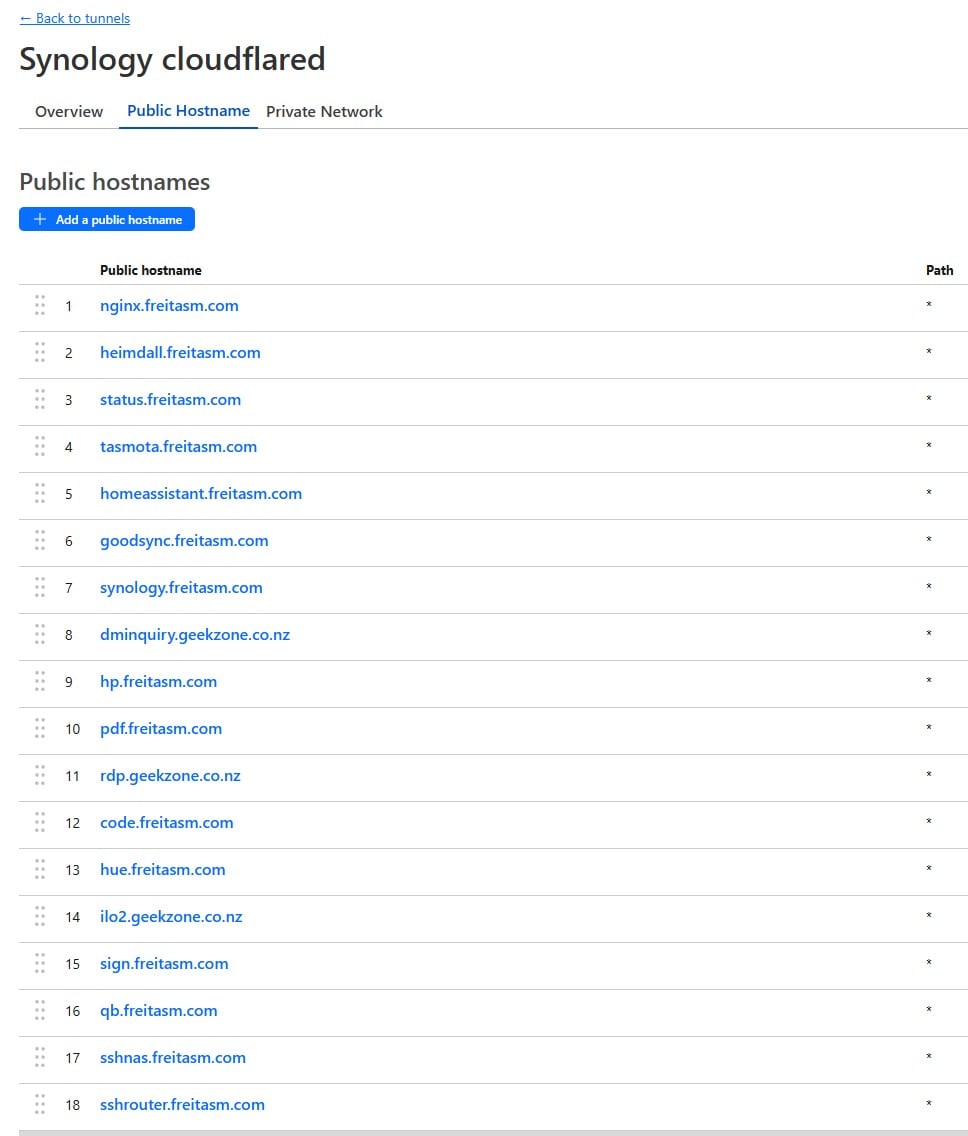
These are just some of the tunnels I have. Note not all go to the NAS. For example, there's the router, HP printer, Tasmota IoT, etc. If you try these and get a login page, then they are also protect by Cloudflare Zero Trust Access:  


Referral links: Quic Broadband (free setup code: R587125ERQ6VE) | Samsung | AliExpress | Wise | Sharesies 


Support Geekzone by subscribing (browse ads-free), or making a one-off or recurring donation through PressPatron.


Stream your favourite shows now on Apple TV (affiliate link).
raytaylor
4076 posts

Uber Geek
+1 received by user: 1296

Trusted

  #3273054 18-Aug-2024 08:32
Send private message

Jiriteach:
raytaylor:


tcabw:


We have a holiday house in a remote location.
At present it has Wireless internet which has incoming port 80 and 443 blocked which is a bit of a nuisance as I have a Synology Diskstation acting as a webserver to display weather station information among other things.


Why not just run it on another port?
Eg. external 8080 or 8443 being translated by the router to internal 80 and 443?


Connection behind CGNAT does not allow incoming connections. You would need a static ip or an ISP that doesn’t run CGNAT.


Ahh I misread that the current connection was behind CG-NAT


However if the ISP was truely running proper two-way CG-NAT you should be assigned a specific port range that are forwarded to you, which you can then forward on to your internal device.


Ray Taylor

There is no place like localhost

Spreadsheet for Comparing Electricity Plans Here


cyril7
9075 posts

Uber Geek
+1 received by user: 2499

ID Verified
Trusted
Subscriber

  #3273185 18-Aug-2024 10:57
Send private message

Hi Ray, very few ISPs offered port forward options on CG-NAT like that, the only one that I know used to was 2Talk and I think that is due to be shut off.


As for Starlink, they most definitely do not support that. I have a number of clients on Starlink due to them being rural business's, I use WireGuard off Mikrotiks at each site reaching back to a Mikrotik CHR I have sitting in Vultr SYD, works brilliant.


@tcabw, you say you publish a web site from your Syno, is there any reason you could not move it to a cloud service, a basic instance in Digital Ocean or Vultr would be way cheaper than the montly cost of a Starlink business connection.


Cyril


freitasm
BDFL - Memuneh
80653 posts

Uber Geek
+1 received by user: 41045

Administrator
ID Verified
Trusted
Geekzone
Lifetime subscriber

  #3273202 18-Aug-2024 11:44
Send private message

Or if it's small, even the Oracle free tier VMs.


Referral links: Quic Broadband (free setup code: R587125ERQ6VE) | Samsung | AliExpress | Wise | Sharesies 


Support Geekzone by subscribing (browse ads-free), or making a one-off or recurring donation through PressPatron.


tcabw

72 posts

Master Geek
+1 received by user: 27


  #3273206 18-Aug-2024 12:10
Send private message


I have a Synology DiskStation and lots of services that can be used through it. But I would never, in my wildest dreams, give Internet users direct access to services on that box without security.
Doing so is asking to have it compromised.


@tcabw, you say you publish a web site from your Syno, is there any reason you could not move it to a cloud service, a basic instance in Digital Ocean or Vultr would be way cheaper than the montly cost of a Starlink business connection.


Firstly, the Diskstation (several different models) has been used successfully to display my Weather Station data for 12 years without being hacked. There is no user interaction. Webstation just displays the information upon a port80 (or lately port 8080)query.
Access to all the other Diskstation features have all the security features activated. The weather station and all associated equipment is a hobby.
I am 78 years of age and I like to try things. My existing wireless internet provider does have several limitations such as speed and line of sight with tall hedges and neighbouring trees and still having a curious mind, Starlink as an alternative or even just a fall-back interests me. The house has an unobtructed view to sea.

The info about Cloudfare is useful and now I've purchased the Starlink kit, I'll play with it while still keeping the wireless going in the meantime. I have an old DS213J running DS7.2 I can play with.
As I said in my previous post, I will consider the matter closed as far I'm concerned.


regards 
TC


Tony C


Cheviot NZ

Create new topic


Geekzone Live »

Try automatic live updates from Geekzone directly in your browser, without refreshing the page, with Geekzone Live now.


Are you subscribed to our RSS feed? You can download the latest headlines and summaries from our stories directly to your computer or smartphone by using a feed reader.