Geekzone: technology news, blogs, forums
Guest
Welcome Guest.
You haven't logged in yet. If you don't have an account you can register now.


Youi

80 posts

Master Geek
+1 received by user: 3


#317324 6-Oct-2024 11:40
Send private message

Hi there, ive just had the email from Skinny saying that my new connection is ready to go (no previous internet at this house) but ive been through all the settings in the Fritz.Box UI and I cant get it to connect. I can see the wifi but there is no internet. The power/DSL light on the fritzbox is blinking continuously, not sure if this is because Skinny havnt actually connected me yet, or im doing something wrong with either the cables connection (Ive tried the ethernet cable in all ports on both the ONT and fritzbox, just to make sure), or if im still missing something in the Fritz.Box UI setup page. Ive emailed Skinny back today to ask if the connection is indeed ready to go or not (logging into their website says its not connected yet, but that could just be slow to be updated), but I thought I would ask here whilst they take their time getting back to me, in case any of you can point out something super obvious I might have missed! The fritzbox does have 2degrees branding on it, but I changed the dropdown from 2Degrees to Skinny in the Fritz.Box UI, if this modem is unable to work with anything other than 2degrees that sucks, but ive only wasted $50 and ill just put it back on trademe. I guess if this is the case, then I have to buy an overpriced modem from Skinny? Any thoughts greatly appreciated, I am, obviously, out of my depth here hah!


Filter this topic showing only the reply marked as answer View this topic in a long page with up to 500 replies per page Create new topic
 1 | 2 | 3 | 4 | 5
Spyware
3818 posts

Uber Geek
+1 received by user: 1366

Lifetime subscriber

  #3293426 6-Oct-2024 11:48
Send private message

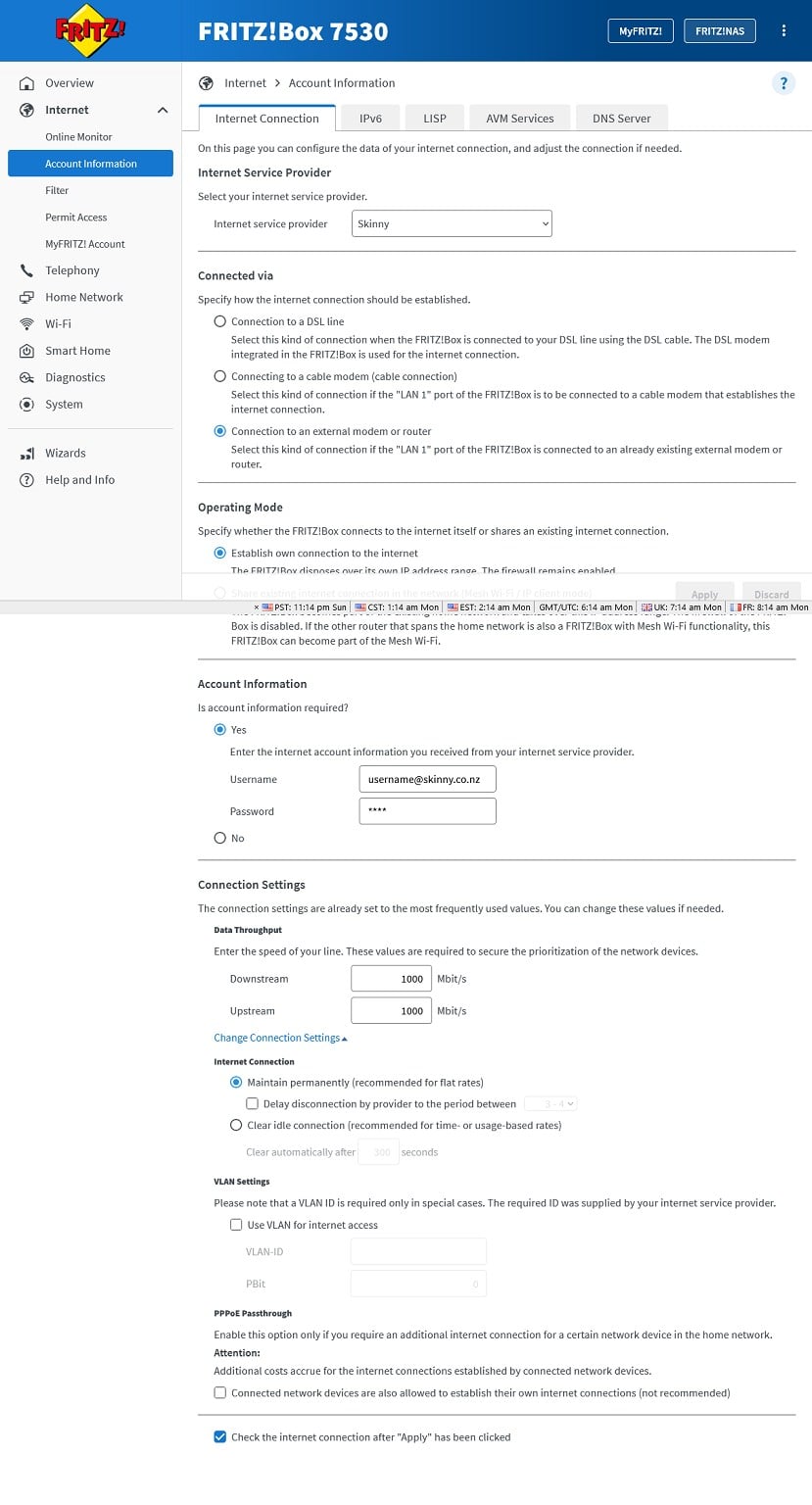
Fritzbox should work but it obviously needs to be configured correctly on WAN for Skinny, PPPoE (username: user@skinny.co.nz password: abc123) with no vlan tag. 2Degrees used to be PPPoE with vlan id = 10 and then changed to use IPoE/DHCP client with vlan id = 10 on migration to Vocus network.


https://support.snappernet.co.nz/support/solutions/articles/5000731965-fritz-box-ufb-general-setup


Spark Max Fibre using Mikrotik CCR1009-8G-1S-1S+, CRS125-24G-1S, Unifi UAP, U6-Pro, UAP-AC-M-Pro, Apple TV 4K (2022), Apple TV 4K (2017), iPad Air 1st gen, iPad Air 4th gen, iPhone 13, SkyNZ3151 (the white box). If it doesn't move then it's data cabled.


Youi

80 posts

Master Geek
+1 received by user: 3


  #3293490 6-Oct-2024 13:09
Send private message

Thank you! When you say username@skinny.co.nz, is this my personal email I used to sign up for skinny with? Or is there a step where I create a username for my Skinny account that they havnt emailed me about yet? I tried it with my personal email and password that I used when singing up for Skinny, but it didnt make a difference.


mrgsm021
1538 posts

Uber Geek
+1 received by user: 310

ID Verified
Trusted

  #3293493 6-Oct-2024 13:16
Send private message

Youi:


Thank you! When you say username@skinny.co.nz, is this my personal email I used to sign up for skinny with? Or is there a step where I create a username for my Skinny account that they havnt emailed me about yet? I tried it with my personal email and password that I used when singing up for Skinny, but it didnt make a difference.


The username and password field for PPPoE settings can be anything, as long as they are not left blank so you can literally just enter user@skinny.co.nz in the username field.


Since you mentioned you tried entering your personal email and password and made no difference, I think the issue is the removal/disabling the VLAN tagging, where the VLAN tagging is still enabled in the setting, which needs to be disabled/removed.


Youi

80 posts

Master Geek
+1 received by user: 3


  #3293496 6-Oct-2024 13:19
Send private message

Ahh, thats easy then! Looking at the website that was sent above, i have a sneaking suspicion that i hadnt clicked from "connection with a dsl line" to "connection to an external modem or router" ... you dont suppose that would have anything to do with it hahaha. I can get back to the house tomorrow to try again, I thought I had looked for any button that said about VLAN to toggle, but didnt see it, or perhaps didnt look hard enough.


mrgsm021
1538 posts

Uber Geek
+1 received by user: 310

ID Verified
Trusted

  #3293498 6-Oct-2024 13:31
Send private message

From the instruction link Spyware shared, the VLAN tagging tick box sits under Connection settings, which needs to be unticked:


Youi

80 posts

Master Geek
+1 received by user: 3


  #3293546 6-Oct-2024 13:47
Send private message

Cheers, I will try and find that setting when I go back to try again tomorrow!


Shop on-line at New World now for your groceries (affiliate link).
Youi

80 posts

Master Geek
+1 received by user: 3


  #3293603 6-Oct-2024 14:48
Send private message

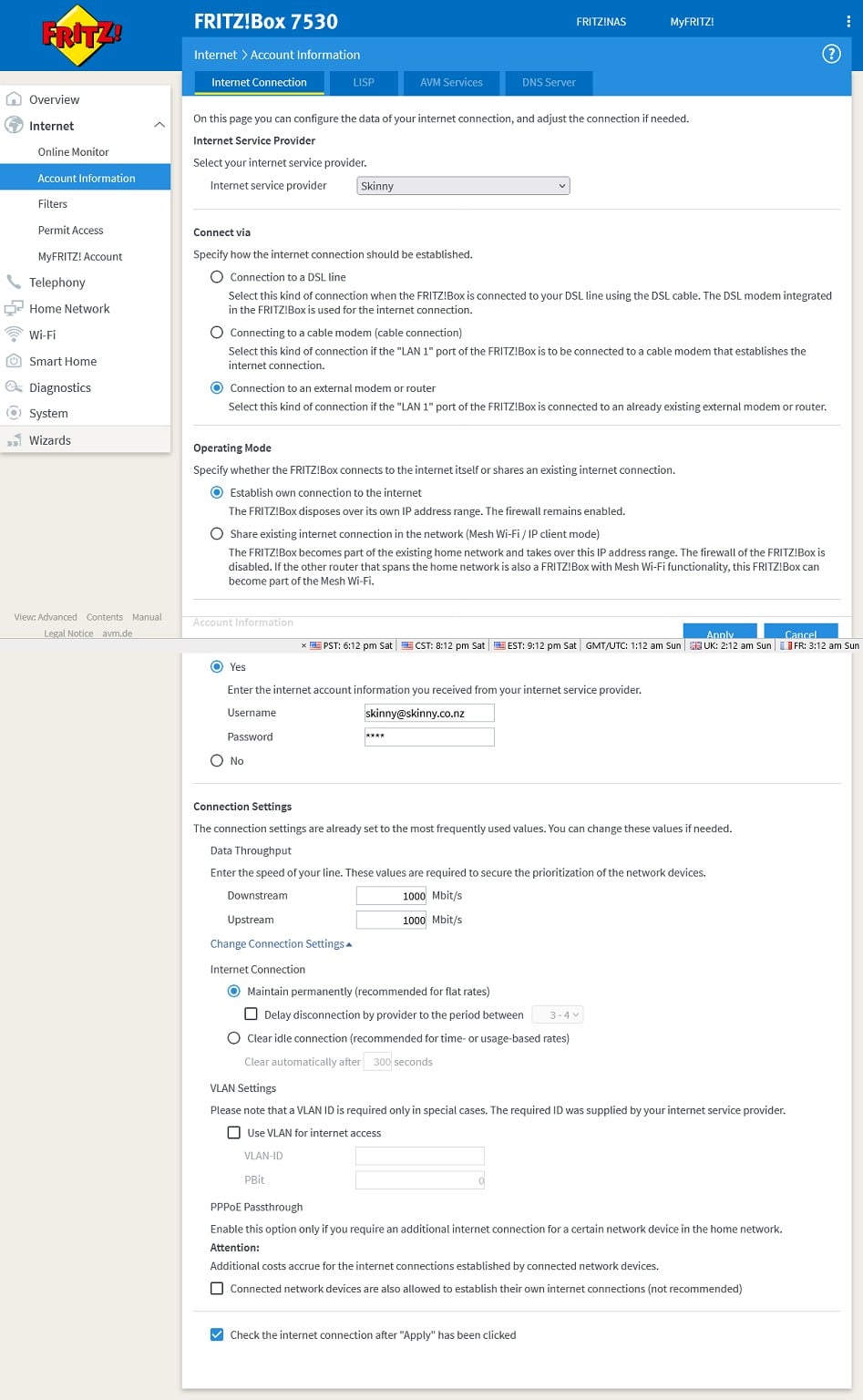
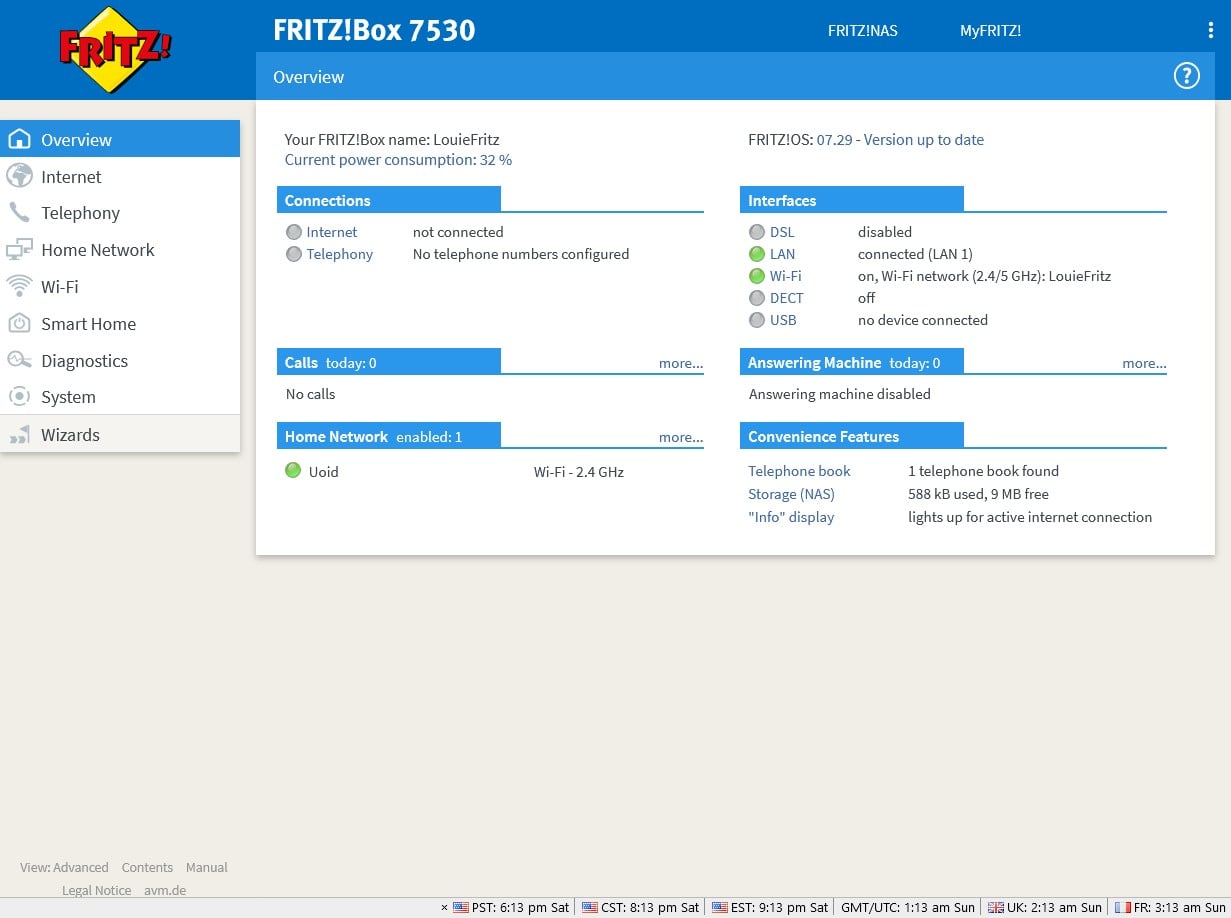
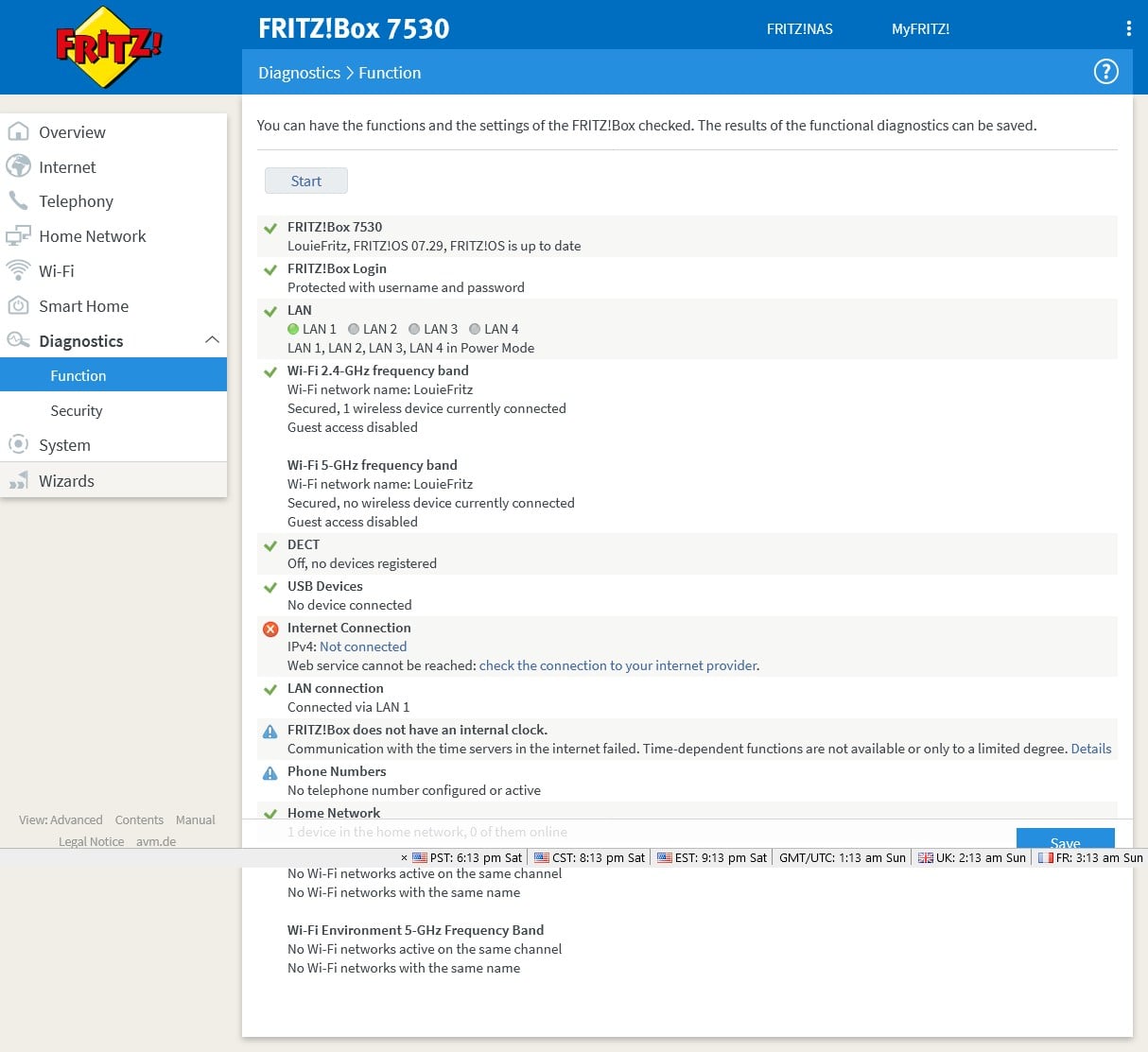
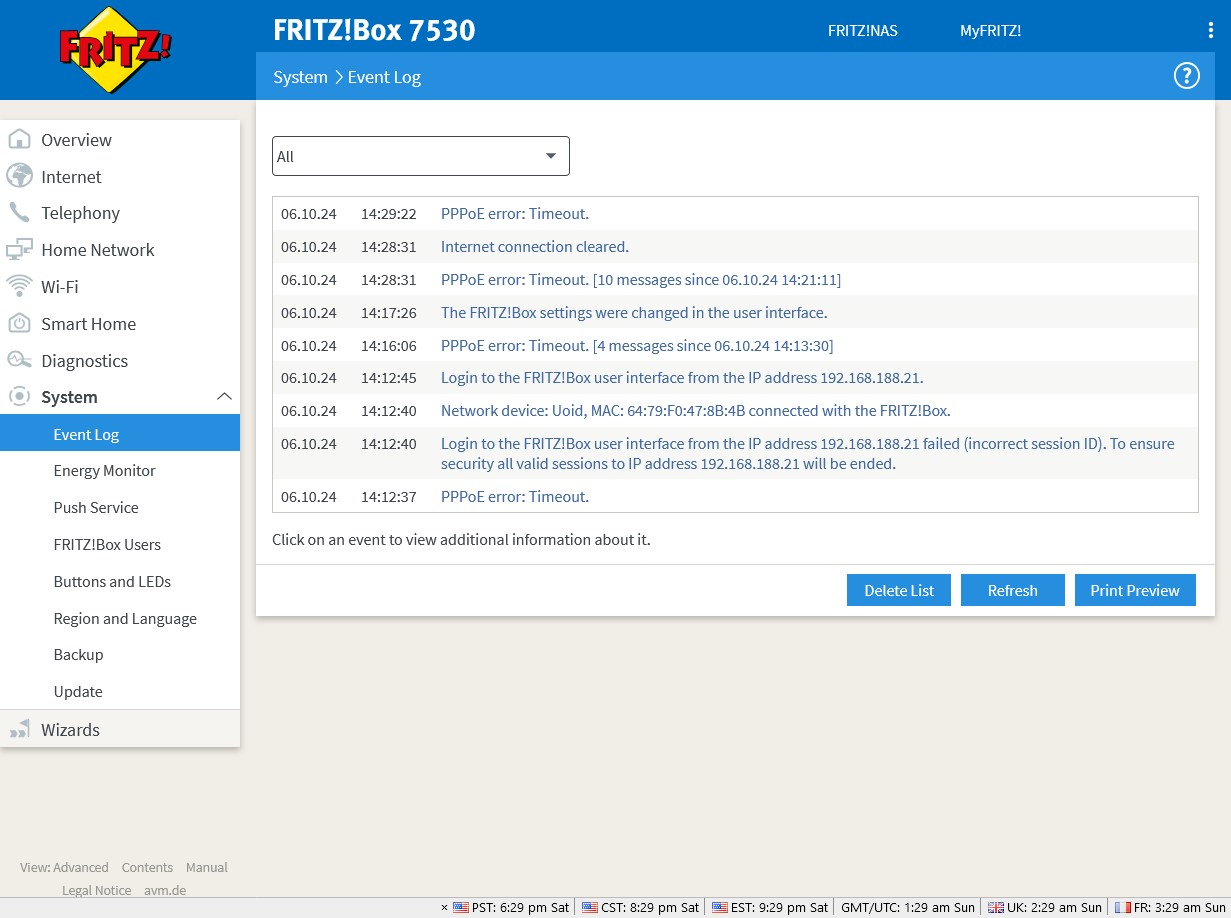
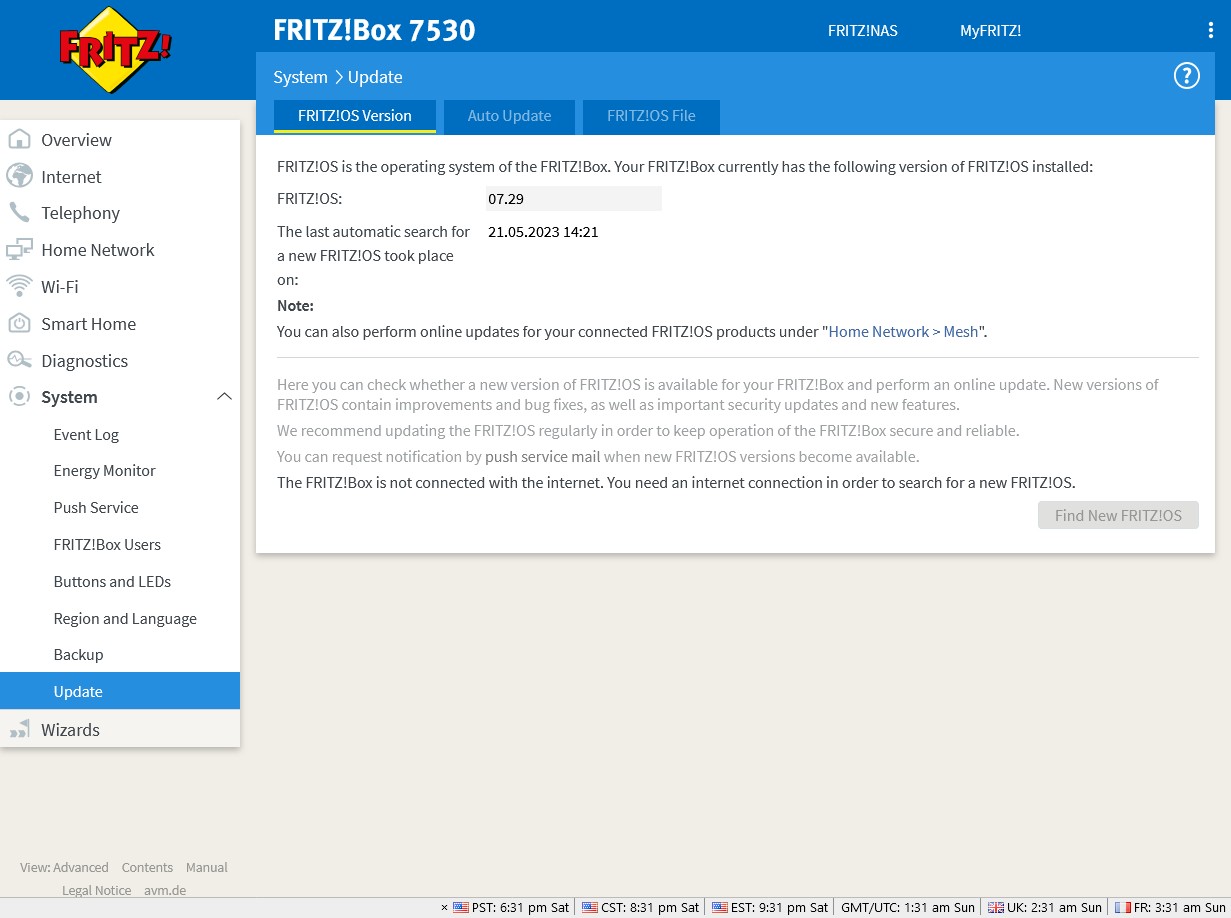
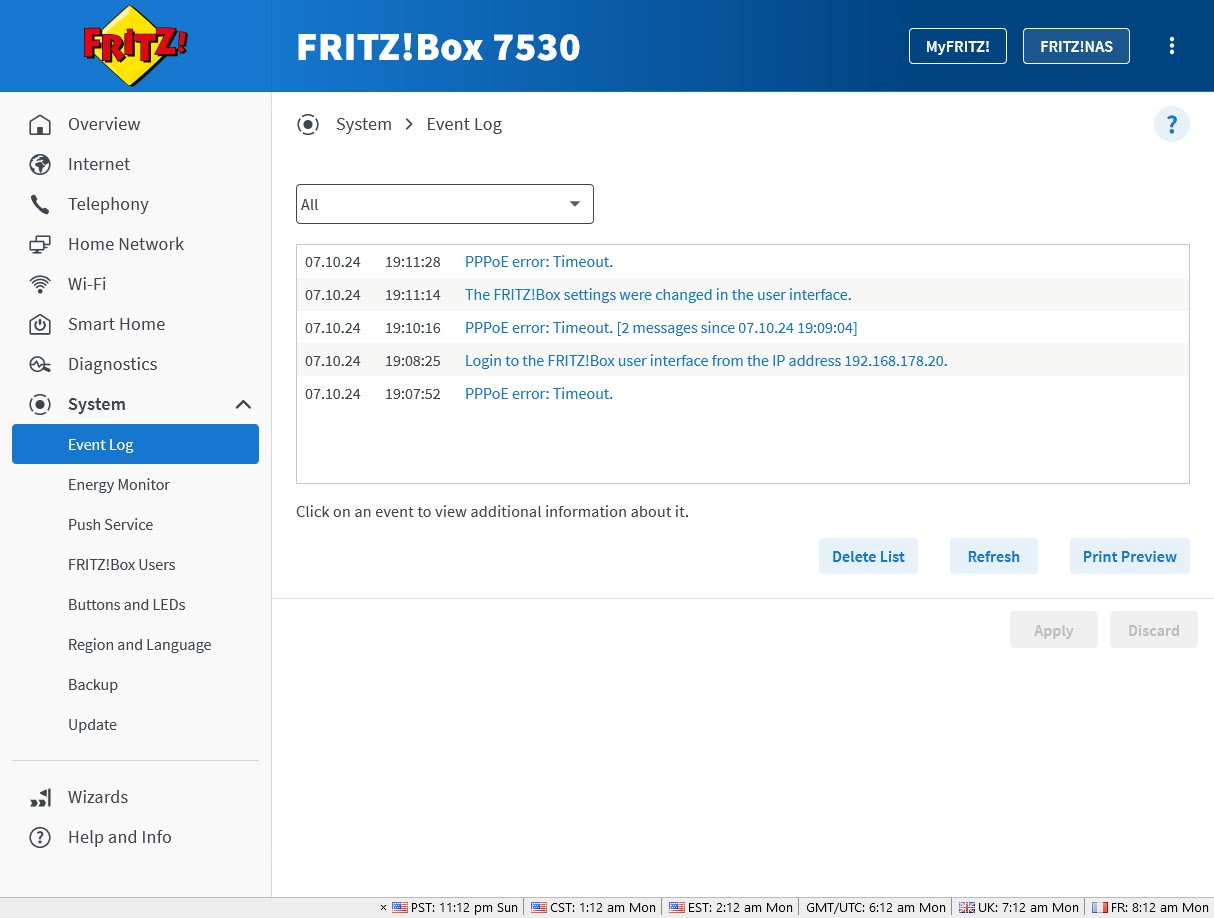
Just managed to get a ride back to the new flat and tried the suggestions, VLAN was already unticked, and I changed from Connect to a DSL line to Connection to an external modem or router. Changing the connection type and checking the internet now gave this error: "The internet connection check failed. The internet service provider is not responding to PPPoE packets. Repeat the test at a later point in time." Whilst I was there I restarted the ONT and the fritzbox. Changing the connection type meant that the power/dsl and wlan lights on the fritzbox are now solid, but still no internet, same error as above. I ticked VLAN, restarted, unticked VLAN, restarted, and it gave a very helpful "The internet connection check failed. The reason for the error could not be determined." Whilst I was looking through settings I noticed that it was OS 07.29 and that might need updating, so I bought the fritzbox home with me to see if I can update it (im hoping I can just plug it into the wall and my laptop and update that way, as we dont have fiber at this property, only 4G). I took some screen shots in case any of this is helpful. EDIT: missed a screenshot


Youi

80 posts

Master Geek
+1 received by user: 3


  #3293605 6-Oct-2024 14:59
Send private message

I found an OS update and downloaded it to my computer, but I cant seem to update the fritzbox from here, cant open the UI, plugging it into my laptop wont let me update that way, and we dont have fiber/an ONT here so I cant do it that way. I guess I have to go BACK to the new flat and update from the fritzbox UI there, as I cant access it from home.


mrgsm021
1538 posts

Uber Geek
+1 received by user: 310

ID Verified
Trusted

  #3293629 6-Oct-2024 19:17
Send private message

Try doing a factory reset and start from scratch if you haven't done so already.


Youi

80 posts

Master Geek
+1 received by user: 3


  #3294120 7-Oct-2024 19:42
Send private message

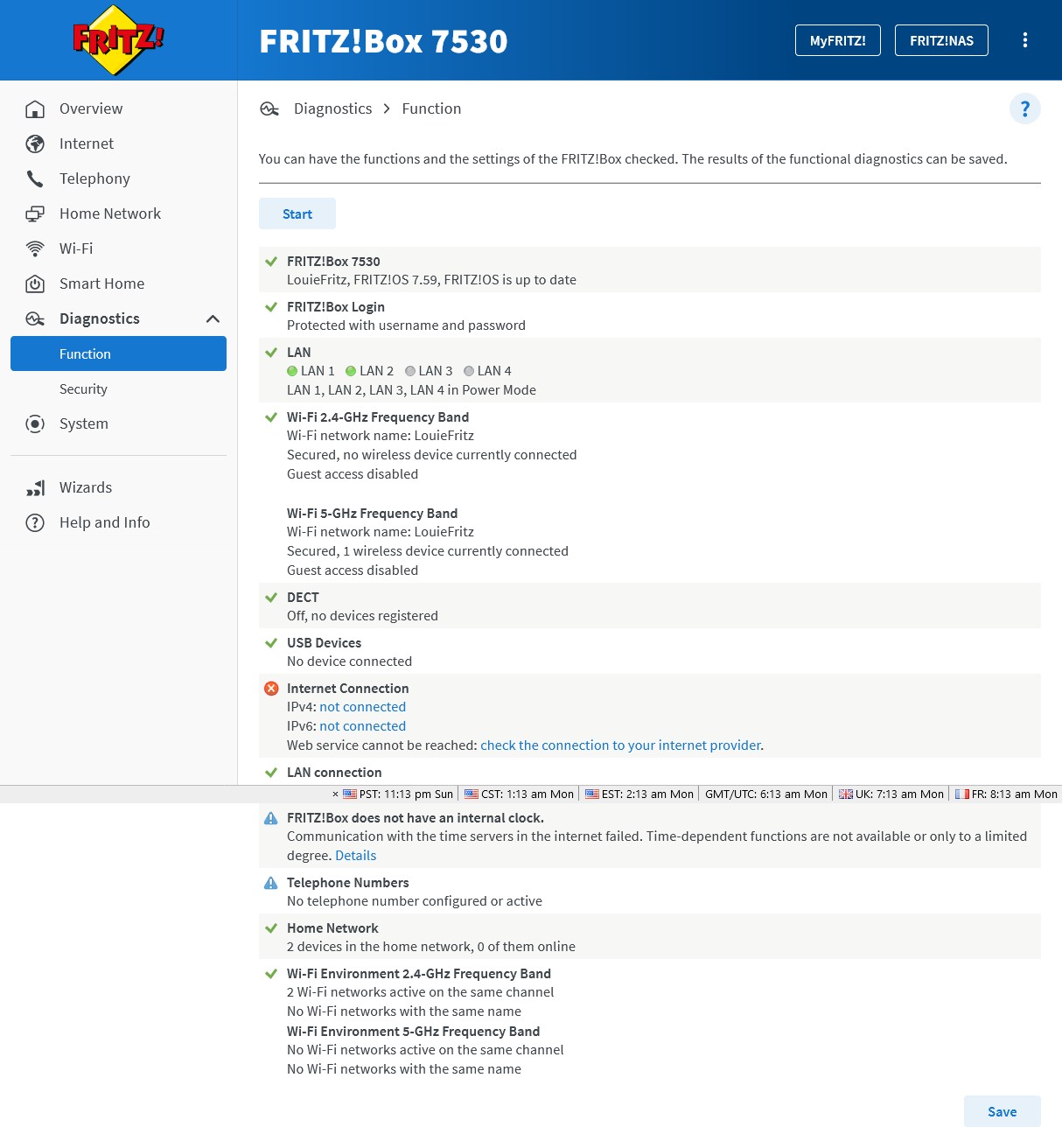
Got a ride back tonight, 4th day trying to make this work. I did a factory reset, I updated the OS to the latest one, set all the settings exactly as they should be, tried different ethernet cables, and unless im missing something really obvious, it still says "The internet connection check failed. The reason for the error could not be determined." Please let me know if theres anything in these screenshots that shows you where im going wrong. I need this on by Saturday and im getting increasingly worried that it wont be. I emailed Skinny on sunday to ask for confirmation that it was indeed connected (yes i got a connection email, but i wanted to double check). I got an email back from them this afternoon linking to the unhelpful 'setting up your own modem' page and he didnt answer my question as to whether the connection was indeed live, so I emailed back to ask again for confirmation that the internet is indeed connected to that address because logging into my account on their website, still says its not connected (despite the connection email).


Youi

80 posts

Master Geek
+1 received by user: 3


  #3294172 7-Oct-2024 20:15
Send private message

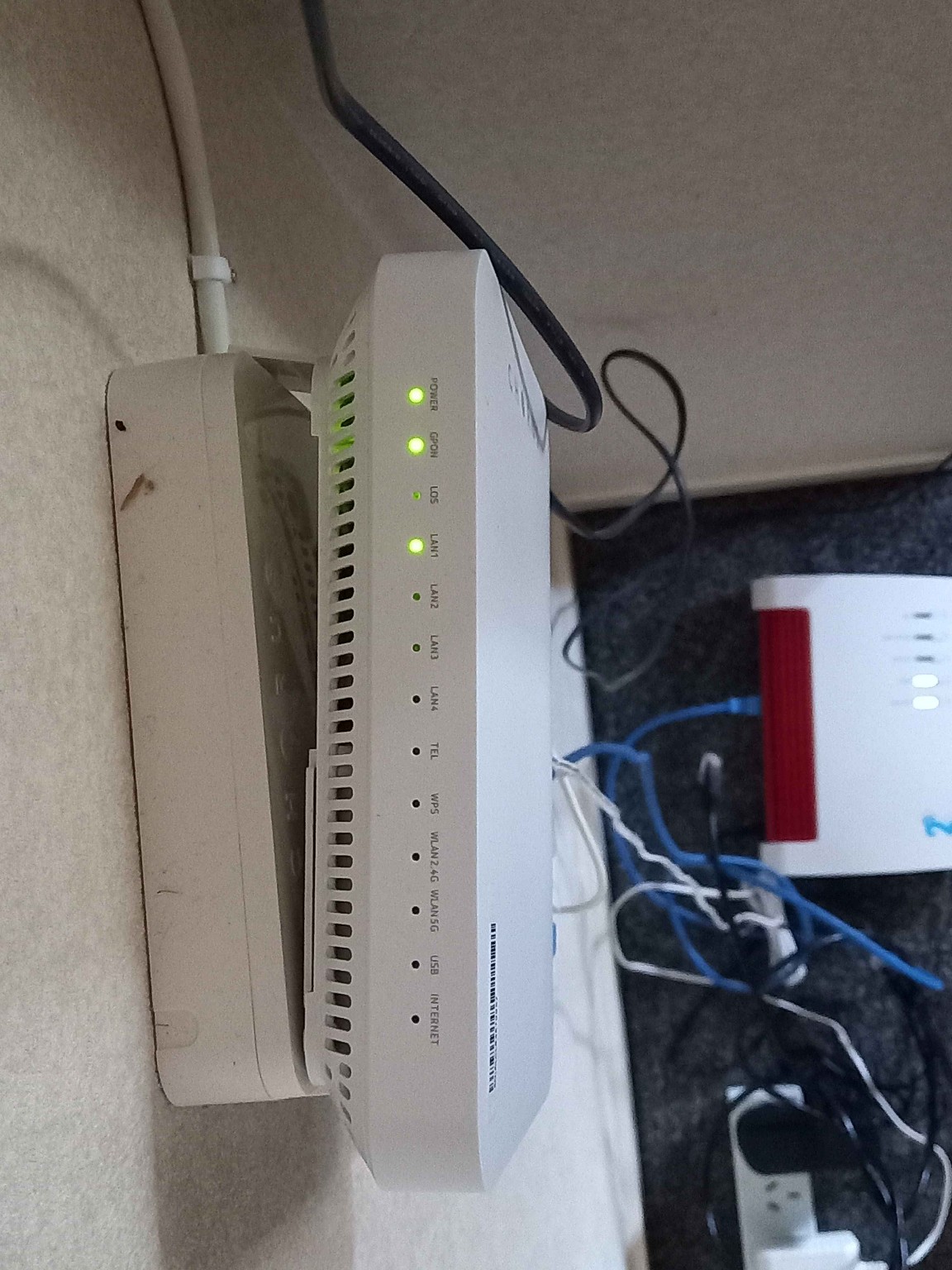
I just realised, that whilst the ONT was installed several years ago, its never actually been used (my nanas old house, she died 1.5 years ago and was 91yo, not much computer let alone internet going on). Could there be something wrong with the ONT?


Shop now for Lenovo laptops and other devices (affiliate link).
Youi

80 posts

Master Geek
+1 received by user: 3


  #3294339 8-Oct-2024 08:05
Send private message

These are the lights that are on, on the ONT, looking at the Chorus website, https://www.chorus.co.nz/help/ont/type-300 they seem to be the ones that should be on? I assume the 'internet' light only comes on when its connected, though should the 'wlan' light be on?


Asteros
363 posts

Ultimate Geek
+1 received by user: 189


  #3294346 8-Oct-2024 08:41
Send private message

Can you try plugging the Fritzbox into the LAN 2 port of the ONT?


Youi

80 posts

Master Geek
+1 received by user: 3


  #3294393 8-Oct-2024 11:31
Send private message

Yup, ive tried the ethernet cable in all combinations of ports from ONT to Fritzbox, no difference.


outdoorsnz
694 posts

Ultimate Geek
+1 received by user: 303

ID Verified

  #3294395 8-Oct-2024 11:33
Send private message

Your last screenshot shows both LAN 1 & 2 as being connected. Are you sure you have the ONT connected into LAN 1 (Fritzbox end)? Try a different Ethernet cable to rule that out...


Factory reset box and start again if you didn't factory reset it in the beginning. I have a 2degrees fritzbox 7490 working fine on skinny.


 1 | 2 | 3 | 4 | 5
Filter this topic showing only the reply marked as answer View this topic in a long page with up to 500 replies per page Create new topic


Geekzone Live »

Try automatic live updates from Geekzone directly in your browser, without refreshing the page, with Geekzone Live now.


Are you subscribed to our RSS feed? You can download the latest headlines and summaries from our stories directly to your computer or smartphone by using a feed reader.