Geekzone: technology news, blogs, forums
Guest
Welcome Guest.
You haven't logged in yet. If you don't have an account you can register now.


LunaCT

5 posts

Wannabe Geek


#317952 30-Nov-2024 14:08
Send private message

Help.  I have moved into a new house and I can’t get the internet to connect.  I have a Chorus ONT 400 on the wall and the internet light is not on.  When I connect my TP Link Archer AX23 to it, still no internet light and an orange internet light on the TP Link.  The provider (2 degrees) says the problem is with the TP Link and as they don’t supply it they won’t help.  I’m going round in circles and getting nowhere.  Should the ONT have an internet light on?   2 degrees says the internet light doesn’t need to be on but then why is the AX23 not liking it ether.  I have no skills in this area and I feel like I’m drowning.  Any advice would be fantastic!


Create new topic
trig42
5901 posts

Uber Geek
+1 received by user: 2114

ID Verified

  #3314379 30-Nov-2024 14:15
Send private message

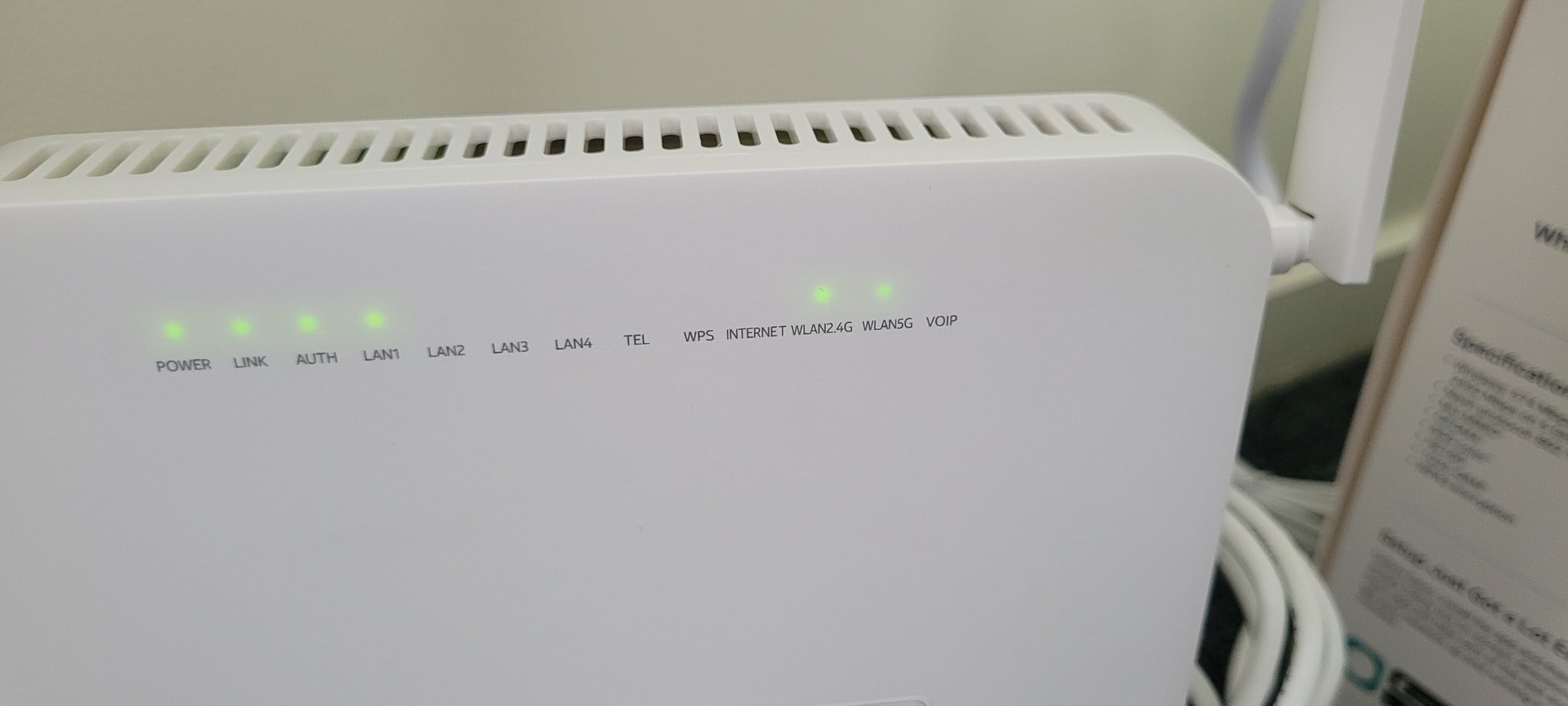
They're correct - the Internet light won't be on - I just checked mine (Chorus Model 400) - the first three lights are on and green, LAN1 is green and blinking. Internet light is off. I'm on Spark, but shouldn't be any different.


What lights are on on yours?


Have you tried connecting your router to a different LAN port? Sometimes they'll activate a new service on LAN2 if the previous occupier still had their service running on LAN1. 


nzkc
1638 posts

Uber Geek
+1 received by user: 1043


  #3314381 30-Nov-2024 14:24
Send private message

Take a photo of the ONT showing the lights, and post it here.


LunaCT

5 posts

Wannabe Geek


  #3314384 30-Nov-2024 14:43
Send private message

Thanks for the quick replies. I have tried the different ports with no success.


LunaCT

5 posts

Wannabe Geek


  #3314387 30-Nov-2024 14:48
Send private message


LunaCT

5 posts

Wannabe Geek


  #3314388 30-Nov-2024 14:49
Send private message

Tp Link lights

ascroft
446 posts

Ultimate Geek
+1 received by user: 184

Subscriber

  #3314389 30-Nov-2024 14:49
Send private message

Was your TP link device working at a different location previously? 


Was it also a Chorus supported location?


"Artificial Intelligence" - aka Machine Learning 2.0


Shop now for Dell laptops and other devices (affiliate link).
LunaCT

5 posts

Wannabe Geek


  #3314390 30-Nov-2024 14:51
Send private message

It is brand new out of the box

ascroft
446 posts

Ultimate Geek
+1 received by user: 184

Subscriber

  #3314391 30-Nov-2024 14:58
Send private message


"Artificial Intelligence" - aka Machine Learning 2.0


ascroft
446 posts

Ultimate Geek
+1 received by user: 184

Subscriber

  #3314393 30-Nov-2024 15:05
Send private message

And check cable from the ONT is connected to the correct port on the back - can’t be one of the standard Ethernet ports.


"Artificial Intelligence" - aka Machine Learning 2.0


Jase2985
13772 posts

Uber Geek
+1 received by user: 6254

ID Verified
Lifetime subscriber

  #3314401 30-Nov-2024 16:09
Send private message

The ONT is fine as its showing the first 3 green lights, it won't show internet as its not connected as a Residential Gateway (RGW) as its not supported any more.


Your issue likely lies with the Router you have, but have you tried the other LAN ports on the ONT to see if they work? Sometimes the service gets provisioned on the second port.


RunningMan
9325 posts

Uber Geek
+1 received by user: 4967


  #3314412 30-Nov-2024 17:02
Send private message

Not sure the ONT is fine at all.


WLAN 2G & 5G are lit, and don't think these should be once configured correctly. They were only used for RGW mode and for the Chorus open WLAN network for configuring the ONT at installation.


@Wheelbarrow01 may be able to confirm this though.


Create new topic


Geekzone Live »

Try automatic live updates from Geekzone directly in your browser, without refreshing the page, with Geekzone Live now.


Are you subscribed to our RSS feed? You can download the latest headlines and summaries from our stories directly to your computer or smartphone by using a feed reader.