Geekzone: technology news, blogs, forums
Guest
Welcome Guest.
You haven't logged in yet. If you don't have an account you can register now.


Kerans

6 posts

Wannabe Geek
+1 received by user: 1


#318244 30-Dec-2024 09:54
Send private message

Hello! Before I run out and buy a new router...


I've moved into a new rental that has Fibre via an ethernet jack wired from the main house. However the router supplied is old and only gives about 40 - 50 mbps download. When I connect my computer directly via ethernet cable it's ~300 mpbs+.


I have a Smart Modem 3 (via Skinny) from my old place that would be more than capable for the house size, but I can't work out how to make it work as a router only.


Is it possible to get a SM3 working in this scenario, or should I grab a new router?


Any advice much appreciated.


Filter this topic showing only the reply marked as answer View this topic in a long page with up to 500 replies per page Create new topic
 1 | 2
Dynamic
4015 posts

Uber Geek
+1 received by user: 1851

ID Verified
Trusted
Lifetime subscriber

  #3326126 30-Dec-2024 09:58
Send private message

Yes you should be able to get it working as a router.  It is a router.


The WAN/Internet connection is likely expecting to communicate with the Chorus network on VLAN 10.  Login to the router and find the WAN interface and turn off VLAN 10.  If authentication is set to PPPoE then turn this off or set it to DHCP.


I don't have one of these available to login and give you more detailed instructions.  If the instructions above are not sufficient, post a screenshot of the router's WAN / Internet setup page if possible.


“Don't believe anything you read on the net. Except this. Well, including this, I suppose.” Douglas Adams


nztim
4012 posts

Uber Geek
+1 received by user: 2710

ID Verified
Trusted
TEAMnetwork
Subscriber

  #3326127 30-Dec-2024 10:00
Send private message

Are you sure they are not on a 300mbps plan?


Any views expressed on these forums are my own and don't necessarily reflect those of my employer. 


Kerans

6 posts

Wannabe Geek
+1 received by user: 1


  #3326135 30-Dec-2024 10:20
Send private message

@Dynamic Thank you for the help!


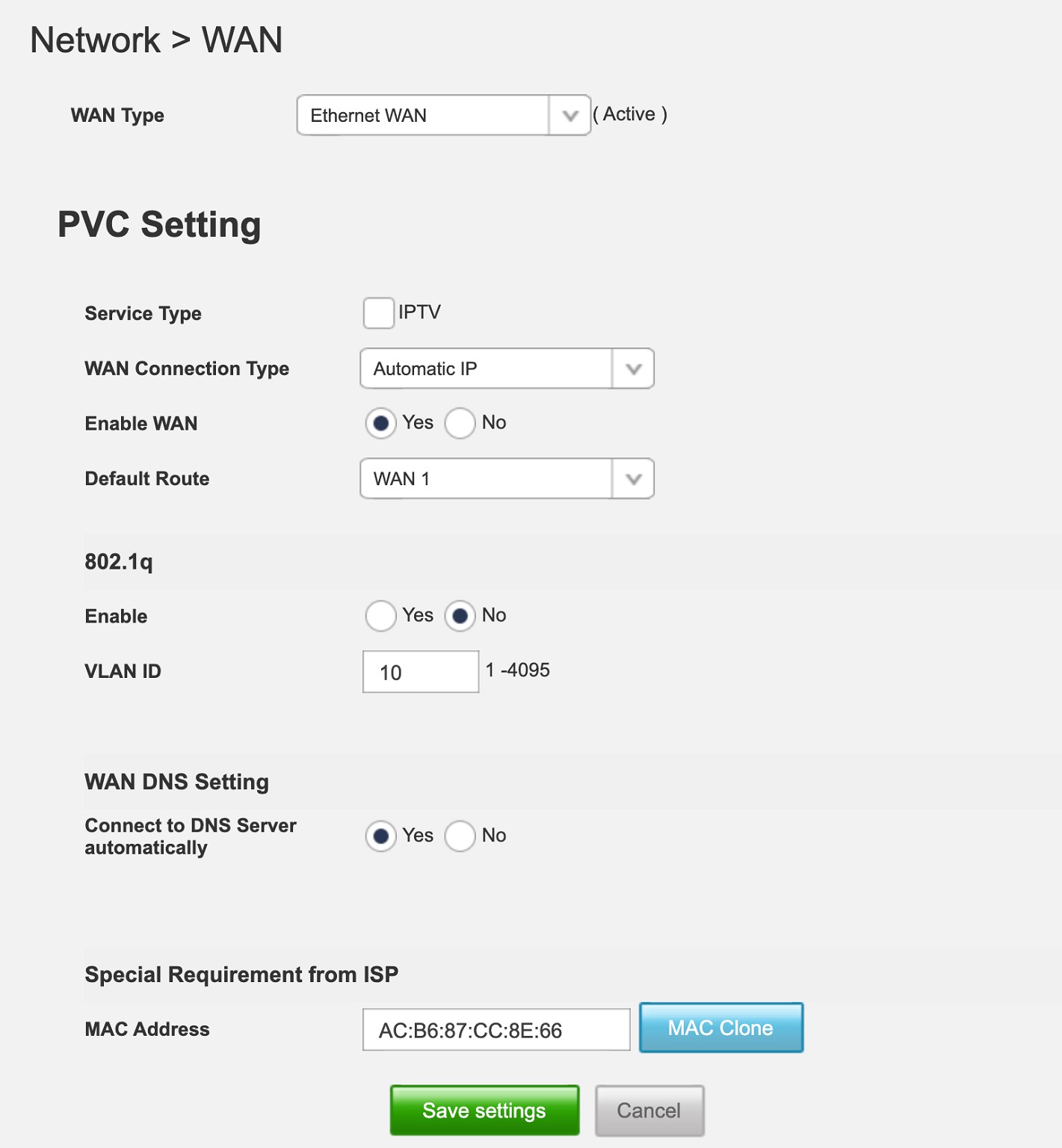
I've tried changing it to Automatic IP (it was on PPPoE) and 802.1q is off, but no internet so far.


@nztim yes according to Chorus they are on Home Fibre 300


Dynamic
4015 posts

Uber Geek
+1 received by user: 1851

ID Verified
Trusted
Lifetime subscriber

  #3326141 30-Dec-2024 10:44
Send private message

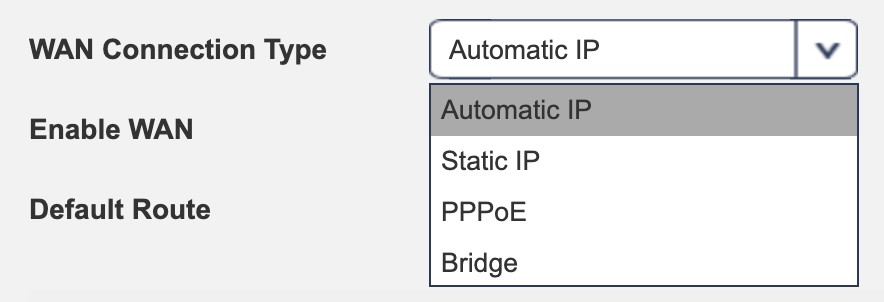
Hmmm.  The Automatic IP is the correct setting for WAN Connection Type.  Is the ethernet cable to the house definitely plugged into the WAN port?  This is the port closest to the power connection on the SM3, if I recall correctly.


Can you plug a computer directly into the ethernet jack and get internet access?  (The answer should normally be yes, and this is helpful info for testing.)


Can you see anywhere else there to disable VLAN?


On a slightly different but potentially track... the slow WiFi router supplied... what model is this?


“Don't believe anything you read on the net. Except this. Well, including this, I suppose.” Douglas Adams


Spyware
3818 posts

Uber Geek
+1 received by user: 1366

Lifetime subscriber

  #3326145 30-Dec-2024 10:53
Send private message

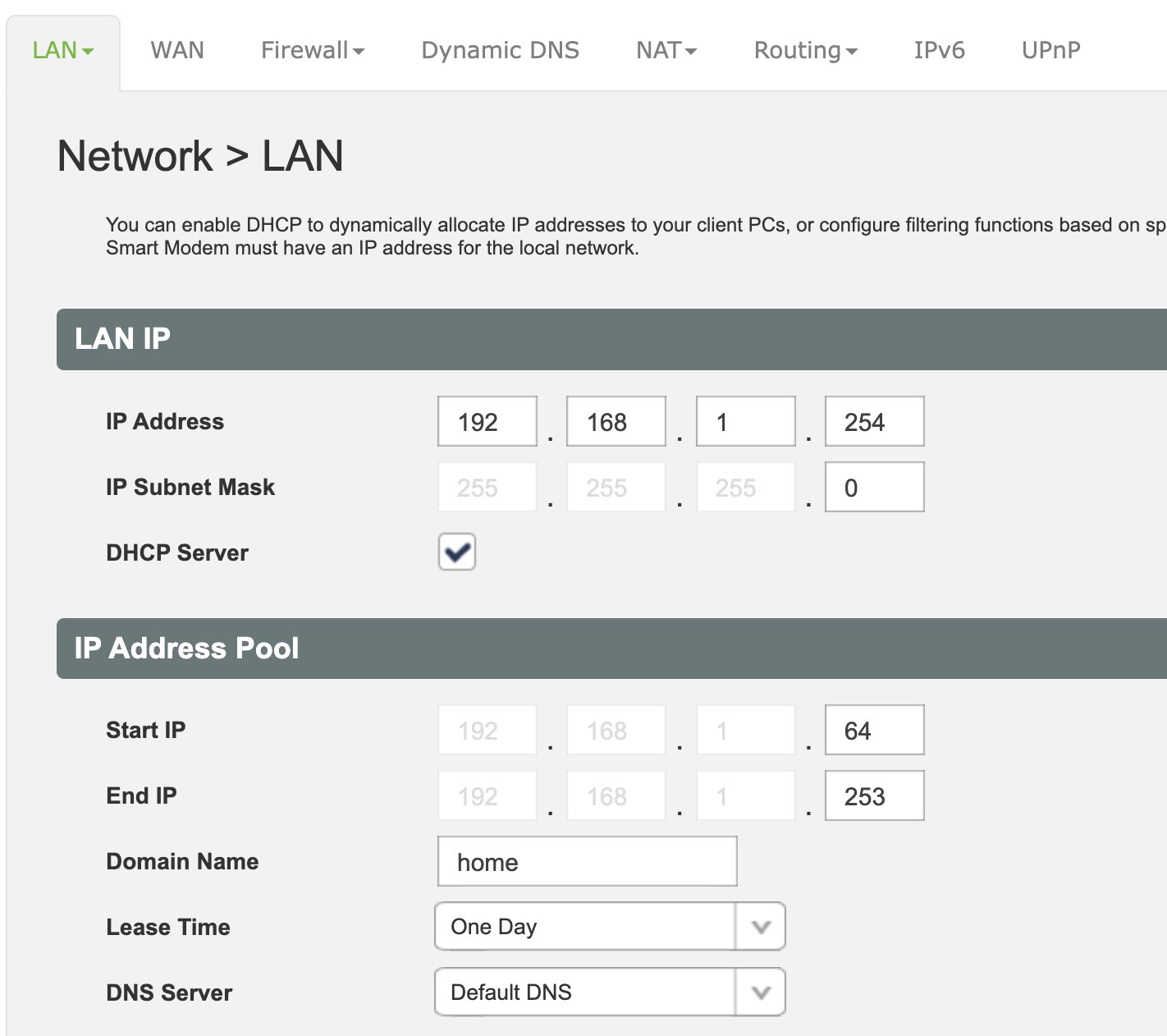
Most likely problem is that the network coming out of the wall and the Smart Modem's LAN are the same, 192.168.1.0/24, therefore no routing will occur.


Spark Max Fibre using Mikrotik CCR1009-8G-1S-1S+, CRS125-24G-1S, Unifi UAP, U6-Pro, UAP-AC-M-Pro, Apple TV 4K (2022), Apple TV 4K (2017), iPad Air 1st gen, iPad Air 4th gen, iPhone 13, SkyNZ3151 (the white box). If it doesn't move then it's data cabled.


Dynamic
4015 posts

Uber Geek
+1 received by user: 1851

ID Verified
Trusted
Lifetime subscriber

  #3326154 30-Dec-2024 11:35
Send private message

Spyware:


Most likely problem is that the network coming out of the wall and the Smart Modem's LAN are the same, 192.168.1.0/24, therefore no routing will occur.


This is a very strong possibility.


“Don't believe anything you read on the net. Except this. Well, including this, I suppose.” Douglas Adams


Stream your favourite shows now on Apple TV (affiliate link).
RunningMan
9185 posts

Uber Geek
+1 received by user: 4838


  #3326236 30-Dec-2024 14:06
Send private message

If this is a tenancy type situation with internet provided, it's more likely connecting to an upstream router, not an ONT port. Perhaps change the WAN mode to bridge.


Really need to understand how the connection is being provided first though.


Kerans

6 posts

Wannabe Geek
+1 received by user: 1


  #3326315 30-Dec-2024 18:24
Send private message

RunningMan:


If this is a tenancy type situation with internet provided, it's more likely connecting to an upstream router, not an ONT port. Perhaps change the WAN mode to bridge.


Really need to understand how the connection is being provided first though.


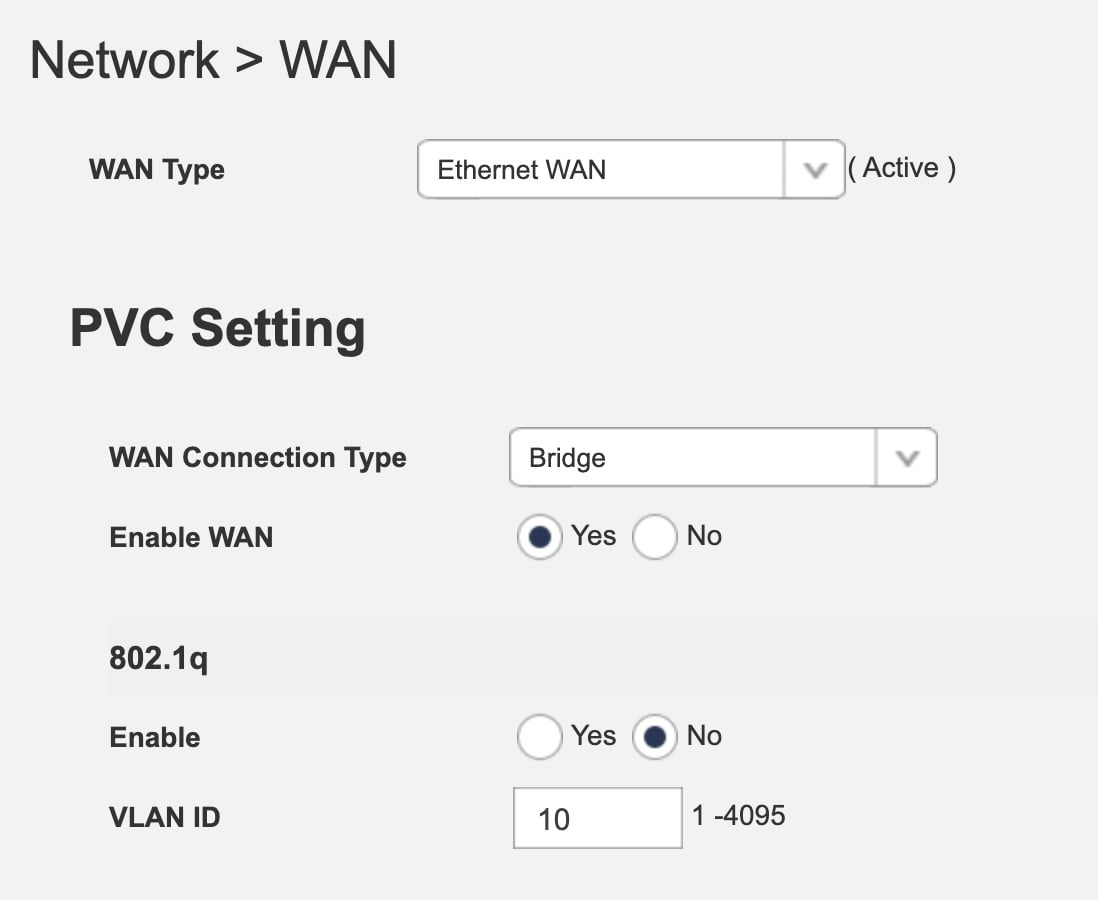
So setting it to this does work!


Well, it kind of works. Green light on the front does come on, and devices can get internet via WiFi at proper speeds. However it seems weirdly flaky and the internet (not wifi connection) will pause / drop out randomly. A Samsung A52 also refuses to get internet on the WiFi, while a Pixel 6 works.


Kerans

6 posts

Wannabe Geek
+1 received by user: 1


  #3326316 30-Dec-2024 18:25
Send private message

Dynamic:


Hmmm.  The Automatic IP is the correct setting for WAN Connection Type.  Is the ethernet cable to the house definitely plugged into the WAN port?  This is the port closest to the power connection on the SM3, if I recall correctly.


Can you plug a computer directly into the ethernet jack and get internet access?  (The answer should normally be yes, and this is helpful info for testing.)


Can you see anywhere else there to disable VLAN?


On a slightly different but potentially track... the slow WiFi router supplied... what model is this?


Definitely in the Fibre port, not one of the ethernet ports. The internet is speedy and consistent when connecting directly to the ethernet.


The old router is a NetGear AC750 R6020, which in theory can support 300 - 400 mbps... but I'm hesitant to reset it and access the settings in case I need credentials I don't have to get the internet back up and running. The landlords are great, just trying not to bother them if I can fix it myself.


Spyware:


Most likely problem is that the network coming out of the wall and the Smart Modem's LAN are the same, 192.168.1.0/24, therefore no routing will occur.


That's interesting... I don't know what I would change, but these are the LAN settings.


RunningMan
9185 posts

Uber Geek
+1 received by user: 4838


  #3326317 30-Dec-2024 18:27
Send private message

You really need to find out what you are connecting to - are you connecting to your landlord's router in the main house, or are you connecting direct to the ONT with your own connection.


Alternatively, check the WAN config for the original router if you have access to it - that should tell you the setup.


Kerans

6 posts

Wannabe Geek
+1 received by user: 1


  #3326321 30-Dec-2024 18:34
Send private message

Thanks @RunningMan, that's fair – unfortunately the existing router isn't using the default password, but I can ask the landlords.


Thanks all for the help!


Shop on-line at New World now for your groceries (affiliate link).
Spyware
3818 posts

Uber Geek
+1 received by user: 1366

Lifetime subscriber

  #3326325 30-Dec-2024 19:03
Send private message

All you have to do is plug a laptop into the wall outlet and look at the IP address assigned. If it is on 192.168.1.0/24 then you would need to change the LAN network on the Smart modem to something else, e.g., 192.168.2.0/24, in order to get it to NAT route.


Spark Max Fibre using Mikrotik CCR1009-8G-1S-1S+, CRS125-24G-1S, Unifi UAP, U6-Pro, UAP-AC-M-Pro, Apple TV 4K (2022), Apple TV 4K (2017), iPad Air 1st gen, iPad Air 4th gen, iPhone 13, SkyNZ3151 (the white box). If it doesn't move then it's data cabled.


ANglEAUT
altered-ego
2436 posts

Uber Geek
+1 received by user: 842

Trusted
Lifetime subscriber

  #3326412 31-Dec-2024 08:06
Send private message

Kerans: ... I've tried changing it to Automatic IP (it was on PPPoE) and 802.1q is off, but no internet so far. ...


If you go back to your original settings and the picture above, are the 'Enable WAN' & 'Default Route' options enabled?


Please keep this GZ community vibrant by contributing in a constructive & respectful manner.


coffeebaron
6304 posts

Uber Geek
+1 received by user: 3567

Trusted
Lifetime subscriber

  #3326415 31-Dec-2024 08:28
Send private message

You probably just need a network switch and wireless access point.


Rural IT and Broadband support.


Broadband troubleshooting and master filter installs.
Starlink installer - one month free: https://www.starlink.com/?referral=RC-32845-88860-71 
Wi-Fi and networking
Cel-Fi supply and installer - boost your mobile phone coverage legally


Need help in Auckland, Waikato or BoP? Click my email button, or email me direct: [my user name] at geekzonemail dot com


Dynamic
4015 posts

Uber Geek
+1 received by user: 1851

ID Verified
Trusted
Lifetime subscriber

  #3326491 31-Dec-2024 10:18
Send private message

Building on what others have added into the mix....


  • What IP address do you get when connecting directly to the ethernet port going to the house?  What IP address do you get when connecting your computer to the SM3?  This will help confirm whether the IP range of the SM3 is the same range as the router in the main house.  If the first three sections are the same (e.g. 192.168.1.10 and 192.168.1.44) no traffic will pass, but this is fairly easily resolved by changing the IP range in your SM3.
  • If you connect the WAN of your SM3 into a LAN port on the NetGear R6020 and then connect your computer to the SM3, does the internet work (even if not particularly fast)?  If so, can you bring up a Command Prompt and type tracert 8.8.8.8 and paste the results to us?


“Don't believe anything you read on the net. Except this. Well, including this, I suppose.” Douglas Adams


 1 | 2
Filter this topic showing only the reply marked as answer View this topic in a long page with up to 500 replies per page Create new topic


Geekzone Live »

Try automatic live updates from Geekzone directly in your browser, without refreshing the page, with Geekzone Live now.


Are you subscribed to our RSS feed? You can download the latest headlines and summaries from our stories directly to your computer or smartphone by using a feed reader.