Geekzone: technology news, blogs, forums
Guest
Welcome Guest.
You haven't logged in yet. If you don't have an account you can register now.


David321

507 posts

Ultimate Geek
+1 received by user: 105


#318599 3-Feb-2025 06:52
Send private message

Hi all,


My wife and I have just moved from a place where we had One's HFC (if its still called that), it wasn't fiber but delivered fiber speeds, I think it was through the old Telstra Clear cable.


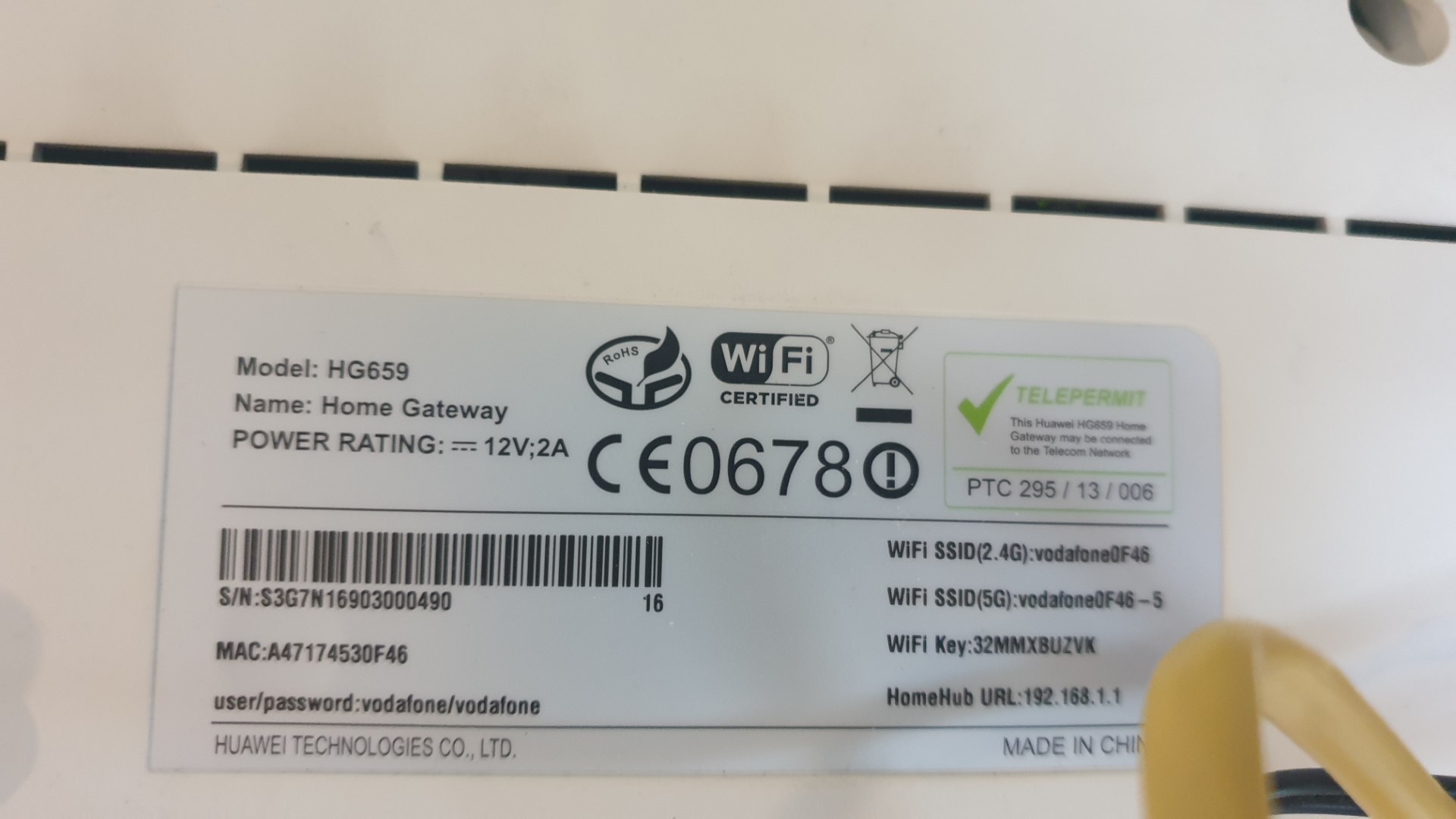
We had almost no issue with the service using a Router that Vodafone (back when they were Vodafone) provided a very long time ago, its a HG59 Router.


We have just moved and HFC is no longer an option for us as we are living in a new subdivision in Rolleston, so fiber was what we went with.


I have plugged our router into the fiber box located in a network cabinet type thing in the wall of garage which has the smart systems gear in it with Ethernet cables running to various ports in the house and the fiber box itself.


I only have one device connected by ethernet and that is the TV in the main living room, which very rarely has issues with buffering, we have another TV in the other living room conected by WiFi but I have not had a chance to do much testing on its performance but from the use it has had from others in the house there seems to be no issue with buffering, this TV is reasonably close to the router.


Last night my daughter was watching a cartoon on the main TV (connected via Ethernet) and it started buffering frequently, although as mentioned earlier this is not usually an issue on this TV.


The biggest issue is with my wife and I's cell phones, the WiFi connection to them can be very problematic, we have good signal but frequently get the ! mark next to the WiFi signal with a "No Internet" message, forcing us to switch to mobile data until it resolves, this happens all over the house.


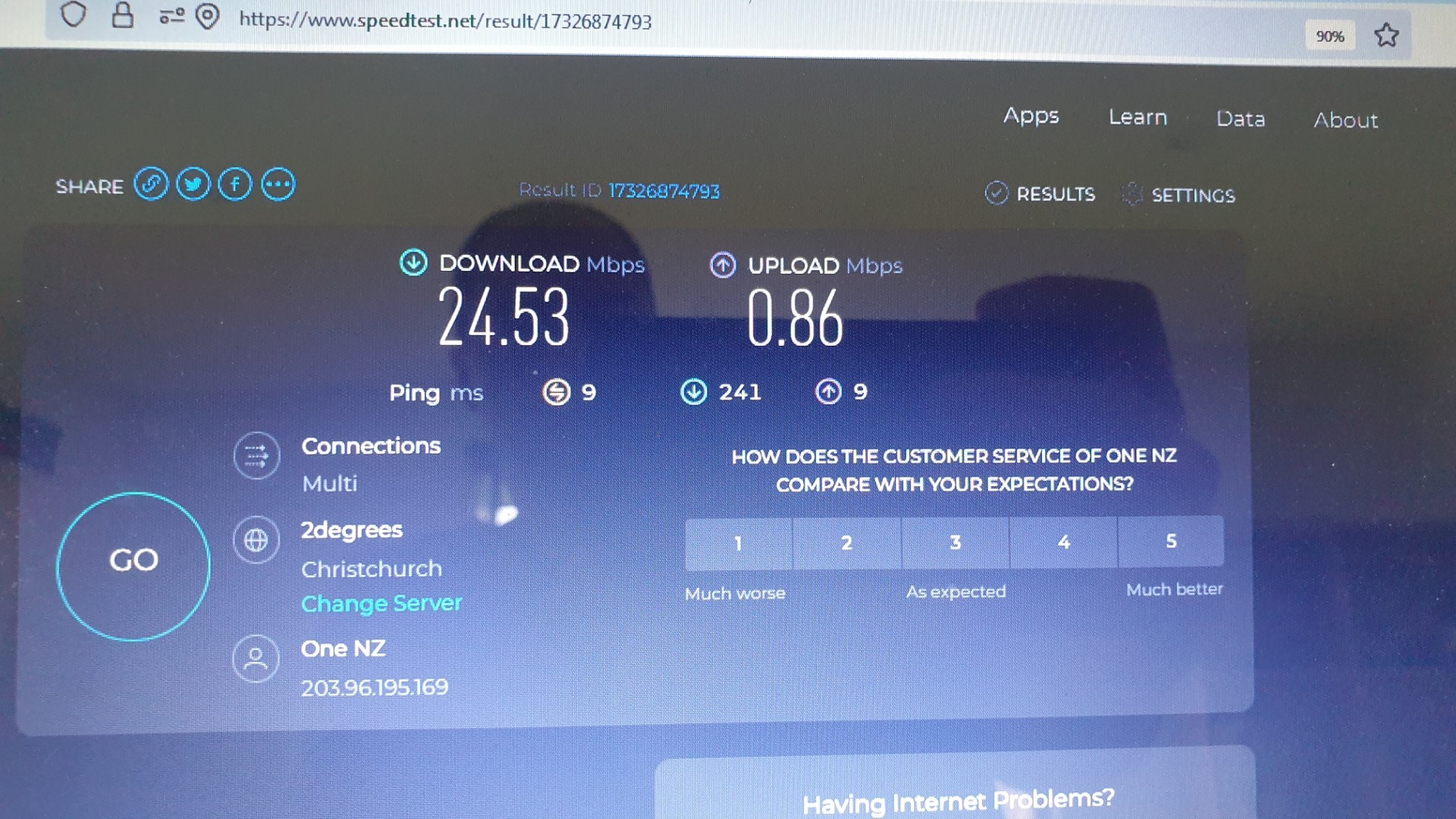
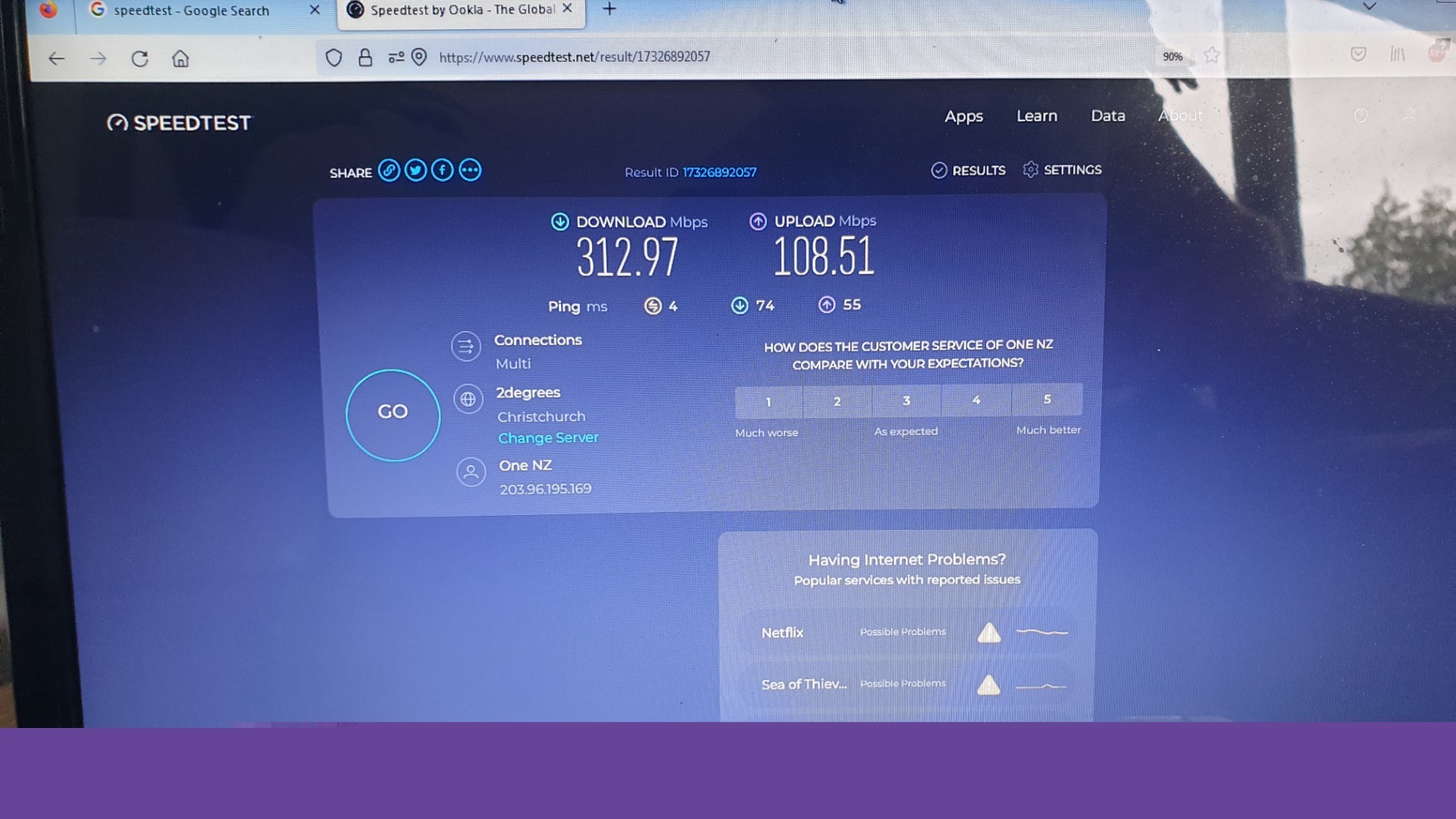
I got my laptop out last night and did some speed tests on the 2.4g and 5g both coming from the router and surprisingly got similar (and disappointing) speeds on both tests 24Mbps down and 0.8Mbps up. I then connected the Ethernet cable to the laptop and got just over the speeds advertised for the plan we are on (312 down 108 up).


Although this may not be enough info to diagnose its all the info I am able to provide at this stage, networking and WiFi etc are far from my area of expertise and I am hoping someone on here can help? I dread calling Vodafone for help for an intermittent fault like this and starting with the whole turn it on and turn it off procedure etc.


I sparky friend of mine said he had similar issues and a new router fixed the issue, but I dont want to fork out for a new router (his was $200) if it may not fix the issue (happy to try if there is a good chance it is though), I also would have no clue what router to get and would be worried about being over sold or undersold by a sales person in a store. One thing I want to add in here is our house is quite long and the WiFi signal is very weak at the other end of the house, so if a new router is recommended we need one with decent coverage, not just decent speed.


So im curious what steps I should take next, is there more tests I could do to help people here get a better understanding of the problem before they offer advise, should I get a new router? (if so any good suggestions?), or so I have to call OneNZ?


Edit: I did move the router out of the garage into a more central port in the pantry, but all of the ethernet cables for ports throughout the house run back to the cabinet in the garage. So I shift the router somewhere more central everything has to run off WiFi


_David_

View this topic in a long page with up to 500 replies per page Create new topic
 1 | 2
Spyware
3818 posts

Uber Geek
+1 received by user: 1366

Lifetime subscriber

  #3338414 3-Feb-2025 07:03
Send private message

Better off disabling the wifi on the HG659 and install two access points, Aruba, Grandstream, Ubiquiti.


https://www.gowifi.co.nz/index.php?virtuemart_manufacturer_id[0]=9&virtuemart_category_id[0]=150&Itemid=231&option=com_customfilters&view=products&lang=en


Spark Max Fibre using Mikrotik CCR1009-8G-1S-1S+, CRS125-24G-1S, Unifi UAP, U6-Pro, UAP-AC-M-Pro, Apple TV 4K (2022), Apple TV 4K (2017), iPad Air 1st gen, iPad Air 4th gen, iPhone 13, SkyNZ3151 (the white box). If it doesn't move then it's data cabled.


CYaBro
4708 posts

Uber Geek
+1 received by user: 1182

ID Verified
Trusted

  #3338415 3-Feb-2025 07:05
Send private message

First thing to fix is to get the wifi out of the cabinet in the garage and in a more central location in the house. 
Is there somewhere that has at least two Ethernet points where you could place the wifi router?


That way you can use one Ethernet for the wan connection back to the ONT / fibre box and the other to patch through to the TV via the cabinet in the garage, if that’s the only device you need to be on Ethernet. 
Or you could get a small network switch and place that in the cabinet in the garage if you want more devices on Ethernet.


Another option would be to leave the main router in the garage and get one or more wireless access points and put them in the house and have them connect via Ethernet back to the main router.   


Opinions are my own and not the views of my employer.


David321

507 posts

Ultimate Geek
+1 received by user: 105


  #3338416 3-Feb-2025 07:16
Send private message

Spyware:


Better off disabling the wifi on the HG659 and install two access points, Aruba, Grandstream, Ubiquiti.


https://www.gowifi.co.nz/index.php?virtuemart_manufacturer_id[0]=9&virtuemart_category_id[0]=150&Itemid=231&option=com_customfilters&view=products&lang=en


@Spyware


Thanks for the suggestion, any chance you could elaborate a bit more, sorry like I say this is not my area of knowledge at all. 


_David_


David321

507 posts

Ultimate Geek
+1 received by user: 105


  #3338418 3-Feb-2025 07:18
Send private message

CYaBro:


First thing to fix is to get the wifi out of the cabinet in the garage and in a more central location in the house. 
Is there somewhere that has at least two Ethernet points where you could place the wifi router?


That way you can use one Ethernet for the wan connection back to the ONT / fibre box and the other to patch through to the TV via the cabinet in the garage, if that’s the only device you need to be on Ethernet. 
Or you could get a small network switch and place that in the cabinet in the garage if you want more devices on Ethernet.


Another option would be to leave the main router in the garage and get one or more wireless access points and put them in the house and have them connect via Ethernet back to the main router.   


@CyaBro


Thanks for the idea, unfortunately all of the ports throughout the house are single, I did have the router in a central-ish port when we first move in to the house, but then I realized everything would have to be connected by WiFi as all the ports throughout the house have their ethernet cables runing to the garage cabinet to be plugged in to the router. 


_David_

xpd

xpd
Geek of Coastguard
14116 posts

Uber Geek
+1 received by user: 4578

Retired Mod
ID Verified
Trusted
Lifetime subscriber

  #3338425 3-Feb-2025 07:50
Send private message

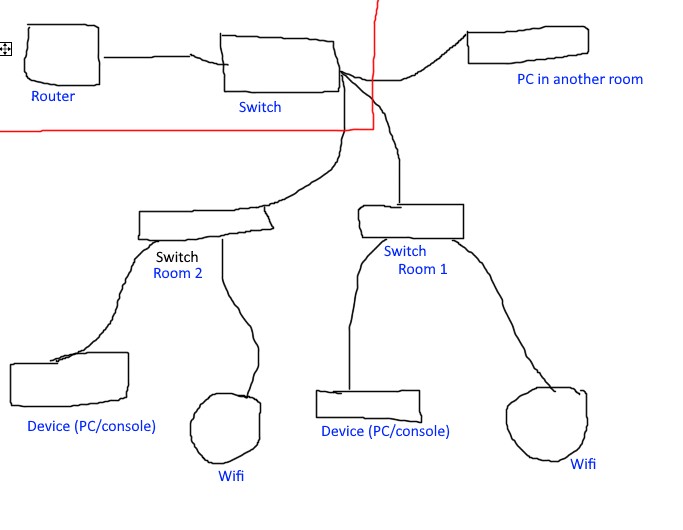
Very rough diagram of how Id do it. Router/switch are in the garage. Hope that makes sense :D


XPD / Gavin


LinkTree


David321

507 posts

Ultimate Geek
+1 received by user: 105


  #3338426 3-Feb-2025 07:54
Send private message

xpd:


Very rough diagram of how Id do it. Router/switch are in the garage. Hope that makes sense :D


Thanks, any chance you could explain what a switch is lol? Although this would probably solve reception issues I dont think it solves why the WiFi is so slow from our current router?


_David_


Shop now for Dell laptops and other devices (affiliate link).

xpd

xpd
Geek of Coastguard
14116 posts

Uber Geek
+1 received by user: 4578

Retired Mod
ID Verified
Trusted
Lifetime subscriber

  #3338428 3-Feb-2025 08:22
Send private message

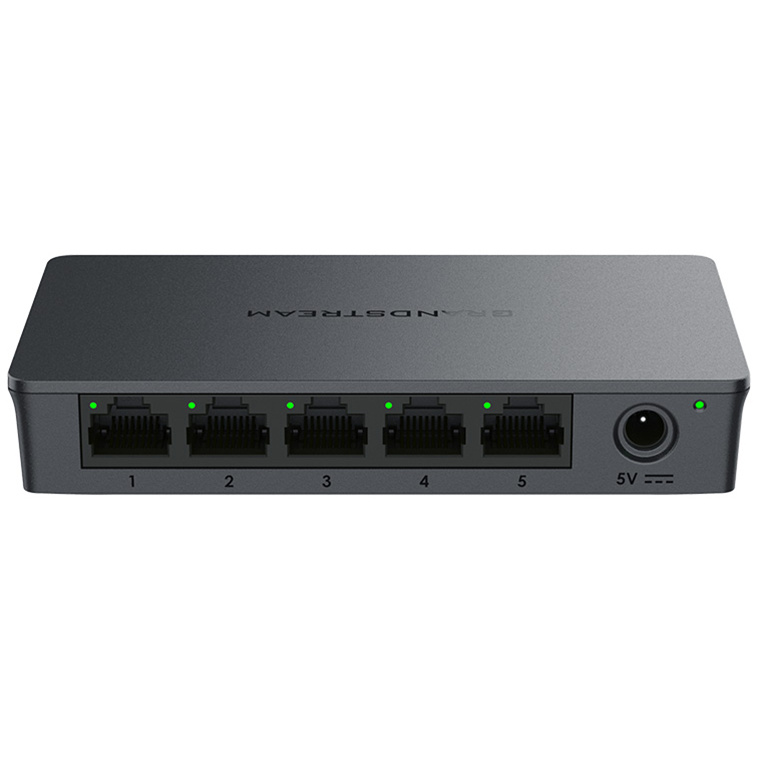
Network switch will take a single network cable and expand it at its most basic :) So if you have a single network port in a room, you can plug one of these into it, and now you have 4 ports available for use.


4-48 port are most common. Consumer routers usually have a 4 port built in.


XPD / Gavin


LinkTree


CYaBro
4708 posts

Uber Geek
+1 received by user: 1182

ID Verified
Trusted

  #3338431 3-Feb-2025 08:40
Send private message

You may not need a switch in the garage with the router, as that router has 4 switch ports on it already. (The 4 yellow ones).
And you'd only need a switch in locations in the house where you'd like more than one ethernet point.


Opinions are my own and not the views of my employer.


djtOtago
1181 posts

Uber Geek
+1 received by user: 605


  #3338432 3-Feb-2025 08:53
Send private message

David321:


Thanks, any chance you could explain what a switch is lol? Although this would probably solve reception issues I dont think it solves why the WiFi is so slow from our current router?


The device currently handling your Wi-Fi (your router) is sitting in a metal box in the garage. Wi-Fi doesn't travel through metal very well. 


noroad
1025 posts

Uber Geek
+1 received by user: 675

Trusted

  #3338492 3-Feb-2025 09:49
Send private message

David321:


I have plugged our router into the fiber box located in a network cabinet type thing in the wall of garage which has the smart systems gear in it with Ethernet cables running to various ports in the house and the fiber box itself.


Buy this https://www.pbtech.co.nz/product/NETTPL9613/TP-Link-Deco-X10-Dual-Band-AX1500-WiFi-6-Whole-Hom


One becomes the master/gateway. One ethernet on it connects to the fibre ONT. The other ethernet on it conencts to a switch (any unmanaged gig switch). The switch conencts to the other X10's in your house via your internal cabling and any local devices. Job done, never think about it again and be happy with $250 well spent. All management of the devices is via the simple mobile app. 


nitro
757 posts

Ultimate Geek
+1 received by user: 336


  #3338494 3-Feb-2025 09:50
Send private message

a new mesh-capable router installed where wifi is needed (main living room), and its satellite where wifi coverage is insufficient might also do the trick.


for 300/100 service, the HG659, albeit rather old, would still be sufficient. you might just need an access point or two for wifi in the house.


where might you be? there could be some of us nearby with an unused AP, seeing how AC wifi would be plenty for you current service.


Shop now at Mighty Ape (affiliate link).
noroad
1025 posts

Uber Geek
+1 received by user: 675

Trusted

  #3338495 3-Feb-2025 09:59
Send private message

noroad:


Buy this https://www.pbtech.co.nz/product/NETTPL9613/TP-Link-Deco-X10-Dual-Band-AX1500-WiFi-6-Whole-Hom


One becomes the master/gateway. One ethernet on it connects to the fibre ONT. The other ethernet on it conencts to a switch (any unmanaged gig switch). The switch conencts to the other X10's in your house via your internal cabling and any local devices. Job done, never think about it again and be happy with $250 well spent. All management of the devices is via the simple mobile app. 


A cheap switch like this is perfectly adequite https://www.pbtech.co.nz/product/SWHTPL1003/TP-Link-TL-SG105-5-Port-Gigabit-Unmanaged-Switch-S


Then throw out the old Huawei


yitz
2239 posts

Uber Geek
+1 received by user: 594


  #3338496 3-Feb-2025 10:01
Send private message

noroad:


Buy this https://www.pbtech.co.nz/product/NETTPL9613/TP-Link-Deco-X10-Dual-Band-AX1500-WiFi-6-Whole-Hom


One becomes the master/gateway. One ethernet on it connects to the fibre ONT. The other ethernet on it conencts to a switch (any unmanaged gig switch). The switch conencts to the other X10's in your house via your internal cabling and any local devices. Job done, never think about it again and be happy with $250 well spent. All management of the devices is via the simple mobile app. 


There is also https://one.nz/superwifi 


There are fibre plans with SmartWiFi modem included so you could go back and negotiate a new modem into your contract - that only includes the single base unit though. To get the satellite units you need to sign up to full coverage "super wifi" for $5 a month. I think you might be able to use the base unit's WiFi with your existing HG659...


https://one.nz/broadband/ultra-fast-fibre/ 


robjg63
4161 posts

Uber Geek
+1 received by user: 1426

Subscriber

  #3338499 3-Feb-2025 10:09
Send private message

Presumably, you could:


Connect the ONT port in your garage network box, into the ethernet port that currently runs to your TV.


Move the HG659 to close by the TV and connect the (formally TV) port to the Internet port on the HG659.


You can then use one of the ethernet ports on the HG659 to cable connect the TV.


Now the router is in your living room has wifi improved?


The HG659s are getting a bit old now. They always had an issue where they start going weird when a certain number of devices start attaching.


You could investigate something like the TP-Link mesh routers - you can but a pack of 2 or 3 (you can buy the single as well - but are cheaper with multiple units).


2 pack $148 https://www.pbtech.co.nz/product/NETTPL9402/TP-Link-Deco-M4-AC1200-Dual-Band-WiFi-5-Whole-Home


3 pack $199 https://www.pbtech.co.nz/product/NETTPL9403/TP-Link-Deco-M4-AC1200-Dual-Band-WiFi-5-Whole-Home


The first unit you set up with an ethernet cable connected to your ONT. It would replace the HG659.


The other units then link (with their own wifi network) to the closest unit/best signal mesh unit and provide coverage.


Each unit has 2 x 1 Gigabit ethernet ports. So the first unit would have one port conneced to the ONT and one free ethernet port.


The other units would each have 2 spare ethernet ports.


Apart from your main TV perhaps,  wifi is probably fine for all devices in your house - the Mesh units provide very high speed wifi.


Nothing is impossible for the man who doesn't have to do it himself - A. H. Weiler


robjg63
4161 posts

Uber Geek
+1 received by user: 1426

Subscriber

  #3338513 3-Feb-2025 11:01
Send private message

Just FYI:


The Deco units from TP-Link all work with each other apparently - so you should be able to mix and match different (Deco) models if required.


I replaced an HG659 a couple of years back with 2 Deco M4s and was astonished how much better the wifi was with just the first unit hooked up.


I saw that the M4s might have been discontinued - but there still seems to be plenty of stock and the prices are good.


I understand maybe they have been replaced by the S4 - but I cant see them on the NZ market.


It is confusing trying to work out the differences between all the Deco models I reckon - gave me a headache and there are even more models around now!


Some variations are - whether they have ethernet ports - the speed of the ethernet ports. Whether of not the units support wifi 6.


The E4's (for example) are similar to the M4s (but cheaper) and have "2 10/100Mbps WAN/LAN Ports" instead of the gigabit ones on the M4's.


Nothing is impossible for the man who doesn't have to do it himself - A. H. Weiler


 1 | 2
View this topic in a long page with up to 500 replies per page Create new topic


Geekzone Live »

Try automatic live updates from Geekzone directly in your browser, without refreshing the page, with Geekzone Live now.


Are you subscribed to our RSS feed? You can download the latest headlines and summaries from our stories directly to your computer or smartphone by using a feed reader.