Geekzone: technology news, blogs, forums
Guest
Welcome Guest.
You haven't logged in yet. If you don't have an account you can register now.


AlDrag

280 posts

Ultimate Geek
+1 received by user: 27


#318651 8-Feb-2025 08:53
Send private message

So we just purchased this new townhouse and would like to install a poe camera and maybe doorbell on the front of the house. We'd also like to do the side and back of the house, but without soffits, I don't think it'll even be plausible.


I've been suckered into the Ubiquiti ecosystem. So will be using their cameras/doorbell.


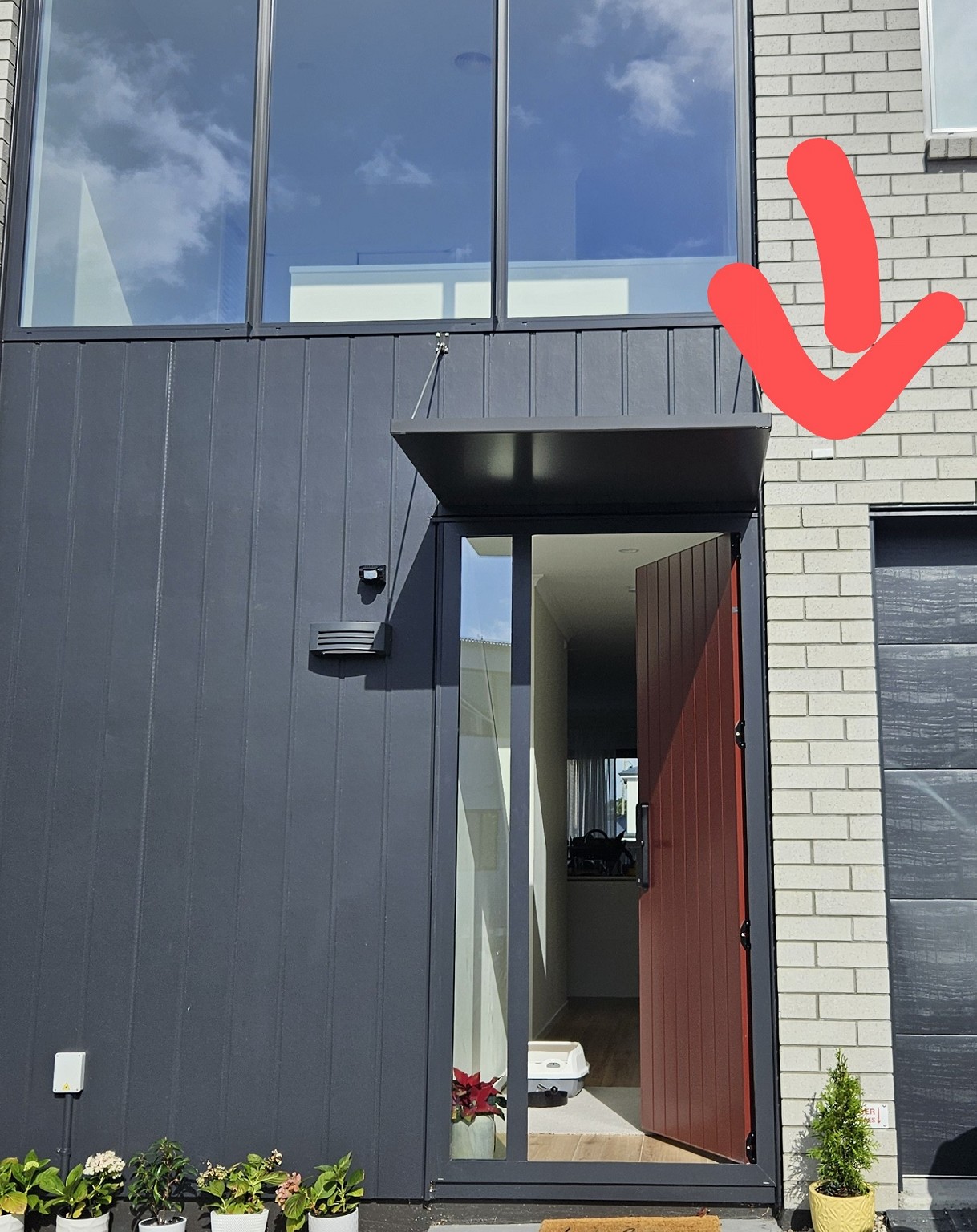
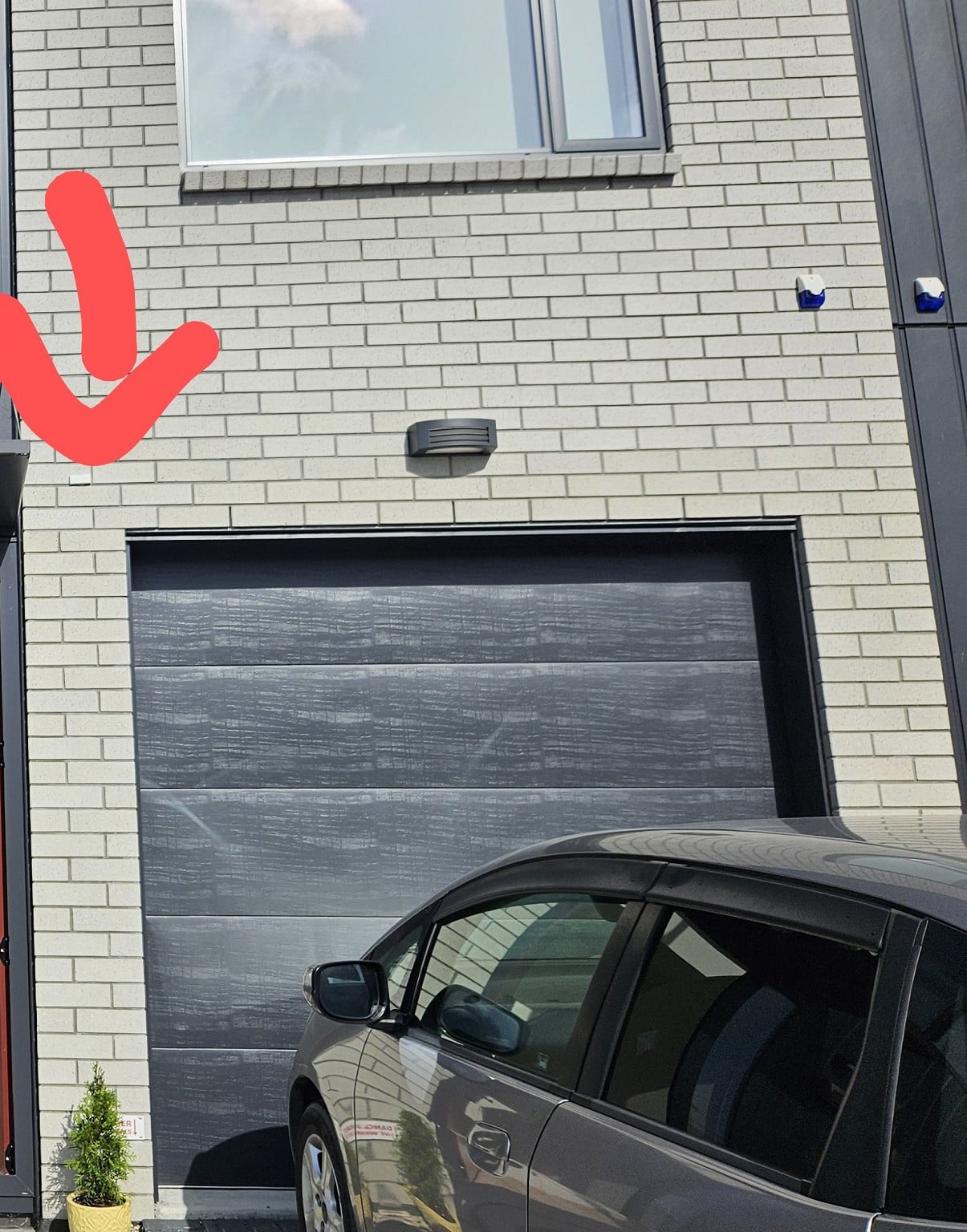
So in this photo, there's an existing ethernet cable where I can power with poe. But it isn't in the best location for a camera due to it being obscured by the door's rain cover. So I assume I'd need to run an external conduit that somehow wasn't ugly?


Just on the right of the door, where the brick cladding starts, is an internal wall to the garage.


I'm just unsure on what solution I should take if I want a doorbell camera and regular camera (or maybe just doorbell is good enough honestly....). I'd like to do the job myself as much as possible, but maybe if it's complicated, I'll have to get a professional.


View this topic in a long page with up to 500 replies per page Create new topic
 1 | 2
Jase2985
13730 posts

Uber Geek
+1 received by user: 6202

ID Verified
Lifetime subscriber

  #3340361 8-Feb-2025 09:07
Send private message

The closer the person is the less you are going to see of their facial features due to the height of the camera, you will see more of the top of their head.

Are you wanting to see them at the door, or just general view of the whole area for deterrence/recording purposes?


AlDrag

280 posts

Ultimate Geek
+1 received by user: 27


  #3340362 8-Feb-2025 09:14
Send private message

Jase2985:


The closer the person is the less you are going to see of their facial features due to the height of the camera, you will see more of the top of their head.

Are you wanting to see them at the door, or just general view of the whole area for deterrence/recording purposes?


It'd be nice to be able to see their face, any package left at the door, and cars/people going past on the road (road is very close to the house, as is the usual with new developments).


Jase2985
13730 posts

Uber Geek
+1 received by user: 6202

ID Verified
Lifetime subscriber

  #3340363 8-Feb-2025 09:15
Send private message

Also if the cable is already there why not just hold the camera up there and see what you can see? might not be as bad as you think


AlDrag

280 posts

Ultimate Geek
+1 received by user: 27


  #3340364 8-Feb-2025 09:17
Send private message

Jase2985:


Also if the cable is already there why not just hold the camera up there and see what you can see? might not be as bad as you think


That would common sense I guess haha. Although I'd like to know what cameras I should buy before hand. Thinking of the ultra turret though.


I guess the camera will be a lot more noticeable (eye sore) on the brick vs the black cladding I guess.


Scotdownunder
225 posts

Master Geek
+1 received by user: 108

Subscriber

  #3340377 8-Feb-2025 09:41
Send private message

Nothing stopping you placing the camera lower down and running a short length of trunking to the existing POE access point.  May not be the best looking but life comes with compromises.  Alternatively explore the space behind the cladding to extend the existing ethernet run internally or even surface run cabling to new location with new access hole in cladding.


Ruphus
469 posts

Ultimate Geek
+1 received by user: 181


  #3340429 8-Feb-2025 10:17
Send private message

As the exterior cladding is brick veneer, there will be a cavity between the brick and the building wrap. You'll be able to drill hole into the brick at a near vertical angle and then rod up to the existing cable.


Shop now on Samsung phones, tablets, TVs and more (affiliate link).
k1w1k1d
1712 posts

Uber Geek
+1 received by user: 1309


  #3340535 8-Feb-2025 14:19
Send private message

You could get someone to walk up to the door while you take a video with your phone held in front of the cover plate. That will give you a good idea of what a fixed camera will show. 


As Ruphus advised there should be an air gap behind the bricks for ventilation.


I would remove the cover plate and drop a small weight on a string down behind the bricks to see how far down it will go. To mount the camera, lower drill through the bricks and fish the string out to use as a draw wire for the ethernet cable.


AlDrag

280 posts

Ultimate Geek
+1 received by user: 27


  #3349625 3-Mar-2025 13:34
Send private message

Ruphus:


As the exterior cladding is brick veneer, there will be a cavity between the brick and the building wrap. You'll be able to drill hole into the brick at a near vertical angle and then rod up to the existing cable.


So basically drill UP so I can push a rod up at the correct angle, then I should be able to fish that from the existing hole at the top and either relocate the cable, or perhaps even snake a second one through from my garage (that would be a 6m snake and nerve racking!).


Does that sound corrrect?


scuwp
3927 posts

Uber Geek
+1 received by user: 2510


  #3349627 3-Mar-2025 13:52
Send private message

Take off the plate, drop a string with a weight on it down the cavity (easier than going up), see how far the string goes.  If it gets down to the level you want, drill a hole and fish the string out, the string can be used as a draw-wire to pull the cable down.  Or use some small conduit on the surface, white won't show up too much.    

The doorbell camera will be good for the immediate vicinity of the door, but depending on obstructions (tree's cars etc) may not cover the whole front yard.  I would be inclined to do both. 


When I installed mine, I just ran a long cable from the NVR and held up the camera in different spots, seeing what it looked like.  What the camera can (and can't) see surprised me and ended up putting them in different places than I first thought.  If you can test before drilling I recommend it.   


Lazy is such an ugly word, I prefer to call it selective participation


wellygary
8810 posts

Uber Geek
+1 received by user: 5287


  #3349639 3-Mar-2025 14:29
Send private message

1) Find the corresponding place on the inside wall of the garage and poke a hole in the GIB to find the cable, examine the options to continue to cable down to the place you want it at...


2) Potentially poke a hole in the interior garage gib at the height you wand things to be ( as others have said look at drilling up (or what ever way is closes to the horizontal dwang ) 


3) install things where you want, 


4) patch the holes, wither with gib/plaster, or a standard blank socket plate,


B) if you cant get good access to the interior wall  looks at sneaking some cable round the corner to where the brick facia meets the aluminium door frame, with trunk down this edge with same coloured trunking, or just silicon dark ethernet cable into the corner, 


raytaylor
4076 posts

Uber Geek
+1 received by user: 1296

Trusted

  #3350582 5-Mar-2025 22:56
Send private message

Bunnings sell a wall panel cover. 
https://www.bunnings.co.nz/fluidmaster-8-white-access-panel_p0268628 


Cut a hole in the gib on the inside just below where the existing cable is, 
Once in the wall you can have a poke around to see whats in there. 
You should be able to extend the cable down to a doorbell location. 


Or you can split it into two 4-pair cables each capable of 100mbits and have one for a doorbell and one for a higher mounted  camera. 

Use the access panel to cover the hole you made in the wall and access it it in the future if needed. 


I use them quite regularly. 


They work well in garages or places where the wall doesnt need to be patched back up again, but you dont want to leave an ugly hole in the wall. 


Here are some photos to show you an example....


Customer's got a new house built. Electrician ran some cat6 cable out to our ETP box but the cable hanging out the wall got damaged. It wasnt long enough to reach outside. 
No attic crawl space so i couldnt run a new cable. 
So I cut a hole on the inside, spliced the cable on to a new one to make it longer and poked that back through to the ETP outside. 

You could do something similar. 


https://imgur.com/a/skQJLOn 


Ray Taylor

There is no place like localhost

Spreadsheet for Comparing Electricity Plans Here


Shop now on AliExpress (affiliate link).
timbosan
2199 posts

Uber Geek
+1 received by user: 294

Subscriber

  #3350716 6-Mar-2025 14:25
Send private message

AlDrag:


Jase2985:


Also if the cable is already there why not just hold the camera up there and see what you can see? might not be as bad as you think


That would common sense I guess haha. Although I'd like to know what cameras I should buy before hand. Thinking of the ultra turret though.


I guess the camera will be a lot more noticeable (eye sore) on the brick vs the black cladding I guess.


I have a Unifi setup (network + cameras) - before you buy a camera or get recommendations, what do you have hardware wise? You will need a least a UNVR / Dream Machine / Cloud Key+ / etc. to record to.

Camera wise, I am a fan of the G5 Bullet and the G5 Flex.  I would like a G5 Pro but Unifi isn't known for being cheap (although I far prefer to "up front cost" option over a subscription model).  I also have G4 Doorbell cameras, they are OK, but I find they are always the things on the network they report "poor" Wifi reception.  

BTW depending on your paranoia level, depends on how do you cabling. In wall = no chance of anyone cutting it, conduits will stop most people, or just go bare (outdoor rated) for the naked look and live life on the edge :-) 

Finally, there are always the AI cameras if you want to get into LNRP or facial recognition, plus Unifi have the AI Port if you prefer non-Uniquiti cameras (maybe a 180 degreee VoF Reolink etc.)


hsvhel
1273 posts

Uber Geek
+1 received by user: 596

ID Verified

  #3350789 6-Mar-2025 20:04
Send private message

You can likely go a "brick and a half" to the RHS without too much drama. 


But where that current location is, it would probably be fine to get coverage from the drive and entry into your section.


No use in seeing the front door from that height to angle.  If you want front door, there are options for that specific situation. 


A bullet mounted in the current location should sort the entry points pretty well


Referral Link Quic


Free Setup use R502152EQH6OK on check out


AlDrag

280 posts

Ultimate Geek
+1 received by user: 27


  #3350795 6-Mar-2025 20:43
Send private message

timbosan:
I have a Unifi setup (network + cameras) - before you buy a camera or get recommendations, what do you have hardware wise? You will need a least a UNVR / Dream Machine / Cloud Key+ / etc. to record to.

Camera wise, I am a fan of the G5 Bullet and the G5 Flex.  I would like a G5 Pro but Unifi isn't known for being cheap (although I far prefer to "up front cost" option over a subscription model).  I also have G4 Doorbell cameras, they are OK, but I find they are always the things on the network they report "poor" Wifi reception.  

BTW depending on your paranoia level, depends on how do you cabling. In wall = no chance of anyone cutting it, conduits will stop most people, or just go bare (outdoor rated) for the naked look and live life on the edge :-) 

Finally, there are always the AI cameras if you want to get into LNRP or facial recognition, plus Unifi have the AI Port if you prefer non-Uniquiti cameras (maybe a 180 degreee VoF Reolink etc.)


I just bought a Dream Machine SE as a bit of an impulse buy a month ago. Kind of regret it due to it being severely overkill for my small home. I don't even need a Unifi AP as my old router is serving as the sole AP just fine.


Camera wise, I just purchased a G5 Turret Ultra, as it seemed the most sensible. Since it's a townhouse, the road is quite close to the house and thus I assumed a wider FOV would be better. They are also just cheap haha.
Unfortunately the one that arrived today from amazon was clearly used and opened, thus I need to return it...


I'm having second thoughts about going into the unifi ecosystem for cameras. They're just so damn expensive for what you get. But in saying that, I do love the software.
I am going to get a Reolink doorbell as well probably. They're still poe and all local. And if I don't end up liking it and its software, I can upgrade to the Unifi Pro doorbell, it's just so damn expensive. Although I love that you can put gifs on the mini screen haha.
AI port is a neat idea, but again, so expensive. I think I heard the LNRP and facial recognition is a bit shit too, although that could get better.


AlDrag

280 posts

Ultimate Geek
+1 received by user: 27


  #3350796 6-Mar-2025 20:46
Send private message

hsvhel:


You can likely go a "brick and a half" to the RHS without too much drama. 


But where that current location is, it would probably be fine to get coverage from the drive and entry into your section.


No use in seeing the front door from that height to angle.  If you want front door, there are options for that specific situation. 


A bullet mounted in the current location should sort the entry points pretty well


The main problem with the current location is that the entry rain cover would cover a decent amount of the corner of the house too. Probably mostly fine in all honesty, but having it either higher or lower would be better.
But maybe for now, I can just install in the current location and see how we like it.


If I had infinite money and somehow ethernet whereever I want, I would love a camera on the side of the house and one at the back, but unfortunately getting ethernet there is a lot more difficult and not a simple diy. I guess I could do wireless just for the side and back as they're less important.


 1 | 2
View this topic in a long page with up to 500 replies per page Create new topic


Geekzone Live »

Try automatic live updates from Geekzone directly in your browser, without refreshing the page, with Geekzone Live now.


Are you subscribed to our RSS feed? You can download the latest headlines and summaries from our stories directly to your computer or smartphone by using a feed reader.
