Geekzone: technology news, blogs, forums
Guest
Welcome Guest.
You haven't logged in yet. If you don't have an account you can register now.


David321

507 posts

Ultimate Geek
+1 received by user: 105


#318712 14-Feb-2025 07:57
Send private message

Hi all, 


I have had some WiFi issues in our new house using our old HG659, not a bad signal throughout the house but terrible speeds due to the router being in the metal smart systems cabinet in the garage.


I then shifted the router to a central part of the house where there was a data port and patched a cable from the ONT in the garage cabinet to that specific port in the house, this allowed me to put the modem in the middle of the house but the catch was there was not data to the other ports throughout the house as these ports run back to the cabinet in the garage where there is now no router to feed them. I figured I would run off WiFi as if the router was central the signal and speed should not be a problem, and I coud still maintain at least the central TV on a cable connection by plugging into the router.


A few days later with this new set up we are still having speed issues and a buffering TV (this TV is in a different room to router and connected by WiFi), using the speedtest.net on that TV in the front lounge showed it was getting around 6-8mbs. My phone also showed significantly lower speeds in this room compared to being closer to the router.


My plan now is the following, as suggested by @robjg63 (thanks for the help!) to buy a mesh router system (I think a two pack will do - 200sq house) that has at least two ports on each router, put one in the garage cabinet connected to ONT using the first port on the router then path a cable from the spare port on the router to the central port in the house and then plug in the second mesh router to the central port in the wall and then plug the TV via cable to that mesh router.


This would give the two routers a cable connection between themselves rather than have them use their WiFi to talk to each other plus I would still have the central TV connected by cable also. It's basically the same system as I have now with the old router so my hope would be that the new mesh router would have significantly better WiFi strength/speed compared to the HG659?


The catch is still the same though, I would only be able to feed one port (out of 4) with internet as most of those mesh routers only have two or three ethernet ports on them and I would have one connected to the ONT and the other connected to the central port line, leaving the other 3 ports in the house useless.


So I few questions before I proceed and potentially waste money:


1 - Is this a good idea or is there a better way to do things? (I am a bit of a rookie when it comes to this sort of stuff but learning a lot thanks to the help/advise on here)


2 - I am considering the TP-Link Deco M4's or the Mercusys Halo H50G (2 packs), would either of these be a good choice? The Mercusy actually has 3 ports compared to TP links 2 ports and is cheaper is there a catch here? The Mercusy seems superior and cheaper.


3 - The second mesh router will be in the central part of the house (living room) where the HG659 is now, currently the TV in the other lounge is only getting 6-8mbs and buffers a lot, will a new mesh router (the TP or the Mercusy) feed the TV in the other lounge significantly better WiFi speed even though the new router will be in the same part of the house as the HG659?


4 - If I want to feed the other ports in the house with internet from the cabinet in the garage, would it be as simple buying a switch with 4 ports, unplug the cable from the router feeding the central part of the house, plug the switch into the now spare port on the router, then feeding the 4 ports in the house from the switch? (hope that makes sense). I didn't realise that single data ports could be divided like that to create multiple feeds which will draw different data - i just figure one cable one device (as a sparky told me) but that is no the case? I figure the one gigabit port on the router feeding four ports in the house would mean that 1 gigabit from the router would have to be shared between all four ports, but I can't see all four ports demanding more than 250mbs at any given time (surely?).


Thanks in advance for any info on this, I am hoping to get something this weekend and finally get this issue sorted after 6 months of trouble!




_David_

View this topic in a long page with up to 500 replies per page Create new topic
 1 | 2
toejam316
1516 posts

Uber Geek
+1 received by user: 888

Trusted
Lifetime subscriber

  #3342715 14-Feb-2025 08:04
Send private message


  1. Yes it's fine.
  2. I generally steer people towards the little bit more expensive TP-Links, or the Netgear Orbi systems.
  3. Too many variables to guarantee anything, but in my experience that Huawei is well past it's use by date, so I suspect yes.
  4. Kind of yes, though I'd recommend getting a unit that has a main router and a satellite node (most of the better nodes will have this). Generally the satellites will have 1-2 ethernet ports, and the primary will have 4-5 ethernet ports (including your WAN port). This way you can use a dedicated link to the satellite and then choose what connections get dedicated links from the routers and what connections go via the switch. The key thing to remember when using a switch is that while every interface of the switch can communicate at full speed, every interface of the switch can ONLY communicate at full speed at most, which means if you have high demand on the switch connected interfaces, they will be bottlenecked by the switch connection to the router itself. Maybe not an issue for you, but if you keep in mind that switch -  switch interfaces will run full speed assuming the devices in question are only interacting with each other, the switch - router interface is a bottleneck, you should be able to work things out


My router picks


Buy the NETGEAR Orbi RBK352 (AX1800) Dual-Band WiFi 6 Mesh System - 2 Pack... ( RBK352-100AUS ) online - PBTech.co.nz


Buy the TP-Link Deco X55 (AX3000) Dual-Band WiFi 6 Whole-Home Mesh System - 2... ( Deco X55(2-pack) ) online - PBTech.co.nz


Join Quic Broadband with my referral - no sign up fee and gives me account credit


Anything I say is the ramblings of an ill informed, opinionated so-and-so, and not representative of any of my past, present or future employers, and is also probably best disregarded.


nzkc
1634 posts

Uber Geek
+1 received by user: 1041


  #3342716 14-Feb-2025 08:11
Send private message

Re point 4 and a switch


Short answer is yes.


All a switch does is manage (technically "switch" hence the name) the traffic between the ports on it. There are a few types basically categorised as unmanaged and managed. Unmanaged means they do very little in the way of managing that traffic and everything gets treated equally. A managed switch has features that allow to customise a whole lot of things. Managed switches are significantly more expensive than unmanaged ones - but all you need from your description is an unmanaged switch. You'll be fine with something as cheap as this: https://www.pbtech.co.nz/product/SWHMES11050/Mercusys-MS105G-5-Port-Gigabit-Desktop-Switch  Just make sure you get a gigabit switch (not fast ethernet).


As for the "sharing" the speed isnt divided down at each port. Everything still gets the 1Gbps. Of course devices connected to the switch are trying to all pull 1Gbps they wont get that but to be clear its not a case of 4 devices = 250Mbps each only. They can each upto get 1Gbps depending on other traffic. You'll rarely notice them sharing the bandwidth at all.


You could put a switch at the end of every data port in each room if you wanted/needed. One piece of advice to follow is to avoid "daisy chaining" switches together. Its better to try and keep the number of switches between a given device and the router to a minimum. From what you have described I dont think this will be a concern - though in the future if you had a switch in the cabinet to feed each room, then a switch in the room(s) you'd be doing this but possibly cannot avoid it.


David321

507 posts

Ultimate Geek
+1 received by user: 105


  #3342790 14-Feb-2025 09:43
Send private message

toejam316:


  1. Yes it's fine.
  2. I generally steer people towards the little bit more expensive TP-Links, or the Netgear Orbi systems.
  3. Too many variables to guarantee anything, but in my experience that Huawei is well past it's use by date, so I suspect yes.
  4. Kind of yes, though I'd recommend getting a unit that has a main router and a satellite node (most of the better nodes will have this). Generally the satellites will have 1-2 ethernet ports, and the primary will have 4-5 ethernet ports (including your WAN port). This way you can use a dedicated link to the satellite and then choose what connections get dedicated links from the routers and what connections go via the switch. The key thing to remember when using a switch is that while every interface of the switch can communicate at full speed, every interface of the switch can ONLY communicate at full speed at most, which means if you have high demand on the switch connected interfaces, they will be bottlenecked by the switch connection to the router itself. Maybe not an issue for you, but if you keep in mind that switch -  switch interfaces will run full speed assuming the devices in question are only interacting with each other, the switch - router interface is a bottleneck, you should be able to work things out


My router picks


Buy the NETGEAR Orbi RBK352 (AX1800) Dual-Band WiFi 6 Mesh System - 2 Pack... ( RBK352-100AUS ) online - PBTech.co.nz


Buy the TP-Link Deco X55 (AX3000) Dual-Band WiFi 6 Whole-Home Mesh System - 2... ( Deco X55(2-pack) ) online - PBTech.co.nz


@toejam316


Thanks for that!


I like the idea of the router and satellite with the router having 4-5 ethernet ports you have mentioned, do you know of any at a reasonable cost? (I have not found any), the two products you have linked do not have quite enough ports to feed the other ports in my house unfortunately, plus they are probably a bit out of my budget.


Perhaps if there is not a more budget friendly option of a router with 4-5 ports plus a satellite then my best option would be the TP-Link Deco M4 two pack and the 5 port gigabit switch @nzkc mentioned? $148 for the mesh routers and $19 for the switch seems like an effective and cheap option that could work just as well?


_David_


toejam316
1516 posts

Uber Geek
+1 received by user: 888

Trusted
Lifetime subscriber

  #3342800 14-Feb-2025 10:00
Send private message

Bear in mind that for $149, you're buying a full router with it own wireless, power supply, etc. as well as a satellite. If you're planning on keeping this setup for any length of time, I'd recommend spending a little more up front to get something with longevity, rather than a stopgap you may wish to upgrade sooner.


I'm sure if you're with a mainstream RSP they probably sell some sort of mesh solution, if buying an adequate one up front is not within the budget it may be worth investigating getting one via IFP through your ISP.


Another consideration could be to turn off the wifi on your Huawei and use a pair of something like Buy the Grandstream GWN7604 2x2 802.11ax AX3000 Wi-Fi 6 AP with Integrated... ( GWN7604 ) online - PBTech.co.nz


You could put units either in each room with a TV, or one in the lounge and one in the box the router currently lives in. Not significantly cheaper, but more in the ballpark of $262, which is a slightly cut down of price, and integrates switches at each point you install one of these.


Although with these you will need PoE injectors, and I'm not sure if these GWN devices come with them or if you'd need them separately.


Join Quic Broadband with my referral - no sign up fee and gives me account credit


Anything I say is the ramblings of an ill informed, opinionated so-and-so, and not representative of any of my past, present or future employers, and is also probably best disregarded.


shk292
2915 posts

Uber Geek
+1 received by user: 2040

Lifetime subscriber

  #3342806 14-Feb-2025 10:39
Send private message

I've been using Deco Mesh units in this way for a few years and they're a really good solution. For a reasonably non technical user, I'd definitely recommend the consumer mesh systems over more complex routers with poe access points etc. 


One thing to remember is that a router with many LAN ports is effectively just a router and a switch inside the same box. It is tidier than a router or mesh unit with a separate switch but there's nothing special about its LAN ports, they will perform just the same (for your purposes) as a cheap unmanaged external switch.  Similarly, while daisy chaining isn't ideal, for your purposes of sharing a 300Mbps internet connection over a fully switched gigabit LAN you won't notice any difference if you have zero, one, two or three switches between the router and a device.  Any wired connection is going to be better than wireless.


mdf

mdf
3566 posts

Uber Geek
+1 received by user: 1519

Trusted

  #3342846 14-Feb-2025 12:04
Send private message

As above, but just chiming in my two cents...


Who is your ISP? Some are now providing mesh options and the advantage of that is that they will support it if you have any problems c.f. "third party router = we will do nothing".


Where are you based? Some of the fine residents of Geekzonia provide (actually) expert cabling/wifi services.


Cable everything you can, even if it is going via a switch. You will get way better overall perforamnce. Even if the switch uplink port is (theoretically) a bottle neck, you will still get way better performance sharing that via cable than sharing it via wifi. Wifi is as much of a shared resource as cable; and your connection to the internet is 99% certainty going to be a bigger bottleneck than any switch uplinks.


That said, do make sure you get a gigabit switch.


HP


Shop now for HP laptops and other devices (affiliate link).
David321

507 posts

Ultimate Geek
+1 received by user: 105


  #3342855 14-Feb-2025 12:40
Send private message

Thanks all, some very very helpful info here!


I will try my luck with the following set up:


Two pack of the TP-Link M4's, one in the garage cabinet connected to the ONT the other in the central port (living room) for good WiFi coverage through the house.


https://www.pbtech.co.nz/product/NETTPL9402/TP-Link-Deco-M4-AC1200-Dual-Band-WiFi-5-Whole-Home


Ill also add the 5 port switch suggested to the m4 in the cabinet to feed the other ports in the house


https://www.pbtech.co.nz/product/SWHMES11050/Mercusys-MS105G-5-Port-Gigabit-Desktop-Switch


If I connect the m4 in the cabinet to the ONT with one port on the M4 and use the other port on the m4 to connect to the 5 port switch that will feed all 4 ports in the house (including the one the second m4 will be plugged to) will the m4's communicate via cable and not their WiFi? I know that if the two m4's were connected with their own cable they can use that rather than their WiFi, but I am unsure if putting a 5 port switch between the two m4's which will also feed other ports will disrupt the m4's cable connection to each other and cause them to talk to each other using their WiFi.


Edit to reply to @mdf - based in Rolleston, I considered OneNZ's mesh system, but at an ongoing cost of $5 per month I think it rather just invest and own one outright.


_David_

nzkc
1634 posts

Uber Geek
+1 received by user: 1041


  #3342867 14-Feb-2025 13:31
Send private message

David321:


If I connect the m4 in the cabinet to the ONT with one port on the M4 and use the other port on the m4 to connect to the 5 port switch that will feed all 4 ports in the house (including the one the second m4 will be plugged to) will the m4's communicate via cable and not their WiFi? I know that if the two m4's were connected with their own cable they can use that rather than their WiFi, but I am unsure if putting a 5 port switch between the two m4's which will also feed other ports will disrupt the m4's cable connection to each other and cause them to talk to each other using their WiFi.


That is the correct way to connect things (if I've interpreted correctly...and I think I have 😀). And yes the M4s should still use that


nzkc
1634 posts

Uber Geek
+1 received by user: 1041


  #3342868 14-Feb-2025 13:35
Send private message

An option you could do is this...


Keep the HG659 as the router but disable its wifi (See: https://one.nz/faq/how-to-turn-off-your-modem-wi-fi-hg659?srsltid=AfmBOorAhEZ-WyUfoorXLBLi0spOHhr3GjtqxL7hPZ3A07bOc1v2lNAc) And use the two M4s as access points in the house (I'm assuming this can be done..weird if it doesnt support it).


You'd put the two M4s in rooms you want (ideally covering most of the house...so "far" away from each other). Then just patch in each room to the HG659. Wouldnt need a switch for that - your HG659 does that work with the 4 yellow ports on the back.


robjg63
4160 posts

Uber Geek
+1 received by user: 1425

Subscriber

  #3342872 14-Feb-2025 13:54
Send private message

nzkc:


An option you could do is this...


Keep the HG659 as the router but disable its wifi (See: https://one.nz/faq/how-to-turn-off-your-modem-wi-fi-hg659?srsltid=AfmBOorAhEZ-WyUfoorXLBLi0spOHhr3GjtqxL7hPZ3A07bOc1v2lNAc) And use the two M4s as access points in the house (I'm assuming this can be done..weird if it doesnt support it).


You'd put the two M4s in rooms you want (ideally covering most of the house...so "far" away from each other). Then just patch in each room to the HG659. Wouldnt need a switch for that - your HG659 does that work with the 4 yellow ports on the back.


Those HG659s are getting a bit old though. Old routers never seem to actually hard fail. They seem to start going odd (IMHO). That model also had a device limit. If there were more than 16 devices on a band - something like that. They never cleared off devices that were no longer active and needed a reboot to reset the count. While the number sounds like a lot of devices, you add a few guests, kids friends and the number of devices seems to blow out really quickly.


Though I agree with what you suggest in principle - seems a pity to 'waste' an M4 having it locked in a cupboard which presumably clobbers it's excellent wifi capabilities.


@David321 said that he only had one device connected by cable - which was the main TV.


I still wonder if it's not worth trying the cable from the ONT port to the port behind the TV and putting the primary M4 there.


The main TV can be connected by cable using the second port on that primary M4.


The second M4 coud just be paired up using its wif mesh link and could be put where ever you think is the best place for a boost.


Then just try it out and see what you think.


Nothing is impossible for the man who doesn't have to do it himself - A. H. Weiler


yitz
2238 posts

Uber Geek
+1 received by user: 594


  #3342881 14-Feb-2025 14:45
Send private message

robjg63:


Those HG659s are getting a bit old though. 


I'd go back and negotiate the Smart WiFi modem (mesh base unit) into your contract... the website says it is included on some of their fibre plans... you should really get a new modem considering you went from HFC to Fibre. There should be only shipping & handling and no ongoing cost, the additional $5/month charge is for satellite units and whole house coverage.


Shop now on Samsung phones, tablets, TVs and more (affiliate link).
David321

507 posts

Ultimate Geek
+1 received by user: 105


  #3342883 14-Feb-2025 14:55
Send private message

robjg63:


nzkc:


An option you could do is this...


Keep the HG659 as the router but disable its wifi (See: https://one.nz/faq/how-to-turn-off-your-modem-wi-fi-hg659?srsltid=AfmBOorAhEZ-WyUfoorXLBLi0spOHhr3GjtqxL7hPZ3A07bOc1v2lNAc) And use the two M4s as access points in the house (I'm assuming this can be done..weird if it doesnt support it).


You'd put the two M4s in rooms you want (ideally covering most of the house...so "far" away from each other). Then just patch in each room to the HG659. Wouldnt need a switch for that - your HG659 does that work with the 4 yellow ports on the back.


Those HG659s are getting a bit old though. Old routers never seem to actually hard fail. They seem to start going odd (IMHO). That model also had a device limit. If there were more than 16 devices on a band - something like that. They never cleared off devices that were no longer active and needed a reboot to reset the count. While the number sounds like a lot of devices, you add a few guests, kids friends and the number of devices seems to blow out really quickly.


Though I agree with what you suggest in principle - seems a pity to 'waste' an M4 having it locked in a cupboard which presumably clobbers it's excellent wifi capabilities.


@David321 said that he only had one device connected by cable - which was the main TV.


I still wonder if it's not worth trying the cable from the ONT port to the port behind the TV and putting the primary M4 there.


The main TV can be connected by cable using the second port on that primary M4.


The second M4 could just be paired up using its wifi mesh link and could be put where ever you think is the best place for a boost.


Then just try it out and see what you think.


@robjg63 I see what you are saying, I have the one TV connected by cable but would like to supply the other (now dead) ports with cable internet also, which is why I figure my best option would be to keep one m4 in the cabinet and use that 5 port switch to feed the fixed ports throughout the house as I may use these in the future.


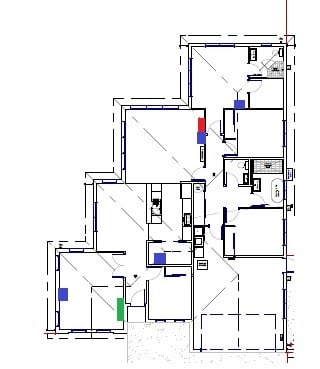
The only uncertainty I have now is whether I need the 3 pack of m4's or two pack, Id hate to get the two pack home and find the signal still to weak in some areas of the house and realize  should have got the three pack. On the other hand Id hate to spend extra on the 3 pack and find two of them is fine. Catch 22!


Its a shame they don't sell the m4's individually as I would (theoretically) be able to buy an individual m4 if I found the two pack was not sufficient.


Our house is 200 square meters, I think that includes the garage. 


For anyone interested -  I have attached a floor plan of our house, the red box is what I believe is a central port of the house (where the main TV is), the blue boxes are the data ports throughout the house (perhaps the data port in the pantry is more central now I look at it). The green box is the TV that is struggling the most with the current router now.


_David_

robjg63
4160 posts

Uber Geek
+1 received by user: 1425

Subscriber

  #3342892 14-Feb-2025 15:56
Send private message

I get where you are coming from.


You can buy single Deco units (I found one place where the M4 was 'on special' at $99), but they are much cheaper when you buy the multipacks.


Don't forget, you can also mix and match with other Deco unit models. 


So you could just have one m4 where the Red square is (connected through to the ONT), another m4 where the second from bottom blue square is (assuming you buy a 2 pack) - they link together over their own wifi connection. You want the primary router at least to have a 1Gb ethernet port - which the M4s do. Some of the others (Deco E4 for example) only have 10/100 ports but their wifi connection should be faster than that. 


As your ONT will be providing at least 300mpbs (chorus is increasing that for free to 500mbps very soon), the  primary unit doesnt want to be choking your internet connection over its ethernet port.


I wont place money on it, but I think you will be surprised that the wifi from 2 units will give pretty good coverage.


If by some chance you were still getting a lowish wifi signal away from the main one, you could always buy a couple of deco E4s for $119 and use them as extra satellites.


Sorry - I'm being loose with someone elses money 🙁


I still suspect you might be ok with just the 2 units though depends a bit how solid your walls are and how many layers.


If it helps - I hate making decisions like this too.🤔


Nothing is impossible for the man who doesn't have to do it himself - A. H. Weiler


mentalinc
3384 posts

Uber Geek
+1 received by user: 1023

Trusted

  #3342894 14-Feb-2025 16:07
Send private message

If the blue boxes are all data ports that you can connect with a switch, you'll want to be getting deco boxes that can use gigabit ethernet as backhaul not wifi. So don't use anything that only has a 10/100 port on it.


CPU: AMD 5900x | RAM: GSKILL Trident Z Neo RGB F4-3600C16D-32GTZNC-32-GB | MB:  Asus X570-E | GFX: EVGA FTW3 Ultra RTX 3080Ti| Monitor: LG 27GL850-B 2560x1440


Quic: https://account.quic.nz/refer/473833 R473833EQKIBX 


nzkc
1634 posts

Uber Geek
+1 received by user: 1041


  #3342945 14-Feb-2025 17:38
Send private message

Ok... seeing the plan of the house... makes me sad they didnt add ports in each bedroom... why?!? Anyway...


I'd first be inclined to do what I suggested re turning off Wifi on the HG659 and putting one Deco unit in the bottom left room with the TV and then the second in the living room with the TV.  And if that still does work (I think it would) I'd then look at a switch(es) if needed. You'd end up with a similar set up I have (also a largish house) where I get great wifi all around. I hear you @robjg63 and if it were me I'd be looking at a dedicated router (I have a mikrotik) but I also want to keep it simple for the OP.


Probably off topic: I didnt follow what you meant when you said the red box is the "central port" since you mentioned your ONT and patch cabinet are in the garage.


 1 | 2
View this topic in a long page with up to 500 replies per page Create new topic


Geekzone Live »

Try automatic live updates from Geekzone directly in your browser, without refreshing the page, with Geekzone Live now.


Are you subscribed to our RSS feed? You can download the latest headlines and summaries from our stories directly to your computer or smartphone by using a feed reader.