Geekzone: technology news, blogs, forums
Guest
Welcome Guest.
You haven't logged in yet. If you don't have an account you can register now.


Learnerdriver

5 posts

Wannabe Geek
+1 received by user: 2


#323248 11-Nov-2025 10:43
Send private message quote this post

I live in a lifestyle village and travel a lot in my motorhome. I use a Sim Enabled B818-263 Huawei Router for my WIFI needs at home and also take it on the road when travelling. this caters for my computing needs and a wee bit of TV. Depending on the time of day download speeds range from 20-38Mbps


My Samsung S21 mobile at the same time of day and location is approx. 2 x the download speed of my Sim Enabled B818-263 Huawei Router.


Is this normal and is there any way I can obtain better speeds on my Home/Motorhome Sim Router to watch TV without buffering, or without having to install Fibre. Both SIMs are Unlimited Vodafone plans.




View this topic in a long page with up to 500 replies per page Create new topic
 1 | 2
wellygary
8813 posts

Uber Geek
+1 received by user: 5293


  #3433201 11-Nov-2025 10:57
Send private message quote this post

The S21 is a 5G phone, the Huawei is a 4G modem, 


I suspect the S21 potentially has better 4G band support, but even if they were the same as more 3G gets repurposed into 5G, its likely to get even better reception that the Modem, 


MaxineN
Max
2056 posts

Uber Geek
+1 received by user: 1674

ID Verified
Trusted
Subscriber

  #3433266 11-Nov-2025 11:28
Send private message quote this post

wellygary:


The S21 is a 5G phone, the Huawei is a 4G modem, 


I suspect the S21 potentially has better 4G band support, but even if they were the same as more 3G gets repurposed into 5G, its likely to get even better reception that the Modem, 


If the phone was on a 5G enabled tower and was in a NSA active state then yes the 5G phone would perform way faster, however the explanation is not entirely accurate.


The B818 is a CAT 19 LTE device whilst the S21 is a CAT 20 device. That won't make much of a difference, however depending on the network and the device, the phone could have additional CA that the B818 is not able to do. They both would have the same LTE/4G bands available as well, although the antenna setup would influence things here.


In other words, it's a bit complicated, and without additional data and knowing who OP is with for both the FWA service and the phone and how testing was done... we're not going to be able to add a lot of value.


Ramblings from a mysterious lady who's into tech. Warning I may often create zingers.


Learnerdriver

5 posts

Wannabe Geek
+1 received by user: 2


  #3433336 11-Nov-2025 13:13
Send private message quote this post

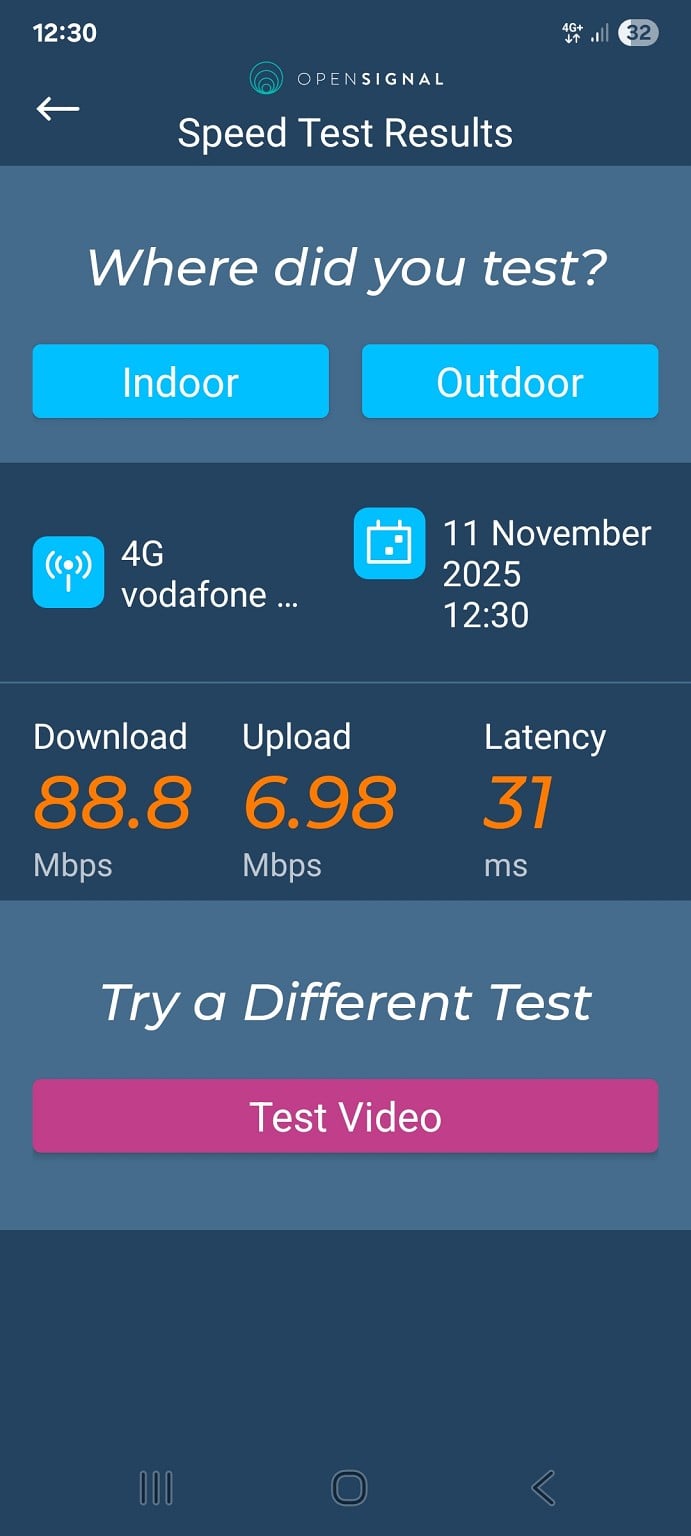
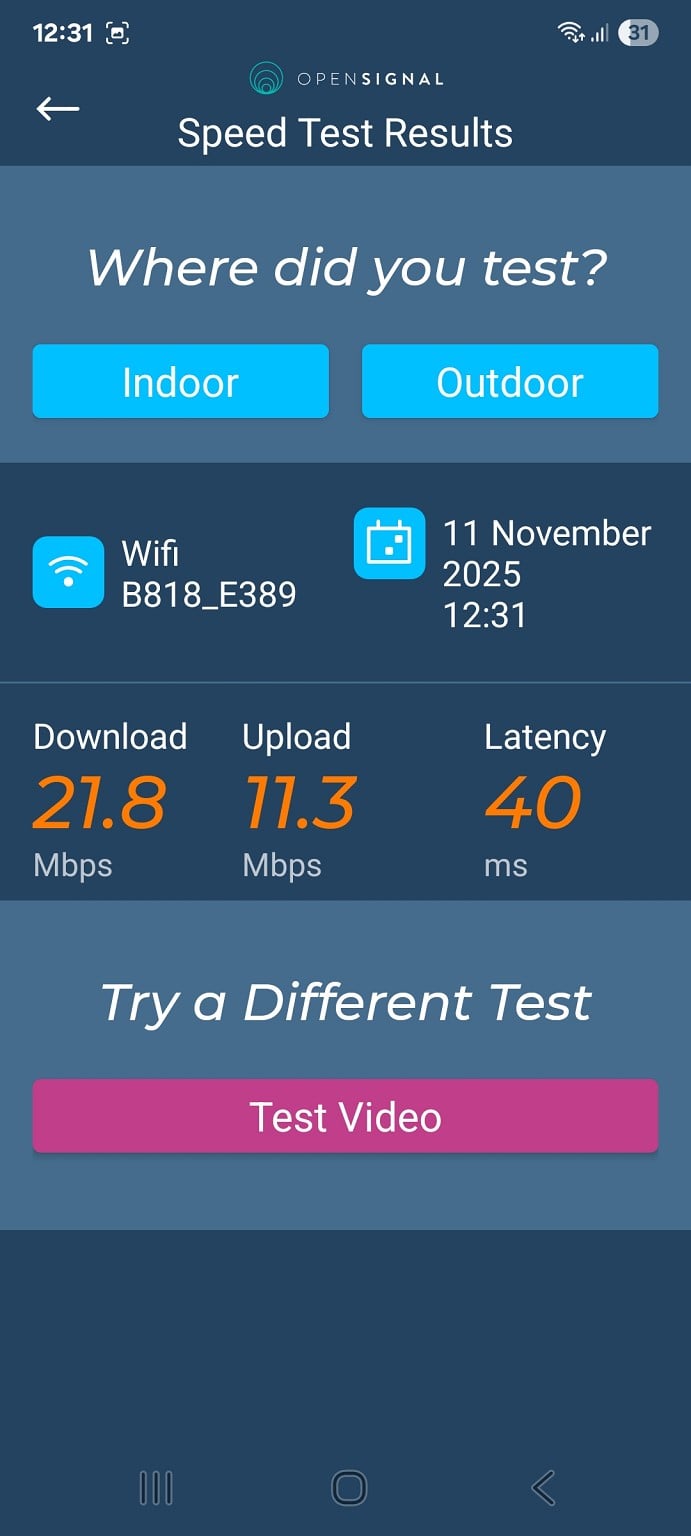
The OpenSignal App was used to obtain the information. 


Both devices use Vodafone Sim and get their signal from a 4G tower located 300m from my house and with a direct line of sight.


Screenshots attached


MaxineN
Max
2056 posts

Uber Geek
+1 received by user: 1674

ID Verified
Trusted
Subscriber

  #3433340 11-Nov-2025 13:29
Send private message quote this post

Unfortunately those screenshots aren't working.


However now that we know we're on the One New Zealand network that makes things a bit easier for me (ex One NZ).


I have a feeling the B818 has a worser starting cell + CA than your S21 so that's one potential cause.
However I believe by memory the B818 (I have one, just haven't powered it on in a while) does band steering by default for it's Wireless SSID so your client could be on the 2.4Ghz network whilst your hotspot is 5Ghz (so this will greatly influence your speed tests), this is another cause.


FWA and Mobile operate on different QCIs. FWA IS treated worse than Mobile. Another cause and one you aren't going to fix.
FWA has different weights with 4G/LTE layers (plays into the worser starting cell bit) so whilst your phone could be sitting on 1800+700+2100 in a CA. Your FWA B818 maybe on 2100+700. Another cause and another one you aren't going to fix (unless we have some antennas and we are pointing in the right direction, then the network may want to push you to 1800). For what it is worth. 1800 is 4x4 and is the only 4x4 configuration. Everything else is 2x2.


I also feel like there's congestion at play too(you could be congestion free at 1800, but 2100 or 700 might be completely smashed). LTE can do a lot more than 20-38mbps... So your time and day of when you test is also a little important.


The explanation is still complicated. But at least we can define things a bit better now.


edit: screenshots working, VERY TINY.


Ramblings from a mysterious lady who's into tech. Warning I may often create zingers.


SATTV
1670 posts

Uber Geek
+1 received by user: 658

ID Verified

  #3433341 11-Nov-2025 13:38
Send private message quote this post

We were diagnosing a speed issue for a client that use one nz as a 4G / 5G backup and the speeds were slower than ADSL


We spoke with someone and said that One prioritises phone data over fixed data, this may be your issue.


John


I know enough to be dangerous


MaxineN
Max
2056 posts

Uber Geek
+1 received by user: 1674

ID Verified
Trusted
Subscriber

  #3433342 11-Nov-2025 13:40
Send private message quote this post

SATTV:


We were diagnosing a speed issue for a client that use one nz as a 4G / 5G backup and the speeds were slower than ADSL


We spoke with someone and said that One prioritises phone data over fixed data, this may be your issue.


John


Correct, QCI is playing a factor here and perhaps also the weighting applied to push FWA modems to 2100 over 1800. However it shouldn't be slower than ADSL. You have a genuine fault and you should push back hard.


Ramblings from a mysterious lady who's into tech. Warning I may often create zingers.


Shop now at Mighty Ape (affiliate link).
Jamry23
9 posts

Wannabe Geek
+1 received by user: 1


  #3433540 11-Nov-2025 20:21
Send private message quote this post

Mobile Phones such as your Samsung s21 5G besides 5G supports much more carrier aggregation than the Huawei 4G modem. So you will get 5G speeds added to your 4G speeds. One New Zealand supports LTE 5 Carrier aggregation WITH 5G NR the 6th on their 5G NSA network. 


Also are you on a fixed wireless product? If so I see you are moving the modem around (reference to the campervan). If so all operators sell FWA to a specific address/ location only (based on design, capacity and coverage) so could be that you are using this modem in a none FWA approved location. Spark actually lock the modem to the location (won’t work elsewhere) but One NZ don’t (giving you more flexibility but it may impact your CX).


Have you considered changing to a new one.nz FWA plan with their 5G modem? 5G doesn’t cost extra on the one.nz network and your modem is quite old (lower capability)


MaxineN
Max
2056 posts

Uber Geek
+1 received by user: 1674

ID Verified
Trusted
Subscriber

  #3433554 11-Nov-2025 22:29
Send private message quote this post

Jamry23:


Mobile Phones such as your Samsung s21 5G besides 5G supports much more carrier aggregation than the Huawei 4G modem. So you will get 5G speeds added to your 4G speeds. One New Zealand supports LTE 5 Carrier aggregation WITH 5G NR the 6th on their 5G NSA network. 


Also are you on a fixed wireless product? If so I see you are moving the modem around (reference to the campervan). If so all operators sell FWA to a specific address/ location only (based on design, capacity and coverage) so could be that you are using this modem in a none FWA approved location. Spark actually lock the modem to the location (won’t work elsewhere) but One NZ don’t (giving you more flexibility but it may impact your CX).


Have you considered changing to a new one.nz FWA plan with their 5G modem? 5G doesn’t cost extra on the one.nz network and your modem is quite old (lower capability)


Erm.


One NZ do actually care if the service is not at the address it's being serviced for. I can count on both hands and toes how many I've told off when I wore the hat. So one would hope this is via the NZMCA ;) where the official modem is (or was) the B818. Any faults laid for the service when it's not at the serviced address won't just get thrown in the bin but there will be a conversation had as to why and if it cannot be sold then you will be given notice.


If this is prepay, then no care will be given but I imagine that would be very expensive.


Also yes, the phone will have extra CA but not because it's a 5G handset. 5G only matters if OP's handset is connected to a 5G enabled site and is not sitting in NSA restricted. Which judging by the 88mbps down (screenshots very tiny but I can make out numbers) that looks like a 4G speed test that isn't sitting on a congested layer. I would be surprised if this is NR 900 (we aren't there yet with the shutdown)


Ramblings from a mysterious lady who's into tech. Warning I may often create zingers.


Learnerdriver

5 posts

Wannabe Geek
+1 received by user: 2


  #3433715 12-Nov-2025 12:05
Send private message quote this post

Thanks all


I have taken the liberty of changing to Vodafone Starter Basic (fibre broadband) for home and will hotspot using one of my mobiles when on holiday.


Cheers


freitasm
BDFL - Memuneh
80657 posts

Uber Geek
+1 received by user: 41065

Administrator
ID Verified
Trusted
Geekzone
Lifetime subscriber

  #3433716 12-Nov-2025 12:20
Send private message quote this post

@MaxineN:


Unfortunately those screenshots aren't working.


edit: screenshots working, VERY TINY.


Those are the thumbnails. I've edited the post to use the actual images.


Referral links: Quic Broadband (free setup code: R587125ERQ6VE) | Samsung | AliExpress | Wise | Sharesies 


Support Geekzone by subscribing (browse ads-free), or making a one-off or recurring donation through PressPatron.


Wara
43 posts

Geek
+1 received by user: 7


  #3462317 17-Feb-2026 20:15
Send private message quote this post

This thread discussed various differences between wireless modems and mobile phones that might cause much slower modem speeds.  In my case, the modem and mobile are similar in capability, but the modem is still 2-3 times slower for download speeds. Both devices are 4G/5G but the tower is 4G.


Pixel 8a, 2 Degrees, DL usually 120-220 mbps depending on timing of the tests.


NX620v2 (new), 2 Degrees, DL 65-66 mbps. Fairly consistent peak/off peak.


Both devices CA in the order B1,B3,B28.  The modem adds B8 to the end. The NetMonster app is used for the mobile stats.


The modem is mostly RSRP/RSRQ/SNR -85/-8/16
The mobile bounces around a bit but the RSRP is generally worse at -95 to -102.


CQI for both devices is usually 15 but can drop to 13 or 14.


Distance to tower is 2km unobstructed. 


Can I assume that the lower modem DL speeds in my setup are due to standard limitations/priority for FWA on this tower?  


Stream your favourite shows now on Apple TV (affiliate link).
freitasm
BDFL - Memuneh
80657 posts

Uber Geek
+1 received by user: 41065

Administrator
ID Verified
Trusted
Geekzone
Lifetime subscriber

  #3462363 17-Feb-2026 20:19
Send private message quote this post

@Wara how are you testing speeds?


Directly on the phone for the Pixel? What about the mobile router? Are you using the phone again, over Wi-Fi?


Referral links: Quic Broadband (free setup code: R587125ERQ6VE) | Samsung | AliExpress | Wise | Sharesies 


Support Geekzone by subscribing (browse ads-free), or making a one-off or recurring donation through PressPatron.


MaxineN
Max
2056 posts

Uber Geek
+1 received by user: 1674

ID Verified
Trusted
Subscriber

  #3462365 17-Feb-2026 20:23
Send private message quote this post

I can't find the LTE CAT grading on the TP-Link jobby so.. @SaltyNZ.


However with the speeds you're seeing... wouldn't be surprised if this is a testing issue OR FWA is also weighted pretty heavily... like the other two do.


Ramblings from a mysterious lady who's into tech. Warning I may often create zingers.


Wara
43 posts

Geek
+1 received by user: 7


  #3462368 17-Feb-2026 20:26
Send private message quote this post

Directly on the phone for the Pixel speeds.


Three methods for the modem.  1) using the speed test in the web interface of the modem, 2) wifi from the Pixel to the modem (5Ghz, alongside), 3) PC connected by ethernet to the modem.


freitasm
BDFL - Memuneh
80657 posts

Uber Geek
+1 received by user: 41065

Administrator
ID Verified
Trusted
Geekzone
Lifetime subscriber

  #3462369 17-Feb-2026 20:29
Send private message quote this post

Does the speed test on the modem use the same test server as the phone? If not, any chance you could use Speedtest app on the phone and on the PC (ethernet) and use the Chorus test lab server for the test?


Referral links: Quic Broadband (free setup code: R587125ERQ6VE) | Samsung | AliExpress | Wise | Sharesies 


Support Geekzone by subscribing (browse ads-free), or making a one-off or recurring donation through PressPatron.


 1 | 2
View this topic in a long page with up to 500 replies per page Create new topic


Geekzone Live »

Try automatic live updates from Geekzone directly in your browser, without refreshing the page, with Geekzone Live now.


Are you subscribed to our RSS feed? You can download the latest headlines and summaries from our stories directly to your computer or smartphone by using a feed reader.