Geekzone: technology news, blogs, forums
Guest
Welcome Guest.
You haven't logged in yet. If you don't have an account you can register now.


stevob

24 posts

Geek
+1 received by user: 36


#323630 24-Dec-2025 18:27
Send private message

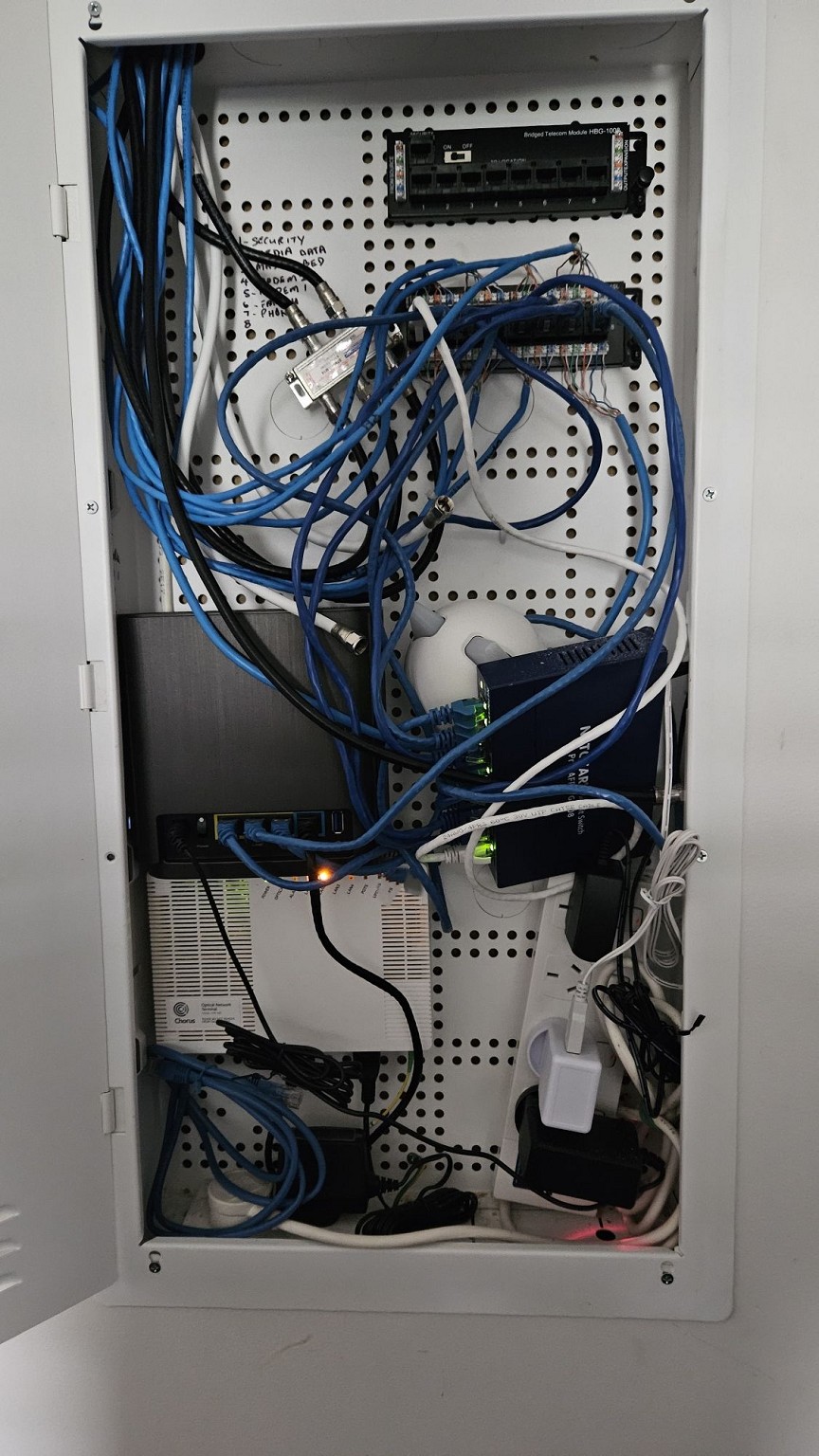
Moved into the new house in March, the folks that had the place before me made a bit of a hash of the network, so it's been low on my priority list.


Managed to get what I needed up and running and stuff was just bunged in any old how.


Now, thanks in no small part to the collective knowledge, wisdom and inspiration contained in these forums, I've sorted out the cabling and tidied up the LAN cabinet


Before 


After
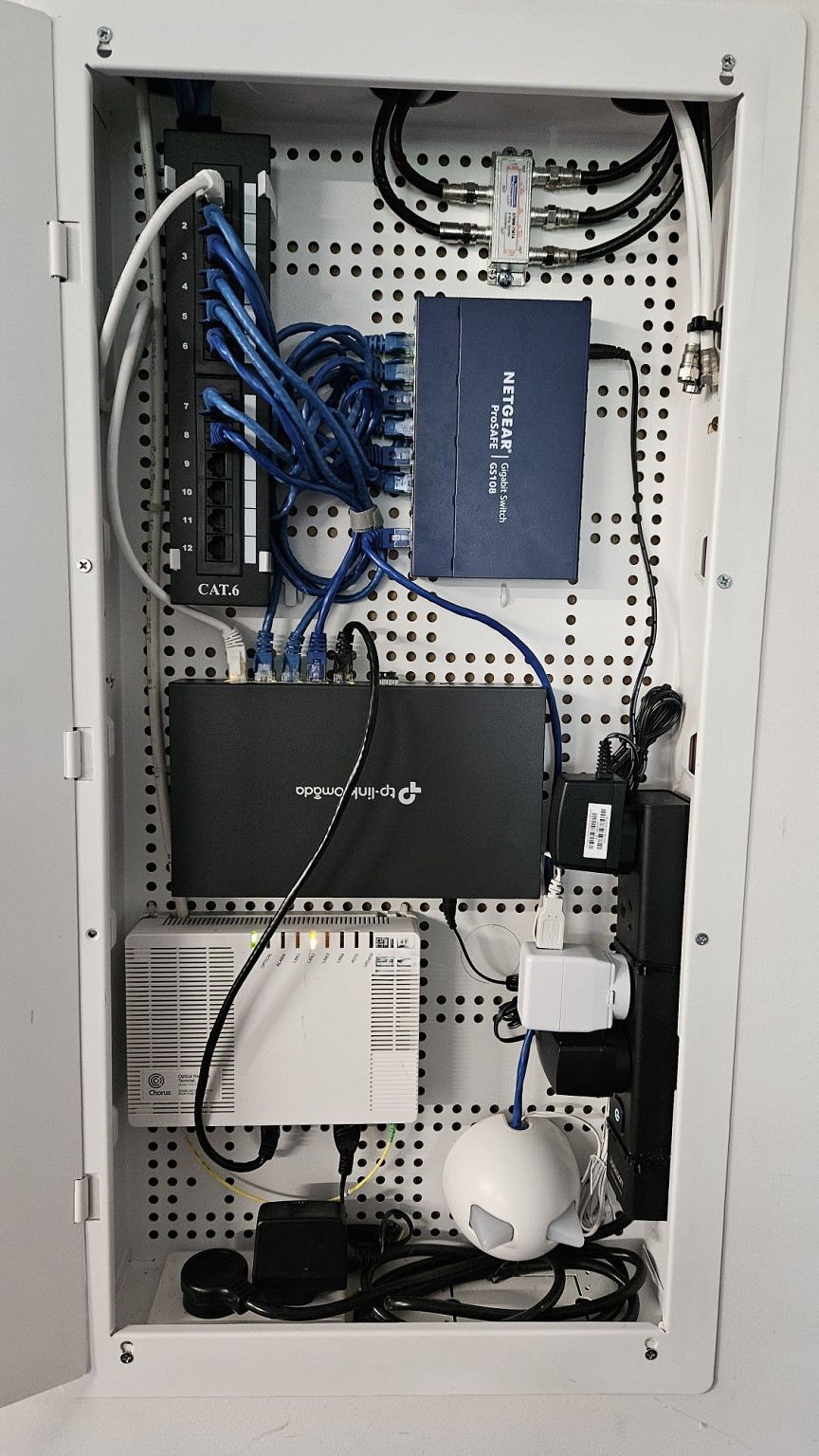


Other than the obvious tidy up:


  • separated out the co-ax from ethernet cables
  • new 12 port patch panel
  • new slimline power board
  • new wired router
  • XT8 now used as a wireless mesh AP along with its twin

So ending the year in a good place, wanted to say thanks to one and all for the inspiration.


Merry Christmas & Happy New Year :-)


Create new topic
mrgsm021
1538 posts

Uber Geek
+1 received by user: 310

ID Verified
Trusted

  #3446973 24-Dec-2025 18:54
Send private message

What a transformation! Well done.


My cabinet is worse than your before photo with all the ethernet cable slacks with RJ45 plugs, no patch panel whatsoever.


I am curious what you used to mount the router and switch inside the enclosure?


Mehrts
1112 posts

Uber Geek
+1 received by user: 984

Trusted

  #3446974 24-Dec-2025 18:56
Send private message

Nice work 👍

Are we placing bets on how long it'll be until you end up with a fully fledged rack of networking/server gear from fellow GZers? Because that's what tends to happen!


Merry Christmas to you too 🎅


stevob

24 posts

Geek
+1 received by user: 36


  #3446975 24-Dec-2025 19:01
Send private message

mrgsm021:


I am curious what you used to mount the router and switch inside the enclosure?


There's a couple of large Command Strips on the back of the router, and one on the switch. Not sure how the glue will hold up, plan B is to attach them to screws.


mrgsm021
1538 posts

Uber Geek
+1 received by user: 310

ID Verified
Trusted

  #3446978 24-Dec-2025 19:27
Send private message

Thanks!


I was hoping you were using some kind of screws for mounting so could ask for the size/type used.


It certainly looks a lot tidier than the cable tie mess that's currently in my cabinet.


nitro
756 posts

Ultimate Geek
+1 received by user: 335


  #3447112 25-Dec-2025 10:56
Send private message

looks awesome! good job!


k1w1k1d
1711 posts

Uber Geek
+1 received by user: 1305


  #3447113 25-Dec-2025 11:17
Send private message

Big improvement on the original mess that you started with. 


Probably just me being picky, but you probably need to get a longer patch cable to go around the ONT rather than over the front of it.


What is the round thing with ears in the bottom right corner?


Shop now for Dyson appliances (affiliate link).
Delorean
673 posts

Ultimate Geek
+1 received by user: 343

ID Verified
Trusted
Lifetime subscriber

  #3447114 25-Dec-2025 11:34
Send private message

That looks awesome. From experience, I can say how transformative a clean setup like this is. When I bought my house, the cabinet was an absolute mess, so I’ve since relocated all of the equipment into a proper rack and re-routed the Ethernet to suit.


The original cabinet now only houses the ONT and an 8-port Ethernet termination block. I’ve run 24 structured cables throughout the house for networking, cameras, and future expansion. It was a significant upfront investment, but the result is a home that’s fully cabled, cleanly organised, and properly future-proofed.


Referral Link: | Quic Broadband (use R142206E0L2CR for free setup)


stevob

24 posts

Geek
+1 received by user: 36


  #3447115 25-Dec-2025 11:48
Send private message

k1w1k1d:


Probably just me being picky, but you probably need to get a longer patch cable to go around the ONT rather than over the front of it.


What is the round thing with ears in the bottom right corner?


Fair observation re the patch cable thanks! Was also thinking to make up shorter ones for the switch>patch panel to get rid of the looped slack in the middle. There's a Grandstream HT802 to fit in too, so a bit of shuffling still to do.


The thing with ears is the IoT hub that connects the cat door to the internet/App - the ears are LED indicators e.g. are red when disconnected and flash green when the cat comes in and out...not that you'd need an LED to  tell you that...!


k1w1k1d
1711 posts

Uber Geek
+1 received by user: 1305


  #3447124 25-Dec-2025 13:03
Send private message

Daughter has the Sureflap pet door connect, but she didn't need the hub. She couldn't see what use it would be. Do you find it useful?


stevob

24 posts

Geek
+1 received by user: 36


  #3447155 25-Dec-2025 15:26
Send private message

k1w1k1d:


Daughter has the Sureflap pet door connect, but she didn't need the hub. She couldn't see what use it would be. Do you find it useful?


Yeah it's needed to use the Sureflap App - which we use to set a curfew, or lock/unlock the door remotely, also gives peace of mind when we're away to know if the cats are in or out.


Create new topic


Geekzone Live »

Try automatic live updates from Geekzone directly in your browser, without refreshing the page, with Geekzone Live now.


Are you subscribed to our RSS feed? You can download the latest headlines and summaries from our stories directly to your computer or smartphone by using a feed reader.