Geekzone: technology news, blogs, forums
Guest
Welcome Guest.
You haven't logged in yet. If you don't have an account you can register now.


Davoid

173 posts

Master Geek
+1 received by user: 37

Lifetime subscriber

#324427 8-Apr-2026 11:01
Send private message quote this post

I am not sure if this is the correct place to ask this, but as I am with Quic thought I would try here.


I have a Samsung S24 phone (Android), which over the last month or so, I am having to disable the wireless connection on the phone and reconnect using the password again to get any wireless Internet connection (it just says unable to connect to Internet, until I do as mentioned). This could happen a few times a day. I am not sure if this is router related or not. Any help would be appreciated.


Thanks, David


Create new topic

xpd

xpd
Geek of Coastguard
14116 posts

Uber Geek
+1 received by user: 4579

Retired Mod
ID Verified
Trusted
Lifetime subscriber

  #3479070 8-Apr-2026 11:04
Send private message quote this post

100% its phone/router related. 


What router ? Possible you have some limit enabled on devices.


XPD / Gavin


LinkTree


Davoid

173 posts

Master Geek
+1 received by user: 37

Lifetime subscriber

  #3479152 8-Apr-2026 12:56
Send private message quote this post

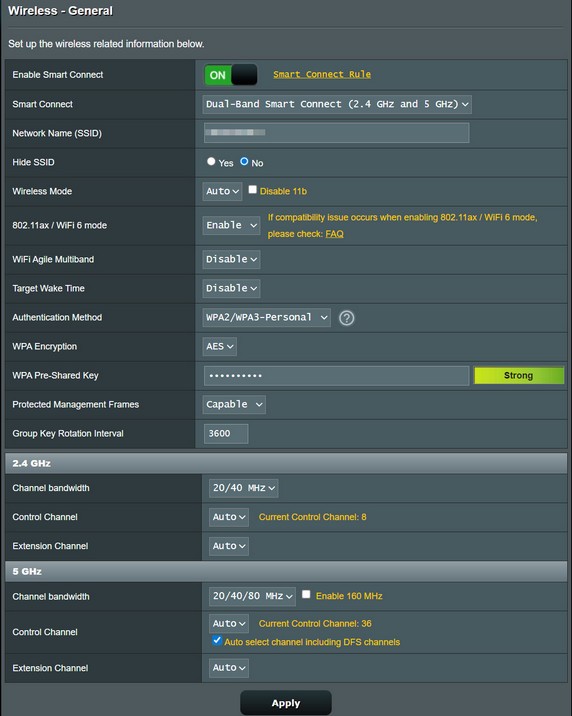
Thanks xpd for the reply, the router is the Asus RT-AX5400. I have attached an image of the wireless general settings.


freitasm
BDFL - Memuneh
80658 posts

Uber Geek
+1 received by user: 41070

Administrator
ID Verified
Trusted
Geekzone
Lifetime subscriber

  #3479164 8-Apr-2026 13:27
Send private message quote this post

You could try disabling 5GHz first. If it works after this it could be interference, and selecting a different channel could solve it 


For everyone else, the ISP has no control over your Wi-Fi and how it's setup.


Referral links: Quic Broadband (free setup code: R587125ERQ6VE) | Samsung | AliExpress | Wise | Sharesies 


Support Geekzone by subscribing (browse ads-free), or making a one-off or recurring donation through PressPatron.


Davoid

173 posts

Master Geek
+1 received by user: 37

Lifetime subscriber

  #3479257 8-Apr-2026 15:50
Send private message quote this post

Thanks for the reply, I have turned off 5GHz but no difference, so I set up a Guest Network on the router using WPA2 only (not WPA2/WPA3) but this still does not correct the issue. All I get is "connected without internet"
Actually, sometimes when I turn off auto connect and the set it back on, I will get the connection for a while.


thanks again,
David


Jase2985
13735 posts

Uber Geek
+1 received by user: 6216

ID Verified
Lifetime subscriber

  #3479261 8-Apr-2026 15:54
Send private message quote this post

any custom DNS on the router or devices? any VPN's?


Davoid

173 posts

Master Geek
+1 received by user: 37

Lifetime subscriber

  #3479262 8-Apr-2026 15:58
Send private message quote this post

No, it gets the DNS server address automatically from my provider.


Shop now for Dell laptops and other devices (affiliate link).
Jase2985
13735 posts

Uber Geek
+1 received by user: 6216

ID Verified
Lifetime subscriber

  #3479263 8-Apr-2026 16:00
Send private message quote this post

Davoid:


No, it gets the DNS server address automatically from my provider.


and your phone? 


Davoid

173 posts

Master Geek
+1 received by user: 37

Lifetime subscriber

  #3479267 8-Apr-2026 16:08
Send private message quote this post

Samsung S24


Create new topic


Geekzone Live »

Try automatic live updates from Geekzone directly in your browser, without refreshing the page, with Geekzone Live now.


Are you subscribed to our RSS feed? You can download the latest headlines and summaries from our stories directly to your computer or smartphone by using a feed reader.