Geekzone: technology news, blogs, forums
Guest
Welcome Guest.
You haven't logged in yet. If you don't have an account you can register now.


Javu84

5 posts

Wannabe Geek


#5305 18-Oct-2005 07:42
Send private message

Hi, my name is Javier, I'm from argentina; and I'm trying to conect a Zire 72 and/or a Tungsten T2 with a bluetooth rs232 adapter. I detect the adapter with both palms but can't connect to it with neither of them. I also have an USB bluetooth adapter on a PC and can connect with the 2 palms and the rs232 adapter. I would appretiate any help.

Thanks,
Javier

Create new topic
freitasm
BDFL - Memuneh
80646 posts

Uber Geek
+1 received by user: 41024

Administrator
ID Verified
Trusted
Geekzone
Lifetime subscriber

#21652 18-Oct-2005 09:33
Send private message

Hello Javier, welcome to Geekzone. What are you trying to achieve with this connection? A wireless HotSync?


Referral links: Quic Broadband (free setup code: R587125ERQ6VE) | Samsung | AliExpress | Wise | Sharesies 


Support Geekzone by subscribing (browse ads-free), or making a one-off or recurring donation through PressPatron.


Javu84

5 posts

Wannabe Geek


  #21653 18-Oct-2005 09:37
Send private message

No, the rs232 adapter is connected to a certain device and I want to activate/deactivate it with a mobile device (currently I have the zire72 and tungsten T2 to test)

freitasm
BDFL - Memuneh
80646 posts

Uber Geek
+1 received by user: 41024

Administrator
ID Verified
Trusted
Geekzone
Lifetime subscriber

  #21655 18-Oct-2005 09:45
Send private message

Hmmm. Ok. On the Palm I supposed you have already paired with the device if the device requires it (most devices have a defalt PIN 0000)?

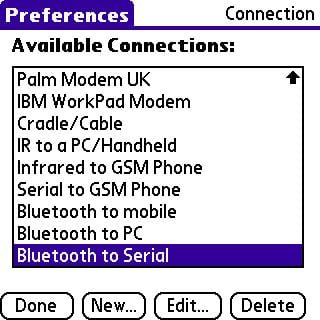
Next you have to create a configuration on Prefs with a new Connection. Then on your programs you have to use this new connection.


Have you tried these steps yet?


Referral links: Quic Broadband (free setup code: R587125ERQ6VE) | Samsung | AliExpress | Wise | Sharesies 


Support Geekzone by subscribing (browse ads-free), or making a one-off or recurring donation through PressPatron.


Javu84

5 posts

Wannabe Geek


  #21656 18-Oct-2005 09:51
Send private message

Yes and no. I tried to connect to the rs232 adapter and couldn't. Both palms detect it, but when I try to connect to it, it doesn't ask me for the pin... it just says it can't entablish connection....

freitasm
BDFL - Memuneh
80646 posts

Uber Geek
+1 received by user: 41024

Administrator
ID Verified
Trusted
Geekzone
Lifetime subscriber

#21660 18-Oct-2005 10:02
Send private message

Before connecting, have you tried entering the device in the list of trusted/paired/known devices in the Prefs | Bluetooth?


Referral links: Quic Broadband (free setup code: R587125ERQ6VE) | Samsung | AliExpress | Wise | Sharesies 


Support Geekzone by subscribing (browse ads-free), or making a one-off or recurring donation through PressPatron.


Javu84

5 posts

Wannabe Geek


  #21661 18-Oct-2005 10:06
Send private message

Yes I tried, but couldn't add it. It never asked me for the pin. just said it couldn't connect


Shop now for Dyson appliances (affiliate link).
Javu84

5 posts

Wannabe Geek


  #21663 18-Oct-2005 11:33
Send private message

Is there a tutorial on how to connect any device of this kind with a palm? or how to pair it? because I couldn't

Javier

freitasm
BDFL - Memuneh
80646 posts

Uber Geek
+1 received by user: 41024

Administrator
ID Verified
Trusted
Geekzone
Lifetime subscriber

#21664 18-Oct-2005 11:53
Send private message

You will have to use a search engine to look for a tutorial - better perhaps is to contact the device's manufacturer?

The guides we have here go through the configuration to connect to a standrd Bluetooth device, not an industrial one.


Referral links: Quic Broadband (free setup code: R587125ERQ6VE) | Samsung | AliExpress | Wise | Sharesies 


Support Geekzone by subscribing (browse ads-free), or making a one-off or recurring donation through PressPatron.


Create new topic


Geekzone Live »

Try automatic live updates from Geekzone directly in your browser, without refreshing the page, with Geekzone Live now.


Are you subscribed to our RSS feed? You can download the latest headlines and summaries from our stories directly to your computer or smartphone by using a feed reader.