Geekzone: technology news, blogs, forums
Guest
Welcome Guest.
You haven't logged in yet. If you don't have an account you can register now.


freitasm

BDFL - Memuneh
80944 posts

Uber Geek
+1 received by user: 41698

Administrator
ID Verified
Trusted
Geekzone
Lifetime subscriber

#57370 11-Feb-2010 11:50
Send private message

Is there a way to configure a DD-WRT router to use a specific QoS class based on destination IP address on the Internet?

I want to assign "Bulk" to all traffic from my LAN (any address) to a specific IP (online backup).


Referral links: Quic Broadband (free setup code: R587125ERQ6VE) | Samsung | AliExpress | Wise | Sharesies 


Support Geekzone by subscribing (browse ads-free), or making a one-off or recurring donation through PressPatron.



Create new topic
sbiddle
30853 posts

Uber Geek
+1 received by user: 9998

Retired Mod
Trusted
Biddle Corp
Lifetime subscriber

  #297927 11-Feb-2010 13:07
Send private message

Since you can't control traffic beyond your router it makes no difference. I'm not aware of any ISP in NZ that will respect any traffic tagging on a residential connection.

You can class the traffic as bulk on your home network but if your focus is ensuring QoS for VoIP there is no need providing the VoIP traffic is already receiving greater priority.


freitasm

BDFL - Memuneh
80944 posts

Uber Geek
+1 received by user: 41698

Administrator
ID Verified
Trusted
Geekzone
Lifetime subscriber

  #297931 11-Feb-2010 13:11
Send private message

I think the QoS on DD-WRT is prioritising what packets the router itself will push out first (outbound) and distribute first to the LAN (inbound) - not actually tagging these packets.

I just want to make sure activities as online backup - which from my laptop goes at 1Mbps upstream on a bad day and I have two PCs running Mozy Home here - don't interfere with other traffic on that router.


Referral links: Quic Broadband (free setup code: R587125ERQ6VE) | Samsung | AliExpress | Wise | Sharesies 


Support Geekzone by subscribing (browse ads-free), or making a one-off or recurring donation through PressPatron.


Ragnor
8287 posts

Uber Geek
+1 received by user: 591

Trusted

  #297949 11-Feb-2010 14:03
Send private message

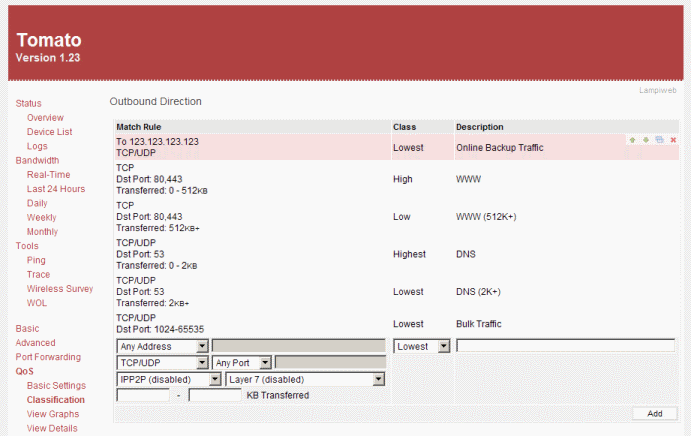
A QoS rule for a specific destination ip is very easy to setup in Tomato which has a much better admin UI than DD-WRT especially for QoS.

Not sure about DD-WRT haven't used it for ages.


freitasm

BDFL - Memuneh
80944 posts

Uber Geek
+1 received by user: 41698

Administrator
ID Verified
Trusted
Geekzone
Lifetime subscriber

  #297951 11-Feb-2010 14:05
Send private message

Just to clarify - does Tomato allows for a QoS rule based on IP for OUTBOUND connections? I am not talking about the internal LAN IPs, this can be done on DD-WRT quite easily.


Referral links: Quic Broadband (free setup code: R587125ERQ6VE) | Samsung | AliExpress | Wise | Sharesies 


Support Geekzone by subscribing (browse ads-free), or making a one-off or recurring donation through PressPatron.


art3011
39 posts

Geek


  #297962 11-Feb-2010 14:44
Send private message

If you mean rule based on destination ip, then yes. See tutorial here http://www.wi-fiplanet.com/tut... for QoS on Tomato. I decided to use Tomato instead of dd-wrt for simplicity of QoS setup.

Ragnor
8287 posts

Uber Geek
+1 received by user: 591

Trusted

  #297968 11-Feb-2010 14:58
Send private message

Bit blurry because I ghetto shrunk the image but here's an example:


Stream your favourite shows now on Apple TV (affiliate link).
freitasm

BDFL - Memuneh
80944 posts

Uber Geek
+1 received by user: 41698

Administrator
ID Verified
Trusted
Geekzone
Lifetime subscriber

  #297970 11-Feb-2010 14:59
Send private message

Yep, better than DD-WRT it seems... Thanks folks.


Referral links: Quic Broadband (free setup code: R587125ERQ6VE) | Samsung | AliExpress | Wise | Sharesies 


Support Geekzone by subscribing (browse ads-free), or making a one-off or recurring donation through PressPatron.


Create new topic


Geekzone Live »

Try automatic live updates from Geekzone directly in your browser, without refreshing the page, with Geekzone Live now.


Are you subscribed to our RSS feed? You can download the latest headlines and summaries from our stories directly to your computer or smartphone by using a feed reader.