Geekzone: technology news, blogs, forums
Guest
Welcome Guest.
You haven't logged in yet. If you don't have an account you can register now.


ToPGuNZ

Topgunz
399 posts

Ultimate Geek
+1 received by user: 142

Lifetime subscriber

#91789 20-Oct-2011 11:45
Send private message


Hi All,

I have a 4 port router with modem (netgear).

I would like to install it in my cabinet but I am not sure what to plug into where.

I thought I would connect 4 of the yellow cables (using the appropriate number for the room required) to the 4 ports on the router. Do I connect the end labeled to switch or the end labeled to rooms?

Also where do I then conenct the modem cable to?

I did try connecting one of the ends going to switch to the router port and then putting the modem cable in its place but got nothing.

Large pic here:
https://cdn.geekzone.co.nz/imagessubs/8c3b6804c63d4b86afdd987e1b27cc84.jpg


Create new topic
chevrolux
4962 posts

Uber Geek
+1 received by user: 2638
Inactive user


  #535578 20-Oct-2011 12:57
Send private message

Have you got a monitored alarm? And if yes, where is your splitter located? If you plug a phone in to your wall outlets at the moment are they live? cant remember off the top of my head but i think that spare rj45 on the top panel is a test outlet and you could probably pick up the dsl from that. The bottom panel goes to your wall outlets so patch from the router in to whatever outlets you want. With any luck your wall outlets are number but if a sparky did the cabling i doubt it lol


ToPGuNZ

Topgunz
399 posts

Ultimate Geek
+1 received by user: 142

Lifetime subscriber

  #535619 20-Oct-2011 14:32
Send private message

Hi chevrolux,

No monitored alarm.
Yes phones work in the wall outlets.
Yes outlets are numbered.

Laser Electrical did the work and it was excellent. They explained to my wife how it worked but she said just plug it in. I said plug it in to where.

I will have a go at your suggestion thanks.


chevrolux
4962 posts

Uber Geek
+1 received by user: 2638
Inactive user


  #535785 20-Oct-2011 19:38
Send private message

No monitored alarm no worries. There wont be a splitter so any one of those 8 outlets in the top panel will have dsl on it. Your line cord will plug straight in all of those ports.


Ragnor
8279 posts

Uber Geek
+1 received by user: 585

Trusted

  #535840 20-Oct-2011 21:30
Send private message

Looks like all the jacks are patched to be phones currently, 

An ADSL master filter should have definitely been fitted imo.

Here's part of the the manual for Hills Home Hub units, you can see in 2nd diagram on the first page how they recommend it be setup.
http://www.hillssignalmaster.co.nz/PDF_FILES/pdf_updates_06_06/HILLS/home%20auto/PHONE%20AND%20DATA.pdf 


This is what should be done imo...

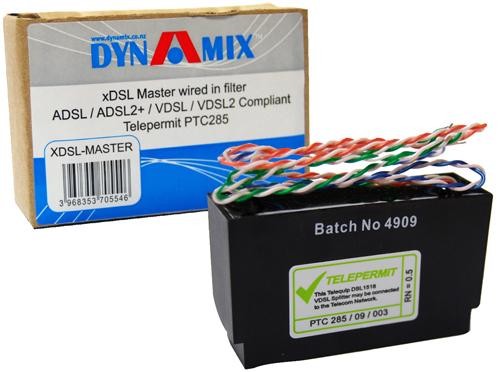
1: Install a DSL master filter (they are cheap ~$30ish)
2: The phone out from the filter goes into the top unit (phone patch panel)
3: The DSL out from the filter into the modem which you could mount below the 2nd unit
4: Any jacks (the 2nd patch panel) that you want to make network ports should be unplugged from the phone patch and plugged into the switch on your modem/router.

I squiggled the gist of it on your photo, have a look:
https://cdn.geekzone.co.nz/imagessubs/84e6336016eef0f2cbac6573ff2890b1.jpg


Q: Is there a power socket near or in the cabinet for the modem to use?

ToPGuNZ

Topgunz
399 posts

Ultimate Geek
+1 received by user: 142

Lifetime subscriber

  #535997 21-Oct-2011 10:04
Send private message

Thank you very much Ragnor, it is all starting to make a lot more sense now.

Last night I did a similar thing to what you descibe. I put a filter on and pluged into the phone patch panel and the cable that was in the phone patch panel I put it into the switch on the router. The modem picked up the dsl but it would not recognise the cable being plugged into the switch on the router. I thought the cable might not be compatible with the router.

I will have a read of the manual you provided and I should then be able to get it sorted thanks.


Yes there is two power sockets in the cabinet.


Spyware
3818 posts

Uber Geek
+1 received by user: 1366

Lifetime subscriber

  #536019 21-Oct-2011 10:47
Send private message

Switch will only light its link led if you had a network interface card at the other end of the cable run. Also are all 4 pairs terminated at the data outlets, one would assume so but maybe not.


Spark Max Fibre using Mikrotik CCR1009-8G-1S-1S+, CRS125-24G-1S, Unifi UAP, U6-Pro, UAP-AC-M-Pro, Apple TV 4K (2022), Apple TV 4K (2017), iPad Air 1st gen, iPad Air 4th gen, iPhone 13, SkyNZ3151 (the white box). If it doesn't move then it's data cabled.


Shop now at Mighty Ape (affiliate link).
Ragnor
8279 posts

Uber Geek
+1 received by user: 585

Trusted

  #536343 22-Oct-2011 00:19
Send private message

ToPGuNZ:  I put a filter on and pluged into the phone patch panel and the cable that was in the phone patch panel.


You really want a proper master filter on the cable on the left, the one bringing the phone line(s) in, this needs to be before the hills telephone patch unit.

They're about $28-30 on trademe or from a electrical parts place and look like this


chevrolux
4962 posts

Uber Geek
+1 received by user: 2638
Inactive user


  #536405 22-Oct-2011 12:34
Send private message

Yea totally agree. chuck a splitter in the etp and then on the hills unit disconnect the orange pair from the cable on the left and whack a jack on the end of it. That way nothing can go wrong with your dsl if someone gets a bit patch happy in your cabinet.

webwat
2036 posts

Uber Geek
+1 received by user: 145

Trusted

  #536411 22-Oct-2011 12:45
Send private message

But the filter should be able to handle a couple of phones no problem, at least for now. The ethernet ports light up only when there is ethernet synchronised on both ends -- basically it should just work if a computer is on and connected to that outlet with straight patch cables.


Time to find a new industry!


ToPGuNZ

Topgunz
399 posts

Ultimate Geek
+1 received by user: 142

Lifetime subscriber

  #537684 26-Oct-2011 12:46
Send private message

Thanks for the replies, I will get a master filter installed and take it from there.

Create new topic


Geekzone Live »

Try automatic live updates from Geekzone directly in your browser, without refreshing the page, with Geekzone Live now.


Are you subscribed to our RSS feed? You can download the latest headlines and summaries from our stories directly to your computer or smartphone by using a feed reader.