Geekzone: technology news, blogs, forums
Guest
Welcome Guest.
You haven't logged in yet. If you don't have an account you can register now.


freitasm

BDFL - Memuneh
80647 posts

Uber Geek
+1 received by user: 41031

Administrator
ID Verified
Trusted
Geekzone
Lifetime subscriber

#317569 26-Oct-2024 21:51
Send private message

We have six Amazon Echo devices at home (plus a couple of Amazon Fire TV).


A couple of days ago two of these devices (Echo Hub and Echo Studio) stopped responding.


I started troubleshooting with the Echo Hub (a lot easier with a touchscreen) and tried to get it back to work.


I unplugged it and plugged it back in, but it was still "disconnected".


I decided to do a factory reset and remove it from my account. I connected to Wi-Fi and entered my information, account email and password, but I got an error message saying, "We can't find your Amazon account." I couldn't get past it.


I tried a few times and different things. I changed the password on my Amazon account to a passphrase (four words), but I still couldn't register the device. I disabled 2FA (authenticator app) but couldn't register the device.


So, I unpacked a brand new Echo Show 5. And it can't find my account either.


I thought it could be something on my network (perhaps the NTP server was interfering with the date/time, causing SSL to fail?), so I decided to use my phone as a hotspot.


Even so, I still couldn't get past that error.


Now I have an Echo Studio, Hub and Show 5 that can't connect to my account. The other devices are still connected and working.


I've seen comments on Reddit from other people saying something similar ("disconnecting") happened to them. Is anyone here seeing it too?




Referral links: Quic Broadband (free setup code: R587125ERQ6VE) | Samsung | AliExpress | Wise | Sharesies 


Support Geekzone by subscribing (browse ads-free), or making a one-off or recurring donation through PressPatron.


Create new topic
Kiwi1971
696 posts

Ultimate Geek
+1 received by user: 9


  #3302247 28-Oct-2024 09:33
Send private message

I was just about to return mine to Harvey Norman as it is experiencing this exact same issue.


A Google search found similar issues but yours was the only one that matched exactly. Maybe it is NZ-centric?


My Echo Hub stopped responding to voice commands, and when I pulled down the menu it said "Disconnected from the network" I tried to reconnect to WiFi and it looked like it had, but kept saying disconnected from the network. 


I had trouble getting into the device settings as the button wasn't responding to presses. It eventually opened the settings after about 10-15 attempts and I tried a factory reset but chose to keep device connections.  Couldn't connect.


Then I did a physical factory reset using the mute and vol down buttons for 20 seconds and deregistered it through the app.


When it restarted it would connect to the WiFi or hotspot (I tried that too) but every attempt to register, failed to find my account after maybe 10 seconds of searching. 


I also reset my Amazon password and removed my passkey and 2FA.  No joy.


Thinking it might be my account blocking registration, I created a new Amazon account with a different email address and again it too wouldn't register the Hub


To check that it wasn't related to my Amazon account, I risked a factory reset on my Echo Show 8 and was able to re-register the device successfully.  However, there was an issue with not liking what I thought to be the new password that I had created the day before.  I reset it again and it registered on the second attempt. Phew.  


I have tried a few times today to register the Echo Hub while monitoring the connection on my router app to confirm it was connected successfully. It was connected to the WiFi and transmitting and receiving small amounts of data.  


I'm assuming this is an Amazon authentication issue at their end. 


freitasm

BDFL - Memuneh
80647 posts

Uber Geek
+1 received by user: 41031

Administrator
ID Verified
Trusted
Geekzone
Lifetime subscriber

  #3302250 28-Oct-2024 09:39
Send private message

I posted on Reddit too, quite a few reports of the same problem.

I have reached to the Amazon PR team.


Referral links: Quic Broadband (free setup code: R587125ERQ6VE) | Samsung | AliExpress | Wise | Sharesies 


Support Geekzone by subscribing (browse ads-free), or making a one-off or recurring donation through PressPatron.


Kiwi1971
696 posts

Ultimate Geek
+1 received by user: 9


  #3302251 28-Oct-2024 09:45
Send private message

Thanks, I will look over there also.  Reddit results are thin in my Google search results and also old. 


Hope this gets sorted as I have run out of troubleshooting ideas. 


I do wonder if I would be able to register on a new out-of-the-box unit. I nearly took mine back yesterday, I would have found out by now.


Cheers!


freitasm

BDFL - Memuneh
80647 posts

Uber Geek
+1 received by user: 41031

Administrator
ID Verified
Trusted
Geekzone
Lifetime subscriber

  #3302253 28-Oct-2024 09:48
Send private message

I had an Echo Show 5 here, unopened. It didn't work.


Referral links: Quic Broadband (free setup code: R587125ERQ6VE) | Samsung | AliExpress | Wise | Sharesies 


Support Geekzone by subscribing (browse ads-free), or making a one-off or recurring donation through PressPatron.


networkn
Networkn
32862 posts

Uber Geek
+1 received by user: 15453

ID Verified
Trusted
Lifetime subscriber

  #3302254 28-Oct-2024 09:56
Send private message

I believe there has been some form of outage. Our devices didn't work for a number of days, and then started working again. I saw a thread a few days ago that mentioned they had some form of outage.


SepticSceptic
2263 posts

Uber Geek
+1 received by user: 779

Trusted

  #3302604 28-Oct-2024 23:02
Send private message

No problems so far on my 3 different Echo's.
Have a Dot, Pop, and an older tube-style Echo.

HP


Shop now for HP laptops and other devices (affiliate link).
freitasm

BDFL - Memuneh
80647 posts

Uber Geek
+1 received by user: 41031

Administrator
ID Verified
Trusted
Geekzone
Lifetime subscriber

  #3302630 29-Oct-2024 09:26
Send private message

Amazon PR team tells me they're investigating. More later.


Referral links: Quic Broadband (free setup code: R587125ERQ6VE) | Samsung | AliExpress | Wise | Sharesies 


Support Geekzone by subscribing (browse ads-free), or making a one-off or recurring donation through PressPatron.


Delorean
673 posts

Ultimate Geek
+1 received by user: 343

ID Verified
Trusted
Lifetime subscriber

  #3302706 29-Oct-2024 13:10
Send private message

I'm not sure if this is related, but since a recent firmware update, my Echo Show 5 has started displaying several ads on the weather page and elsewhere on the screen.


I really hope the screens don’t turn into an infomercial, especially since we don’t have Amazon here - it seems rather pointless!


Referral Link: | Quic Broadband (use R142206E0L2CR for free setup)


richms
29098 posts

Uber Geek
+1 received by user: 10209

Trusted
Lifetime subscriber

  #3302734 29-Oct-2024 14:41
Send private message

Delorean:


I'm not sure if this is related, but since a recent firmware update, my Echo Show 5 has started displaying several ads on the weather page and elsewhere on the screen.


I really hope the screens don’t turn into an infomercial, especially since we don’t have Amazon here - it seems rather pointless!


My apps only google TVs have also just had ad's appear on them. The echos have had them for ages. Got to the point I have unplugged the echo with a screen in the kitchen because it was annoying me.


That and the "By the way I found a routine...." crap is making it really get on my nerves. That and the current thing where many of my tuya lights are now not working from Alexa unless I say "alexa lights 100%" or "alexa lights 0%" instead of on and off.


Richard rich.ms

timmmay
20858 posts

Uber Geek
+1 received by user: 5350

Trusted
Lifetime subscriber

  #3302909 29-Oct-2024 20:51
Send private message

"Alexa Screen Off" - partial solution to advertising. If advertising becomes prominent I'll toss them out.


freitasm

BDFL - Memuneh
80647 posts

Uber Geek
+1 received by user: 41031

Administrator
ID Verified
Trusted
Geekzone
Lifetime subscriber

  #3303127 30-Oct-2024 12:16
Send private message

I am not at home now but I'm told this is fixed. Can you confirm @Kiwi1971?


Referral links: Quic Broadband (free setup code: R587125ERQ6VE) | Samsung | AliExpress | Wise | Sharesies 


Support Geekzone by subscribing (browse ads-free), or making a one-off or recurring donation through PressPatron.


HP


Shop now for HP laptops and other devices (affiliate link).
Kiwi1971
696 posts

Ultimate Geek
+1 received by user: 9


  #3303169 30-Oct-2024 13:31
Send private message

Yes, I was just coming here to say it was working again. 


Thanks for reaching out to them.  I would be interested in their explanation of the issue.


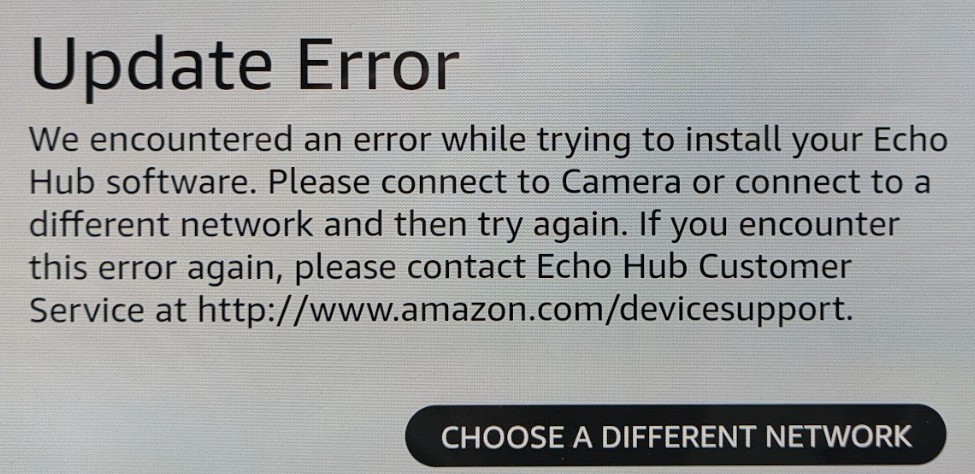
I completed the setup after posting the above and hit one hiccup when it needed to update after signing in and it kept failing, I am not sure if it was disconnecting from the network but connecting to a mobile hotspot allowed it to complete the installation, now it seems happy on the WiFi and is back to controlling lights etc. 


*The reference to 'Camera' in the screenshot, refers to a WiFi network I have, called 'Camera' for smart devices, not an actual camera. 


Create new topic


Geekzone Live »

Try automatic live updates from Geekzone directly in your browser, without refreshing the page, with Geekzone Live now.


Are you subscribed to our RSS feed? You can download the latest headlines and summaries from our stories directly to your computer or smartphone by using a feed reader.