Geekzone: technology news, blogs, forums
Guest
Welcome Guest.
You haven't logged in yet. If you don't have an account you can register now.


View this topic in a long page with up to 500 replies per page Create new topic
1 | 2 
jamesrt
1679 posts

Uber Geek
+1 received by user: 961

ID Verified
Trusted
Lifetime subscriber

  #2399165 16-Jan-2020 17:53
Send private message

jamesrt:
lchiu7: But if I press it I see a brief flash of another screen A Better Way to Pay by Google and then it disappears.


Yes, I can't do much myself with the app either; the 'disappear' is the app crashing, I think. It may be more stable if the VPN was still up; or if I used the proxy trick from the XDA article, or indeed went to Australia! [Hopefully will be visiting later in the year so will be interesting to compare functionality]

I said it worked, I didn't say it worked well!!


OK, I've had some more success after some reading in the XDA thread for the "Permanent Proxy" app.


A number of people have reported the same problem - touching the "3 dots" causes the app to crash, etc.  Turns out that the app is partially disabled; and needs to be "fully" enabled for it to work.


I turned by ProxyVPN back on (phone), and made sure the watch had WiFi disabled (just to be sure).  Then went into the Play Store on the watch, and  searched for "pay", and then selected Google Pay off the list.  It was marked as "disabled", and gave me the option to enable it, which I did.


Left things for a few minutes, and then rebooted the watch again (still on the VPN).


Interestingly, after the reboot, the first time I accessed Google Pay, it went through the whole setup process again; but this time when the app finished and the virtual card was visible on the screen, the "3 dots" worked, and I could then add additional cards, examine the card I had, etc, etc.


---


In the end, I've just removed the card, and disabled my watch PIN again; which is what I was hoping to do.


TBH, Pay on Wear is a nice trick, but I'll almost certainly have my phone with me 99% of the time when I'm trying to do a PayWave transaction; and the hoop jumping was getting a bit much.  Plus having a pin on the watch was becoming a real pain in the a**.


If NZ ever becomes officially supported I'd think about enabling it again for the geek-factor; but at the end of the day, I'm happy not using it currently.


lchiu7

6528 posts

Uber Geek
+1 received by user: 546

Trusted

  #2400274 16-Jan-2020 21:37
Send private message

jamesrt:


Interestingly, after the reboot, the first time I accessed Google Pay, it went through the whole setup process again; but this time when the app finished and the virtual card was visible on the screen, the "3 dots" worked, and I could then add additional cards, examine the card I had, etc, etc.


---


In the end, I've just removed the card, and disabled my watch PIN again; which is what I was hoping to do.


I never got that app to work - maybe another setup might work but I can't be bothered now.


The PIN (well I used a pattern) didn't bother me since it only kicked in if I take the watch off my wrist.


As you note, it's a nice trick but I cannot find a valid use case for it.


Staying in Wellington. Check out my AirBnB in the Wellington CBD.  https://www.airbnb.co.nz/h/wellycbd  PM me and mention GZ to get a 15% discount and no AirBnB charges.


lchiu7

6528 posts

Uber Geek
+1 received by user: 546

Trusted

  #2400371 17-Jan-2020 08:19
Send private message

lchiu7:


jamesrt:


Interestingly, after the reboot, the first time I accessed Google Pay, it went through the whole setup process again; but this time when the app finished and the virtual card was visible on the screen, the "3 dots" worked, and I could then add additional cards, examine the card I had, etc, etc.


---


In the end, I've just removed the card, and disabled my watch PIN again; which is what I was hoping to do.


I never got that app to work - maybe another setup might work but I can't be bothered now.


The PIN (well I used a pattern) didn't bother me since it only kicked in if I take the watch off my wrist.


As you note, it's a nice trick but I cannot find a valid use case for it.


Noticed that after having the watch on the charger all night the app disappeared. But rebooting the watch while the phone was on Tunnelbear restored it.  Still can't bring up the transaction list by swiping the card icon so the installation isn't quite right. Might play around with it this weekend just for academic curiosity.


Staying in Wellington. Check out my AirBnB in the Wellington CBD.  https://www.airbnb.co.nz/h/wellycbd  PM me and mention GZ to get a 15% discount and no AirBnB charges.


jamesrt
1679 posts

Uber Geek
+1 received by user: 961

ID Verified
Trusted
Lifetime subscriber

  #2400373 17-Jan-2020 08:27
Send private message

lchiu7: Still can't bring up the transaction list by swiping the card icon so the installation isn't quite right. Might play around with it this weekend just for academic curiosity.


One other thing I did when I was fiddling was a force-install of Google Pay via the Play store on a web browser on a PC.  I noticed that on the web-based store, my phone listed it as being installed, but the watch didn't, so I told it to.  It didn't install as far as I could tell, but that may have triggered something in the background - who knows?   (VPN was active at the time).


May be something to try yourself...  


lchiu7

6528 posts

Uber Geek
+1 received by user: 546

Trusted

  #2400382 17-Jan-2020 08:39
Send private message

jamesrt:


lchiu7: Still can't bring up the transaction list by swiping the card icon so the installation isn't quite right. Might play around with it this weekend just for academic curiosity.


One other thing I did when I was fiddling was a force-install of Google Pay via the Play store on a web browser on a PC.  I noticed that on the web-based store, my phone listed it as being installed, but the watch didn't, so I told it to.  It didn't install as far as I could tell, but that may have triggered something in the background - who knows?   (VPN was active at the time).


May be something to try yourself...  


No on Google Play it shows the app is installed on the watch. I might try an uninstall and re-install while on the VPN


[UPDATE]


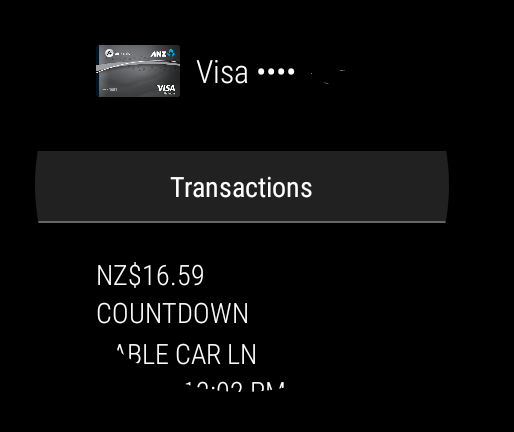
Note sure what happened but I did the following. I uninstalled the app and then did an install. It's a system app so it said Update. Clicked OK and then waited forever as it was downloading. It never completed so I just restarted the watch (all while on the VPN) and now the app behaves as it should Press the three dots and now I see another screen and if I swipe up I get Add Card, How to Pay. No transactions but I haven't done any since I restarted so will go out for a Big Mac again today :-)


[Update 2]


It's working pretty seamlessly now. Did 4 transactions today and all worked fine. And the transaction shows up on the phone.


Here's a screenshot


Still not convinced as to the utility of this but nice as a proof of concept


Staying in Wellington. Check out my AirBnB in the Wellington CBD.  https://www.airbnb.co.nz/h/wellycbd  PM me and mention GZ to get a 15% discount and no AirBnB charges.


geocom
597 posts

Ultimate Geek
+1 received by user: 143

Subscriber

  #2758981 12-Aug-2021 11:29
Send private message

Woke up this morning to notice that gPay was enabled on my watch. Looks like google has now actually started to enabled gPay in NZ. They had announced that support was coming but that was slated for a few months ago.


Not sure if its just a internet setting that google needed to flip but from what I can tell no updates where done to my watch or gpay last night. Did enable gpay last night to see if it was yet working but it wasn't so maybe it needs to be enabled first then left for a bit to enable but could also just be that it now just works.


Geoff E


Shop now for Lego sets and other gifts (affiliate link).
jamesrt
1679 posts

Uber Geek
+1 received by user: 961

ID Verified
Trusted
Lifetime subscriber

  #2759023 12-Aug-2021 13:06
Send private message

Huh; me too.  Nice.


TicWatch Pro 3


--


On a related note, I've also got a TicWatch C2 which also has NFC support and should therefore work with gPay/Wear  (it did when I used the VPN trick), which I don't use any more.


PM if interested; I'll probably post in the "Offers and Wanted" too when I get around to it. 


Oblivian
7374 posts

Uber Geek
+1 received by user: 2143

ID Verified

  #2759030 12-Aug-2021 13:23
Send private message

As of overnight/early am..


For starters, Google Pay’s support for contactless payments from smartwatches is expanding to 16 new countries: Belgium, Brazil, Chile, Croatia, Czech Republic, Denmark, Finland, Hong Kong, Ireland, New Zealand, Norway, Slovakia, Sweden, Taiwan, Ukraine, and United Arab Emirates. It’s previously been possible to use Google Pay from smartphones in these countries, but not from smartwatches.


And looks like a messaging app update to make it more usable.


Shame my still going like-new hardly worn moto360 can't keep up. Silly early adoptions that would 'never take off'


lchiu7

6528 posts

Uber Geek
+1 received by user: 546

Trusted

  #2759227 12-Aug-2021 18:48
Send private message

jamesrt:


Huh; me too.  Nice.


TicWatch Pro 3


--. 


Me too I wondered why it still worked when I did not do the VPN hack


Staying in Wellington. Check out my AirBnB in the Wellington CBD.  https://www.airbnb.co.nz/h/wellycbd  PM me and mention GZ to get a 15% discount and no AirBnB charges.


kingjj
1731 posts

Uber Geek
+1 received by user: 450

ID Verified
Trusted

  #2759287 12-Aug-2021 19:17
Send private message

Huh neat, just checked my Oppo Watch it it let me setup Gpay without any grief. I'm going to have to venture out tomorrow and test it out. Will be useful in my case as my phone doesn't have NFC and my work has disabled ApplePay on work devices. Cheers for the heads up @geocom


Antzzz
190 posts

Master Geek
+1 received by user: 12


  #2775690 9-Sep-2021 21:15
Send private message

Tried it out today at Countdown on my aging Fossil Gen 4 watch - worked perfectly. Only thing is that you need to have the Google Pay app running which makes it slightly less convenient than just unlocking and tapping your phone...


Move to New Zealand's best fibre broadband service (affiliate link). Free setup code: R587125ERQ6VE. Note that to use Quic Broadband you must be comfortable with configuring your own router.
lchiu7

6528 posts

Uber Geek
+1 received by user: 546

Trusted

  #2775759 10-Sep-2021 07:34
Send private message

Antzzz:


Tried it out today at Countdown on my aging Fossil Gen 4 watch - worked perfectly. Only thing is that you need to have the Google Pay app running which makes it slightly less convenient than just unlocking and tapping your phone...


On the Gen 5 Fossil I have assigned the top right button to Google Pay. I think this could be a default? So just one press of that button and Google Play opens up ready for you to tap. I see the Gen 4 also has the top button so it should work similarly.


Staying in Wellington. Check out my AirBnB in the Wellington CBD.  https://www.airbnb.co.nz/h/wellycbd  PM me and mention GZ to get a 15% discount and no AirBnB charges.


1 | 2 
View this topic in a long page with up to 500 replies per page Create new topic


Geekzone Live »

Try automatic live updates from Geekzone directly in your browser, without refreshing the page, with Geekzone Live now.


Are you subscribed to our RSS feed? You can download the latest headlines and summaries from our stories directly to your computer or smartphone by using a feed reader.