Geekzone: technology news, blogs, forums
Guest
Welcome Guest.
You haven't logged in yet. If you don't have an account you can register now.


View this topic in a long page with up to 500 replies per page Create new topic
1 | 2 
Loismustdye
942 posts

Ultimate Geek
+1 received by user: 256

Trusted

  #3275074 25-Aug-2024 09:27
Send private message

To hijack the thread I’m looking at getting a printer to print small accessories (weapons and the occasional larger background accessories piece) for my action figures etc (as well as the kids wanting to have a play), so would be wanting something that can do the finer prints to avoid lines etc.


Would the ender that’s currently on sale at pb tech be a good starting point? https://www.pbtech.co.nz/product/PTRCRL0006/Creality-FDM-3D-Printer-Ender-3-V3-SE-Build-Size-2


Not really wanting to spend a fortune in case it’s a fly by night trend for myself and the kids but could push the budget a bit higher if reccomended.


cheers


mdf

mdf
3566 posts

Uber Geek
+1 received by user: 1519

Trusted

  #3275146 25-Aug-2024 10:57
Send private message

For models and figurines, a resin printer is probably the better option than FDM. FDM will always have some layer lines off the printer though if you're painting a high build primer will deal with most of that. Pros and cons to resin printers so you'd probably want to do a little more investigation. 


tchart
2396 posts

Uber Geek
+1 received by user: 577

ID Verified
Trusted

  #3275185 25-Aug-2024 14:40
Send private message

Picked up an Ender 3 V3 SE yesterday as they are $299 at JayCar. This is my second printer.

Pretty happy with it so far. Just printed out some figure stands so far and quality is good.


Reanalyse
398 posts

Ultimate Geek
+1 received by user: 311


  #3275190 25-Aug-2024 15:53
Send private message

Found an interesting 3D model tool- AI Rodin


Type in text or add image and it will generate a printable model as STL file.


I have used it, and like it, but YMMV


Link here https://hyperhuman.deemos.com/


gehenna
8667 posts

Uber Geek
+1 received by user: 3883

Moderator
Trusted
Lifetime subscriber

  #3275191 25-Aug-2024 16:01
Send private message

Creality if you have time to troubleshoot and test and troubleshoot and test.....which can be a rewarding deep-dive education about how these devices work.... Prusa / Bambu Lab if you want to spend more time printing and less time troubleshooting.  


gehenna
8667 posts

Uber Geek
+1 received by user: 3883

Moderator
Trusted
Lifetime subscriber

  #3275192 25-Aug-2024 16:03
Send private message

mdf:


For models and figurines, a resin printer is probably the better option than FDM. FDM will always have some layer lines off the printer though if you're painting a high build primer will deal with most of that. Pros and cons to resin printers so you'd probably want to do a little more investigation. 


Some of the newer FDM printers support smaller nozzle sizes and hot ends, and the print quality is comparable to entry / mid-resolution resin printers.  


Shop now on AliExpress (affiliate link).
richms
29098 posts

Uber Geek
+1 received by user: 10209

Trusted
Lifetime subscriber

  #3275193 25-Aug-2024 16:05
Send private message

gehenna:

Creality if you have time to troubleshoot and test and troubleshoot and test.....which can be a rewarding deep-dive education about how these devices work.... Prusa / Bambu Lab if you want to spend more time printing and less time troubleshooting.  


That was the case before the v3se but it is such a different machine to the old ones made of just 2020 extrusion that IMO they shouldn't have called it an ender 3.


Richard rich.ms

gehenna
8667 posts

Uber Geek
+1 received by user: 3883

Moderator
Trusted
Lifetime subscriber

  #3275197 25-Aug-2024 16:17
Send private message

That's the one that informed my opinion.


michaelmurfy
meow
13579 posts

Uber Geek
+1 received by user: 10910

Moderator
ID Verified
Trusted
Lifetime subscriber

  #3275213 25-Aug-2024 18:04
Send private message

@Loismustdye Where are you based? Because I do have literally everything including a Resin 3D Printer (Anycubic Photon Mono 4K) along with the Anycubic Wash & Cure Plus and basically everything you need to get into resin 3D printing I'll be keen on selling. The only thing is, the boxes are massive so delivery in the Wellington region only.


Also have a grow tent with an extractor fan etc to go along with it. If anyone wants to get into resin 3D printing then hit me up and make a reasonable offer. You do need a ventilated space for it.


Michael Murphy | https://murfy.nz
Referral Links: Quic Broadband (use R122101E7CV7Q for free setup)

Are you happy with what you get from Geekzone? Please consider supporting us by subscribing.
Opinions are my own and not the views of my employer.


tehgerbil
1110 posts

Uber Geek
+1 received by user: 884

ID Verified
Subscriber

  #3275463 26-Aug-2024 13:19
Send private message

For anyone reading this post too - 

For any printer, even unbox and print devices you always need to do a few things first:


1 - Use a FAST SD card. Class 10 minimum. Creality recommends no larger than 8GB. (The V3 SE stutters and causes zits when copying card to cache.)


2 - Check the belt tensions often (like every 30 hours worth of printing) as they will get lose and cause issues, they tend to be the last thing you check for print quality problems.


3 - Get a spray bottle of isopropyl and microfibre cloth for wiping your bed, and scrub with dishsoap and hot water every few prints. This is the cause of many poor layer adhesion issues. A cheap paper gluestick can also help.


4 - Invest in a 20litre sistema box and humidity sensor (e.g. Xiaomi Mi Home humidity and temp) for storing your filament and monitoring the humidity levels. I keep a Damp-rid container in mine for removing excess humidity.


5 - Always dry your filament. There are many ways to do this, a dedicated dryer is around $100. On the DIY scene the KMart food dehydrator is perfectly adequate either new $60 or 2nd hand on FB marketplace/Tardme.


If you're stupid/desperate you can use the heated bed of the printer, put the filament on the bed and turn it on. Many instructions available online for this, don't blame me when your insurance wants to know how your house burnt down... 


And in case it needs to be said: don't ever mix food and filaments, wet or dry, liquid or solid, printed or unprinted. So don't dry your filament in your household oven unless you enjoy the taste of plastic and high risk of PFAS and microbe exposure. Use the heated bed method or get a dryer. 


Rough filament drying guides:
PLA - Dry out of box, then fornightly if printing in an air conditioned room at ~50% r.h. 
PETG - Dry out of the box, then every week or 2.
TPU - Dry out of box, then daily if kept out. Seriously the difference in print quality is night and day if left out even overnight :(


6 - Install a good slicer app. Personally I've tried many and always settle back on Cura, their preset configs for generic PETG/PLA/TPU are a great starting point. See below for a few Cura config tips.


7 - Be prepared for a higher power bill! You can install a widget in Cura which can calculate the rough energy cost. So many people underestimate this one. This can be lowered by using a print tent or printing in an enclosed space. (careful of fumes especially if printing ABS.)


8 - Research how to set the Z-offset for your printer, the self leveling function can set the wrong Z-offset. Always watch the first few minutes of your print, a bad offset will destroy your printer easily. If your Z-offset is wrong and the nozzle grinds against the bed pull the power power up and reset offset.


After your first few prints and the honeymoon phase is over..


To avoid constantly re-drying filament you can use a repurposed Sistema container to hold your loaded spool.


There are many 3D print spool holders you can download and print or make your own. Bearings can be found from most hardware stores.


Specific to the Ender V3 - The SD card mechanism is also a known wear point (mine broke after 3 months, Creality shipped a new motherboard in 2 days from China) so just be gentle when inserting and removing the card.


In terms of filament I find Creality filament the best, I've use e-sun and been happy with results.


And a few slicer tips:


For prints with tight tolerance (like print in place gears) ALWAYS use "Outside -> In" and Tolerance set to: "Exclusive".


If you're after printing in the popular vase mode, this is found under "Spiralise" settings in Cura.


To avoid changing the flow rates at all, I set the print width to .42 on a .4 nozzle and .32 layer height:


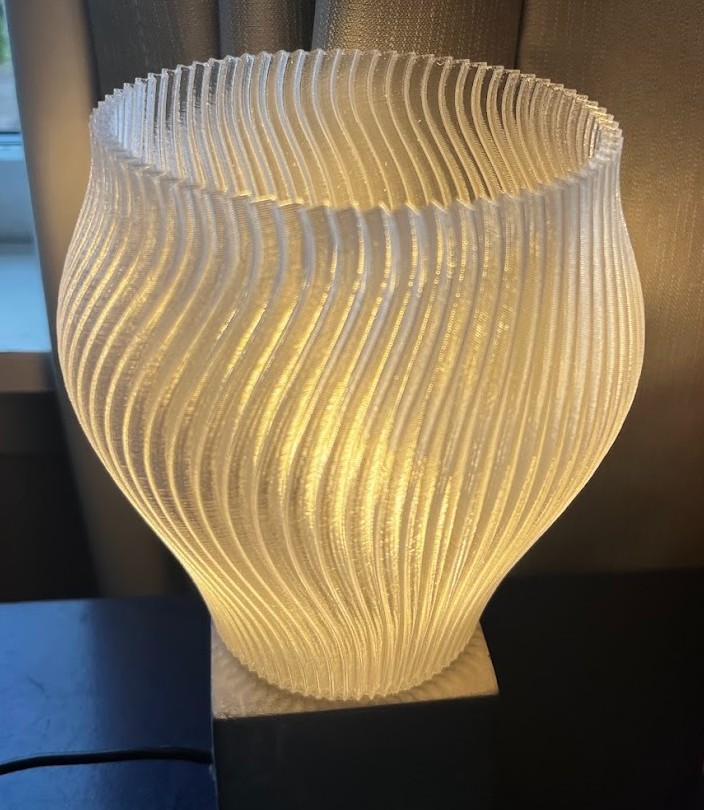
My latest print - A vase mode lampshade printed with Creality transparent PETG.


For reliable good quality free .STLs check out thingiverse.com.


And for making your own prints, nothing comes close to tinkercad!


Hope this helps someone. :)


afe66
3181 posts

Uber Geek
+1 received by user: 1678

Lifetime subscriber

  #3275491 26-Aug-2024 15:51
Send private message

I put my filament in a sealable contIner from mitre 10, one with rubber seal and then put a couple of those bottles dehumidifier crystal to keep cupboards from being musty.

Internal humidity is about 25%


Shop now on AliExpress (affiliate link).
richms
29098 posts

Uber Geek
+1 received by user: 10209

Trusted
Lifetime subscriber

  #3275498 26-Aug-2024 16:14
Send private message

I wired a mini sized dehumidifier into my storage container and it somewhat works. Just put a cable gland thru the side of the storage tote to take the power cable out. Plan is for the next one to have glands on the lid to let filament come out of it as well but I have to sort out a roll holder that can have the rolls on it, and since they are all paper now they need a rod thru the core, not rolling on the edges of them. Still worried about all the paper shedding and getting onto the filament and into the print doing it that way too.


Richard rich.ms

everettpsycho
668 posts

Ultimate Geek
+1 received by user: 270


  #3277271 30-Aug-2024 20:33
Send private message

I haven't dared try it yet, but has anyone considered a heat pump dryer with the filament on the shoe rack? Feels like it wouldn't get hot enough to melt the filament t and is designed to stuff out.

So far I'm still enjoying the hobby but underestimated how little printing I'd get done as by the time I can start a print it would finish in the middle of the night.

Loismustdye
942 posts

Ultimate Geek
+1 received by user: 256

Trusted

  #3277273 30-Aug-2024 20:41
Send private message

michaelmurfy:


@Loismustdye Where are you based? Because I do have literally everything including a Resin 3D Printer (Anycubic Photon Mono 4K) along with the Anycubic Wash & Cure Plus and basically everything you need to get into resin 3D printing I'll be keen on selling. The only thing is, the boxes are massive so delivery in the Wellington region only.


Also have a grow tent with an extractor fan etc to go along with it. If anyone wants to get into resin 3D printing then hit me up and make a reasonable offer. You do need a ventilated space for it.


thanks for the offer but I’m going to have to research a bit more on this. Seems it’s not so much plug and play as I was hoping from what I’ve read up so far. Cheers 


Stu1
1892 posts

Uber Geek
+1 received by user: 489

ID Verified
Subscriber

  #3277310 30-Aug-2024 21:44
Send private message

tehgerbil:


For anyone reading this post too - 

For any printer, even unbox and print devices you always need to do a few things first:


1 - Use a FAST SD card. Class 10 minimum. Creality recommends no larger than 8GB. (The V3 SE stutters and causes zits when copying card to cache.)


2 - Check the belt tensions often (like every 30 hours worth of printing) as they will get lose and cause issues, they tend to be the last thing you check for print quality problems.


3 - Get a spray bottle of isopropyl and microfibre cloth for wiping your bed, and scrub with dishsoap and hot water every few prints. This is the cause of many poor layer adhesion issues. A cheap paper gluestick can also help.


4 - Invest in a 20litre sistema box and humidity sensor (e.g. Xiaomi Mi Home humidity and temp) for storing your filament and monitoring the humidity levels. I keep a Damp-rid container in mine for removing excess humidity.


5 - Always dry your filament. There are many ways to do this, a dedicated dryer is around $100. On the DIY scene the KMart food dehydrator is perfectly adequate either new $60 or 2nd hand on FB marketplace/Tardme.


If you're stupid/desperate you can use the heated bed of the printer, put the filament on the bed and turn it on. Many instructions available online for this, don't blame me when your insurance wants to know how your house burnt down... 


And in case it needs to be said: don't ever mix food and filaments, wet or dry, liquid or solid, printed or unprinted. So don't dry your filament in your household oven unless you enjoy the taste of plastic and high risk of PFAS and microbe exposure. Use the heated bed method or get a dryer. 


Rough filament drying guides:
PLA - Dry out of box, then fornightly if printing in an air conditioned room at ~50% r.h. 
PETG - Dry out of the box, then every week or 2.
TPU - Dry out of box, then daily if kept out. Seriously the difference in print quality is night and day if left out even overnight :(


6 - Install a good slicer app. Personally I've tried many and always settle back on Cura, their preset configs for generic PETG/PLA/TPU are a great starting point. See below for a few Cura config tips.


7 - Be prepared for a higher power bill! You can install a widget in Cura which can calculate the rough energy cost. So many people underestimate this one. This can be lowered by using a print tent or printing in an enclosed space. (careful of fumes especially if printing ABS.)


8 - Research how to set the Z-offset for your printer, the self leveling function can set the wrong Z-offset. Always watch the first few minutes of your print, a bad offset will destroy your printer easily. If your Z-offset is wrong and the nozzle grinds against the bed pull the power power up and reset offset.


After your first few prints and the honeymoon phase is over..


To avoid constantly re-drying filament you can use a repurposed Sistema container to hold your loaded spool.


There are many 3D print spool holders you can download and print or make your own. Bearings can be found from most hardware stores.


Specific to the Ender V3 - The SD card mechanism is also a known wear point (mine broke after 3 months, Creality shipped a new motherboard in 2 days from China) so just be gentle when inserting and removing the card.


In terms of filament I find Creality filament the best, I've use e-sun and been happy with results.


And a few slicer tips:


For prints with tight tolerance (like print in place gears) ALWAYS use "Outside -> In" and Tolerance set to: "Exclusive".


If you're after printing in the popular vase mode, this is found under "Spiralise" settings in Cura.


To avoid changing the flow rates at all, I set the print width to .42 on a .4 nozzle and .32 layer height:


My latest print - A vase mode lampshade printed with Creality transparent PETG.


For reliable good quality free .STLs check out thingiverse.com.


And for making your own prints, nothing comes close to tinkercad!


Hope this helps someone. :)


The vase is amazing , thank you for the tips


1 | 2 
View this topic in a long page with up to 500 replies per page Create new topic


Geekzone Live »

Try automatic live updates from Geekzone directly in your browser, without refreshing the page, with Geekzone Live now.


Are you subscribed to our RSS feed? You can download the latest headlines and summaries from our stories directly to your computer or smartphone by using a feed reader.