Geekzone: technology news, blogs, forums
Guest
Welcome Guest.
You haven't logged in yet. If you don't have an account you can register now.


View this topic in a long page with up to 500 replies per page Create new topic
1 | 2 | 3 | 4 | 5 | 6 | 7 | 8 | 9 | 10

gzt

gzt
18879 posts

Uber Geek
+1 received by user: 8001

Lifetime subscriber

  #2985459 20-Oct-2022 18:01
Send private message

AV1 and Firestick. YouTube delivers AV1 4K inside 23-25MB easily. I'm finding out YouTube has little available in AV1. Nothing I regularly watch. I have yet to check premium. Anyway nothing has good released on Premium for years so who cares about Premium ; )

AV1 Netflix while they have a lot in AV1 is harder to know. There are no on screen indicators. I believe I initially had Netflix AV1 service, then accidentally I started a stream on another machine at the same time. Netflix prioritize quality to the max so I expect my client id hit a cooldown in the service algorithm and no 4K AV1 for me anymore. Hard to know with Netflix if I'm on HD AV1 now or it's dropped back to h264. Also, I have not seen Netflix official support for AV1 on Firestick announced. It's all second hand info on 3rd party news sites. For other devices like Roku it's definite direct from Netflix.


alisam
890 posts

Ultimate Geek
+1 received by user: 86


  #2986005 22-Oct-2022 08:47
Send private message

I have purchased the 4K MAX but only have (at present) a Samsung H6400 (Approx 2014 Vintage) which has a max of 1080p with an LG NB4540 Soundbar (manual says it supports 1080p).


My only issue is with HDMI CEC (ARC).


Prior to the MAX I was using a first (or second) generation Fire TV (not stick) and used the Samsung Remote to switch the TV on and then used the Fire TV Remote (since it didn't have a power button for this remote model).


I would say 19 out of 20 times, the Soundbar would automatically switch from 'Optical' to 'ARC'.


If it didn't, I went into the Samsung Menu and set the audio from 'TV Speaker' or 'Receiver' (or sometimes just changed 'Receiver' back to 'TV Speaker' and then back again).


Now, with the Max, the Soundbar very rarely switches to ARC automatically (but I have seen it do it).


Through trial and error, I have found that I can go to the MAX Settings, Display and Audio, HDMI CEC Device Control and toggle the setting from ON -> OFF -> ON and ARC is shown on the Soundbar, and I get sound.


It's no problem for me to get the sound working, but the Wife Acceptance Factor (WAF) approval will not be forthcoming.


Any ideas on how to get Soundbar to automatically switch to ARC?


PC: Dell Inspiron 16 5640 (Windows 11 Home), Dell Inspiron 7591 2n1 (Windows 11 Pro), HP ProBook 470G1 (Windows 10 Pro), Intel NUC7I5BNH (Zorin)
Net: Grandstream 1 x GWN7062 Router, 1 x GWN7665 Access Point
Storage: Synology DS216play NAS, 2 x 6TB
Media: 3 x Amazon FireTV. Echo, Dot, Spot
TV: 2 x Samsung H6400 55" LED TV, Panasonic TH-P50G10Z 50" Plasma TV
Mobile: Samsung Galaxy A52 5G
Wearable: Gear S3 Frontier


alisam
890 posts

Ultimate Geek
+1 received by user: 86


  #2986014 22-Oct-2022 09:44
Send private message

Also swapped out the HDMI Cable.


As recommended for the soundbar it is a 'High Speed HDMI Cable with Ethernet'.


Additionally, the cable says '4k x 2k', 'Ultra High Definition 3D Cable'.


PC: Dell Inspiron 16 5640 (Windows 11 Home), Dell Inspiron 7591 2n1 (Windows 11 Pro), HP ProBook 470G1 (Windows 10 Pro), Intel NUC7I5BNH (Zorin)
Net: Grandstream 1 x GWN7062 Router, 1 x GWN7665 Access Point
Storage: Synology DS216play NAS, 2 x 6TB
Media: 3 x Amazon FireTV. Echo, Dot, Spot
TV: 2 x Samsung H6400 55" LED TV, Panasonic TH-P50G10Z 50" Plasma TV
Mobile: Samsung Galaxy A52 5G
Wearable: Gear S3 Frontier


alisam
890 posts

Ultimate Geek
+1 received by user: 86


  #2987091 24-Oct-2022 08:18
Send private message

I have done quite a bit of searching and there are a lot of comments (say over 2 years old) that Samsung have had a problem with CEC for a number of years. I don't know whether they solved the issue in newer TV's.


Many people have watched a YouTube video where the solution was to simply disconnect the power to the TV. Some people disconnected for 15 minutes, others just 30 seconds. This trick seemed to solve a lot of people's issues.


It did work for me, but the first time only.


So, my solution (not ideal) was to get the soundbar to recognise ARC (from OPTICAL) and:


1) Ensure the soundbar is on permanently (with ARC).


2) Ensure the Samsung TV doesn't try and switch off the CEC controlled device i.e. soundbar when the TV is switched off via the Fire Stick.


Happy Days!


PC: Dell Inspiron 16 5640 (Windows 11 Home), Dell Inspiron 7591 2n1 (Windows 11 Pro), HP ProBook 470G1 (Windows 10 Pro), Intel NUC7I5BNH (Zorin)
Net: Grandstream 1 x GWN7062 Router, 1 x GWN7665 Access Point
Storage: Synology DS216play NAS, 2 x 6TB
Media: 3 x Amazon FireTV. Echo, Dot, Spot
TV: 2 x Samsung H6400 55" LED TV, Panasonic TH-P50G10Z 50" Plasma TV
Mobile: Samsung Galaxy A52 5G
Wearable: Gear S3 Frontier


alisam
890 posts

Ultimate Geek
+1 received by user: 86


  #2987103 24-Oct-2022 10:17
Send private message

Not as I had hoped for.


Found a digital copy of the Soundbar Manual and it says (English is not very good):


This unit will be off itself to save electric
consumption in the case main unit is not
connected to external device and is not used for 20
minutes.


PC: Dell Inspiron 16 5640 (Windows 11 Home), Dell Inspiron 7591 2n1 (Windows 11 Pro), HP ProBook 470G1 (Windows 10 Pro), Intel NUC7I5BNH (Zorin)
Net: Grandstream 1 x GWN7062 Router, 1 x GWN7665 Access Point
Storage: Synology DS216play NAS, 2 x 6TB
Media: 3 x Amazon FireTV. Echo, Dot, Spot
TV: 2 x Samsung H6400 55" LED TV, Panasonic TH-P50G10Z 50" Plasma TV
Mobile: Samsung Galaxy A52 5G
Wearable: Gear S3 Frontier


johno1234
3431 posts

Uber Geek
+1 received by user: 2935


  #2989844 31-Oct-2022 09:09
Send private message

Still unable to get skysportnow working again on new Fire TV Stick. I contacted skysportnow support and they have simply replied that the FireTV stick is not a supported device. Full stop.


Might be time to think about moving into the AppleTV space. I was always an Android person until better support for hearing aids pushed me to an iPhone. Apple devices seem to just work without meddling required and the older I get the less interested I am in meddling.


Shop on-line at New World now for your groceries (affiliate link).
Kiwiuk
143 posts

Master Geek
+1 received by user: 24

ID Verified

  #2990976 2-Nov-2022 12:51
Send private message

I have a FireCube Gen 2 registered to our aussie amazon account, Spark Sport will not install, shows unavailable, no problems with 3+, SSNow or TV1, go figure 😀


I have AMC+ installed no problem on the Apple TV but on the Amazon there is no app, just Shudder, and AMC's emailed response was - there is no app for NZ 😒


Happy to be corrected or have any of your working solutions especially for AMC+ as wanted AcornTV for the wife and she extensively uses the Cube


johno1234
3431 posts

Uber Geek
+1 received by user: 2935


  #2990988 2-Nov-2022 13:42
Send private message

This gives me an idea: create a brand new Amazon account with NZ location, and relink (or even factory reset) the Fire TV Stick to the new account. It seems that once the device thinks it is not in NZ it is really hard to remove that. Would have to cancel Amazon Prime Video and restart on the new account which would be an inconvenience.


Reanalyse
402 posts

Ultimate Geek
+1 received by user: 315


  #2990997 2-Nov-2022 14:11
Send private message

Kiwiuk:


I have a FireCube Gen 2 registered to our aussie amazon account, Spark Sport will not install, shows unavailable, no problems with 3+, SSNow or TV1, go figure 😀


I have AMC+ installed no problem on the Apple TV but on the Amazon there is no app, just Shudder, and AMC's emailed response was - there is no app for NZ 😒


Happy to be corrected or have any of your working solutions especially for AMC+ as wanted AcornTV for the wife and she extensively uses the Cube


No working solutions, both AMC and Amazon state no app for New Zealand.


johno1234
3431 posts

Uber Geek
+1 received by user: 2935


  #2991001 2-Nov-2022 14:36
Send private message

Reanalyse:


No working solutions, both AMC and Amazon state no app for New Zealand.


Amazon Prime Video working fine for me on Fire TV Stick.


Reanalyse
402 posts

Ultimate Geek
+1 received by user: 315


  #2991087 2-Nov-2022 15:44
Send private message

johno1234:


Reanalyse:


No working solutions, both AMC and Amazon state no app for New Zealand.


Amazon Prime Video working fine for me on Fire TV Stick.


Sorry - what I meant was I contacted Amazon Support and got exactly the same response as from AMC, you are correct I have no issue with Amazon Prime Video on firestick


Support Geekzone with one-off or recurring donations Donate via PressPatron.
Reanalyse
402 posts

Ultimate Geek
+1 received by user: 315


  #2992060 4-Nov-2022 19:17
Send private message

AMC+ has just appeared on the FireStick


johno1234
3431 posts

Uber Geek
+1 received by user: 2935


  #2992586 6-Nov-2022 16:24
Send private message

Well what do you know? Sky sport now mysteriously just started working on the Fire TV Stick.

tim0001
279 posts

Ultimate Geek
+1 received by user: 147


  #3000767 24-Nov-2022 10:49
Send private message

gzt: AV1 and Firestick. YouTube delivers AV1 4K inside 23-25MB easily. I'm finding out YouTube has little available in AV1. Nothing I regularly watch. I have yet to check premium. Anyway nothing has good released on Premium for years so who cares about Premium ; )

AV1 Netflix while they have a lot in AV1 is harder to know. There are no on screen indicators. I believe I initially had Netflix AV1 service, then accidentally I started a stream on another machine at the same time. Netflix prioritize quality to the max so I expect my client id hit a cooldown in the service algorithm and no 4K AV1 for me anymore. Hard to know with Netflix if I'm on HD AV1 now or it's dropped back to h264. Also, I have not seen Netflix official support for AV1 on Firestick announced. It's all second hand info on 3rd party news sites. For other devices like Roku it's definite direct from Netflix.


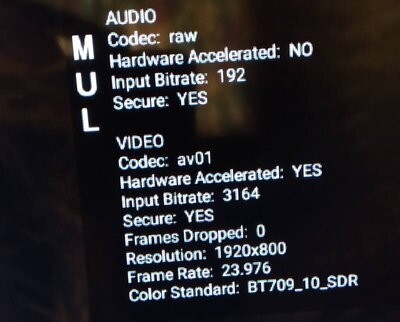
Have you tried putting the Firestick in "Developer Mode" to show the codec?  (The very beginning of this video shows how)


I only got my firestick 4k max yesterday, but here's my initial codec results for 1080p:


Netflix- mainly hevc HD, but there was one movie that played in H.264.  No AV1 HD found yet.


Prime Video- I found one that played in AV1 HD (see picture below), the rest were hevc 


Youtube- it will mainly use VP9, but there are some that will play in AV1


The Firestick is quite an improvement over my HTPC for Netfix (that was only H.264)


Was thinking of installing "Mouse Toggle for Fire TV" because I don't have an OTG cable yet.  Is this a commonly used app?  (apkmirror doesn't have it, and all the links look slightly dubious..)  Would be interested to know what codecs Chrome/Brave will use.  So it would be great if someone could tell me please.


richms
29162 posts

Uber Geek
+1 received by user: 10281

Trusted
Lifetime subscriber

  #3000772 24-Nov-2022 10:52
Send private message

Is this different to what the youtube player shows as the codec? Because I am seeing heaps and heaps of AV1 on the stats for nerds page of youtube. Even old 480p stuff is getting AV1


Richard rich.ms

1 | 2 | 3 | 4 | 5 | 6 | 7 | 8 | 9 | 10
View this topic in a long page with up to 500 replies per page Create new topic


Geekzone Live »

Try automatic live updates from Geekzone directly in your browser, without refreshing the page, with Geekzone Live now.


Are you subscribed to our RSS feed? You can download the latest headlines and summaries from our stories directly to your computer or smartphone by using a feed reader.