Geekzone: technology news, blogs, forums
Guest
Welcome Guest.
You haven't logged in yet. If you don't have an account you can register now.


prat33k

182 posts

Master Geek
+1 received by user: 31


#255944 7-Sep-2019 22:49
Send private message

I watch r/homelab and the setups are way too extraordinary. Does anyone here has a homelab setup? If yes, then what you use it for?

I am currently looking for recommendations as I want to setup a home network/lab for testing and learning but am out of ideas. I currently have a Edgerouter X + unifi AC Pro, that I just bought and a raspberry pi 3b+ running hassio + pihole.

My next plan is to get a desktop (something low power consuming) that I can chuck some VMs to for learning Linux.

Any homelab inspiration appreciated. Thanks guys

View this topic in a long page with up to 500 replies per page Create new topic
 1 | 2 | 3
michaelmurfy
meow
13579 posts

Uber Geek
+1 received by user: 10910

Moderator
ID Verified
Trusted
Lifetime subscriber

  #2312586 7-Sep-2019 23:35
Send private message

I do: https://www.reddit.com/r/homelab/comments/cvnbg5/my_flat_pack_lab/


Basically I run a fair few things here. My HPe Microserver runs UnRaid with several Debian VM's, Docker containers etc. I basically build projects to Docker and run them on that server.


I have a Lenovo Tiny (Core i5-4570T, 8gb ram running Debian) running as my Plex server. This is grabbing my media via NFS off my Microserver.


I have 2x single mode Fibres heading from the "man-cave" to the house (providing 2Gbit backhaul via a LAG). In the house I have a 24pt Switch, Hue Bridge, My Plex server and a UniFi NanoHD. In the Cave I have a small 10pt Cisco PoE switch (with 2x SFP ports which have the fibre modules for the house), the Microserver which has a bonded LAG, my PC (a Intel Xeon E5 (8 cores, 16 threads) with 32gb ECC ram and a GTX 1060 running Windows 10 + Linux, a couple of Raspberry Pi's and an Odroid C2 running PiHole.


It is a smaller lab, but works well for my needs. I can host what I like without running into CPU or space restrictions and with Gigabit broadband with full IPv6 (provided by 2degrees) it means I can spawn multiple services on the internet by using IPv6 and Cloudflare (as Cloudflare does IPv6 to IPv4 for those IPv4-only punters out there).


I am still building my network as I have only been in my new place for around a month. Got a few improvements to add but I have both done my network on the cheap and attempted to do it right the first time.


Michael Murphy | https://murfy.nz
Referral Links: Quic Broadband (use R122101E7CV7Q for free setup)

Are you happy with what you get from Geekzone? Please consider supporting us by subscribing.
Opinions are my own and not the views of my employer.


xpd

xpd
Geek of Coastguard
14116 posts

Uber Geek
+1 received by user: 4578

Retired Mod
ID Verified
Trusted
Lifetime subscriber

  #2312679 8-Sep-2019 09:54
Send private message

Ive got an "old" i5 system running as a home server which contains a few HyperV machines (mail server etc), and the host itself runs as a seedbox and FTP with Plex. Ive got 3 old (well, ones a G8 so not too old in scheme of things) HP servers, will be working on getting one of those running to replace the i5, and I'll look to add more stuff and play.


XPD / Gavin


LinkTree


hio77
'That VDSL Cat'
13036 posts

Uber Geek
+1 received by user: 3896

ID Verified
Trusted
Lizard Networks
Subscriber

  #2312760 8-Sep-2019 11:18
Send private message

i'll hold off on photos till i finish the rework i'm doing (it's quite messy given there are multiple machines sharing tasks temporarily)


I've got 2 older Athlons, one running unraid (with virtualization) and one running esxi (this is next up to be replaced). ontop of that i have a Supermicro C2750 based machine that's a little more of the power house.


This all sits behind a RB3011 with RB951 doing transparent shaping on the DSL tails to squeeze all i can out of them.


Aside from the two athlons, these all run on 12V DC Battery to keep up for any outages.


In the event of an outage, RB3011 Detects the link going down to the main vlan switch and turns on it's POE port to a lower powered AP to provide wifi in a pretty much seamless way. 


#include <std_disclaimer>


Any comments made are personal opinion and do not reflect directly on the position my current or past employers may have. 


Peppery
919 posts

Ultimate Geek
+1 received by user: 188

Trusted

  #2312765 8-Sep-2019 11:27
Send private message

I always get jealous of the setups on r/homelab and how decently priced equipment is hard to come by until I remember power bills are a thing.

We have an Unraid server in the garage that provides 40TB of usable storage (10x 4-5TB drives, 3x SSD for cache/docker/VMs). Main use case is of course Plex and a few small apps (a flat bill tracker, among other small projects). It’s getting pretty full so I think in the next few months I’ll start to buy 10TB disks. On the other hand the CPU is getting pinned quite a bit so I’m on the hunt for an upgrade.

We also have a couple of Raspberry Pi’s doing Pihole and home automation (wired into our garage door remote and front gate remote to do HomeKit)

xpd

xpd
Geek of Coastguard
14116 posts

Uber Geek
+1 received by user: 4578

Retired Mod
ID Verified
Trusted
Lifetime subscriber

  #2312766 8-Sep-2019 11:29
Send private message

Peppery: I always get jealous of the setups on r/homelab and how decently priced equipment is hard to come by until I remember power bills are a thing.


Yeah, thats the thing thats concerning me with these HP servers Ive got for testing, is the change in power consumption - will probably do a test run in next few weeks, and see if its noticeable on the meter. 


Thankfully I work in the industry so picking up gear is not an expense as such :D (Thanks clients who upgrade their servers)


XPD / Gavin


LinkTree


Peppery
919 posts

Ultimate Geek
+1 received by user: 188

Trusted

  #2312770 8-Sep-2019 11:42
Send private message

xpd:


Yeah, thats the thing thats concerning me with these HP servers Ive got for testing, is the change in power consumption - will probably do a test run in next few weeks, and see if its noticeable on the meter.


This is probably the largest reason why old gear just isn't worth it. My setup idles at about 105W according to the UPS, and at our current rate of 22.2c/kWh that's about $204 a year. Not bad but if that were to double or triple we'd have to ask questions about how useful it really is.


xpd:


Thankfully I work in the industry so picking up gear is not an expense as such :D (Thanks clients who upgrade their servers)


If uhhh you ever need to get rid of them, I'm always here buddy :D


Shop now for Dell laptops and other devices (affiliate link).
PANiCnz
999 posts

Ultimate Geek
+1 received by user: 161


  #2312819 8-Sep-2019 12:10
Send private message

Click to see full size


VMware ESXi with VM's for Openmediavault, TVHeadend, Guacamole, OpenVPN, Pi-hole, Emby, Zoneminder and a few others.


10gbe links to my desktop and the server, parts were mainly scrounged off TradeMe over the course of a few months. 


dan

dan
1134 posts

Uber Geek
+1 received by user: 105

Lifetime subscriber

  #2312859 8-Sep-2019 12:12
Send private message

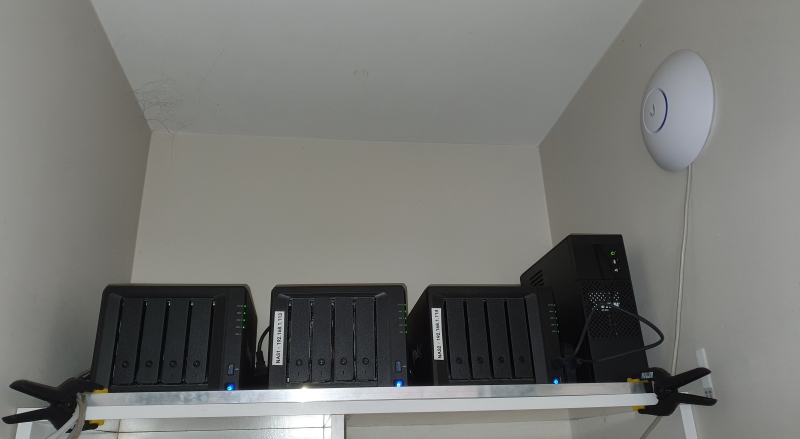
i have the below


3x Synology DS918s  (data storage, docker host for about 8 docker images, synology survaliance station)


with 84TB storage


1x i7 7800 16GB 2x250GB NVME SSD's  (dedicated plex server)


2x Ubquity Unifi AC Aps


3x Battery backup UPS's


1x Gigabit Fibre


4x IP Cameras


alot of the gear is spread around the house, but i do have the NAS's in same location


xpd

xpd
Geek of Coastguard
14116 posts

Uber Geek
+1 received by user: 4578

Retired Mod
ID Verified
Trusted
Lifetime subscriber

  #2312871 8-Sep-2019 12:45
Send private message

My setup is a mess at the moment.... so no pics :D I am considering doing a very budget patch panel and look at a rackmount switch (homemade rack) to help tidy things up.


XPD / Gavin


LinkTree


Dolts
214 posts

Master Geek
+1 received by user: 76


  #2312876 8-Sep-2019 13:02
Send private message

I have a Dell R710 with 48GB RAM, dual L5640 Xeons, some SAS drives and some SSDs.


Have been running XCP-NG on it and installing things from https://github.com/Kickball/awesome-selfhosted 


It has helped me a lot with my Linux journey.


shrub
790 posts

Ultimate Geek
+1 received by user: 272

ID Verified

  #2313033 8-Sep-2019 15:30
Send private message

Yea im becoming a hoarder... Got an interesting setup.


Unraid box i7 6700 32gb ram with 9 drives with 20tb usable and its about to have more drives added. Its got a handful of dockers and VM's like plex pi-hole openvpn etc. Also has a 1060 6gb card so the windows 10 VM can play games.


Pfsense box is an oldasf amd system x2 255 with a 4port gig card with gigabit internet. Also has locked down VPN for chomecasts and tablets so I can cast sport.


Multiple IOT devices on a separate wifi for restricting call home features.


Next step is setting up UPS and working out how to backup as the amount of data i'm getting up to is getting silly expensive.


Shop now at Mighty Ape (affiliate link).
Tinkerisk
4798 posts

Uber Geek
+1 received by user: 3660


  #2313039 8-Sep-2019 15:47
Send private message

prat33k: Does anyone here has a homelab setup? If yes, then what you use it for?


Nope, just a production environment. :-)


- NET: FTTH & VDSL, OPNsense, 10G backbone, GWN APs
- SRV: 12 RU HA server cluster, 0.1 PB storage on premise
- IoT:   thread, zigbee, tasmota, BidCoS, LoRa, WX suite, IR
- 3D:    two 3D printers, 3D scanner, CNC router, laser cutter


antoniosk
2382 posts

Uber Geek
+1 received by user: 742

ID Verified
Trusted
Lifetime subscriber

  #2313127 8-Sep-2019 17:12
Send private message

xpd:


Ive got an "old" i5 system running as a home server which contains a few HyperV machines (mail server etc), and the host itself runs as a seedbox and FTP with Plex. Ive got 3 old (well, ones a G8 so not too old in scheme of things) HP servers, will be working on getting one of those running to replace the i5, and I'll look to add more stuff and play.


I just noticed this on your signature - "Emulation - The art of getting your $4000 PC to run an 80's system - and still fails." - which really made me smile... been emulating all sorts of things since the late 80's....


________


Antoniosk


antoniosk
2382 posts

Uber Geek
+1 received by user: 742

ID Verified
Trusted
Lifetime subscriber

  #2313131 8-Sep-2019 17:26
Send private message

prat33k: I watch r/homelab and the setups are way too extraordinary. Does anyone here has a homelab setup? If yes, then what you use it for?

I am currently looking for recommendations as I want to setup a home network/lab for testing and learning but am out of ideas. I currently have a Edgerouter X + unifi AC Pro, that I just bought and a raspberry pi 3b+ running hassio + pihole.

My next plan is to get a desktop (something low power consuming) that I can chuck some VMs to for learning Linux.

Any homelab inspiration appreciated. Thanks guys


1. Don't overdo it, but just appreciate the learning. You will learn is to HATE cables and power bricks. So much equipment does not have the power supply built in and you are left with all sorts of nasty cables laying around, of various sizes. Some will overlap power ports. Some will come with thin cable for the DC power and thick cabling for the AC side, that is machine folded and inflexible. you will learn to hate them all for the rats nest of cables they create.


2. Get lots of high quality cabling of various lengths and treat it VERY well. Cheap is the enemy. Dispose thoughtfully of cables no longer good enough. But dont persevere with old rubbish. 


3. Accept that you will have to learn about local and wide area networking on wireless and wired networks. Nothing operates without the network these days, but just accept you have to learn. Having said that dont waste time learning about old networks, just look at new modern stuff and learn a little about how ipv6 helps.


4. Surge protectors and high quality power connectors. Seriously, none of that rubbish from the supermarket. Dont risk your kit - or house - to a power strip arc because you cheaped out on the 4-way board


5. Learn the basics of electricity and if you can wire for it. We had extra cabling put into our lab - known as the closet - that supported higher current and multiples connections. I feel safe concentrating all my kit into one location


6. Noise & dust. Whatever you are going to use, learn about it's noise. Fans means cooling but also means it attracts air and dust, quite naturally. Lift kit off carpet and separate with hard break - eg a wooden board. Carpet is static is death for electrical kit.


7. After that build small and slow - and ensure you have a mighty location for the huge gathering of stuff you will amass. A clear space to perform technical surgery on. LIGHT LIGHT LIGHT. Good tools. 


8. A radio and or tv. Yes you can stream via your technology but it all consumes cpu cycles and gets in the way and can be slow. Radio is free and easy to change channels, and fills the day.


9. All technologies evolve and what was current last year is obsolete next year. Accept it. 


________


Antoniosk


Tinkerisk
4798 posts

Uber Geek
+1 received by user: 3660


  #2313149 8-Sep-2019 18:31
Send private message

So here it is for me (I might have overlooked something) ...


- Public free wifi hotspot on crowded place ('freifunk' network) via CPE
- Public stratum 1 server (NTP pool)
- Public Weather station (for weather networks)
- Public LoRaWan gateway ('TheThingsNetwork')
- Public Nextcloud server (for familiy & friends)
- NAS
- Remote backup server
- VPN server
- TFTP server
- Two DNS
- Radius server
- Smart Home server
- Print server for 3D printers
- AI cluster server
- Blockchain hot node (no, I do no Cryptocurrency with it)
- WebCam server
- ipPBX server
- Plex server
- ipDVB-S server
- SDR server


With some IT you'll solve problems you won't have without IT ;-)


- NET: FTTH & VDSL, OPNsense, 10G backbone, GWN APs
- SRV: 12 RU HA server cluster, 0.1 PB storage on premise
- IoT:   thread, zigbee, tasmota, BidCoS, LoRa, WX suite, IR
- 3D:    two 3D printers, 3D scanner, CNC router, laser cutter


 1 | 2 | 3
View this topic in a long page with up to 500 replies per page Create new topic


Geekzone Live »

Try automatic live updates from Geekzone directly in your browser, without refreshing the page, with Geekzone Live now.


Are you subscribed to our RSS feed? You can download the latest headlines and summaries from our stories directly to your computer or smartphone by using a feed reader.