Geekzone: technology news, blogs, forums
Guest
Welcome Guest.
You haven't logged in yet. If you don't have an account you can register now.


gregmcc

2173 posts

Uber Geek
+1 received by user: 836

ID Verified
Trusted
Lifetime subscriber

#298540 25-Jun-2022 17:05
Send private message

Time to buy a 3D printer, A few things lately that I have said to myself "if I had a 3d printer I could make one of those"


My knowledge of 3D printers is about zero, but I'm not afraid to mess with technology.


Budget up to $800


I'm not after top of the line do all whiz bang one, just something that isn't a piece of rubbish or cheap and nasty.


Keen to hear feedback on what other have, the good things and the bad things.


Ideally I want to set it up in the spare room (away from the computer) and leave it printing. WiFi or Ethernet will not be a problem, I'm assuming the usual way is to send a print job to it much like a paper printer?


I have had a brief look at the Ender Pro 3D, but as I'm lacking in what is good and what is rubbish, I'm not sure.




View this topic in a long page with up to 500 replies per page Create new topic
 1 | 2
SirHumphreyAppleby
2938 posts

Uber Geek
+1 received by user: 1860


  #2934330 25-Jun-2022 17:53
Send private message

First thing you need to decide... FDM or resin.


I've had a FDM printer for years. Most of the time it's sat in a non-functional state, mainly because I hadn't got around to doing the upgrades I'd planned and I needed to disassemble the print head to adjust the feeder. A couple of years ago someone picked it up by the top of the frame so now it's a major reassembly project. I've accepted that will probably not happen, and with technology moving on it's now easier to just buy a new printer with automatic bed leveling etc. out of the box. That said, I'm expecting delivery of a resin printer next week and I am expecting it to be a lot less hassle.


For more than $100 less than Jaycar sells the printer alone, you can get an Anycubic Photon Mono 4k and Wash & Cure Machine 2.0 imported. It's a tiny printer, but should be a good intro to resin printing and will actually do most things I need it to until DLP models (which some think are the future) come down in price.


happyfunball
287 posts

Ultimate Geek
+1 received by user: 112


  #2937846 3-Jul-2022 12:00
Send private message

SirHumphreyAppleby:


That said, I'm expecting delivery of a resin printer next week and I am expecting it to be a lot less hassle.


For more than $100 less than Jaycar sells the printer alone, you can get an Anycubic Photon Mono 4k and Wash & Cure Machine 2.0 imported. It's a tiny printer, but should be a good intro to resin printing and will actually do most things I need it to until DLP models (which some think are the future) come down in price.


I ordered the same model from the anycubic website last week, the 4k mono and the wash station, the price was too good to pass up.  But its been a few days and still no tracking number, I tried emailing their support but the message bounced (official@anycubic.comNow I'm starting to get worried, the price was almost too good to be true and they've already taken my money.  Did you get your printer yet?  How long did it take before they sent it?


mdf

mdf
3566 posts

Uber Geek
+1 received by user: 1519

Trusted

  #2937867 3-Jul-2022 12:41
Send private message

@gregmcc


I got started a few years ago with a Creality Ender 3 Pro. Still using it (though with plenty of self printed updates). They are still available, along with quite a lot of variants. These are super common so plenty of support, tutorials and suggestions available. 


Ender 3 range shouldn't max out your budget, but will allow you some headroom for upgrades and accessories. In particular, most (all?) models lack wifi, which is fine because you will probably want to add a Raspberry Pi and OctoPi for a _much_ better experience. I ran prints from my PC for a bit, but you will ruin a print if your PC goes to sleep or gets interrupted.


I should say that you absolutely have to be you have to be willing to learn and tinker to get Ender printers running to their potential. Out of the box, some basic assembly is required and the manual is fine for that. But beyond that, expect to spend a fair amount of time online reading/watching tutorials about 3d printing, set up and modelling. The more effort you put in, the better it will print. I've had mine a couple of years and still each time I do a new project I learn something new. Learning how to model properly is probably the thing that will require the most effort.


If you just want to open a box and print existing models without any fuss whatsoever, something like an Ultimaker is probably a better bet, but at a significantly higher entry point. Or possible a resin printer.


I got my Ender direct from the Creality store in China, but since then I've discovered Kiwi3d who are local stockists. I haven't bought a printer from them, but have bought a whole load of accessories and filament and would highly recommend.


There are a few other threads on GZ, you might like to have a look at this one with similar questions: https://www.geekzone.co.nz/forums.asp?forumid=73&topicid=272735&singlepage=yes or this one: https://www.geekzone.co.nz/forums.asp?forumid=164&topicid=279555&singlepage=yes


@michaelmurfy and @stu might like to chime in on their experience with the Ender 3v2.


gehenna
8667 posts

Uber Geek
+1 received by user: 3883

Moderator
Trusted
Lifetime subscriber

  #2937871 3-Jul-2022 13:21
Send private message

I received my Ender 3 S1 Pro about a month ago. Took a while to get the settings right but now it's going pretty much all day every day. I'm considering getting a resin printer now. I can see the benefits of both. Personally I think the Ender 3 is better for utility type things, brackets and mounts and so on. It does print very high resolution figures but they will always show some layer lines compared to resin.

I've been surprised how cheap it is to get into all a hobby. For the price of a mid range computer you can get the printer and several filaments. I've hardly touched the sides of the filament too, even though it's been printing for a couple of weeks solidly.

happyfunball
287 posts

Ultimate Geek
+1 received by user: 112


  #2937898 3-Jul-2022 15:20
Send private message

Is anyone using fdm for printing wargame/rpg minis? How I the ender 3 for that?


gregmcc

2173 posts

Uber Geek
+1 received by user: 836

ID Verified
Trusted
Lifetime subscriber

  #2937900 3-Jul-2022 15:32
Send private message

gehenna: I received my Ender 3 S1 Pro about a month ago. Took a while to get the settings right but now it's going pretty much all day every day. I'm considering getting a resin printer now. I can see the benefits of both. Personally I think the Ender 3 is better for utility type things, brackets and mounts and so on. It does print very high resolution figures but they will always show some layer lines compared to resin.

I've been surprised how cheap it is to get into all a hobby. For the price of a mid range computer you can get the printer and several filaments. I've hardly touched the sides of the filament too, even though it's been printing for a couple of weeks solidly.


I've seen than one a couple of days ago, looks good


Stream your favourite shows now on Apple TV (affiliate link).
SirHumphreyAppleby
2938 posts

Uber Geek
+1 received by user: 1860


  #2937919 3-Jul-2022 16:23
Send private message

happyfunball:


I ordered the same model from the anycubic website last week, the 4k mono and the wash station, the price was too good to pass up.  But its been a few days and still no tracking number, I tried emailing their support but the message bounced (official@anycubic.comNow I'm starting to get worried, the price was almost too good to be true and they've already taken my money.  Did you get your printer yet?  How long did it take before they sent it?


@happyfunball. My printer arrived on Thursday. I'm actually about to do my first print (I added a magnetic build plate and needed to wait 72 hours for the adhesive to achieve maximum strength).


I received tracking information two days after my order and pickup was approximately two days later (from the Australian warehouse).


frankv
5705 posts

Uber Geek
+1 received by user: 3666

Lifetime subscriber

  #2938040 4-Jul-2022 08:56
Send private message

I got a Creality "Halot One" resin printer a few months ago, after several FDM machines. Although the downsides list below is longer, mostly they're small. I don't regret the move to resin. I'm happy to expand on any of the points below if anyone wants.


The upsides of resin


  • *beautiful* detail and *smooth* surface
  • easier printer setup
  • less failed prints
  • products not affected by heat like PLA filament
  • stronger, waterproof products than FDM
  • can mix resins to get the exact colour you want. I have a set of Cyan, Magenta, Yellow resins to try mixing.
  • can add dye to resin to get the exact colour you want

The downsides are


  • Print time depends solely on number of vertical layers, so can be slow for tall, detailed jobs.
  • Dealing with resin, which is messy, smelly, and a skin irritant.
  • Dealing with isopropyl alcohol, which is smelly. (But there are water-washable resins now)
  • Smaller print size
  • Hard, brittle product
  • Not many colours available off the shelf 
  • Can't do multi-material prints (which also means you can't print two or more colours on the same object)
  • Software isn't as mature as for FDM
  • Different considerations from FDM: resin traps, suction cups
  • Proprietary printer firmware & hardware rather than open source
  • More expensive: about $85/kg of resin vs about $35/kg for PLA filament
  • Printers are more expensive (but coming down in price) for a given build volume
  • More process: washing and curing after printing
  • Metallic colour resin doesn't work well.


gehenna
8667 posts

Uber Geek
+1 received by user: 3883

Moderator
Trusted
Lifetime subscriber

  #2938050 4-Jul-2022 10:01
Send private message

happyfunball: Is anyone using fdm for printing wargame/rpg minis? How I the ender 3 for that?


Not very good for minis, you'll want resin for that


Loismustdye
942 posts

Ultimate Geek
+1 received by user: 256

Trusted

  #2938053 4-Jul-2022 10:19
Send private message

frankv:

I got a Creality "Halot One" resin printer a few months ago, after several FDM machines. Although the downsides list below is longer, mostly they're small. I don't regret the move to resin. I'm happy to expand on any of the points below if anyone wants.


The upsides of resin


  • *beautiful* detail and *smooth* surface

  • easier printer setup

  • less failed prints

  • products not affected by heat like PLA filament

  • stronger, waterproof products than FDM

  • can mix resins to get the exact colour you want. I have a set of Cyan, Magenta, Yellow resins to try mixing.

  • can add dye to resin to get the exact colour you want


The downsides are


  • Print time depends solely on number of vertical layers, so can be slow for tall, detailed jobs.

  • Dealing with resin, which is messy, smelly, and a skin irritant.

  • Dealing with isopropyl alcohol, which is smelly. (But there are water-washable resins now)

  • Smaller print size

  • Hard, brittle product

  • Not many colours available off the shelf 

  • Can't do multi-material prints (which also means you can't print two or more colours on the same object)

  • Software isn't as mature as for FDM

  • Different considerations from FDM: resin traps, suction cups

  • Proprietary printer firmware & hardware rather than open source

  • More expensive: about $85/kg of resin vs about $35/kg for PLA filament

  • Printers are more expensive (but coming down in price) for a given build volume

  • More process: washing and curing after printing

  • Metallic colour resin doesn't work well.


How does this go for printing small objects with a bit of detail like gaming minitures and the likes?
Looking at getting a small printer to learn to print off small accessories and replacement parts for my collectables, and from waht people say resin is the bestboption for smller stuff.

richms
29098 posts

Uber Geek
+1 received by user: 10209

Trusted
Lifetime subscriber

  #2938062 4-Jul-2022 10:58
Send private message

You want resin for miniatures. FDM is more for prototyping, making brackets enclosures where you will be either leaving as is or else finishing them with sanding and painting. There is no way to keep fine detail and remove the layer lines enough for a miniature character. Some people do use them for scenery where they're heavily finishing them and its just the basic structure they're after, but you will be finishing it as you would for a whole lot of styrene glued together.


Richard rich.ms


Support Geekzone with one-off or recurring donations Donate via PressPatron.
frankv
5705 posts

Uber Geek
+1 received by user: 3666

Lifetime subscriber

  #2938179 4-Jul-2022 13:52
Send private message

As the others said, if mini models is your thing then resin is what you want.


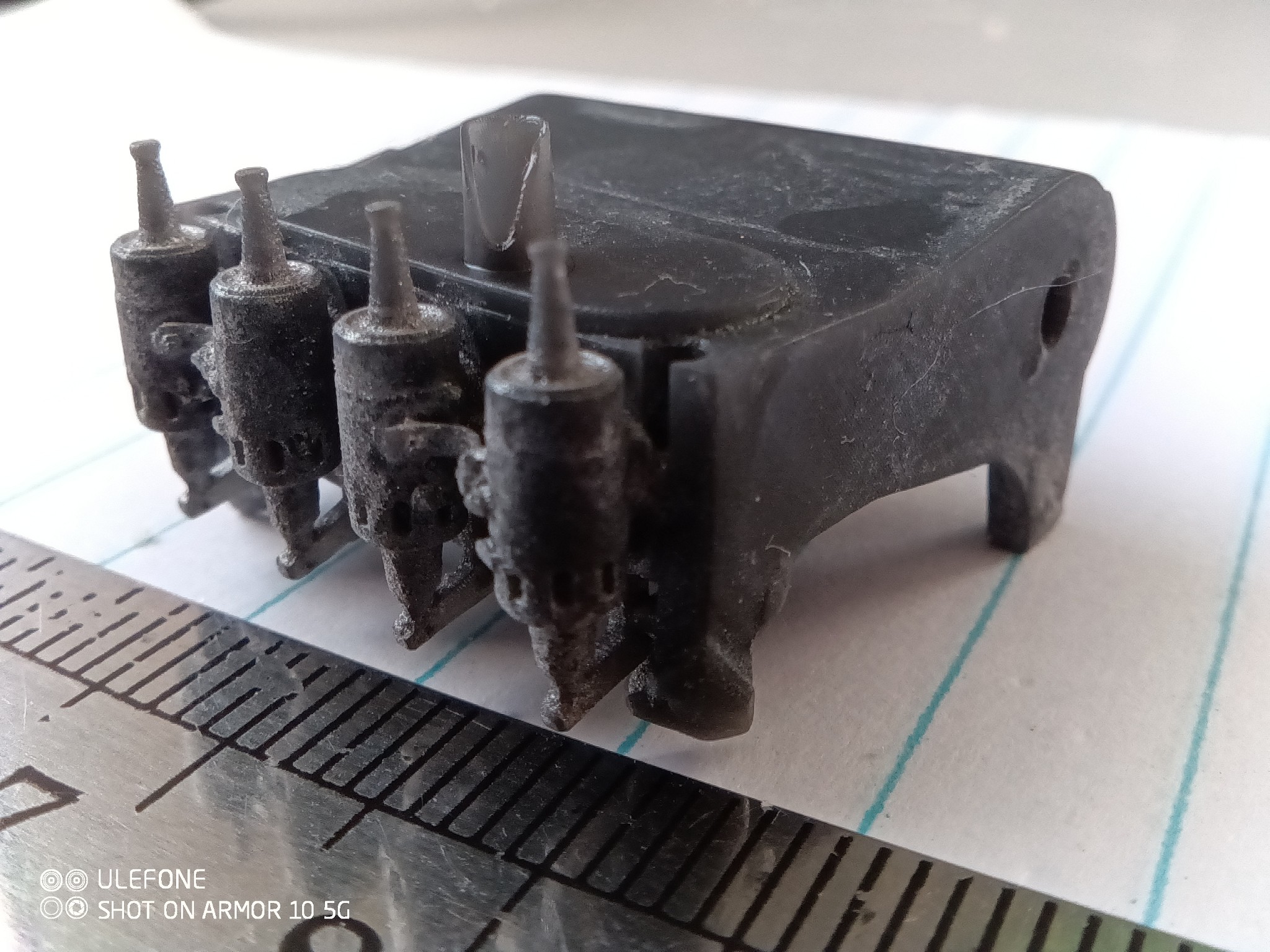
That's not my thing, so I don't have an example to show you. But here's a photo of a model I printed of the Wright brothers' engine. The ruler scale is mm. [Edit] The hole at the far end is 2mm in diameter. The discoloration on the surface is due to my attempts to dye it.


For comparison, here's a photo of the actual thing.


The Halot one's best resolution is 10 microns in the Z axis, and 50 in XY. I printed this at about 45 degrees (because, as I discovered, you don't want to print a horizontal surface) so I guess voxel resolution would average out to about 30 microns. IIRC this was a 15 hour print. I suspect I could do marginally better if I could find out the exact steps/mm of the Z axis, and perhaps spent some effort on positioning the model at the optimal angle for printing.


Oh, one other benefit of resin: there's not a lot of moving parts. Apart from the Z axis screw, there's no belts to stretch or other moving parts to wear, so your 100th print will be as good as your first one.


neb

neb
11294 posts

Uber Geek
+1 received by user: 10018

Trusted
Lifetime subscriber

  #2938261 4-Jul-2022 15:37
Send private message

An indirect reply, many libraries and similar places will let you use their, typically high-end, 3D printers for a small fee, you could play around with that a bit and see if there's any specific things you need to be aware of/look out for if you're getting your own one.

richms
29098 posts

Uber Geek
+1 received by user: 10209

Trusted
Lifetime subscriber

  #2938321 4-Jul-2022 17:18
Send private message

neb: An indirect reply, many libraries and similar places will let you use their, typically high-end, 3D printers for a small fee, you could play around with that a bit and see if there's any specific things you need to be aware of/look out for if you're getting your own one.


More importantly they have someone that knows how it works doing it.


Even with the resin ones there is so much with the profiles that you need to tune, and there is no adjustment in the printer for temperature so as they heat up with running, the performance of the resins change which can cause the first print to be fine, but a second one to stick to the film too much or similar.


Richard rich.ms

Loismustdye
942 posts

Ultimate Geek
+1 received by user: 256

Trusted

  #2938377 4-Jul-2022 22:17
Send private message

Thanks for those that answered my hyjack of the thread question, might touch base with the local library and have a look see at what’s on offer there to trial. Cheers 


 1 | 2
View this topic in a long page with up to 500 replies per page Create new topic


Geekzone Live »

Try automatic live updates from Geekzone directly in your browser, without refreshing the page, with Geekzone Live now.


Are you subscribed to our RSS feed? You can download the latest headlines and summaries from our stories directly to your computer or smartphone by using a feed reader.