Geekzone: technology news, blogs, forums
Guest
Welcome Guest.
You haven't logged in yet. If you don't have an account you can register now.


xpd

xpd

Geek of Coastguard
14115 posts

Uber Geek
+1 received by user: 4574

Retired Mod
ID Verified
Trusted
Lifetime subscriber

#298898 25-Jul-2022 23:19
Send private message

Recently sold my Kindles and picked up a new Kobo reader.


Now I'm looking at the Overdrive (aka Libby) options for reading books from the library system.


Logged in via the web, found a book and it prompted me to download an Android/Apple app or an EPUB (which reqs ADE)......  no way to tell it I wanted to use my Kobo. So looked at Kobo settings, found Overdrive, logged in, and searched for the same book. Got completely different results, and the book is now only available in Roman (???)......... errrr....  bit confused now :D


Anyone else had this ? I guess its something to do with the catalogue they have and the book I'm after isn't available in a suitable format for the Kobo ? Altho...its available as an EPUB.... :-/


Will keep poking around to see if I've missed something in meantime.


XPD / Gavin


LinkTree


Filter this topic showing only the reply marked as answer Create new topic
MurrayM
2502 posts

Uber Geek
+1 received by user: 742

ID Verified
Trusted
Lifetime subscriber

  #2946378 26-Jul-2022 07:44
Send private message

You don't mention which library system you're using, but I found the following info for the Auckland libraries: OverDrive on eReader


xpd

xpd

Geek of Coastguard
14115 posts

Uber Geek
+1 received by user: 4574

Retired Mod
ID Verified
Trusted
Lifetime subscriber

  #2946386 26-Jul-2022 08:07
Send private message

It is Auckland, but no, that page is just for connecting/setting up, done that, but seems the book selections are different from the web version, to the Kobo version.


I'll just use ADE for now to get it onto my Kobo (Which is the ClaraHD so shouldn't need ADE) and poke around some more later on.


XPD / Gavin


LinkTree


Bung
6733 posts

Uber Geek
+1 received by user: 2926

Subscriber

  #2946389 26-Jul-2022 08:14
Send private message

Have you tried poking around the Kobo site? https://help.kobo.com/hc/en-us/articles/360017677053-Borrow-eBooks-from-the-public-library-using-your-Kobo-eReader

Book selections are library specific, are you logging into your library?


jonathan18
7415 posts

Uber Geek
+1 received by user: 2850

ID Verified
Trusted

  #2946405 26-Jul-2022 08:42
Send private message

I agree it’s a bit of a mess - I’ve had a Kobo with built-in OverDrive for a few years now, but still think it’s more confusing that it should be.

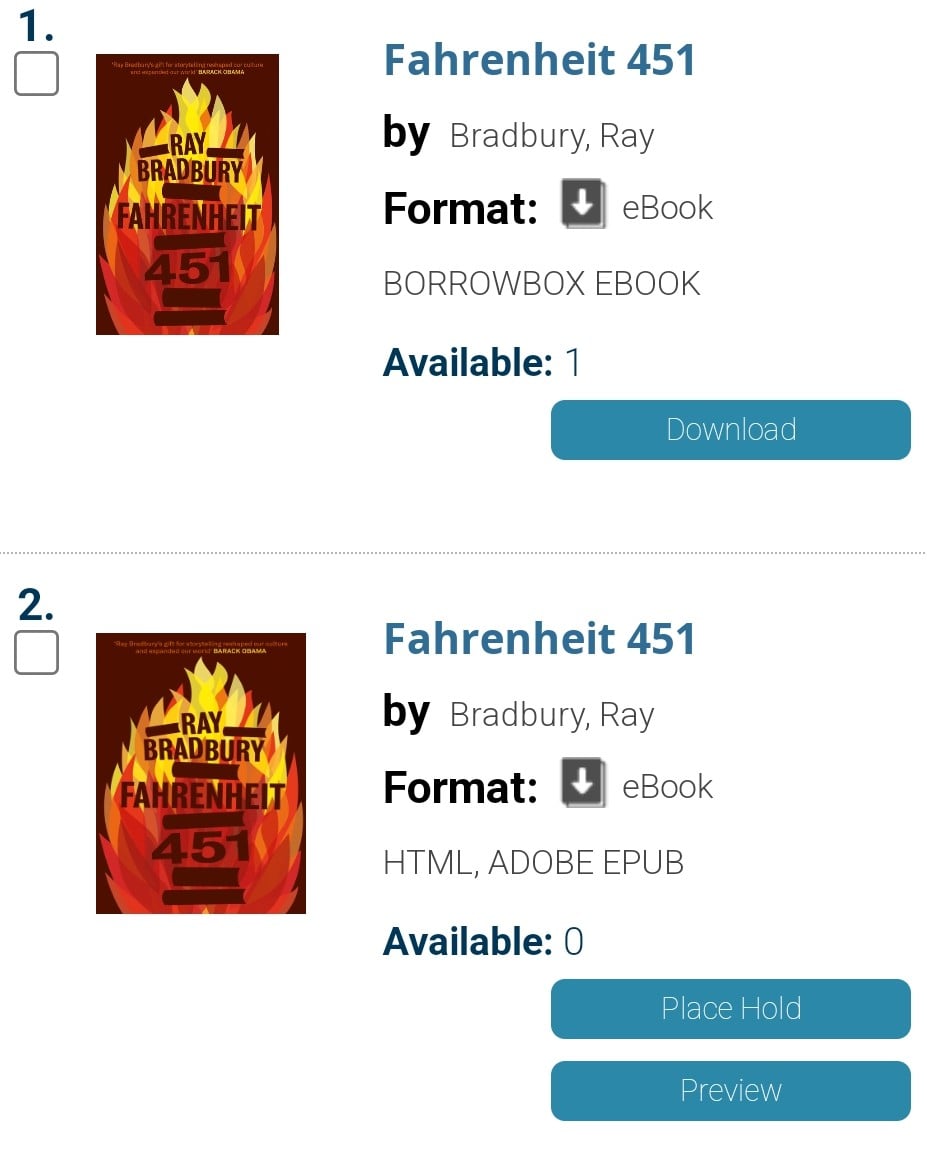
Partly, I think this comes from libraries using different services that use different e-book formats, only some of which are compatible with Kobos - for example, the book I’m currently reading is available in these two formats:


The Borrowbox version, I assume, is only readable in the Borrowbox app, whereas Adobe EPUB format obviously works with the Kobo. If you filter to only show Adobe EPUB titles you should see what’s compatible with your Kobo.

I assume Auckland Libraries also use Libby? That’s an OverDrive app so will only show compatible books - you can borrow them on the app and they’ll download automatically on your Kobo, just the same as borrowing from the library’s website. I’ve sometimes found it a bit delayed in syncing, but the most recent update hopefully sorted that. (I know that it’s possible to browse and borrow your library’s OverDrive content on the Kobo, but e-book screens are not great for browsing - I find it far easier/ more pleasant to use either a web browser or Libby, and then sync the Kobo.)

All this said, while it can be frustrating, I’ve never needed to end up downloading content to my current Kobo via Adobe Digital Editions - avoiding this dog of an app was one of the main reasons for moving on from my previous Kobo - so I suggest it really is worth working it out in the early stages of ownership to reap the benefits.

aaristotle
161 posts

Master Geek
+1 received by user: 37


  #2946406 26-Jul-2022 08:43
Send private message

I do this currently with my Kobo and Auckland library.
I use the Overdrive app on my phone, and login to the Auckland library with my library card number and pin through the app. You then checkout the books you want, but don't download them. On the kobo in the Overdrive settings also login to the Auckland library with the same library card. When you next sync the kobo it will download any checked out books.

Filter this topic showing only the reply marked as answer Create new topic


Geekzone Live »

Try automatic live updates from Geekzone directly in your browser, without refreshing the page, with Geekzone Live now.


Are you subscribed to our RSS feed? You can download the latest headlines and summaries from our stories directly to your computer or smartphone by using a feed reader.