Geekzone: technology news, blogs, forums
Guest
Welcome Guest.
You haven't logged in yet. If you don't have an account you can register now.


hwomc20

6 posts

Wannabe Geek
+1 received by user: 1


#303958 23-Mar-2023 11:59
Send private message

I would like to control my heat pump via HA as described here https://chrdavis.github.io/hacking-a-mitsubishi-heat-pump-Part-1/, but I am not 100% sure if my MSZ-GE42VAD heat pump has a CN105 connector.


First, I read the service manual, which does not mention CN105. Then, I checked the installation guide for the official Wi-Fi module MAC-568IF-E (see https://www.mitsubishi-electric.co.nz/materials/controllers/manuals/wi-fi/1_operation/guide_wi-fi_control_installation_mac-568.pdf), which states "Locate the CN105 port on the main control PCB and connect the Wi-Fi interface.". The Wi-Fi interface is compatible MSZ-GE42VAD, according to the vendor's website (see https://www.mitsubishi-electric.co.nz/heatpump/i/69744/wi-fi-interface). I therefore assume my heat pump has a CN105 interface.


I have opened it, and had a look, but did not find anything labelled "CN105". Am I assuming correctly that this is the plug? It has five pins, same as the plugs in this post: https://www.geekzone.co.nz/forums.asp?forumid=73&topicid=265469




Create new topic
michaelmurfy
meow
13664 posts

Uber Geek
+1 received by user: 11069

Moderator
ID Verified
Trusted
Lifetime subscriber

  #3053793 23-Mar-2023 14:04
Send private message

I just oped for the Mitsubishi WiFI Controller myself instead of building my own solution. This works very well with Home Assistant along with Homekit.


I think the white port beside the red one is CN105. I do recall it being in a different place on my GE42.


Michael Murphy | https://murfy.nz
Referral Links: Quic Broadband (use R122101E7CV7Q for free setup)

Are you happy with what you get from Geekzone? Please consider supporting us by subscribing.
Opinions are my own and not the views of my employer.


Resnick
242 posts

Master Geek
+1 received by user: 58

Lifetime subscriber

  #3053798 23-Mar-2023 14:17
Send private message

The white port looks like a 4 pin from what I can see. My CN105 was red, but labelled and mounted facing out for what that is worth.


This link might be of some help.


dasimpsonsrule
148 posts

Master Geek
+1 received by user: 37


  #3053843 23-Mar-2023 18:17
Send private message

Can you get a photo from a angle slightly more to the left? It says "05" at the bottom left of the connector, which could be part of the CN105 label


fe31nz
1303 posts

Uber Geek
+1 received by user: 430


  #3053942 24-Mar-2023 00:22
Send private message

This page has photos showing the CN105 connector on their heat pump.  My bet would be yours is the red one, since the plug on the official WiFi unit is also red.


https://chrdavis.github.io/hacking-a-mitsubishi-heat-pump-Part-1/


hwomc20

6 posts

Wannabe Geek
+1 received by user: 1


  #3098472 1-Jul-2023 21:01
Send private message

Apologies for the long delay; I do not often have the permission to open the heatpump. ;) Thanks for all the replies; awesome!


Those links were very helpful. And, @dasimpsonsrule, well spotted: 


In fact, the picture taken from a different angle, there is a "CN105" label at the red port. I had not seen this, as it is pretty small, half covered by the plastic bracket that I couldn't easily remove, and maybe because I stood on that slightly wobbly ladder. Thanks a lot; that's definitely it!


In the meanwhile, I have sourced a plug with the help of this post https://www.geekzone.co.nz/forums.asp?forumid=73&topicid=265469&page_no=1#3090599 , and the plug has arrived.


Guess what: It fits!


I have tried to figure out the next steps. It seems like these guys here get the cables right https://chrdavis.github.io/hacking-a-mitsubishi-heat-pump-Part-1/:


If I understand this right, this would mean for my cable:


  • orange = RX
  • yellow = TX
  • white = 5V
  • red = GND
  • ... and black unconnected

In contrary to most people here, I intend to use a WEMOS D1; I just happen to have one, and it means no soldering. ;)


So far, everything is ready, but after reading "Primera"'s post on https://chrdavis.github.io/hacking-a-mitsubishi-heat-pump-Part-1/, I am getting cold feet: They managed to break their heatpump. What if I break the unit? @michaelmurfy's idea of purchasing the wifi unit (I assume ~ NZD 300?) seems expensive compared to a WEMOS D1 and some plugs, but cheap compared to replacing the entire heatpump. Can I really break the unit just by connecting those wires, if I connect them correctly? Is there a way to test before I go "live"? A way to be extra sure?


rscole86
5002 posts

Uber Geek
+1 received by user: 467

Moderator
Trusted
Lifetime subscriber

  #3098487 1-Jul-2023 22:13
Send private message

No idea about breaking the A/C, but I got it wrong first time round. I can't remember what wires I got wrong, but plugged it in, nothing happened, resoldered and worked fine ever since.


Want to support Geekzone and browse the site without the ads? Subscribe to Geekzone now (monthly, annual and lifetime options).
hwomc20

6 posts

Wannabe Geek
+1 received by user: 1


  #3099128 3-Jul-2023 16:16
Send private message

@rscole86: All done; it works:


  • Out of the box with a WEMOS D1 (not mini!)
  • Without soldering :D ... admittedly, this is more the prototype design, and I might switch to the D1 mini in the future
  • I got the RX/TX cabling wrong in the post above; the correct layout is:


    • orange = TX
    • yellow = RX
    • white = 5V
    • red = GND
    • black unconnected

Final cabling (of the working prototype):


... and here the "mounted" version (for now, the plugs hold it up there):


... its built-in webserver


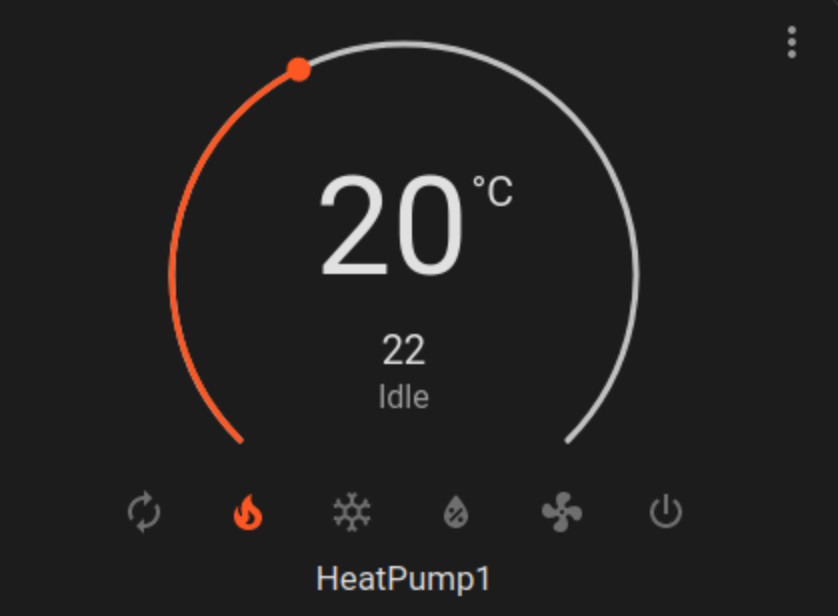
... as well as evidence of it working in Home Assistant:


Thanks for all the help here in the forum; couldn't have done it without you!


dolsen
1484 posts

Uber Geek
+1 received by user: 320

Trusted
Lifetime subscriber

  #3205989 13-Mar-2024 12:20
Send private message

Just a note for people using the D1 mini and an issue you may face. 


I used a D1 mini (clone) from aliexpress and had some issues initially.


Connecting it, the D1 was unable to communicate with the heatpump. I initially tried adding some 10K pullup resistors from +5V to TX and RX, but this did not solve the issue.


I looked around and there was some talk about needing to cut tracks on the D1 mini to make it work. 


On the front of the D1 mini, the esp8266 is connected to the TX and RX pins.


On the back, the TX and RX pins are connected to the USB interface chip, and they were interfering with the signals to the heatpump.


After desoldering the following surface mount resistors, the D1 was then able to communicate with the heatpump sucessfully.


Destructive removal of those two resistors is also an option if you are unable to desolder them.


Note - I left the two pullup 10K resisters between +5V and the TX / RX pins, but, these are probably not needed.


neb

neb
11294 posts

Uber Geek
+1 received by user: 10018

Trusted
Lifetime subscriber

  #3205999 13-Mar-2024 13:01
Send private message

Also for non-Mitsubishi heat pumps make absolutely sure you know what's on the pins of the internal connectors. For some Daikins it's:


Red, Yellow, etc


Black = 327VDC


Yup, TTL-level signals next to lethal voltages, on a connector that probably isn't rated for those voltage levels.

hsvhel
1277 posts

Uber Geek
+1 received by user: 598

ID Verified

  #3206000 13-Mar-2024 13:06
Send private message

neb: Also for non-Mitsubishi heat pumps make absolutely sure you know what's on the pins of the internal connectors. For some Daikins it's: Red, Yellow, etc Black = 327VDC Yup, TTL-level signals next to lethal voltages, on a connector that probably isn't rated for those voltage levels.


No way!!!


That voltage was on an interface port??


Referral Link Quic


Free Setup use R502152EQH6OK on check out


neb

neb
11294 posts

Uber Geek
+1 received by user: 10018

Trusted
Lifetime subscriber

  #3206004 13-Mar-2024 13:30
Send private message

Yup, the S403 internal connector that goes to the WiFi controller has 327VDC present on one of the pins, so after you've got the WiFi controller board you need to go out and buy another controller board that's essentially a set of optoisolators and other circuitry to isolate the control signalling from the DC high voltages. +15V power, Rx, Tx, GND, ... 327VDC.


Daikin make good-value products when you see them as a magic black box that makes hot/cold air come out, but some of their design decisions are just nuts.


Shop on-line at New World now for your groceries (affiliate link).
Senecio
2881 posts

Uber Geek
+1 received by user: 3199

ID Verified
Lifetime subscriber

  #3206008 13-Mar-2024 14:09
Send private message

hsvhel:


neb: Also for non-Mitsubishi heat pumps make absolutely sure you know what's on the pins of the internal connectors. For some Daikins it's: Red, Yellow, etc Black = 327VDC Yup, TTL-level signals next to lethal voltages, on a connector that probably isn't rated for those voltage levels.


No way!!!


That voltage was on an interface port??


Yes, don't ask me how I found out! But thankfully I'm still here.


Create new topic


Geekzone Live »

Try automatic live updates from Geekzone directly in your browser, without refreshing the page, with Geekzone Live now.


Are you subscribed to our RSS feed? You can download the latest headlines and summaries from our stories directly to your computer or smartphone by using a feed reader.