Geekzone: technology news, blogs, forums
Guest
Welcome Guest.
You haven't logged in yet. If you don't have an account you can register now.


Regiiko

27 posts

Geek
+1 received by user: 1


#309418 17-Oct-2023 16:56
Send private message

Hi all,


I've got an Arrowhead Elite S Lite that seems to be exactly the same as this user on Reddit. that I'd like to integrate with a Konnected Interface Kit.


I've managed to find a copy of the installation manual floating around the internet but I'm having a bit of trouble parsing it...


A geekzone user posted back in 2014 hinting that it was possible to program the inputs/outputs to do what I'd like to do but I don't know if they're still around.


What I'd like to figure out is how to program the damn thing to do the following:


  • reconfigure the output (3 & 4) to output the following statuses: arm/disarm (is the alarm armed or disarmed?) & activation (is the alarm going off?)
  • reconfigure the tamper input to arm/disarm the alarm.

If anyone has done this, or knows how to do this, some help would be great! If not, I'll keep glaring at the alarm system until the heat death of the universe.


View this topic in a long page with up to 500 replies per page Create new topic
 1 | 2
gregmcc
2173 posts

Uber Geek
+1 received by user: 836

ID Verified
Trusted
Lifetime subscriber

  #3148499 17-Oct-2023 17:20
Send private message


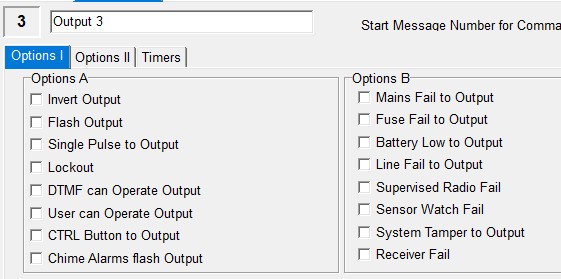
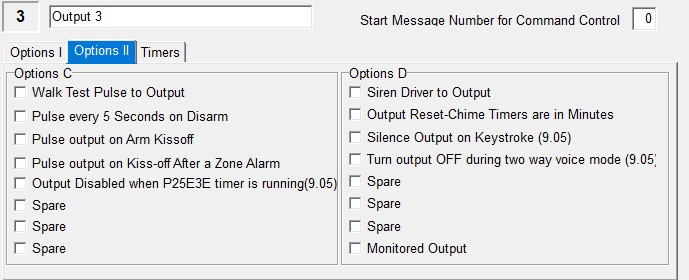
looks like there are output options (see above) 


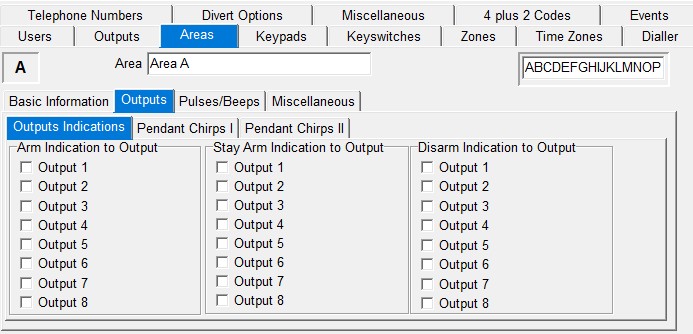
found these


Looks like you can map a area arm to an output


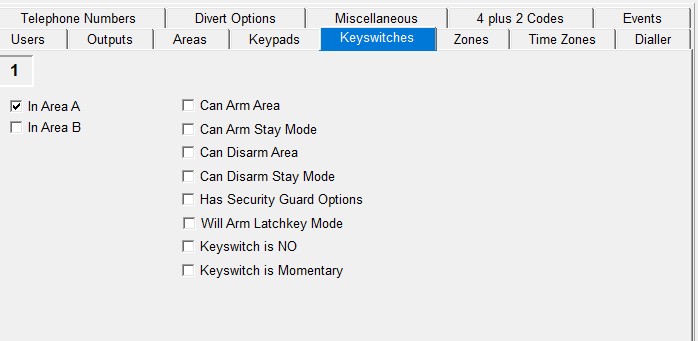
as for disarming


not sure off the top of my head where the keyswitch input is, I can't see anything about reassigning the tamper input to anything else.


Regiiko

27 posts

Geek
+1 received by user: 1


  #3148518 17-Oct-2023 19:32
Send private message

not sure off the top of my head where the keyswitch input is, I can't see anything about reassigning the tamper input to anything else.


Page 66 of the manual (linked in the first post) has this to say about the tamper input:

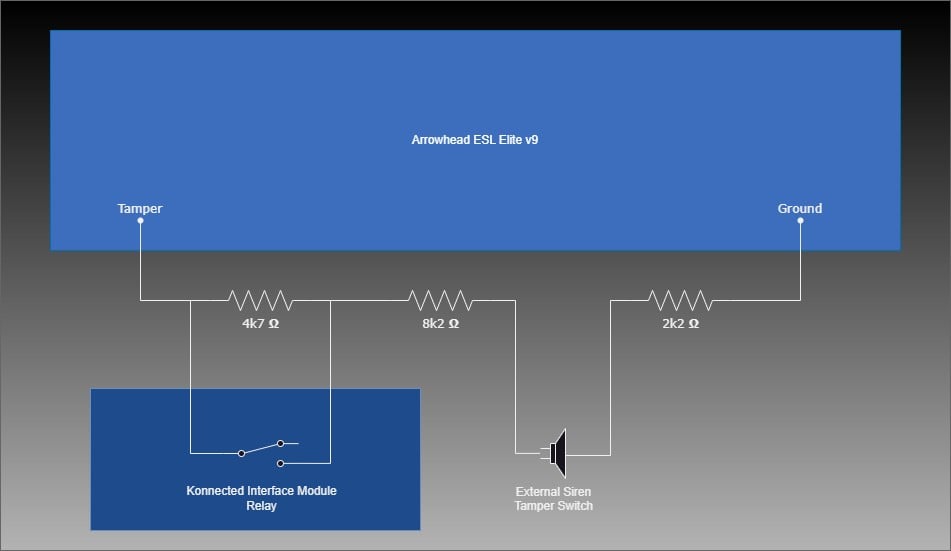
The two Key-Switch inputs are available on the panel tamper. Normally the panel tamper is a single 2k2 EOL resistor, however if the tamper input is wired as per the type 14 option shown on page 5, the 4k7 resistor becomes Key-switch number 1 and the 8k2 resistor becomes Key-switch number 2 (the 2k2 still acts as the tamper resistor). If the tamper input is shorted out or cut the panel will still go into system tamper alarm but provided the 2k2 resistor is maintained then shorting or opening the 4k7 or 8k2 resistors will operate the key-switch functions.

I’m still really confused by this entire system, unfortunately.

mentalinc
3384 posts

Uber Geek
+1 received by user: 1023

Trusted

  #3148579 17-Oct-2023 21:46
Send private message

There is an IP-Module you can purchase and flash with a particular firmware (need an FTDI to do it) to get it working in Home Assistant for example: https://community.home-assistant.io/t/custom-component-crow-runner-arrowhead-aap-8-16-alarm-ip-module/130588


Suggest you use the tools (ULD16) from the screenshots above first to get the Installer code - without that, I think you're kinda stuck.


I've recently followed that thread and got the desired result of being able to be notified when the alarm goes off, reset and activate, monitor zones etc etc.


Arrowhead = Crow alarms


The cost of the official module (and IP Loom) was well worth cutting down the effort, and hacking stuff together too much, or damaging the alarm- https://www.aap.co.nz/shop/Alarm+Systems/Modules/IP-MODULE.html


There is also an option to just subscribe to their cloud service (elitecloud).


I guess finally Arrowhead is a NZ company based in Silverdale in Auckland.


Hopefully you don't already have the Konnected Alarm yet...


Toward the bottom of the thread above looks to be an ESP version (I've not used it and looks rather new (less than a month old), but would be an even cheaper entry..


CPU: AMD 5900x | RAM: GSKILL Trident Z Neo RGB F4-3600C16D-32GTZNC-32-GB | MB:  Asus X570-E | GFX: EVGA FTW3 Ultra RTX 3080Ti| Monitor: LG 27GL850-B 2560x1440


Quic: https://account.quic.nz/refer/473833 R473833EQKIBX 


Regiiko

27 posts

Geek
+1 received by user: 1


  #3151154 22-Oct-2023 21:18
Send private message

Is there a way to access the installer code without having the IP expansion? I do have a FTDI 3V3 serial programmer lying around.


mentalinc
3384 posts

Uber Geek
+1 received by user: 1023

Trusted

  #3151163 22-Oct-2023 22:00
Send private message

You can probably try connecting to the PC connection below, and the ULD16 app (https://www.aap.co.nz/QuickPage/ULD16.html) to connect to the comm port of the FTDI - https://www.aap.co.nz/site/aap/files/pdfs/Elite%20S%20ULD%20for%20IP.pdf 


Check this thread https://community.home-assistant.io/t/custom-component-crow-runner-arrowhead-aap-8-16-alarm-ip-module/130588 and you might find the pin out, but from memory only had the Ip-module.. You are basically replacing the DLINK cable with the FTDI instead.


Not sure if it will work, may perm kill your alarm etc


Once you get ULD16 working and connect - navigate Miscellaneous -> Installer options -> installed code will be in the box on the right


CPU: AMD 5900x | RAM: GSKILL Trident Z Neo RGB F4-3600C16D-32GTZNC-32-GB | MB:  Asus X570-E | GFX: EVGA FTW3 Ultra RTX 3080Ti| Monitor: LG 27GL850-B 2560x1440


Quic: https://account.quic.nz/refer/473833 R473833EQKIBX 


Regiiko

27 posts

Geek
+1 received by user: 1


  #3151358 23-Oct-2023 10:49
Send private message

Someone on the HA forums has said they've bricked their alarm panel by doing that, so understandably, I'm *very* hesitant to try that!


Shop now on AliExpress (affiliate link).
mentalinc
3384 posts

Uber Geek
+1 received by user: 1023

Trusted

  #3151943 25-Oct-2023 06:51
Send private message

I guess that leaves going back to the IP module to get the installer code (still likely to be cheaper than paying someone to come and look at it).


CPU: AMD 5900x | RAM: GSKILL Trident Z Neo RGB F4-3600C16D-32GTZNC-32-GB | MB:  Asus X570-E | GFX: EVGA FTW3 Ultra RTX 3080Ti| Monitor: LG 27GL850-B 2560x1440


Quic: https://account.quic.nz/refer/473833 R473833EQKIBX 


technician14
122 posts

Master Geek
+1 received by user: 9


  #3152223 25-Oct-2023 20:30
Send private message

You can access installer programming without a installer code, by turn off the system then back on then go to kp and push program and enter within a few seconds

phrozenpenguin
868 posts

Ultimate Geek
+1 received by user: 90


  #3152250 25-Oct-2023 22:09
Send private message

Some of this may be covered but what is the end state you are aiming for?


If it is piping this data into Home Assistant then it would be much easier (and cheaper) to get the IP panel, the programming cable, the "local" firmware and set that up, and then use the Home Assistant custom component to get the data.


I've used the serial cable and node-red as another option, and then replaced it with the IP panel when it was available.


DataBitz
37 posts

Geek
+1 received by user: 14


  #3161196 19-Nov-2023 15:35
Send private message

Regiiko:


not sure off the top of my head where the keyswitch input is, I can't see anything about reassigning the tamper input to anything else.


Page 66 of the manual (linked in the first post) has this to say about the tamper input:

The two Key-Switch inputs are available on the panel tamper. Normally the panel tamper is a single 2k2 EOL resistor, however if the tamper input is wired as per the type 14 option shown on page 5, the 4k7 resistor becomes Key-switch number 1 and the 8k2 resistor becomes Key-switch number 2 (the 2k2 still acts as the tamper resistor). If the tamper input is shorted out or cut the panel will still go into system tamper alarm but provided the 2k2 resistor is maintained then shorting or opening the 4k7 or 8k2 resistors will operate the key-switch functions.

I’m still really confused by this entire system, unfortunately.


I got this working yesterday using the tamper input and key switch to control the arm/disarm of the alarm via the Konnected.
Note I'm just a DIY'er so no qualifications and this could we be wrong but it worked for me. Hope it helps.


Got the resistors from Jaycar.
4.7k Ohm 0.5 Watt Metal Film Resistors - Pack of 8 | Jaycar Electronics New Zealand
8.2k Ohm 0.5 Watt Metal Film Resistors - Pack of 8 | Jaycar Electronics New Zealand
2.2k Ohm 0.5 Watt Metal Film Resistors - Pack of 8 | Jaycar Electronics New Zealand

Configured the alarm to allow control via key switch


P112E 1E
Enable options to allow Keyswitch 1 to Arm/Disarm


P25E 10E
Enable Panel Tamper is 2k2 EOL 


roderickh
221 posts

Master Geek
+1 received by user: 63


  #3177650 4-Jan-2024 15:43
Send private message

DataBitz:


I got this working yesterday using the tamper input and key switch to control the arm/disarm of the alarm via the Konnected.
Note I'm just a DIY'er so no qualifications and this could we be wrong but it worked for me. Hope it helps.


Just reviving this thread a bit - I have a elite s v908.12b alarm with 4 zones (currently using 1 piggybacked to have 5 zones). Tried pairing it with a konnected interface kit, but for the life of me just haven't succeded - do you mind sharing your wiring (a photo maybe?). Really close to just selling this interface kit and opting for something else. tyvm!


Move to New Zealand's best fibre broadband service (affiliate link). Free setup code: R587125ERQ6VE. Note that to use Quic Broadband you must be comfortable with configuring your own router.
Anjana
3 posts

Wannabe Geek


  #3258465 11-Jul-2024 14:56
Send private message

I'm in the same boat.


I even created a ticket with Konnected, but they are not helpful.


Has anyone found a working solution? Or do I have to throw this Konnected gear into the garbage?


Anjana
3 posts

Wannabe Geek


  #3258467 11-Jul-2024 14:59
Send private message

roderickh:


DataBitz:


I got this working yesterday using the tamper input and key switch to control the arm/disarm of the alarm via the Konnected.
Note I'm just a DIY'er so no qualifications and this could we be wrong but it worked for me. Hope it helps.


Just reviving this thread a bit - I have a elite s v908.12b alarm with 4 zones (currently using 1 piggybacked to have 5 zones). Tried pairing it with a konnected interface kit, but for the life of me just haven't succeded - do you mind sharing your wiring (a photo maybe?). Really close to just selling this interface kit and opting for something else. tyvm!


Any of you guys know what are the Programable outputs Konnected is talking about?? I cann't find like that in our board..


roderickh
221 posts

Master Geek
+1 received by user: 63


  #3258505 11-Jul-2024 16:20
Send private message

Unfortunately I haven't had success either. I was hoping the poster above that succesfully managed to do so would share a pic but no bueno. 


DataBitz
37 posts

Geek
+1 received by user: 14


  #3258513 11-Jul-2024 17:26
Send private message

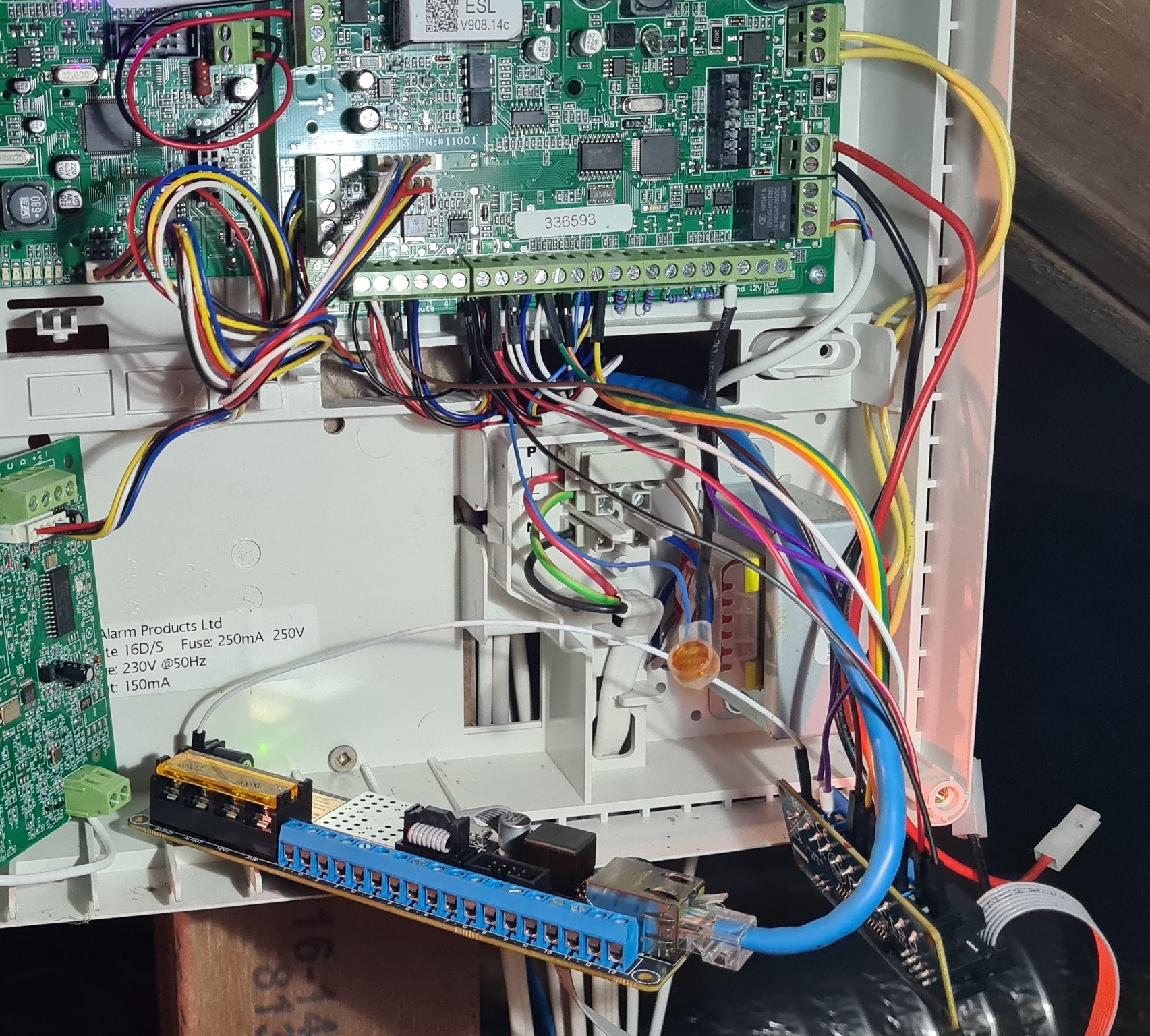
Here is a photo, not sure how much help it is.


The purple wires from the Konnect relay module go into black shrink wrap (that holds the resistors shown in my last post).


I no longer have access to this system so can't provide much more detail. 


 1 | 2
View this topic in a long page with up to 500 replies per page Create new topic


Geekzone Live »

Try automatic live updates from Geekzone directly in your browser, without refreshing the page, with Geekzone Live now.


Are you subscribed to our RSS feed? You can download the latest headlines and summaries from our stories directly to your computer or smartphone by using a feed reader.