How would I go about producing an automation that will turn on a switch every second day at a set time? Thanks.
|
|
Editing this post to remove the faulty AI-generated code...
This automation should work - although it will still need to be tested.
alias: Turn on switch every second day at 8 PMdescription: ""
trigger:
- platform: time
at: "20:00:00"
condition:
- condition: template
value_template: "{{ now().day % 2 == 0 }}"
action:
- service: switch.turn_on
target:
entity_id: switch.your_switch_entity_id
data: {}
mode: single
Thats impressive, AI at work. Will try and let you know. Thanks.
I'm supposed to respect my elders, but it's getting harder and harder for me to find one now.

The only downside to this approach is that it will only match dates that are divisible by 2, e.g. 2nd, 4th, 6th, 8th, etc. If you wanted it to trigger on odd days instead, then you'd need to use a template condition type with: {{ (now().day % 2) == 1 }}
I tried that suggestion, got the following error message......
Message malformed: extra keys not allowed @ data['days']
I'm supposed to respect my elders, but it's getting harder and harder for me to find one now.
Ah - interesting. Looks like the time-pattern doesn't support "days". The Google AI is not that impressive :-)
Try use the "template" conditional instead:
alias: Turn on switch every second day at 8 PMdescription: ""
trigger:
- platform: time
at: "20:00:00"
condition:
- condition: template
value_template: "{{ now().day % 2 == 0 }}"
action:
- service: switch.turn_on
target:
entity_id: switch.your_switch_entity_id
data: {}
mode: single
Thanks, tried that with the same error message as before.
I'm supposed to respect my elders, but it's getting harder and harder for me to find one now.
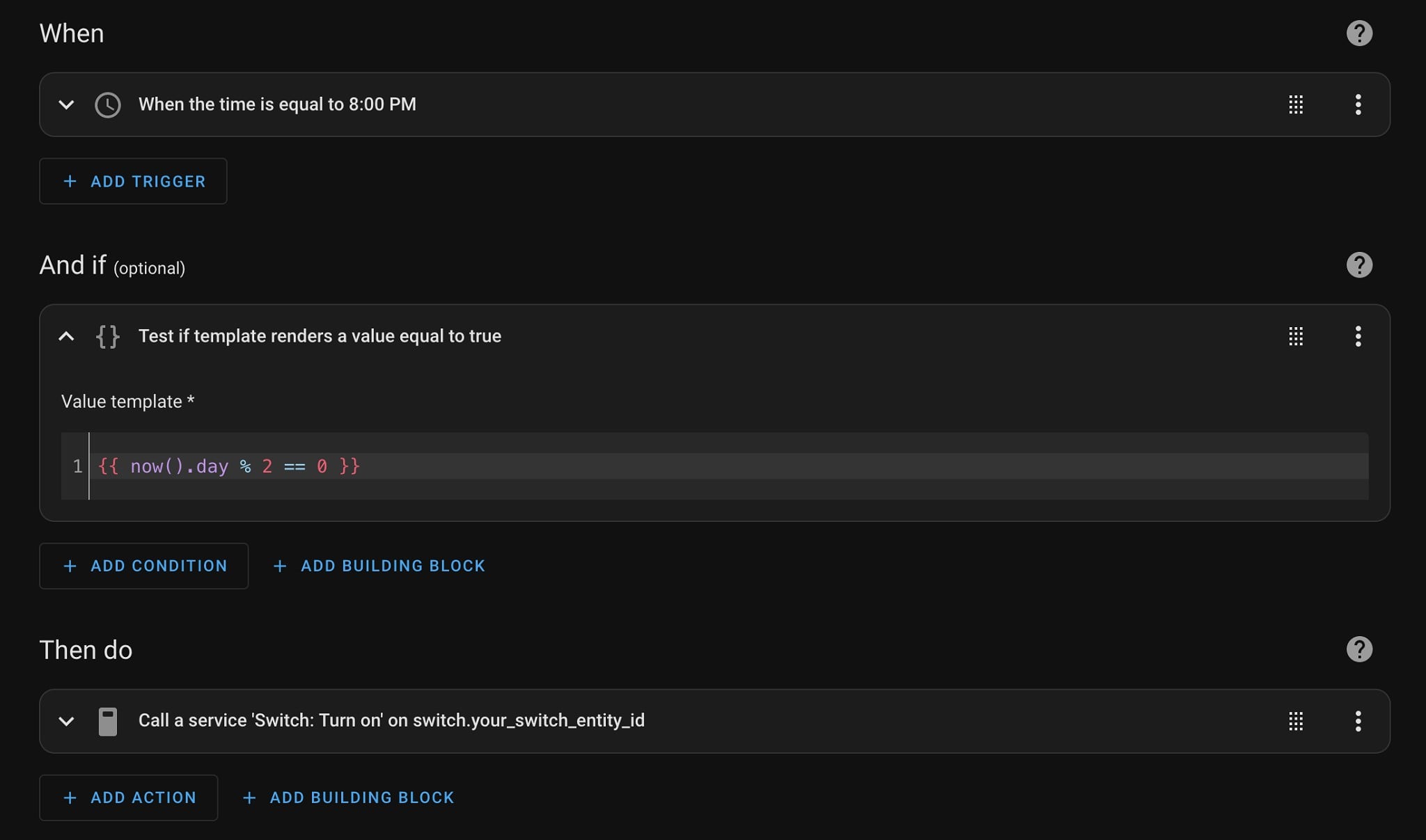
That might be an issue on your side. I tried the above code in my Home Assistant and it loaded up fine. Should look something like this:

Instead of messing around with days, you could just use a boolean helper.
Day 1, If boolean off, set boolean to true, turn on lights.
Day 2, if boolean true, turn off
OK, so instead of entering as yaml I used the visual editor and copied from your screenshot and that was accepted without errors.
So all going well it should not trip tomorrow and turn on Wednesday, will advise.
Thanks so much for your help.
I'm supposed to respect my elders, but it's getting harder and harder for me to find one now.
Would it be easier to create a calendar event (within the Home Assistant calendar) set to repeat every second day, and use that as the trigger in the automation?
SpookyAwol:
Instead of messing around with days, you could just use a boolean helper.
I need to brush up on my booleans 😬
I'm supposed to respect my elders, but it's getting harder and harder for me to find one now.
Down side of the suggested response is that on months with odd numbers of days (29/31) you'll get the automation triggering either twice in a row (triggering on odd days) or not triggering for 2 days (of triggering on even days). The boolean toggle might work better but won't remember your "schedule" if it's disabled/skipped for a day. If you really want to make sure it sticks to a fixed day-on-day-off schedule, do it based on epoch instead. Something like this (also AI generated, untested):
value_template: "{{ (now() - as_datetime('19700101T00Z')).days % 2 == 0 }}"
neb: Sort of a meta-question but it does apply to the above, does anyone know why HA tries to use a markup language as a scripting language? If I was going to script something for automation, YAML is pretty much the last tool I'd reach for, every single thing you want to do with HA becomes an awkwardly painful exercise in lateral thinking as you try and guess how you'd express something like a control loop using a mechanism that can't do that but can only do markup.
I'm not a fan of YAML at all, but all this is doing is describing the automation in an "if this then that" type of manner. So the YAML markup is not actually doing any scripting, although you can include template blocks which are based on Jinja which means you can include Python-like code in the YAML files.
SpookyAwol:
Instead of messing around with days, you could just use a boolean helper.
Day 1, If boolean off, set boolean to true, turn on lights.
Day 2, if boolean true, turn off
That's how I'd do it. Toggle the boolean on a schedule then follow with an if statement
|
|