Geekzone: technology news, blogs, forums
Guest
Welcome Guest.
You haven't logged in yet. If you don't have an account you can register now.


peejayw

1913 posts

Uber Geek
+1 received by user: 123


#315245 25-Jun-2024 17:28
Send private message

I have found a script (https://github.com/MRobi1/Home-Assistant/blob/main/nightlight_script.yaml) that I would like to use in Home Assistant. How do I go about bringing it into Home Assistant?


Thanks.


 I'm supposed to respect my elders, but it's getting harder and harder for me to find one now.


Filter this topic showing only the reply marked as answer Create new topic
rscole86
4999 posts

Uber Geek
+1 received by user: 462

Moderator
Trusted
Lifetime subscriber

  #3253127 25-Jun-2024 17:49
Send private message

In home assistant, go to settings, automations, scripts, add script, create new script, then edit in yaml. Copy and paste the content over.


peejayw

1913 posts

Uber Geek
+1 received by user: 123


  #3253129 25-Jun-2024 18:00
Send private message

Thanks, didnt see the edit in yaml part.


 I'm supposed to respect my elders, but it's getting harder and harder for me to find one now.


peejayw

1913 posts

Uber Geek
+1 received by user: 123


  #3253328 26-Jun-2024 08:39
Send private message

Having composed my script, how do I save it? I don't see a Save option anywhere, just a Copy to Clipboard one.


Thanks.


 I'm supposed to respect my elders, but it's getting harder and harder for me to find one now.


bigreddog
236 posts

Master Geek
+1 received by user: 117

Subscriber

  #3253336 26-Jun-2024 09:33
Send private message

The Save Script button should appear in the bottom right when you made changes - I think I have seen there is a bug in the latest version which can cause this not to show, but if you change to YAML mode it should appear - you can always add some text into the Description field so it registers a "change" and it should appear?


Tauranga
Quic Fibre (use R213449EPZJ3R for free setup)


peejayw

1913 posts

Uber Geek
+1 received by user: 123


  #3253344 26-Jun-2024 09:51
Send private message

No button there sadly, even after making a change.


 I'm supposed to respect my elders, but it's getting harder and harder for me to find one now.


peejayw

1913 posts

Uber Geek
+1 received by user: 123


  #3253398 26-Jun-2024 10:11
Send private message

So here are the steps I am taking.


Scripts-Add Script Click button
Create New Script. Save Button is  at lower right of screen.
Change to Edit in Yaml
Paste in saved script and select Save Script, RENAME window appears
Change script name and click Rename.
At this point the Save Script button disappears.


 I'm supposed to respect my elders, but it's getting harder and harder for me to find one now.


Shop now on AliExpress (affiliate link).
rscole86
4999 posts

Uber Geek
+1 received by user: 462

Moderator
Trusted
Lifetime subscriber

  #3253520 26-Jun-2024 15:47
Send private message

So long as you hit rename, that should save and rename at the same time. (Just tested and that's how my instance behaves).

peejayw

1913 posts

Uber Geek
+1 received by user: 123


  #3253530 26-Jun-2024 16:07
Send private message

The problem I am seeing is yes, the script is saved but when I open it and select Edit in Yaml again, all I see is this...


alias: Light On at Sunset
sequence: []
description: ""


As opposed to the actual script which starts...


alias: Light On at Sunset
sequence:
  - variables:
#     starting light brightness. 0-255. (255=100%)  
      start_brightness: 0
#     end light brightness. 0-255      
      end_brightness: 200
#     increment to change brightness by... ie: when set to 5 it will go 255->250->245
      brightness_increments: 5
#     duration in minutes to dim light
      duration_mins: 20


etc


I am obviously doing something wrong but it has me beat.


 I'm supposed to respect my elders, but it's getting harder and harder for me to find one now.


bigreddog
236 posts

Master Geek
+1 received by user: 117

Subscriber

  #3253728 27-Jun-2024 09:49
Send private message

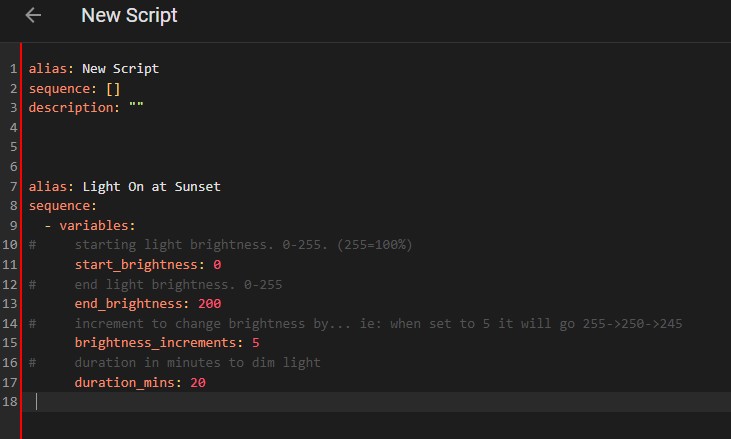
Does your script window have red down the lefthand side like below? If so that means there is an error in the script.  


I could replicate this by creating a script and saving it calling it "New Script" then I copied in your text. The reason the red bar down the left appears is because the script syntax is not correct - in this case alias and sequence are in the script twice.


If this not the case, can you at least post a screenshot so we're not guessing so much? 


Tauranga
Quic Fibre (use R213449EPZJ3R for free setup)


peejayw

1913 posts

Uber Geek
+1 received by user: 123


  #3253734 27-Jun-2024 10:01
Send private message

This is the full script i am pasting in.


alias: Light On at Sunset
sequence:
  - variables:
#     starting light brightness. 0-255. (255=100%)  
      start_brightness: 0
#     end light brightness. 0-255      
      end_brightness: 200
#     increment to change brightness by... ie: when set to 5 it will go 255->250->245
      brightness_increments: 5
#     duration in minutes to dim light
      duration_mins: 20
#     use this variables when dimming lights down
#      repeat_count: "{{ ((start_brightness - end_brightness) / brightness_increments) }}"
#     uncomment and use this variables when increasing light brightness
      repeat_count: "{{ ((end_brightness - start_brightness) / brightness_increments) }}"
      repeat_delay: "{{ ((duration_mins * 60) / repeat_count) }}"
  - service: light.turn_on
    data:
      brightness: "{{ start_brightness }}"
    target:
      entity_id: light.diningroom_light
  - delay:
      hours: 0
      minutes: 0
      seconds: "{{ repeat_delay | int }} "
      milliseconds: 0
  - repeat:
      while:
        - condition: template
#         use this when dimming the lights down
#          value_template: >-
#            {{ (state_attr('light.night_light_group', 'brightness') >
            end_brightness) }}
#         Uncomment and use this formula to increase the brightness of the lights (IE: For a wake-up light routine)
          value_template: >-
            {{ (state_attr('light.diningroom_light', 'brightness') <
            end_brightness) }}            
      sequence:
        - service: light.turn_on
          data:
#           Use this formula when dimming lights down        
#            brightness: >-
#              {{ state_attr('light.night_light_group', 'brightness') | int -
#              brightness_increments }}
#            Uncomment and use this formula when increasing light brightness
            brightness: >-
              {{ state_attr('light.diningroom_light', 'brightness') | int +
              brightness_increments }}
          entity_id:
            - light.diningroom_light
        - delay:
            hours: 0
            minutes: 0
            seconds: "{{ repeat_delay | int }} "
            milliseconds: 0
mode: restart
icon: mdi:lightbulb


 I'm supposed to respect my elders, but it's getting harder and harder for me to find one now.


bigreddog
236 posts

Master Geek
+1 received by user: 117

Subscriber

  #3253739 27-Jun-2024 10:24
Send private message

There is a line about halfway down that looks like it should be commented out (#) - line number 33:


end_brightness) }}


As soon as you comment out that line (or attach it to the line above) then the red bar disappears for me and save is successful.


Tauranga
Quic Fibre (use R213449EPZJ3R for free setup)


Shop on-line at New World now for your groceries (affiliate link).
peejayw

1913 posts

Uber Geek
+1 received by user: 123


  #3253745 27-Jun-2024 10:34
Send private message

Thank you, thank you, thank you! All working now.


 I'm supposed to respect my elders, but it's getting harder and harder for me to find one now.


Filter this topic showing only the reply marked as answer Create new topic


Geekzone Live »

Try automatic live updates from Geekzone directly in your browser, without refreshing the page, with Geekzone Live now.


Are you subscribed to our RSS feed? You can download the latest headlines and summaries from our stories directly to your computer or smartphone by using a feed reader.