Geekzone: technology news, blogs, forums
Guest
Welcome Guest.
You haven't logged in yet. If you don't have an account you can register now.


peejayw

1918 posts

Uber Geek
+1 received by user: 123


#317314 5-Oct-2024 08:49
Send private message

All my automations that call my media player (Google Home Mini) are no longer working properly after the recent Home Assistant update.


When I select Add Action, Media Player, Play Media, when I select the media player I get this.....


"Visual editor is not supported for this configuration


  • Key 'service' is not expected or not supported by the visual editor.
You can still edit your config in YAML.


action: media_player.play_media
target:
  entity_id: media_player.googlehome5810
data:
  media_content_id: ""
  media_content_type: ""
metadata: {}
service: media_player.play_media"


If I try to save I get this message....


"Message malformed. Cannot specify both service and action. Please use action only"


Where is the "service" call coming from? I can delete it but I dont know how to add the media I want to play, it was easy to do in the visual editor.



 I'm supposed to respect my elders, but it's getting harder and harder for me to find one now.


Create new topic
mentalinc
3403 posts

Uber Geek
+1 received by user: 1035

Trusted

  #3293138 5-Oct-2024 09:05
Send private message

Is the yaml valid? https://jsonformatter.org/yaml-validator 


Can you edit jus the yaml file?


Have you updated all HACS or similar components?


Have you made a large jump in versions?


But mainly read the release notes: 


https://www.home-assistant.io/blog/2024/10/02/release-202410/#improved-yaml-syntax-for-automations 


CPU: AMD 5900x | RAM: GSKILL Trident Z Neo RGB F4-3600C16D-32GTZNC-32-GB | MB:  Asus X570-E | GFX: EVGA FTW3 Ultra RTX 3080Ti| Monitor: LG 27GL850-B 2560x1440


Quic: https://account.quic.nz/refer/473833 R473833EQKIBX 


peejayw

1918 posts

Uber Geek
+1 received by user: 123


  #3293149 5-Oct-2024 09:30
Send private message

Yes, yes, yes, no.


 I'm supposed to respect my elders, but it's getting harder and harder for me to find one now.


mentalinc
3403 posts

Uber Geek
+1 received by user: 1035

Trusted

  #3293160 5-Oct-2024 11:08
Send private message

This is the line that isn't working:


service: media_player.play_media


Is media_player still the right device name?


CPU: AMD 5900x | RAM: GSKILL Trident Z Neo RGB F4-3600C16D-32GTZNC-32-GB | MB:  Asus X570-E | GFX: EVGA FTW3 Ultra RTX 3080Ti| Monitor: LG 27GL850-B 2560x1440


Quic: https://account.quic.nz/refer/473833 R473833EQKIBX 


peejayw

1918 posts

Uber Geek
+1 received by user: 123


  #3293162 5-Oct-2024 11:13
Send private message

It shows as media_player.googlehome5810


 I'm supposed to respect my elders, but it's getting harder and harder for me to find one now.


bigreddog
248 posts

Master Geek
+1 received by user: 123

Subscriber

  #3294009 7-Oct-2024 16:05
Send private message

service: media_player.play_media
has been superceded by
action: media_player.play_media


Services are now actions | Home Assistant Developer Docs (home-assistant.io)


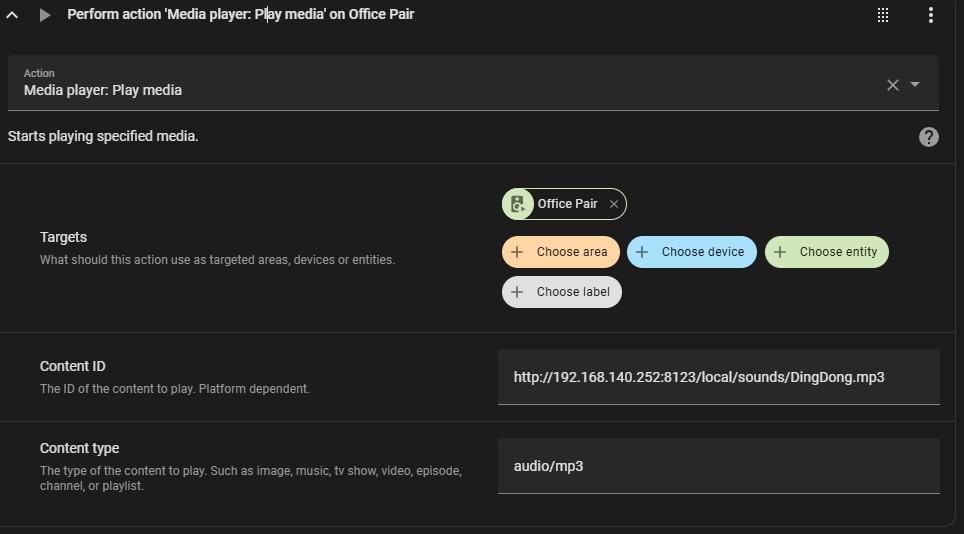
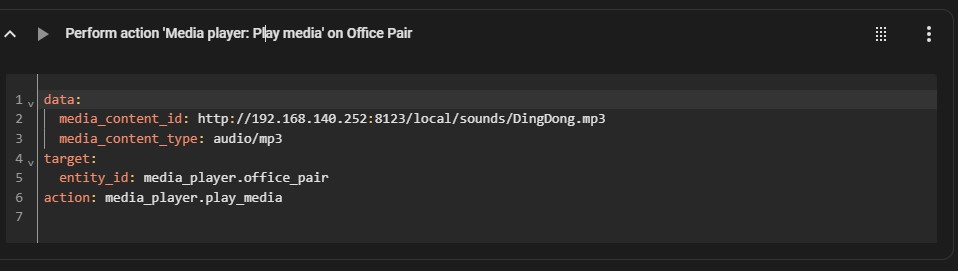
So you need to get rid of either "service" (best) or maybe "action" (but won't work forever).


Here is a screenshot of a section of one of my automations both Visual Editor view and YAML:


richms
29251 posts

Uber Geek
+1 received by user: 10359

Trusted
Lifetime subscriber

  #3294015 7-Oct-2024 16:24
Send private message

I now do not upgrade my home assistant. I just leave it as is and build a new one when something that looks useful comes out.


It always breaks when upgrades happen.


Half the integrations are half working at best.


Richard rich.ms


Shop now for Dyson appliances (affiliate link).
peejayw

1918 posts

Uber Geek
+1 received by user: 123


  #3294023 7-Oct-2024 16:56
Send private message

bigreddog:


service: media_player.play_media
has been superceded by
action: media_player.play_media


Services are now actions | Home Assistant Developer Docs (home-assistant.io)


So you need to get rid of either "service" (best) or maybe "action" (but won't work forever).


Thanks for that, all working now.


 I'm supposed to respect my elders, but it's getting harder and harder for me to find one now.


MarkM536
323 posts

Ultimate Geek
+1 received by user: 147


  #3294599 8-Oct-2024 13:51
Send private message

Home Assistant Alexa Media Player integration is having problems.


Mine logged me out and is now stuck in a loop on login. 


https://community.home-assistant.io/t/alexa-media-player-custom-integration-on-life-support-help-wanted/725684


-edit to make the link clickable.


bigreddog
248 posts

Master Geek
+1 received by user: 123

Subscriber

  #3294605 8-Oct-2024 14:09
Send private message

Thats an issue with Alexa Media Player (I don't use it).  


Solution is either disable or rollback the Alexa Integration:  https://github.com/alandtse/alexa_media_player/issues/2579#issuecomment-2390846519


edit overuse of "apparently" 🤦


Tauranga
Quic Fibre (use R213449EPZJ3R for free setup)


Talkiet
4822 posts

Uber Geek
+1 received by user: 3941

Trusted

  #3294675 8-Oct-2024 14:49
Send private message

As RichMS says above - don't upgrade HA unless you have a weekend free and want to spend most of it learning new and frustrating things about Python versions, incompatible databases etc.


Homeassistant has more breaking changes in regular updates than I have seen in all other software I have EVER USED, COMBINED.


I'm pretty convinced the developers hate normal users and want only linux gurus to use it.


Cheers - N


Please note all comments are from my own brain and don't necessarily represent the position or opinions of my employer, previous employers, colleagues, friends or pets.


boosacnoodle
1388 posts

Uber Geek
+1 received by user: 930


  #3294677 8-Oct-2024 14:52
Send private message

Seldom (if ever) experience issues with HA upgrades. I have a dozen+ automations and none of them faced an issue with the most recent update.


It sounds like your automation was one that was built with YAML originally and so was not able to be converted across automatically.


Want to support Geekzone and browse the site without the ads? Subscribe to Geekzone now (monthly, annual and lifetime options).
SumnerBoy
2079 posts

Uber Geek
+1 received by user: 306

ID Verified
Lifetime subscriber

  #3294680 8-Oct-2024 14:54
Send private message

Yeah I tend to agree with boosacnoodle. I have HA running in docker and set to auto-update on every new release. Never have any issues in the last 12 months. They have gotten much better with their release stability.


bigreddog
248 posts

Master Geek
+1 received by user: 123

Subscriber

  #3294693 8-Oct-2024 15:23
Send private message

Same as above with no problems, however I never upgrade to a 2024.x.0 version, always wait for 2024.x.1 or 2.


Haven't any problems, running 73 automations, 53 scripts and according to the config - 198 devices!


Tauranga
Quic Fibre (use R213449EPZJ3R for free setup)


Create new topic


Geekzone Live »

Try automatic live updates from Geekzone directly in your browser, without refreshing the page, with Geekzone Live now.


Are you subscribed to our RSS feed? You can download the latest headlines and summaries from our stories directly to your computer or smartphone by using a feed reader.