Geekzone: technology news, blogs, forums
Guest
Welcome Guest.
You haven't logged in yet. If you don't have an account you can register now.


Paul1977

5171 posts

Uber Geek
+1 received by user: 2192


#324190 11-Mar-2026 10:59
Send private message quote this post

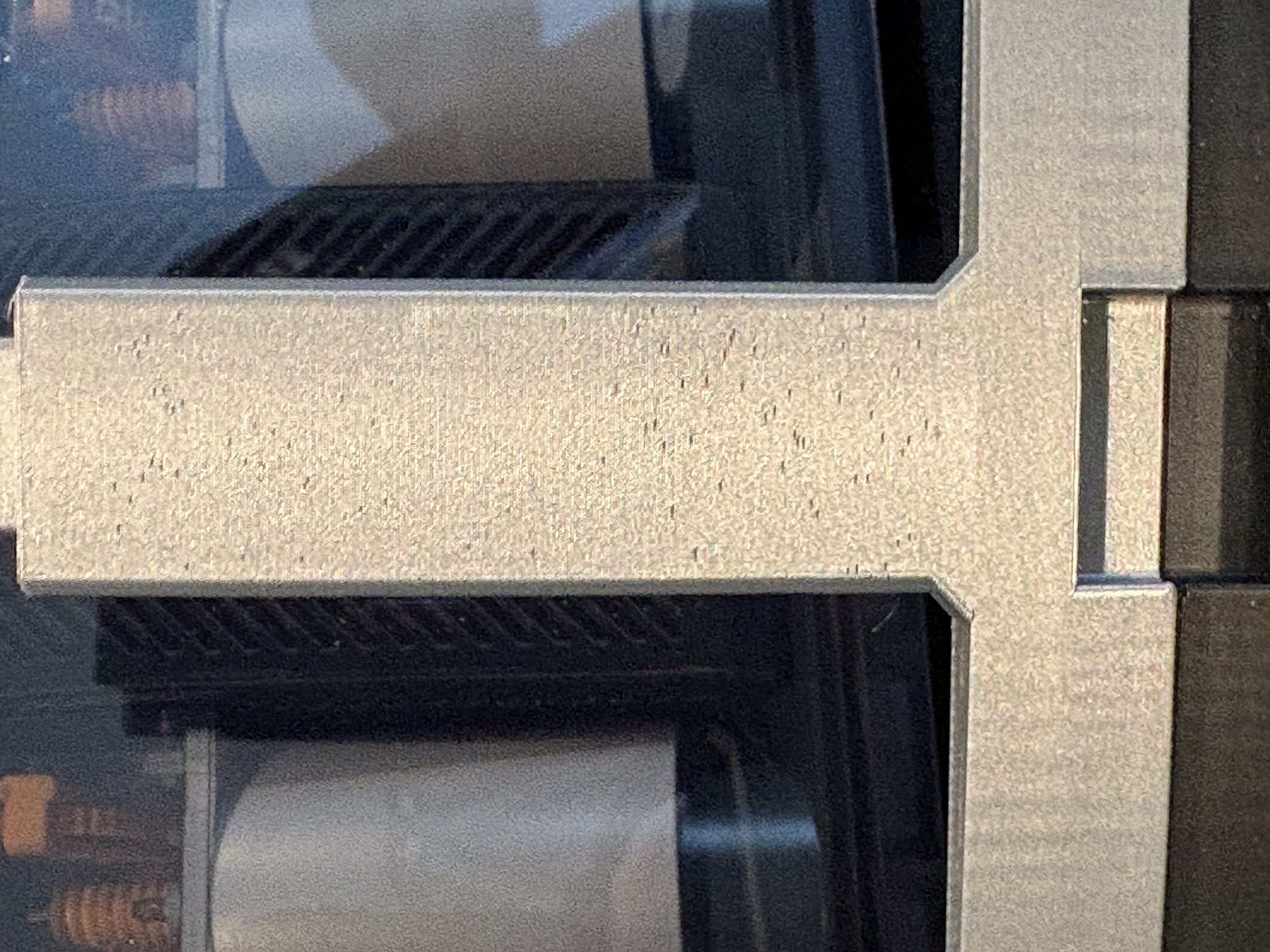
I have a Bambu P1S with AMS. I am far from an expert, and am having some issues with certain filaments leaving what appear to be small gaps in some of the layer lines and I just can't figure it out as it is noticeably worse on short paths. The filaments I'm struggling with right now are:


  • Bambu Silk PLA+
  • Bambu PLA Basic Silver

I haven't noticed the issue with any other colours of PLA Basic, just the silver (but I mainly use PLA Matte).


See below example with PLA Basic Silver which shows this very clearly - the bottom wide part is fine, but as soon as it transitions to the skinnier part the problem occurs.


I've tried lowering the outer wall speed, lowering the outer wall acceleration, and thoroughly drying the filament.


The seams are aligned to the edge, so these gaps aren't from the start of a new layer.


Do any experienced users have any ideas on this?


Thanks


Create new topic

pab

pab
110 posts

Master Geek
+1 received by user: 24

ID Verified

  #3468705 11-Mar-2026 11:04
Send private message quote this post

On first glance it looks like you have the slicer setting of Seam Position set to 'Random' rather than 'Aligned' at the 'Back' of the print.

https://wiki.bambulab.com/en/software/bambu-studio/Seam


Paul1977

5171 posts

Uber Geek
+1 received by user: 2192


  #3468733 11-Mar-2026 12:09
Send private message quote this post

pab: On first glance it looks like you have the slicer setting of Seam Position set to 'Random' rather than 'Aligned' at the 'Back' of the print.

https://wiki.bambulab.com/en/software/bambu-studio/Seam


Thanks, but seams are aligned to the back edge - so it's not that.


nickt
94 posts

Master Geek
+1 received by user: 10


  #3468734 11-Mar-2026 12:15
Send private message quote this post

Silks are obviously a lot less forgiving than matte filaments for showing defects, but I don't think I've seen that particular issue before.


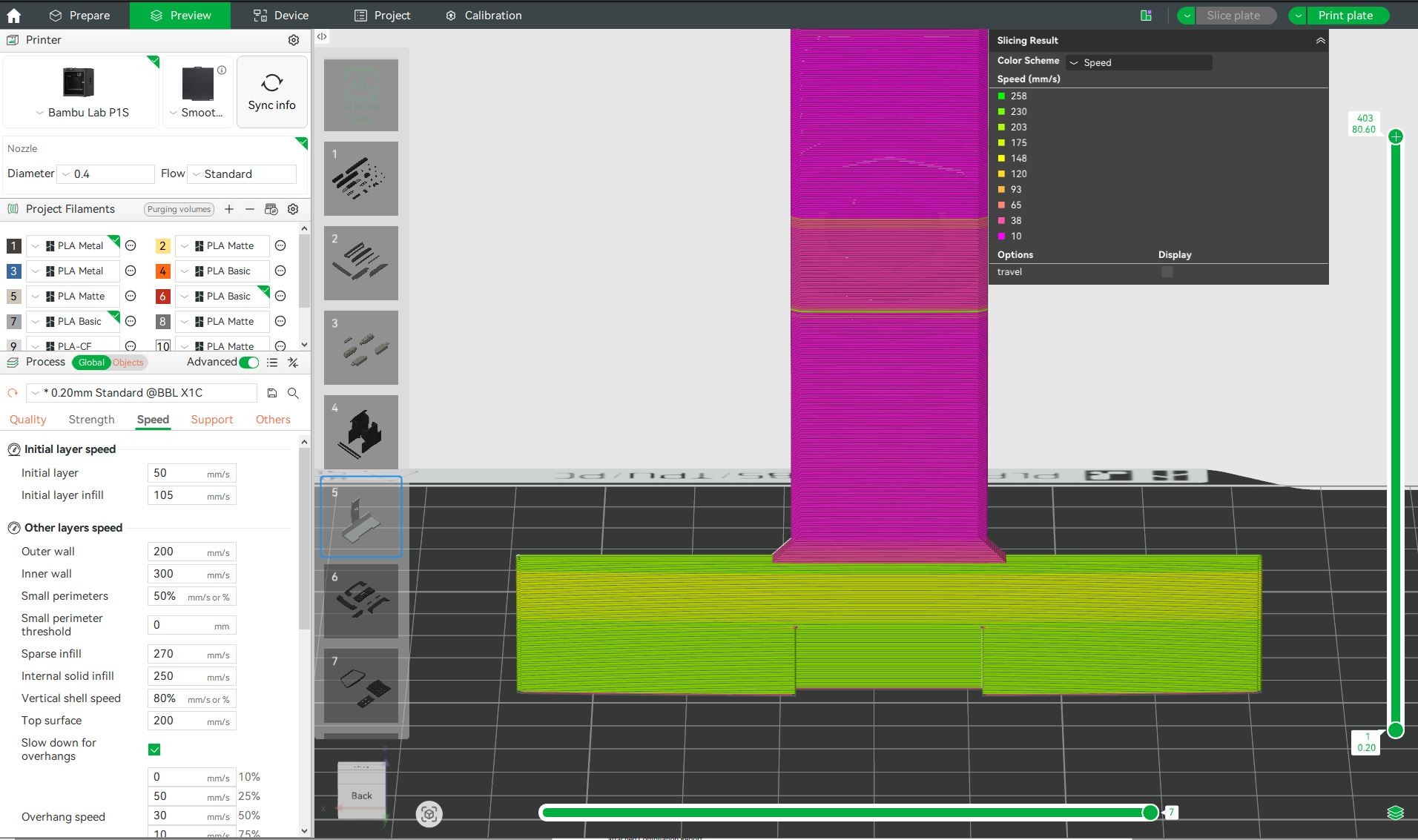
Are there any features visible on the Preview at the same locations as the defects ? Seam position will show up as a white dot, but could be line width or speed changes if there's some internal structure. 


It would be interesting to know what print speeds it uses on the broad bottom vs the skinnier part. A minimum layer time is often set in OrcaSlicer & derivatives, which can result in low print speeds for small layers, lower even than the wall speed you've set. This helps with cooling but can yield surface finish variation, so globally setting the outer wall speed below 100 mm/s can get it more uniform.


BTW, that wave-like VFA on the bottom section can sometimes be tuned away with outer wall speed too, and/or rotating the part. There's a calibration described at https://wiki.bambulab.com/en/bambu-studio/Calibration which can help see what your printer does.


pab

pab
110 posts

Master Geek
+1 received by user: 24

ID Verified

  #3468786 11-Mar-2026 13:38
Send private message quote this post

Thanks, but seams are aligned to the back edge - so it's not that.


My next step would be dry the filament some more to see if you see improvement.
https://ellis3dp.com/Print-Tuning-Guide/articles/troubleshooting/pockmarks.html
How are you currently drying your filament and keeping it dry?

Paul1977

5171 posts

Uber Geek
+1 received by user: 2192


  #3468926 11-Mar-2026 14:40
Send private message quote this post

pab: 
My next step would be dry the filament some more to see if you see improvement.
https://ellis3dp.com/Print-Tuning-Guide/articles/troubleshooting/pockmarks.html
How are you currently drying your filament and keeping it dry?


The Basic PLA Silver from the photo was a brand new roll that I opened and then dried in a Creality Space Pi X4 at 50C for 9 hours before use. The Silk+ was dried when first opened, but I just dried it again for 9 hours at 55C.


I store all my filaments in gasketed storage containers (about 9 spools per container) with about a kg of rechargeable desiccant in a mesh bag lining the bottom of each container. Either that or in the AMS which I printed additional desiccant holders to fit in, so loads of rechargeable desiccant in there as well. The desiccant is all still bright orange (turns green when saturated).


I'm as sure as I can be that the problem isn't damp filament. That link sure is what it looks like though (but only on short perimeters - which is what's really confusing me).


Paul1977

5171 posts

Uber Geek
+1 received by user: 2192


  #3468937 11-Mar-2026 15:05
Send private message quote this post

nickt:


Silks are obviously a lot less forgiving than matte filaments for showing defects, but I don't think I've seen that particular issue before.


Are there any features visible on the Preview at the same locations as the defects ? Seam position will show up as a white dot, but could be line width or speed changes if there's some internal structure. 


It would be interesting to know what print speeds it uses on the broad bottom vs the skinnier part. A minimum layer time is often set in OrcaSlicer & derivatives, which can result in low print speeds for small layers, lower even than the wall speed you've set. This helps with cooling but can yield surface finish variation, so globally setting the outer wall speed below 100 mm/s can get it more uniform.


BTW, that wave-like VFA on the bottom section can sometimes be tuned away with outer wall speed too, and/or rotating the part. There's a calibration described at https://wiki.bambulab.com/en/bambu-studio/Calibration which can help see what your printer does.


Definitely not seam position


The one in the photo I believe was set at the default settings since it was just PLA Basic, so was set to 200mm/s for the outer wall. But looking at the preview it is showing the low wide section printing much faster than the upper skinny part. I hadn't really noticed the wave at the bottom.


Stream your favourite shows now on Apple TV (affiliate link).
nickt
94 posts

Master Geek
+1 received by user: 10


  #3468986 11-Mar-2026 15:52
Send private message quote this post

Paul1977:


The one in the photo I believe was set at the default settings since it was just PLA Basic, so was set to 200mm/s for the outer wall. But looking at the preview it is showing the low wide section printing much faster than the upper skinny part. I hadn't really noticed the wave at the bottom.


Ah, so it is printing at only 10 mm/s on the skinny part. Possibly a slight clog in the nozzle ? At high speeds it may blast filament through while slow clogs up every so often. Might be worth trying a cold pull, and could print a subset of the part to verify.


Paul1977

5171 posts

Uber Geek
+1 received by user: 2192


  #3468999 11-Mar-2026 16:08
Send private message quote this post

nickt:


Ah, so it is printing at only 10 mm/s on the skinny part. Possibly a slight clog in the nozzle ? At high speeds it may blast filament through while slow clogs up every so often. Might be worth trying a cold pull, and could print a subset of the part to verify.


I had to Google what a cold pull was. I'll give that a try tonight, thanks.


Paul1977

5171 posts

Uber Geek
+1 received by user: 2192


  #3469186 11-Mar-2026 21:14
Send private message quote this post

Paul1977:


nickt:


Ah, so it is printing at only 10 mm/s on the skinny part. Possibly a slight clog in the nozzle ? At high speeds it may blast filament through while slow clogs up every so often. Might be worth trying a cold pull, and could print a subset of the part to verify.


I had to Google what a cold pull was. I'll give that a try tonight, thanks.


Well, cold pull seemed to noticeably improve the PLA Basic Silver, still a couple on little gaps but way better than it was. The only other difference was that I cut the model down to just print a smaller section of wide and small to save on wasted filament, but I don't think that would account for any difference.


Unfortunately PLA Silk+ still looks like garbage. So now I really don't know. Will have to try going through some calibration test prints I guess - although (unless I'm blind) the Bambu article you linked doesn't seem to have any downloads for the files it's using. I'm sure I can find something on MakerWorld though. Might be a job for the weekend.


Bloody frustrating.


Paul1977

5171 posts

Uber Geek
+1 received by user: 2192


  #3469964 14-Mar-2026 10:17
Send private message quote this post

Just an update.


I haven't done any further tests or calibrations yet, but I redried both rolls of filament (12 hrs @ 50C for PLA Basic Silver, 12 hrs @ 55C for PLA Silk+ Silver) weighing the spools before and after. Weight didn't change for either of them by even a single gram.


So, I think that's definitive that they were both already bone dry and moisture isn't a factor.


Create new topic


Geekzone Live »

Try automatic live updates from Geekzone directly in your browser, without refreshing the page, with Geekzone Live now.


Are you subscribed to our RSS feed? You can download the latest headlines and summaries from our stories directly to your computer or smartphone by using a feed reader.