
Geekzone: technology news, blogs, forums
Guest
Welcome Guest.
You haven't logged in yet. If you don't have an account you can register now.


View this topic in a long page with up to 500 replies per page Create new topic
1 | 2 | 3

xpd

xpd

Geek of Coastguard
14116 posts

Uber Geek
+1 received by user: 4577

Retired Mod
ID Verified
Trusted
Lifetime subscriber

  #2940326 10-Jul-2022 11:15
Send private message

lxsw20:


Should work fine with existing photos, I suspect configuration issue.


Nope, been through all the settings etc, and no way to get it to upload the existing photos. :(


Really frustrating as theres some photos on there I really need ASAP for a project, but too many to go through and email etc.



XPD / Gavin


LinkTree


xpd

xpd

Geek of Coastguard
14116 posts

Uber Geek
+1 received by user: 4577

Retired Mod
ID Verified
Trusted
Lifetime subscriber

  #2940329 10-Jul-2022 11:27
Send private message

Right, found I can do manual uploading via the OneDrive app, but its painful, can only select few files at a time and not everything :(


Oh well, guess what Im doing today :D


XPD / Gavin


LinkTree


dt

dt
1152 posts

Uber Geek
+1 received by user: 371
Inactive user


  #2940332 10-Jul-2022 11:44
Send private message

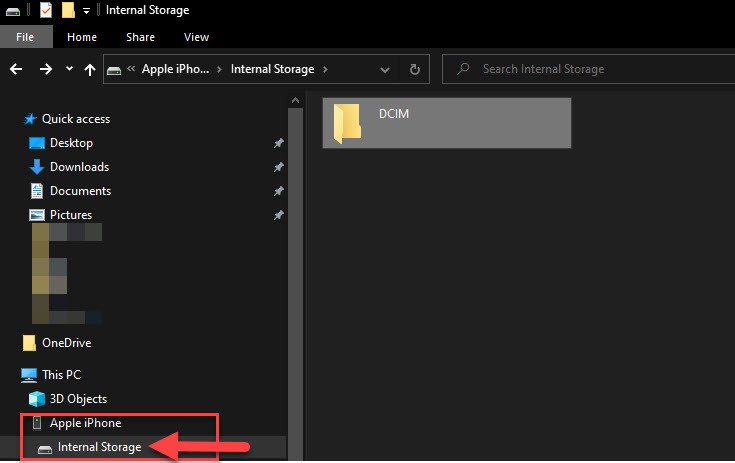
My iphone I just plug it into my PC and I can see the internal media storage and just transfer them out that way


This is all native with no wiz bang applications installed other than itunes but I never use that


xpd

xpd

Geek of Coastguard
14116 posts

Uber Geek
+1 received by user: 4577

Retired Mod
ID Verified
Trusted
Lifetime subscriber

  #2940334 10-Jul-2022 12:08
Send private message

Yeah, I get that option, but as per OP, it stops after about 30s no matter what cable, USB port, or device I connect it to.


XPD / Gavin


LinkTree


dt

dt
1152 posts

Uber Geek
+1 received by user: 371
Inactive user


  #2940336 10-Jul-2022 12:14
Send private message

oops sorry I did read that but fish memory'd it the moment I posted 


I just tried a 30gb copy and worked for me


I'm using an apple usb-c to lightning cable fwiw 


lxsw20
3689 posts

Uber Geek
+1 received by user: 2174

Subscriber

  #2940350 10-Jul-2022 12:53
Send private message

Assuming under 50GB of stuff to backup, you're looking at less than $20 a year to use iCloud. Surely your time mucking around with 3rd party options is worth more than that.


OneDrive won't offload to cloud like iCloud will either, I don't think any other solution will.


Shop now for Lenovo laptops and other devices (affiliate link).
1024kb
1197 posts

Uber Geek
+1 received by user: 519

ID Verified
Lifetime subscriber

  #2940380 10-Jul-2022 16:33
Send private message

3U Tools.

That's the 3rd party Windows app that manages iDevices in a way that iTunes never got close to. You can import all media from iPhone / iPad easily. 3U will also transcode the HEIC images that Windows machines don't understand into regular .jpg images on the fly. Same with live photos & videos.

The features aren't limited to exporting media, just about every facet of iOS maintenance is covered - including cleaning junk & log files - one by one or en mass. You can pull reports on the condition of your device including battery life & whether each component is the original one fitted at build. 3U lets you reinstall firmware with either retaining user, standard clean install or secure wipe install options.

3U is freeware & I fully recommend it.


Megabyte - so geek it megahertz

surfisup1000
5288 posts

Uber Geek
+1 received by user: 2159


  #2940382 10-Jul-2022 16:48
Send private message

antoniosk:


Apple stopped supporting the 'phone as usb disk' a while ago. just install icloud for windows, download full (it WILL take time to sync) and clean the cruft.


icloud is not a great solution due to most people constrained to the 5gb limit. 


I have had this 'device' error too, usually when copying large numbers of files. I think it might have something to do with converting heic picture formats during the copy but could never get to the exact cause. 


My solution in the end was to buy this....


https://www.apple.com/nz/shop/product/MJYT2AM/A/lightning-to-sd-card-camera-reader


Then, you can just copy your iphone files to an SD card. 


I also have the ravpower filehub device...works well ...


https://havecamerawilltravel.com/ravpower-6-port-usb-charger-filehub/


surfisup1000
5288 posts

Uber Geek
+1 received by user: 2159


  #2940383 10-Jul-2022 16:55
Send private message

1024kb: 3U Tools.

That's the 3rd party Windows app that manages iDevices in a way that iTunes never got close to. You can import all media from iPhone / iPad easily. 3U will also transcode the HEIC images that Windows machines don't understand into regular .jpg images on the fly. Same with live photos & videos.

The features aren't limited to exporting media, just about every facet of iOS maintenance is covered - including cleaning junk & log files - one by one or en mass. You can pull reports on the condition of your device including battery life & whether each component is the original one fitted at build. 3U lets you reinstall firmware with either retaining user, standard clean install or secure wipe install options.

3U is freeware & I fully recommend it.


Thanks , best solution!


xpd

xpd

Geek of Coastguard
14116 posts

Uber Geek
+1 received by user: 4577

Retired Mod
ID Verified
Trusted
Lifetime subscriber

  #2940474 10-Jul-2022 18:38
Send private message

1024kb: 3U Tools.

That's the 3rd party Windows app that manages iDevices in a way that iTunes never got close to. You can import all media from iPhone / iPad easily. 3U will also transcode the HEIC images that Windows machines don't understand into regular .jpg images on the fly. Same with live photos & videos.

The features aren't limited to exporting media, just about every facet of iOS maintenance is covered - including cleaning junk & log files - one by one or en mass. You can pull reports on the condition of your device including battery life & whether each component is the original one fitted at build. 3U lets you reinstall firmware with either retaining user, standard clean install or secure wipe install options.

3U is freeware & I fully recommend it.


Will take a look, cheers :)


XPD / Gavin


LinkTree


xpd

xpd

Geek of Coastguard
14116 posts

Uber Geek
+1 received by user: 4577

Retired Mod
ID Verified
Trusted
Lifetime subscriber

  #2940486 10-Jul-2022 18:56
Send private message

Wow, 3U is actually working - except puzzled... says its downloading 73GB of photos/videos. Its a 64GB phone. :D


Will let it run and see what happens.


XPD / Gavin


LinkTree


HP


Shop now for HP laptops and other devices (affiliate link).
1024kb
1197 posts

Uber Geek
+1 received by user: 519

ID Verified
Lifetime subscriber

  #2940501 10-Jul-2022 20:13
Send private message

xpd:

Wow, 3U is actually working - except puzzled... says its downloading 73GB of photos/videos. Its a 64GB phone. :D


Will let it run and see what happens.


3U Tools, recommended by Megabyte - so geek it megahertz.

😁


Megabyte - so geek it megahertz

harlansmart
447 posts

Ultimate Geek
+1 received by user: 59


  #2940720 11-Jul-2022 14:38
Send private message

Yip - 3U Tools works awesome


3U Tools, recommended by Megabyte - so geek it megahertz.

😁


kiwifidget
"Cookie"
3640 posts

Uber Geek
+1 received by user: 1969

Lifetime subscriber

  #2940777 11-Jul-2022 17:44
Send private message

Oohh I'm going to try 3U Tools.


Do I select Install iTunes or Install Driver?


Just need to be able to upload photos from my Windows pc to a Shared Album on ipad.


Delete cookies?! Are you insane?!


xpd

xpd

Geek of Coastguard
14116 posts

Uber Geek
+1 received by user: 4577

Retired Mod
ID Verified
Trusted
Lifetime subscriber

  #2940778 11-Jul-2022 17:45
Send private message

I installed the driver.


XPD / Gavin


LinkTree


1 | 2 | 3
View this topic in a long page with up to 500 replies per page Create new topic


Geekzone Live »

Try automatic live updates from Geekzone directly in your browser, without refreshing the page, with Geekzone Live now.


Are you subscribed to our RSS feed? You can download the latest headlines and summaries from our stories directly to your computer or smartphone by using a feed reader.