Geekzone: technology news, blogs, forums
Guest
Welcome Guest.
You haven't logged in yet. If you don't have an account you can register now.


xpd

xpd

Geek of Coastguard
14115 posts

Uber Geek
+1 received by user: 4574

Retired Mod
ID Verified
Trusted
Lifetime subscriber

#298706 8-Jul-2022 19:49
Send private message

I'm not an Apple user, but my daughter has an iPhone XR with latest iOS.


It is completely full of movies and photos, and no matter what I try, I cannot get the damn things off her phone.


The phone shows up on my Windows laptop and I can access the photos/videos, but if I try copying them, within 30s the copying stops with an error saying the device is not valid.


I've tried all sorts of different software, and multiple cables (3rd party and Apple), different devices and same issue each time.


Is there any other way I can get this stuff off her phone ? 


I'm going to install iCloud for Windows on another system and maybe I can pull some down via that, but only at 5GB at a time (think thats what the default iCloud size is ?)


I'm not holding out much hope tho........


XPD / Gavin


LinkTree


View this topic in a long page with up to 500 replies per page Create new topic
 1 | 2 | 3
Stu1
1892 posts

Uber Geek
+1 received by user: 489

ID Verified
Subscriber

  #2939894 8-Jul-2022 21:47
Send private message

I feel you pain , the way I do is I select all the photos then select the download icon by the heart , then select copy iCloud link near the bottom of the list , paste it to an email and send it to your Lap top. Open link on lap top and you can download the photos. I would love to know a better ways well. This work around works though


MadEngineer
4591 posts

Uber Geek
+1 received by user: 2570

Trusted

  #2939895 8-Jul-2022 21:49
Send private message

I’d start by seeing if there’s a large video that’s not really needed or an app that can be uninstalled and put back in later.

Also turn it off n on again if you haven’t already. People get used to them being so reliable that when something does go wrong it’s the last thing they consider doing.

Turn off data and wifi to stop it downloading from the cloud or other as you remove content.


You're not on Atlantis anymore, Duncan Idaho.

antoniosk
2382 posts

Uber Geek
+1 received by user: 742

ID Verified
Trusted
Lifetime subscriber

  #2939935 9-Jul-2022 09:09
Send private message

xpd:


I'm not an Apple user, but my daughter has an iPhone XR with latest iOS.


It is completely full of movies and photos, and no matter what I try, I cannot get the damn things off her phone.


The phone shows up on my Windows laptop and I can access the photos/videos, but if I try copying them, within 30s the copying stops with an error saying the device is not valid.


I've tried all sorts of different software, and multiple cables (3rd party and Apple), different devices and same issue each time.


Is there any other way I can get this stuff off her phone ? 


I'm going to install iCloud for Windows on another system and maybe I can pull some down via that, but only at 5GB at a time (think thats what the default iCloud size is ?)


I'm not holding out much hope tho........



Apple stopped supporting the 'phone as usb disk' a while ago. just install icloud for windows, download full (it WILL take time to sync) and clean the cruft.


________


Antoniosk


scuwp
3927 posts

Uber Geek
+1 received by user: 2510


  #2939956 9-Jul-2022 10:47
Send private message

antoniosk:


Apple stopped supporting the 'phone as usb disk' a while ago. just install icloud for windows, download full (it WILL take time to sync) and clean the cruft.


Huh?  We have no problems just plugging our phones in, bringing up the folder, and copying any images or videos onto our computer.  Works just fine on an iPhone 8 and 12 running latest iOS.  


I have had some issues with aftermarket cables, so if not already try a genuine Apple one.  


Lazy is such an ugly word, I prefer to call it selective participation


Dratsab
3964 posts

Uber Geek
+1 received by user: 1728

Trusted
Lifetime subscriber

  #2940021 9-Jul-2022 12:05
Send private message

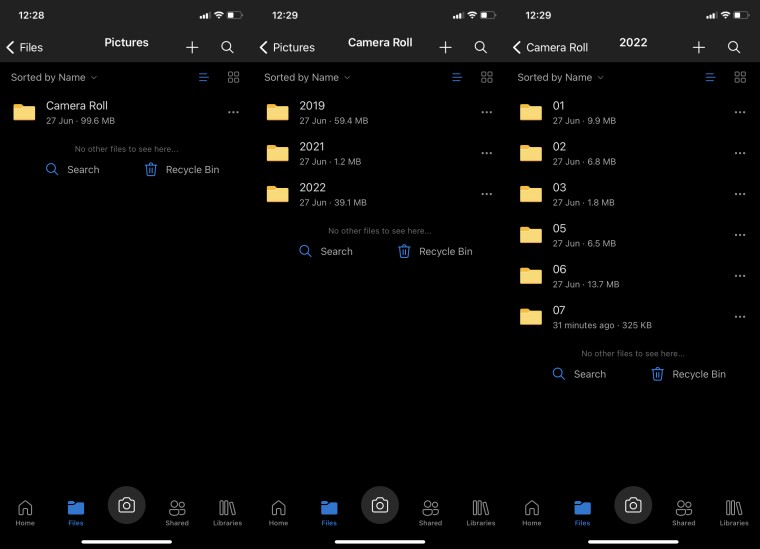
Set her up with a OneDrive account and install the OneDrive app on her phone. You can set up photos/videos to sync to it (you can exclude mobile data) then access them from any device with the account credentials.


afe66
3181 posts

Uber Geek
+1 received by user: 1678

Lifetime subscriber

  #2940034 9-Jul-2022 12:26
Send private message

I feel your pain.

Give me the windows idea where there is a photo directory and everything is just there as listed by date of creation not the mystery apple way with multiple folders of various types photos.


Shop now on AliExpress (affiliate link).
Dratsab
3964 posts

Uber Geek
+1 received by user: 1728

Trusted
Lifetime subscriber

  #2940039 9-Jul-2022 12:45
Send private message

These three screenshots show how iPhone sorts them in OneDrive, automatically creating folders as necessary. 


xpd

xpd

Geek of Coastguard
14115 posts

Uber Geek
+1 received by user: 4574

Retired Mod
ID Verified
Trusted
Lifetime subscriber

  #2940040 9-Jul-2022 12:53
Send private message

Right, installed iCloud, it downloaded 20GB of photos/videos. Great I thought, so moved them all to my local storage.


Figured the iPhone will go "hey look, space on iCloud" and backup more there.... nope......  nothing in the iCloud folder on the PC, and the phone still reports iCloud as being full with the same amount of images etc when to my mind, there should be 20GB free now on the phone.


I'll try OneDrive with my account as I have 40GB on mine vs 5GB on the free she'd end up with......


XPD / Gavin


LinkTree


FineWine
3111 posts

Uber Geek
+1 received by user: 2440

Trusted
Nurse (R)
Lifetime subscriber

  #2940044 9-Jul-2022 13:08
Send private message

Delete photos and videos in iCloud for Windows


or better still 


Set up Photos in iCloud for Windows and click on table of contents and scroll down to Photos


Whilst the difficult we can do immediately, the impossible takes a bit longer. However, miracles you will have to wait for.


ANglEAUT
altered-ego
2436 posts

Uber Geek
+1 received by user: 841

Trusted
Lifetime subscriber

  #2940120 9-Jul-2022 15:20
Send private message

This has worked a treat for me: Kingston Bolt USB 3.0 Flash Drive Memory Stick for Apple iPhone & iPads (I made sure to buy the 128GB version at the time)


  • Insert drive into iPhone, launch app, select what to sync, wait, unplug from phone, plug directly into PC, viola!

Or you could consider these options as well.


Please keep this GZ community vibrant by contributing in a constructive & respectful manner.


FineWine
3111 posts

Uber Geek
+1 received by user: 2440

Trusted
Nurse (R)
Lifetime subscriber

  #2940133 9-Jul-2022 16:03
Send private message

ANglEAUT:


This has worked a treat for me: Kingston Bolt USB 3.0 Flash Drive Memory Stick for Apple iPhone & iPads (I made sure to buy the 128GB version at the time)


  • Insert drive into iPhone, launch app, select what to sync, wait, unplug from phone, plug directly into PC, viola!

Or you could consider these options as well.


Looks like the above kingston not currently available. But Harvey Norman, PBTech & Apple sell similar with sandisk ixpand being the popular one.


Whilst the difficult we can do immediately, the impossible takes a bit longer. However, miracles you will have to wait for.


Shop now for Dell laptops and other devices (affiliate link).

xpd

xpd

Geek of Coastguard
14115 posts

Uber Geek
+1 received by user: 4574

Retired Mod
ID Verified
Trusted
Lifetime subscriber

  #2940215 9-Jul-2022 22:26
Send private message

Tried OneDrive..... nothing come through. Suspect it will only work for new photos and not existing :(


Hate this thing :D


XPD / Gavin


LinkTree


lxsw20
3689 posts

Uber Geek
+1 received by user: 2174

Subscriber

  #2940268 9-Jul-2022 23:37
Send private message

Should work fine with existing photos, I suspect configuration issue.


Focus on the Videos first obviously, they are what will be causing space issues. 


The other option is if not already paying for the iCloud storage required, then do that. Then on the iPhone go to Settings > Photos. Enable iCloud Photos, then set "Optimise iPhone Storage"


iCloud is cheap peace of mind to backup your photo library along with the rest of your iPhone.


rugrat
3140 posts

Uber Geek
+1 received by user: 944

Lifetime subscriber

  #2940275 10-Jul-2022 02:56
Send private message

Aloha browser will allow direct transfer from iPhone to computer on same network.


I think Wifi sharing is a premium feature,  about $3.50 a month.


Files also need to be shared from photo’s to Aloha Browser first, so would probably be a lot more fiddling then One Drive or Drop Box type solution for a large amount.


Also found an application called wifi photo transfer, says it’s free in description, looks like works same way.


MadEngineer
4591 posts

Uber Geek
+1 received by user: 2570

Trusted

  #2940310 10-Jul-2022 10:03
Send private message

xpd:


Tried OneDrive..... nothing come through. Suspect it will only work for new photos and not existing :(


Hate this thing :D


have you taken it offline and cleared any space yet?


You're not on Atlantis anymore, Duncan Idaho.

 1 | 2 | 3
View this topic in a long page with up to 500 replies per page Create new topic


Geekzone Live »

Try automatic live updates from Geekzone directly in your browser, without refreshing the page, with Geekzone Live now.


Are you subscribed to our RSS feed? You can download the latest headlines and summaries from our stories directly to your computer or smartphone by using a feed reader.