
Geekzone: technology news, blogs, forums
Guest
Welcome Guest.
You haven't logged in yet. If you don't have an account you can register now.


Filter this topic showing only the reply marked as answer View this topic in a long page with up to 500 replies per page Create new topic
1 | 2 | 3 | 4 
chiefie
I iz your trusted friend
5877 posts

Uber Geek
+1 received by user: 151

Retired Mod
Trusted
Lifetime subscriber

  #2800902 25-Oct-2021 15:50
Send private message

Batman:


but when you reply to those email from the catch-all mailbox, how do you reply as that specific alias for that specific email?


there is no "reply as" option in the email compose box.


When you're replying, use "full editor" by clicking on the 'reply' dropdown, select "Edit subject" which will expand the compose email, click once on the email "To" field, and the "From" field will show up and you can change the reply-as.


Internet is my backyard...


«Geekzone blog: Tech 'n Chips Takeaway» «Personal blog: And then...»


Please read the Geekzone's FUG


chiefie
I iz your trusted friend
5877 posts

Uber Geek
+1 received by user: 151

Retired Mod
Trusted
Lifetime subscriber

  #2800904 25-Oct-2021 15:58
Send private message

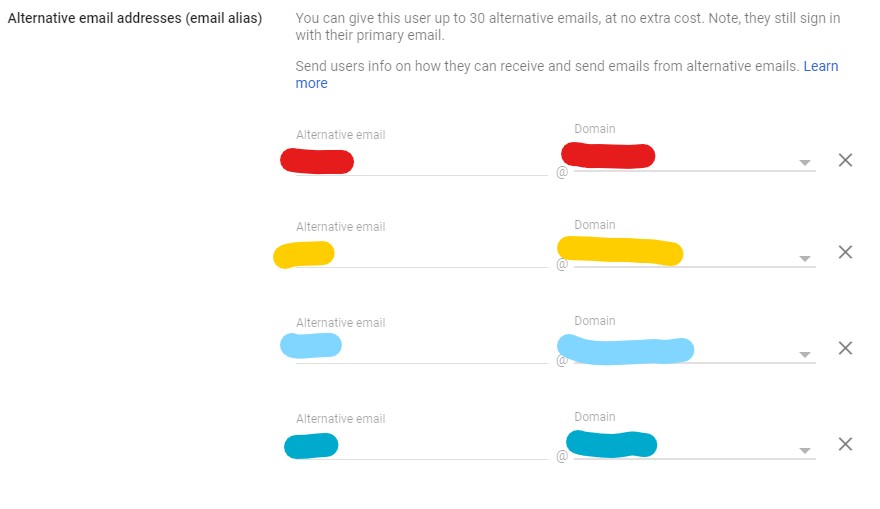
I used colours here to show different alternative emails and different domains.


Internet is my backyard...


«Geekzone blog: Tech 'n Chips Takeaway» «Personal blog: And then...»


Please read the Geekzone's FUG


Batman

Mad Scientist
30014 posts

Uber Geek
+1 received by user: 6217

Trusted
Lifetime subscriber

  #2800912 25-Oct-2021 16:11
Send private message

thanks i managed to get "from" tab showing up. just needed to add the emails in a separate screen.


chiefie
I iz your trusted friend
5877 posts

Uber Geek
+1 received by user: 151

Retired Mod
Trusted
Lifetime subscriber

  #2800916 25-Oct-2021 16:17
Send private message

Batman:


thanks i managed to get "from" tab showing up. just needed to add the emails in a separate screen.


You add email aliases in your Google Workspace Admin to manage user. Once there you can add secondary email aliases as I shown on the previous post. You can name whatever you want for email part, and mix-match with any domain. Once set that alias is associated with that user.

Once that's done, make sure you set up "sent-as" in the Gmail settings > Accounts.


Internet is my backyard...


«Geekzone blog: Tech 'n Chips Takeaway» «Personal blog: And then...»


Please read the Geekzone's FUG


1 | 2 | 3 | 4 
Filter this topic showing only the reply marked as answer View this topic in a long page with up to 500 replies per page Create new topic


Geekzone Live »

Try automatic live updates from Geekzone directly in your browser, without refreshing the page, with Geekzone Live now.


Are you subscribed to our RSS feed? You can download the latest headlines and summaries from our stories directly to your computer or smartphone by using a feed reader.