Geekzone: technology news, blogs, forums
Guest
Welcome Guest.
You haven't logged in yet. If you don't have an account you can register now.


eracode

Smpl Mnmlst
9331 posts

Uber Geek
+1 received by user: 6198

ID Verified
Trusted
Lifetime subscriber

#225975 13-Dec-2017 16:12
Send private message

Today I noticed that no xtra 'Sent' emails were showing on the Apple Mail app on my iPhone. Checked the server settings as well as I could given my limited knowledge and confirmed that they are the same as on my iPad, which is operating just fine.


I called Spark who got me to re-do all the IMAP server settings etc without success and then they gave up and put me through to Apple (I think in Oz). 


Apple did much the same thing and then escalated it to a more techy person (I think in the US).


After 90 minutes total on the phone, Apple came back after a long on-hold and told me that the behaviour was 'as expected'. I.E. If you send an email via xtra  from a Macbook or an iPad using Apple Mail, it will show up in other devices' Sent folders - but not on the iPhone Mail app 'sent' box. Only emails sent from the iPhone itself will show up in the iPhone Mail 'sent' box.


Similarly, emails sent from an iPhone show in the phone's Sent box but not other Apple devices' Sent boxes.


This may well totally correct behaviour but it strikes me as odd (because the other devices do sync) and I don't know enough to tell whether I'm being fobbed off. 


The only way to see all sent emails on an iPhone, regardless of sending device, is via Spark xtra webmail.


Would welcome comments and advice.


TLDR: iPhone Mail app does not show Sent messages sent on other Apple devices' Mail apps. T/F?


Sometimes I just sit and think. Other times I just sit.


Filter this topic showing only the reply marked as answer Create new topic
SheriffNZ
677 posts

Ultimate Geek
+1 received by user: 322


  #1919162 13-Dec-2017 16:17
Send private message

I'd be surprised if iOS operated that differently across phone versions but in my sent items on my 7 I can see all emails sent from my account, regardless of which device they were sent from. 


Sounds to me like you were being fobbed off.. Sorry I can't be any more help...


RunningMan
9184 posts

Uber Geek
+1 received by user: 4833


  #1919168 13-Dec-2017 16:35
Send private message

SheriffNZ:


Sounds to me like you were being fobbed off.. Sorry I can't be any more help...


This. Fundamental iOS mail features like the sent items shouldn't differ between iOS devices.


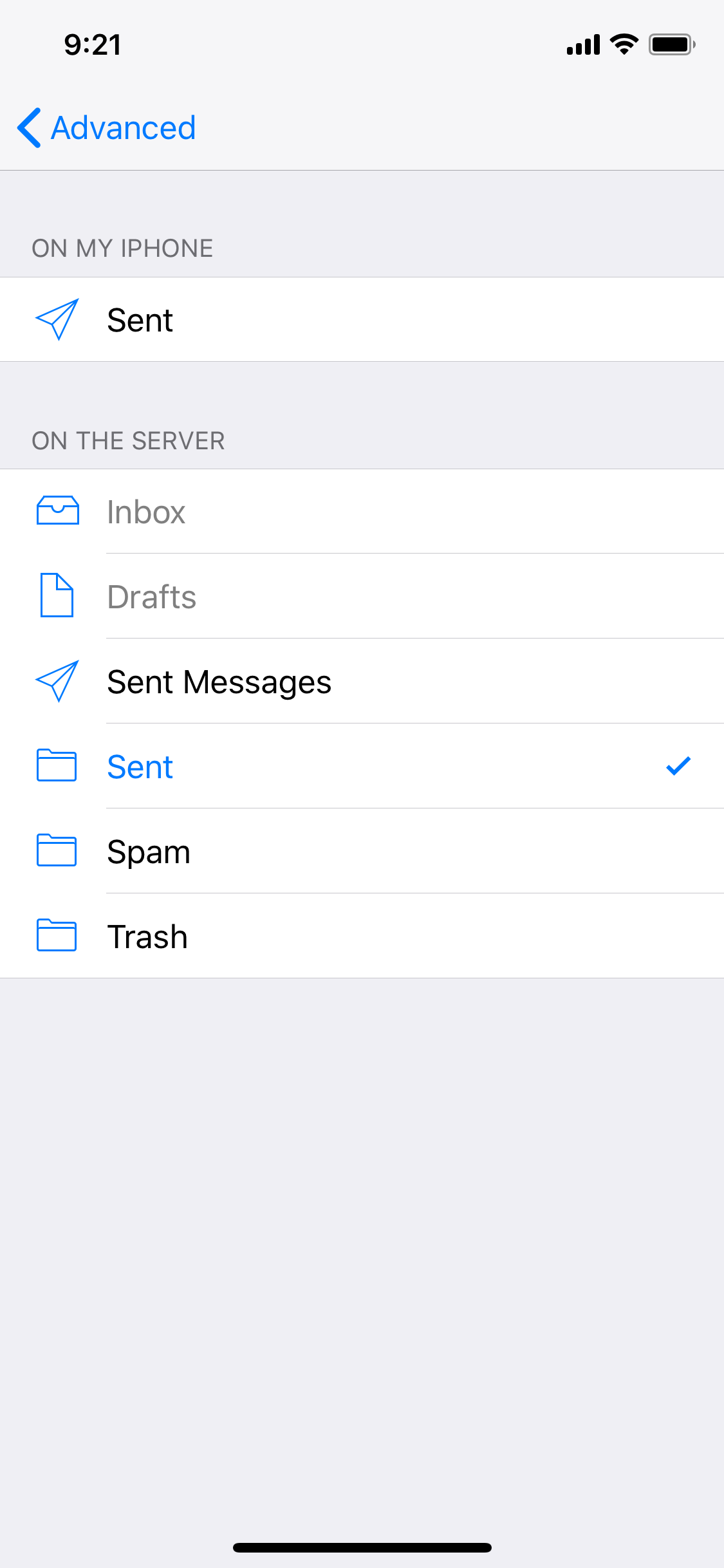
Try Settings-> Accounts & Passwords -> [account name] -> Account -> Advanced -> then check the sent mailbox is the same one that is being used on other devices.


wellygary
8810 posts

Uber Geek
+1 received by user: 5287


  #1919170 13-Dec-2017 16:36
Send private message

I assume that mail send from the MacBook turn up in the sent folder on the Ipad?


What IOS versions are running on the Ipad and X


on 10.3.3  I can see mail I send via Gmail's web site in IOS mail's sent folder  


sbiddle
30853 posts

Uber Geek
+1 received by user: 9996

Retired Mod
Trusted
Biddle Corp
Lifetime subscriber

  #1919365 14-Dec-2017 07:20
Send private message

You're really starting to push the limits when it comes to features such as this - it's not something IMAP is supposed to do. Like hacks to POP3 to enable multiple devices using IMAP across multiple devices requires hacks in email software to enable such things to work.


IMHO if you want true multi device email with sync of all folders and sent items you should move to a proper email solution based on something such as EAS / ActiveSync that natively supports such features.


chewster
127 posts

Master Geek
+1 received by user: 77

Trusted

  #1919371 14-Dec-2017 07:33
Send private message

this is why i never use Mac mail or iOS mail for IMAP or pop, it always stuffs up. Timesaving tip: get a better mail client that lets you actually see the settings.


If my post helped you, consider my referrals (: Sharesies $5 referral code, Skinny 4GB buddy code, Contact Energy $100 promo code


scuwp
3927 posts

Uber Geek
+1 received by user: 2510


  #1919374 14-Dec-2017 08:14
Send private message

Download Outlook for iOS. Apple mail app is plagued with problems IME.


Lazy is such an ugly word, I prefer to call it selective participation


Shop now for Lego sets and other gifts (affiliate link).
Paul1977
5171 posts

Uber Geek
+1 received by user: 2192


  #1920016 15-Dec-2017 09:28
Send private message

RunningMan:


Try Settings-> Accounts & Passwords -> [account name] -> Account -> Advanced -> then check the sent mailbox is the same one that is being used on other devices.


@eracode The above suggestion works, I just tested it with a Spark account. Change it from "Sent Messages" to "Sent", save the changes and any new sent items will sync.


Click to see full size


EDIT: It's quite pathetic that neither Spark nor Apple could sort this out for you.


EDIT 2: After doing this the old "Sent Messages" folder seems to disappear from the folder view, so move everything out of it first.


eracode

Smpl Mnmlst
9331 posts

Uber Geek
+1 received by user: 6198

ID Verified
Trusted
Lifetime subscriber

  #1920069 15-Dec-2017 10:40
Send private message

@RunningMan and @Paul1977 Thanks - appeciate the effort. However I don't have a 'Sent' option in 'On the Server' - only 'Sent Message'.


PS: Aha - found the Sent box buried in my email folder list - will try this. Cheers.


And now success - thanks again to you both. Agree re slackness on the part of Spark and Apple.


Sometimes I just sit and think. Other times I just sit.


eracode

Smpl Mnmlst
9331 posts

Uber Geek
+1 received by user: 6198

ID Verified
Trusted
Lifetime subscriber

  #1920083 15-Dec-2017 11:03
Send private message

sbiddle:


You're really starting to push the limits when it comes to features such as this - it's not something IMAP is supposed to do. Like hacks to POP3 to enable multiple devices using IMAP across multiple devices requires hacks in email software to enable such things to work.


IMHO if you want true multi device email with sync of all folders and sent items you should move to a proper email solution based on something such as EAS / ActiveSync that natively supports such features.


Thanks but no thanks - got it running as expected so I do now have "true multi device email with sync of all folders and sent items" using the native Apple Mail. Done with ease once I got the right advice here on gz.


Sometimes I just sit and think. Other times I just sit.


sbiddle
30853 posts

Uber Geek
+1 received by user: 9996

Retired Mod
Trusted
Biddle Corp
Lifetime subscriber

  #1920119 15-Dec-2017 11:56
Send private message

eracode:


sbiddle:


You're really starting to push the limits when it comes to features such as this - it's not something IMAP is supposed to do. Like hacks to POP3 to enable multiple devices using IMAP across multiple devices requires hacks in email software to enable such things to work.


IMHO if you want true multi device email with sync of all folders and sent items you should move to a proper email solution based on something such as EAS / ActiveSync that natively supports such features.


Thanks but no thanks - got it running as expected so I do now have "true multi device email with sync of all folders and sent items" using the native Apple Mail. Done with ease once I got the right advice here on gz.


You kinda do. It's good that you have a working solution but it's still a vastly inferior solution to a true multi device EAS / ActiveSync based solution.


Paul1977
5171 posts

Uber Geek
+1 received by user: 2192


  #1920128 15-Dec-2017 12:05
Send private message

sbiddle:


You kinda do. It's good that you have a working solution but it's still a vastly inferior solution to a true multi device EAS / ActiveSync based solution.


Activesync is indeed better, but for most users IMAP is sufficient if all they desire is to sync email.


Move to New Zealand's best fibre broadband service (affiliate link). Free setup code: R587125ERQ6VE. Note that to use Quic Broadband you must be comfortable with configuring your own router.
eracode

Smpl Mnmlst
9331 posts

Uber Geek
+1 received by user: 6198

ID Verified
Trusted
Lifetime subscriber

  #1920134 15-Dec-2017 12:10
Send private message

sbiddle:


eracode:


sbiddle:


You're really starting to push the limits when it comes to features such as this - it's not something IMAP is supposed to do. Like hacks to POP3 to enable multiple devices using IMAP across multiple devices requires hacks in email software to enable such things to work.


IMHO if you want true multi device email with sync of all folders and sent items you should move to a proper email solution based on something such as EAS / ActiveSync that natively supports such features.


Thanks but no thanks - got it running as expected so I do now have "true multi device email with sync of all folders and sent items" using the native Apple Mail. Done with ease once I got the right advice here on gz.


You kinda do. It's good that you have a working solution but it's still a vastly inferior solution to a true multi device EAS / ActiveSync based solution.


I now have all that I was wanting - not some overkill solution.


Sometimes I just sit and think. Other times I just sit.


bagheera
544 posts

Ultimate Geek
+1 received by user: 189


  #1920139 15-Dec-2017 12:28
Send private message

also had to do that same thing for draft vs drafts for my dad xtra account on his iphone.


Filter this topic showing only the reply marked as answer Create new topic


Geekzone Live »

Try automatic live updates from Geekzone directly in your browser, without refreshing the page, with Geekzone Live now.


Are you subscribed to our RSS feed? You can download the latest headlines and summaries from our stories directly to your computer or smartphone by using a feed reader.