Geekzone: technology news, blogs, forums
Guest
Welcome Guest.
You haven't logged in yet. If you don't have an account you can register now.


Item

1739 posts

Uber Geek
+1 received by user: 726

Subscriber

#237968 27-Jun-2018 08:37
Send private message

My 6 month old 8 plus has developed an intermittently faulty lightning port.


It works most of the time, but the action has become "spongy" and sometimes I have to wiggle or re-seat it to get the charge or CarPlay connection going.


I have the phone under contract with 2Degrees but would I be best going through them or straight to Apple to get it repaired under warranty?




.

Filter this topic showing only the reply marked as answer Create new topic
Nate001
677 posts

Ultimate Geek
+1 received by user: 465


  #2044565 27-Jun-2018 08:48
Send private message

Have you checked there isn't a bit of fluff in the port? You'll be surprised what you can dig out with a needle/pin...


Item

1739 posts

Uber Geek
+1 received by user: 726

Subscriber

  #2044568 27-Jun-2018 08:53
Send private message

Nate001:


Have you checked there isn't a bit of fluff in the port? You'll be surprised what you can dig out with a needle/pin...


I did have a gentle poke around and found one very small bit of pocket lint which I removed...didn't seem to help significantly and I can't see anything else in there.


I am trying to dig out a can of compressed air and give that a go first as well.


It is odd - it seems almost as if the little internal friction clips are inconsistently gripping - sometimes I get a tactile soft "click" when I seat it, other times not.


.

gehenna
8667 posts

Uber Geek
+1 received by user: 3883

Moderator
Trusted
Lifetime subscriber

  #2044569 27-Jun-2018 08:56
Send private message

Give AppleCare a call as you're within the first 12 months of their support.  They'll give you the best route to getting it resolved, which is probably direct with a service provider like Service Plus


surfisup1000
5288 posts

Uber Geek
+1 received by user: 2159


  #2044570 27-Jun-2018 08:57
Send private message

The same symptom happened to my iphone. 


It would sometimes charge, sometimes not.  The lightning connector had some lateral movement when connected to the phone, like it was uneven.  Your spongy description would apply. 


I visually checked the phone socket at it 'looked ok'.  However, just in case I used a pin to scratch out any debris that may have accumulated - and quite a bit of compacted dust did actually come out. 


Fixed the issue perfectly. 


Item

1739 posts

Uber Geek
+1 received by user: 726

Subscriber

  #2044577 27-Jun-2018 09:05
Send private message

Nate001:


Have you checked there isn't a bit of fluff in the port? You'll be surprised what you can dig out with a needle/pin...


surfisup1000:


The same symptom happened to my iphone. 


It would sometimes charge, sometimes not.  The lightning connector had some lateral movement when connected to the phone, like it was uneven.  Your spongy description would apply. 


I visually checked the phone socket at it 'looked ok'.  However, just in case I used a pin to scratch out any debris that may have accumulated - and quite a bit of compacted dust did actually come out. 


Fixed the issue perfectly. 


I confess I rolled my eyes a little:


"but I have already done this 3-4 times now and it is definitely clear and I really don't want to damage the pins..."


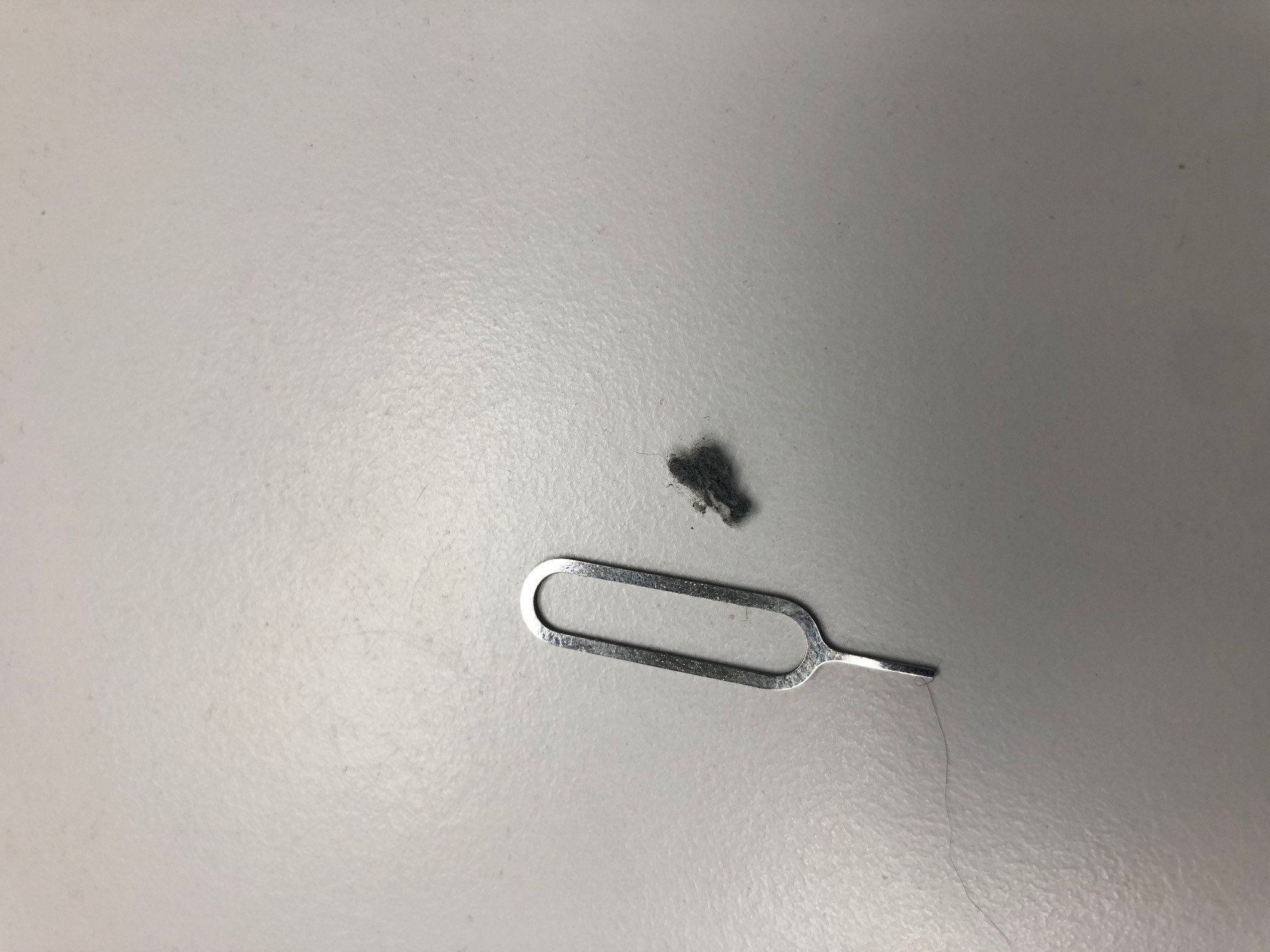
...but I gave it another, slight more vigorous probing/scraping with an iPhone SIM removal tool and:


embarassed


Thanks for pushing the point guys - with that lint removed it is clear how bad it had got; the action is crisp and clean now!


.

Nate001
677 posts

Ultimate Geek
+1 received by user: 465


  #2044581 27-Jun-2018 09:07
Send private message

Item:


Nate001:


Have you checked there isn't a bit of fluff in the port? You'll be surprised what you can dig out with a needle/pin...


surfisup1000:


The same symptom happened to my iphone. 


It would sometimes charge, sometimes not.  The lightning connector had some lateral movement when connected to the phone, like it was uneven.  Your spongy description would apply. 


I visually checked the phone socket at it 'looked ok'.  However, just in case I used a pin to scratch out any debris that may have accumulated - and quite a bit of compacted dust did actually come out. 


Fixed the issue perfectly. 


I confess I rolled my eyes a little:


"but I have already done this 3-4 times now and it is definitely clear and I really don't want to damage the pins..."


...but I gave it another, slight more vigorous probing/scraping with an iPhone SIM removal tool and:


embarassed


Thanks for pushing the point guys - with that lint removed it is clear how bad it had got; the action is crisp and clean now!


There is your problem...


Stream your favourite shows now on Apple TV (affiliate link).
JPNZ
1715 posts

Uber Geek
+1 received by user: 840


  #2045163 28-Jun-2018 09:20
Send private message

Isint it amazing how much lint can make it up there!!


Panasonic 65GZ1000, Onkyo RZ730, Atmos 5.1.2, AppleTV 4K, Nest Mini's, PS5, PS3, MacbookPro, iPad Pro, Apple watch SE2, iPhone 15+


Coil
6614 posts

Uber Geek
+1 received by user: 2153
Inactive user


  #2045165 28-Jun-2018 09:24
Send private message

I tend to use tooth picks. They are non conductive in the case you may short something out. Unsure if you can but thats my rule..
Just did this to my phone and i got a little pad of lint out!


Never had an issue before tho. 


1eStar
1604 posts

Uber Geek
+1 received by user: 375


  #2045169 28-Jun-2018 09:38
Send private message

My friend was having the same issue, but it was leading to frequent connects and reconnects during charging. After removal of lint, blowing of air etc, the final remedy was to empty half a can of contact cleaner into the port.

antoniosk
2382 posts

Uber Geek
+1 received by user: 742

ID Verified
Trusted
Lifetime subscriber

  #2045229 28-Jun-2018 09:56
Send private message

Item:


I confess I rolled my eyes a little:


"but I have already done this 3-4 times now and it is definitely clear and I really don't want to damage the pins..."


...but I gave it another, slight more vigorous probing/scraping with an iPhone SIM removal tool and:


embarassed


Thanks for pushing the point guys - with that lint removed it is clear how bad it had got; the action is crisp and clean now!


The guys at ServicePlus tell me lint in the port is a REALLY common fault... pretty soon all ports on these devices will be good so the unit will be hermatically sealed, only wirelss for charging headphone sims etc.


________


Antoniosk


Filter this topic showing only the reply marked as answer Create new topic


Geekzone Live »

Try automatic live updates from Geekzone directly in your browser, without refreshing the page, with Geekzone Live now.


Are you subscribed to our RSS feed? You can download the latest headlines and summaries from our stories directly to your computer or smartphone by using a feed reader.