Geekzone: technology news, blogs, forums
Guest
Welcome Guest.
You haven't logged in yet. If you don't have an account you can register now.


dragonsinger57

39 posts

Geek

Trusted

#97662 19-Feb-2012 15:21
Send private message

I'm not sure exactly how to describe this problem but my daughter has a new iPhone 4 running OS5 (week old) - when she opens up apps like the mail app - the text and symbols on the top bar (not the one which shows the vodafone network info etc but the one that says 'Mailboxes' or 'Settings') and the bottom bar (in mail it has the back arrow; write icon & 'gmail') look as if they have a shadow behind them - we can clearly see it with our eyes and can see it in great detail when we use a magnifier. 

However - it doesn't show up in screenshots.  I've attached a screenshot with the affected areas circled but you can't see the effect unfortunately.
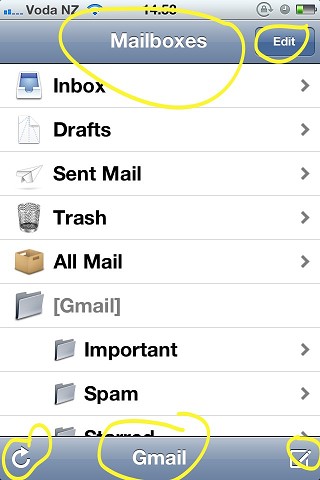


Has anyone else noticed this - if so - is it a bug or is it normal (i have a 3GS and don't have this problem).

Thanks for any help. 



"You know, you blow up one sun and suddenly everyone expects you to walk on water!"

Create new topic
imatt
16 posts

Geek


  #583465 19-Feb-2012 16:08
Send private message

try reseting the phone by holding down the home and powerbutton for about 20seconds   see if that helps :)


dragonsinger57

39 posts

Geek

Trusted

  #583487 19-Feb-2012 17:16
Send private message

Thanks imatt - probably should have said that we've tried both resetting and restoring to no avail. When we took it into the vodafone shop of course it wasn't doing it!


"You know, you blow up one sun and suddenly everyone expects you to walk on water!"

steve98
1400 posts

Uber Geek
+1 received by user: 252

Trusted

  #585161 22-Feb-2012 13:55
Send private message

Are there display issues with that part of the screen at other times (i.e. on the home screen, when playing games etc)? Can you capture it by taking a photo? I'm intrigued but also trying to figure out what the implications are... is it just annoying / intriguing you or does it impede its use in some way?

PS - I see drop-shadows behind the text and icons you're highlighting... are they not what you're talking about? Can you describe them if not?

Steve


scuwp
3927 posts

Uber Geek
+1 received by user: 2510


  #585170 22-Feb-2012 14:17
Send private message

Just checked mine, I can see the drop shadows which give it a kinda 3D look but that's about it...just like you see on the screen shot. You could try a restore through iTunes, otherwise I guess it's back to the shop under warranty.


Lazy is such an ugly word, I prefer to call it selective participation


jonherries
1433 posts

Uber Geek
+1 received by user: 316

Trusted
Subscriber

  #585198 22-Feb-2012 15:09
Send private message

Maybe the retina screen makes the icons just *pop* like magic...

You mentioned you have a 3gs the screens are massively different (retina vs non-retina) in terms of visual quality.

Jon

dragonsinger57

39 posts

Geek

Trusted

  #585326 22-Feb-2012 19:38
Send private message

The drop shadows aren't what i'm talking about - this is more a blocky/pixelating effect - i'm still trying to get a proper screenshot ...

Thanks for all your help so far ...


"You know, you blow up one sun and suddenly everyone expects you to walk on water!"


Want to support Geekzone and browse the site without the ads? Subscribe to Geekzone now (monthly, annual and lifetime options).
Aaroona
3204 posts

Uber Geek
+1 received by user: 169


  #586489 24-Feb-2012 22:41
Send private message

I get ones like this... is this what you're referring to?


Sorry I couldnt see your image very well so just clarifying more than anything....
Other than that though, I don't have any issues.. though I am on a 4S

dragonsinger57

39 posts

Geek

Trusted

  #586530 25-Feb-2012 08:04
Send private message

Thanks Aaroona - actually i'm wondering if it's just not rendering the image correctly for some reason - i'll try for a new screenshot when she's not working this weekend ...


"You know, you blow up one sun and suddenly everyone expects you to walk on water!"

Create new topic


Geekzone Live »

Try automatic live updates from Geekzone directly in your browser, without refreshing the page, with Geekzone Live now.


Are you subscribed to our RSS feed? You can download the latest headlines and summaries from our stories directly to your computer or smartphone by using a feed reader.