Geekzone: technology news, blogs, forums
Guest
Welcome Guest.
You haven't logged in yet. If you don't have an account you can register now.
To post in this sub-forum you must have made 100 posts or have Trust status or have completed our ID Verification


michaelmurfy

meow
13580 posts

Uber Geek
+1 received by user: 10910

Moderator
ID Verified
Trusted
Lifetime subscriber

#310625 7-Nov-2023 12:54
Send private message

So, you've arrived here thinking "what the hell is the Remote Two? Who is Unfolded Circle?" and I know, this is a bit of a niche but hear me out.


What if Apple made a privacy focused, locally managed Logitech Harmony Elite universal remote?


So I was once a Logitech Harmony Elite owner and when I saw that Logitech were ending the manufacturing and potentially support of the Harmony line I was really disappointed. The Logitech is fully in the mercy of Logitech's cloud services meaning I had a potential brick on my hands in a few years so started looking at alternatives.


I backed the Remote Two a few years back on Kickstarter as I loved how:


1) It wasn't driven by the Cloud.
2) Linux!
3) The design.
4) Just how polished it looked in general.
5) Open to development.


Kickstarter here: https://www.kickstarter.com/projects/marton/remote-two


But my needs changed over the years and I just ended up simplifying everything to the point I use an Apple TV Remote to control the living room now (boring!) so have no need for this.


So, this remote arrived the other week. I unboxed it because I was really keen on seeing this and trust me when I say this is the best feeling remote you'll ever have. This is a remote developed by a very passionate team and they do care about their community (Marton, who is the CEO has even spoken to me to ask me what I wanted in the remote via their Discord). Like seriously if I had a need for this remote it would be in my living room running everything now. This is the very first Kickstarter I've backed that has vastly exceeded expectations.


The remote is locally managed with no cloud ties (apart from firmware checks) and links into Home Assistant and can control basically anything via that + IR. There are profiles you can add on it for family members, you can use it in multiple rooms etc. All managed by a web interface that runs on the remote itself (the remote connects to WiFi, the dock can connect via Ethernet or WiFi).


So, if you're looking for a Logitech Harmony replacement then this is it. Plain and simple. Just from playing around with it you won't regret it. Just note that unlike the Logitech Harmony this does have far more options on it so a little like Home Assistant you'll have to really play around with it.


More details on their site: https://www.unfoldedcircle.com/ 


And, if you want my one then it'll cost you $800 with free NZ wide shipping - basically I'm just seeking to make back what I paid on this. A little less than if Apple made this.


And, here is a photo of the remote: 


This will come in the original box with all accessories.



Michael Murphy | https://murfy.nz
Referral Links: Quic Broadband (use R122101E7CV7Q for free setup)

Are you happy with what you get from Geekzone? Please consider supporting us by subscribing.
Opinions are my own and not the views of my employer.


Create new topic
eracode
Smpl Mnmlst
9333 posts

Uber Geek
+1 received by user: 6203

ID Verified
Trusted
Lifetime subscriber

  #3156952 7-Nov-2023 13:41
Send private message

Utterly gorgeous and covet-worthy - however ….


Sometimes I just sit and think. Other times I just sit.


Dingbatt
6804 posts

Uber Geek
+1 received by user: 3694

Lifetime subscriber

  #3156953 7-Nov-2023 13:45
Send private message

I know you have experience with the Harmony Elite (and sold yours recently). I have no coding skills, although I have played around with Home Assistant. I have become quite proficient in programming the Harmony to achieve the activities to run my various entertainment set ups. Half the time having to use the “learn” function, the rest of the time getting what I need from the Logitech database.


How easy is this remote to set up an Activity like “Watch Lounge MySky” which involves a TV, an AV Receiver and a MySky Set-top box? And then turns the Hue lights down?


There seems to be far less buttons the Harmony. Are they configurable on the led screen? This is one of the main limitations of the “Sofabaton” remote which appears to be the only other Harmony replacement that even comes close.


“We’ve arranged a society based on science and technology, in which nobody understands anything about science technology. Carl Sagan 1996


michaelmurfy

meow
13580 posts

Uber Geek
+1 received by user: 10910

Moderator
ID Verified
Trusted
Lifetime subscriber

  #3156973 7-Nov-2023 14:36
Send private message

Dingbatt: How easy is this remote to set up an Activity like “Watch Lounge MySky” which involves a TV, an AV Receiver and a MySky Set-top box? And then turns the Hue lights down?


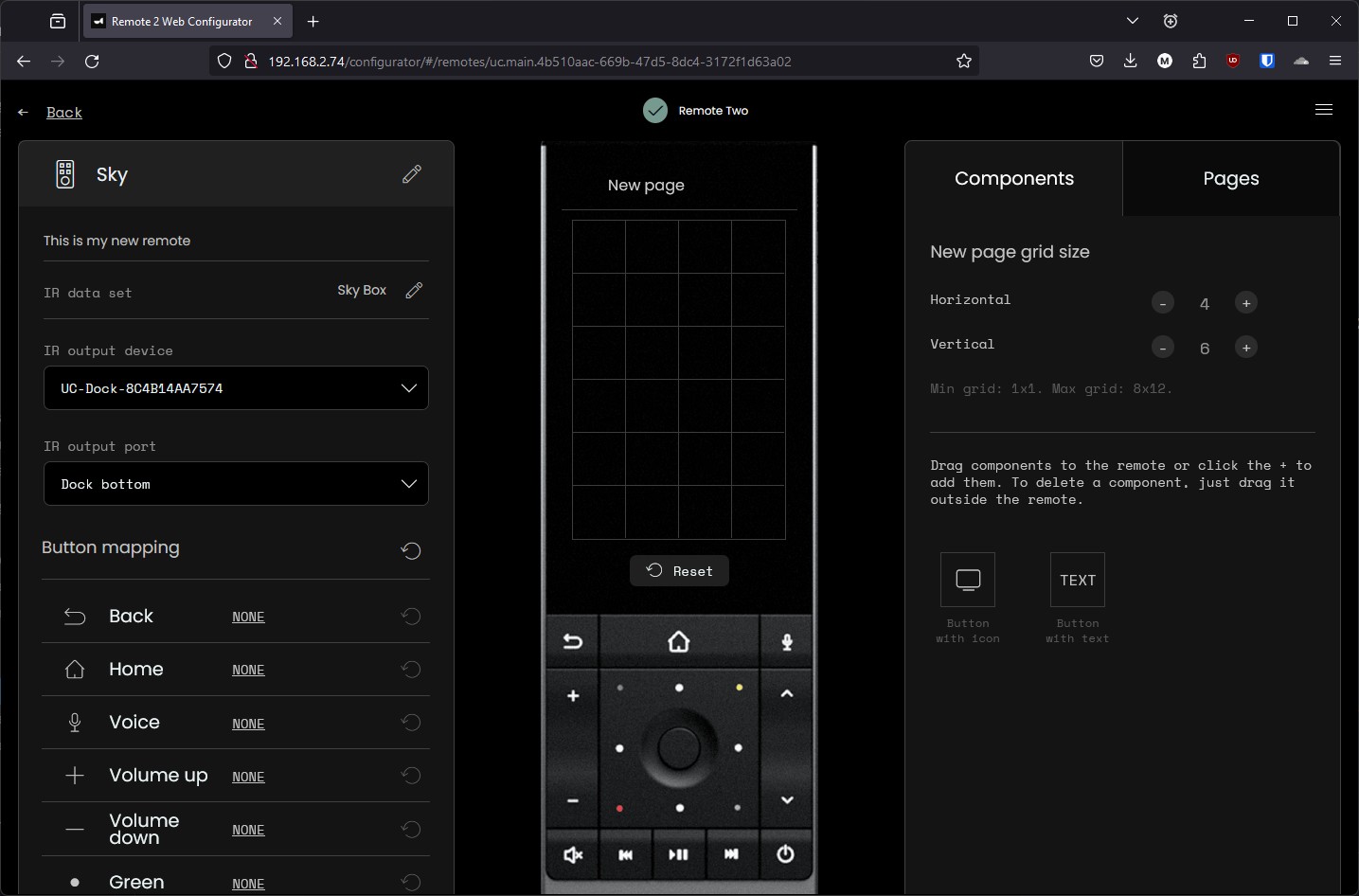
Actually very easy. With things like MySky you may need to teach it some remote commands but the web interface allows you to fully customize every aspect including the physical buttons. To be honest though I didn't go this far (I don't have Sky myself and all my stuff is network controlled). It has Hue support however baked in and talks directly to the hub.


It has been geered towards the normal user to a degree - if you can load the web interface you can basically use it and the support forums and their discord are incredibly helpful too. You can even have it so different users have different screens, button configurations etc. But while I say "it is a little more involved" I mean it isn't as simple as using an app on your phone with a Logitech app just because there is no cloud behind this remote.


However, note, this page is running on the darn remote itself. So if you don't mind training it then you basically can customize it however you like (never seen this until now and count me surprised):


I did also note from latest firmware they've added some IR Manufactures. Not as many as the Harmony, but you can also submit stuff to them too so hopefully this means this will improve over time.


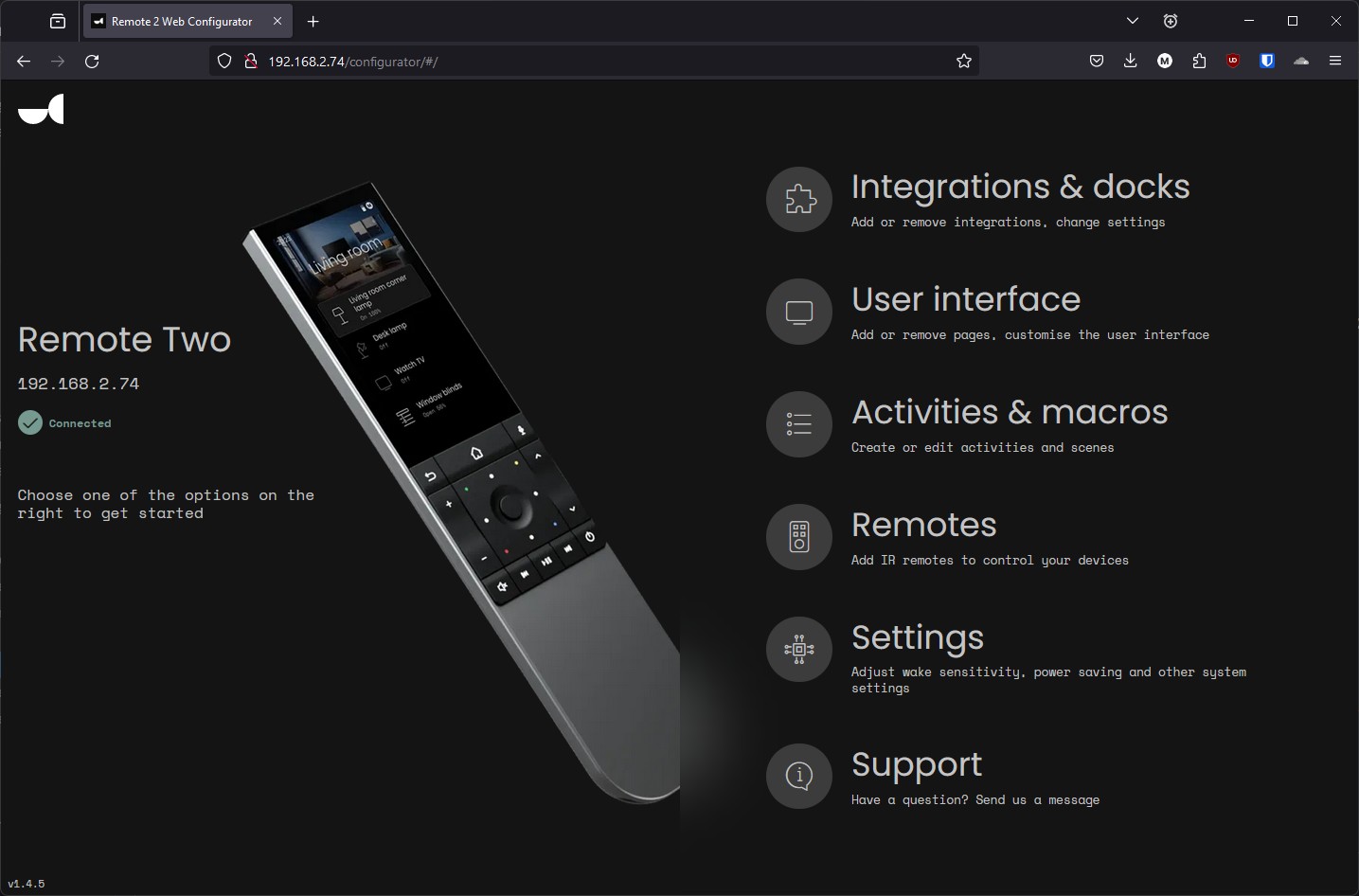
This is the main homepage too - so once you have items added you can go into Activities & macros and add your own things in there:


Michael Murphy | https://murfy.nz
Referral Links: Quic Broadband (use R122101E7CV7Q for free setup)

Are you happy with what you get from Geekzone? Please consider supporting us by subscribing.
Opinions are my own and not the views of my employer.


michaelmurfy

meow
13580 posts

Uber Geek
+1 received by user: 10910

Moderator
ID Verified
Trusted
Lifetime subscriber

  #3157021 7-Nov-2023 14:43
Send private message

Oh the screen is a rather high resolution OLED display and looks incredible too.


Michael Murphy | https://murfy.nz
Referral Links: Quic Broadband (use R122101E7CV7Q for free setup)

Are you happy with what you get from Geekzone? Please consider supporting us by subscribing.
Opinions are my own and not the views of my employer.


networkn
Networkn
32864 posts

Uber Geek
+1 received by user: 15454

ID Verified
Trusted
Lifetime subscriber

  #3157024 7-Nov-2023 14:56
Send private message

How's battery life? This is a bugbear with my elite, though I have largely stopped using it in favour of using the harmony app on my Phone. 


michaelmurfy

meow
13580 posts

Uber Geek
+1 received by user: 10910

Moderator
ID Verified
Trusted
Lifetime subscriber

  #3157026 7-Nov-2023 15:03
Send private message

Battery lasts "up to" 5 days and is even user replaceable too. The dock is much nicer than the Harmonys one (even has magnets meaning the remote feels like it snaps in place).


Michael Murphy | https://murfy.nz
Referral Links: Quic Broadband (use R122101E7CV7Q for free setup)

Are you happy with what you get from Geekzone? Please consider supporting us by subscribing.
Opinions are my own and not the views of my employer.


Shop now for Dyson appliances (affiliate link).
Dingbatt
6804 posts

Uber Geek
+1 received by user: 3694

Lifetime subscriber

  #3157028 7-Nov-2023 15:20
Send private message

Most of the stuff I can find about this is a couple of years old (when the Kickstarter launched) apart from a more recent YT video, but I don’t speak German so it wasn’t particularly useful either. Do you have any links that are more up to date. I have found the community page.


I notice on the software roadmap a lot of stuff is yet to be implemented. Does it feel like it’s still in beta?


“We’ve arranged a society based on science and technology, in which nobody understands anything about science technology. Carl Sagan 1996


michaelmurfy

meow
13580 posts

Uber Geek
+1 received by user: 10910

Moderator
ID Verified
Trusted
Lifetime subscriber

  #3157032 7-Nov-2023 15:29
Send private message

While exploring I never felt it was still in beta as the remote interface and web interface are really snappy and feel polished. Sure, some stuff is yet to be implemented but I'll say more development will happen in this space once the final Kickstarter remotes have been sent out. I think they've been focusing on this right now.


The Discord is the best place I've found to get news, and even assistance. Marton is rather active in there.


They use Github for bug tracking and there is even a simulator repo there too: https://github.com/unfoldedcircle


Michael Murphy | https://murfy.nz
Referral Links: Quic Broadband (use R122101E7CV7Q for free setup)

Are you happy with what you get from Geekzone? Please consider supporting us by subscribing.
Opinions are my own and not the views of my employer.


michaelmurfy

meow
13580 posts

Uber Geek
+1 received by user: 10910

Moderator
ID Verified
Trusted
Lifetime subscriber

  #3157219 8-Nov-2023 10:51
Send private message

Sold. Thanks all!


Michael Murphy | https://murfy.nz
Referral Links: Quic Broadband (use R122101E7CV7Q for free setup)

Are you happy with what you get from Geekzone? Please consider supporting us by subscribing.
Opinions are my own and not the views of my employer.


Create new topic


Geekzone Live »

Try automatic live updates from Geekzone directly in your browser, without refreshing the page, with Geekzone Live now.


Are you subscribed to our RSS feed? You can download the latest headlines and summaries from our stories directly to your computer or smartphone by using a feed reader.