Geekzone: technology news, blogs, forums
Guest
Welcome Guest.
You haven't logged in yet. If you don't have an account you can register now.


deeveus

15 posts

Geek


#215141 13-Jun-2017 18:59
Send private message

Hi all..

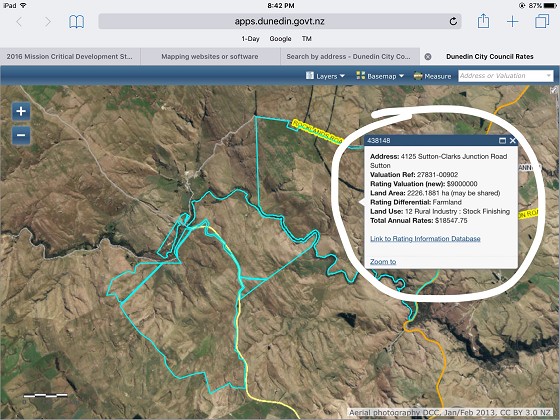
I'm trying to find software or any website that can enable me to locate a property and define it on its own such as attached file but able to zoom in on particular areas and print for example. You can do this on the DCC website http://www.dunedin.govt.nz/services/rates-information/rates?ratingID=438148 here but the pesky information thing is in the way otherwise it's perfect.. any one in the know?
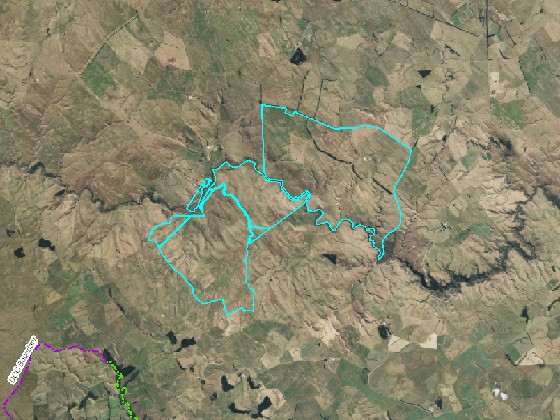


If I use the pic attached and zoom in the resolution drops and looks rat sh...

Thanks in advance..


Create new topic
tchart
2397 posts

Uber Geek
+1 received by user: 579

ID Verified
Trusted

  #1799604 13-Jun-2017 19:10
Send private message

What is the result you want?

If you go to ArcGIS.com it should show NZ imagery most of which is sourced from LINZ or the councils. You should be able to zoom in or print a better quality map.

Otherwise try WAMS
http://www.walkingaccess.govt.nz/walkways-and-access/walking-access-mapping/

The imagery is the same as on ArcGIS.com but they have property boundaries too.


deeveus

15 posts

Geek


  #1799682 13-Jun-2017 21:02
Send private message

I'm after the below which the dcc site gives you but need the caption box removed. See below..


If you hit X on the caption box it then removes all the property outline. Hope this helps..

Cheers.

Oblivian
7347 posts

Uber Geek
+1 received by user: 2117

ID Verified

  #1799688 13-Jun-2017 21:08
Send private message

That's a littttlleeee bit on the shadey side doing a screendump/print..


However. This is where developer tools comes in (F12). Hide the div element class="esriPopup" and you can thank me later.


ANglEAUT
altered-ego
2438 posts

Uber Geek
+1 received by user: 842

Trusted
Lifetime subscriber

  #1799719 13-Jun-2017 23:03
Send private message

 Both Google Maps & Google Earth allow you to create custom maps & draw arbitrary lines on the map, zoomed in at the required level.


Please keep this GZ community vibrant by contributing in a constructive & respectful manner.


AidanS
458 posts

Ultimate Geek
+1 received by user: 135


  #1799729 13-Jun-2017 23:52
Send private message

You can just delete that HTML element using Google Chrome's inspect element feature (same on other browsers).


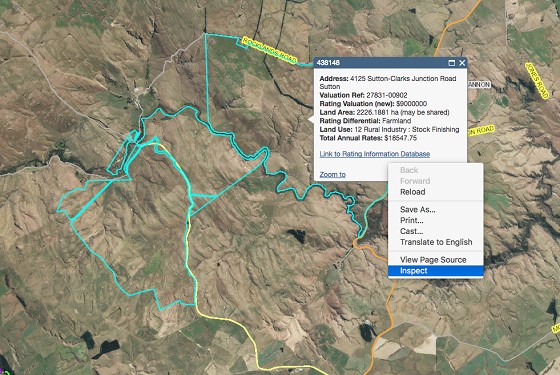
Step 1, right click on the popup box, click "inspect element"


Step 2, find the element that is selected blue in the below screenshot. When you click it, it should make the entire popup window blue


Click to see full size


Step 3, hit the "DEL' key on your keyboard to delete this element


Click to see full size


dgashby
71 posts

Master Geek
+1 received by user: 12


  #1799751 14-Jun-2017 07:18
Send private message

There's a fairly steep learning curve if you aren't familiar with GIS but QGIS is a feature rich open source cross-platform mapping application.  Combine it with data from LINZ Data Service or Koordinates.


Stream your favourite shows now on Apple TV (affiliate link).
deeveus

15 posts

Geek


  #1799838 14-Jun-2017 09:13
Send private message

Awesome, thanks guys. I've got enough now to see me right. Cheers!


Create new topic


Geekzone Live »

Try automatic live updates from Geekzone directly in your browser, without refreshing the page, with Geekzone Live now.


Are you subscribed to our RSS feed? You can download the latest headlines and summaries from our stories directly to your computer or smartphone by using a feed reader.