Geekzone: technology news, blogs, forums
Guest
Welcome Guest.
You haven't logged in yet. If you don't have an account you can register now.


mattie47

79 posts

Master Geek
+1 received by user: 1


#218014 22-Jul-2017 14:54
Send private message

Hi all,


Thought it would be worth posting a method I've just used to upgrade my old Snap 7360 Fritz!box.


I've had this modem for some time, and knew there was new Fritz OS updates for it, but for some reason my device was still showing the old UI.


I tried clicking System > Update > Autoupdate then check for updates, but this would always auto direct to the fritz.box index page. 


I emailed AVM asking for the latest Fritzbox image for my device, hoping I may be able to manually install it. AVM replied with great support, and provided a link: 


ftp://ftp.avm.de/fritz.box/fritzbox.fon_wlan_7360_v2/firmware/english/


However, after downloading it, I could see no option on the manual install process to actually upload the image!


So, in this guide I'll explain how I managed to get around this. 


The very short story is that you simply need to edit the manual update firmware page HTML and remove the div style "display:none" from the upload button div.


It seems the fritzbox devs were probably told to not allow the ability to update the fritzboxes for some ISPs and the easiest way to achieve this was simply to hide the functionality on the page rather than any more drastic work...


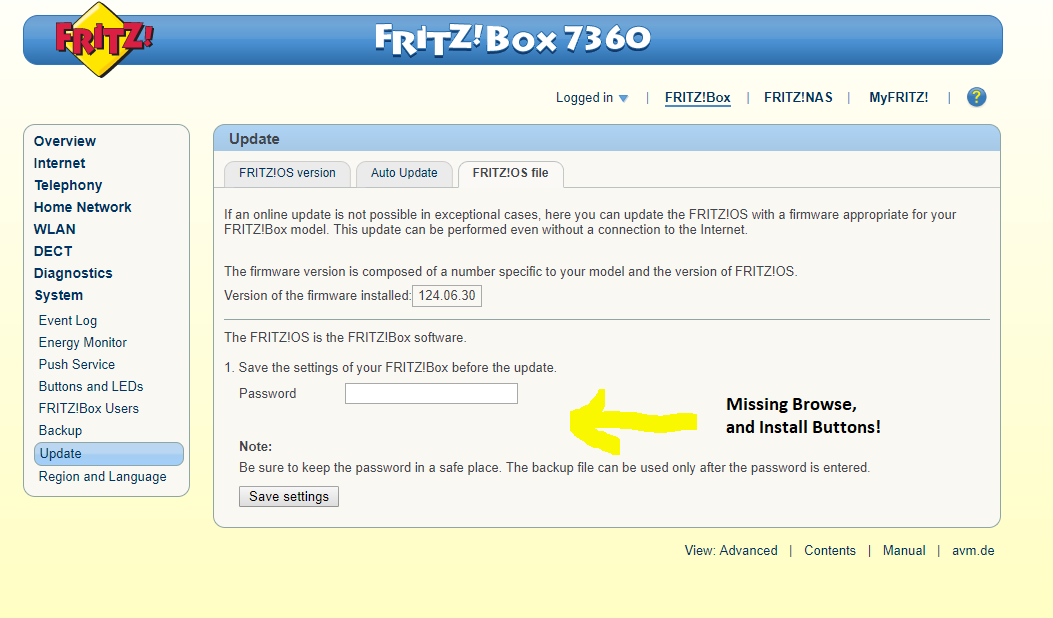
So if your fritz UI looks something like this:


Click to see full size


(IMGUR link if above image link fails - http://imgur.com/a/KmyCE


Head over to Update then flick the third tab "Fritz!OS File".


As you can see, there's no "Choose File" button. We need to unhide this in the code.


The easiest method (explained using Chrome) is to "Ctrl + Shift + C". This will allow you to hover over an element on the webpage and inspect its code. Hovering over or just below "Password" reveals about 3 Divs (A Div is a "Devision" or section in HTML) which have a Style assigned of "none". Essentially this means the element is hidden on the page.


So we need to unhide it.


Simply remove the text "none" from these Divs, and you should now see the Choose file and Start buttons appear. Choose the correctly downloaded image from the FTP site above and start the update process.


Hopefully at this point your frizbox will start updating!


Interestingly, after the update I still have these elements hidden on update page: 


Click to see full size 


Should a new Fritz OS come out, simply use the same method again to update.


Enjoy!



Media centre PC - Case Silverstone LC17 case with 430w PSU, MOBOAsus P5VD2-MX, CPU Intel 2.8Ghz Dual Core RAM 2 Gig, HDD 600gb WD Sata II, Tuners Hauppauge HVR-3000,  Play TV BT878 UHF/VHF, Video Asus 9400GT Silent,  OS Windows 7 Pro
Main PC - Case Raidmax Ninja Black, MOBO Asus P6T, CPU ,Intel i7 930 RAM 6 Gig, HDD X3 Seagate 1tb , Tuner Skystar 2 DVB-S, Video NVIDIA 9600GT OC Edition,  OS Windows 7 Pro


Create new topic
mattie47

79 posts

Master Geek
+1 received by user: 1


  #1827211 22-Jul-2017 17:50
Send private message

Specifically what I'm referring to. Seems I forgot to include this in original post:


Media centre PC - Case Silverstone LC17 case with 430w PSU, MOBOAsus P5VD2-MX, CPU Intel 2.8Ghz Dual Core RAM 2 Gig, HDD 600gb WD Sata II, Tuners Hauppauge HVR-3000,  Play TV BT878 UHF/VHF, Video Asus 9400GT Silent,  OS Windows 7 Pro
Main PC - Case Raidmax Ninja Black, MOBO Asus P6T, CPU ,Intel i7 930 RAM 6 Gig, HDD X3 Seagate 1tb , Tuner Skystar 2 DVB-S, Video NVIDIA 9600GT OC Edition,  OS Windows 7 Pro


freitasm
BDFL - Memuneh
80661 posts

Uber Geek
+1 received by user: 41083

Administrator
ID Verified
Trusted
Geekzone
Lifetime subscriber

  #1827307 22-Jul-2017 21:17
Send private message

Are you using an adblocker by any chance?


Referral links: Quic Broadband (free setup code: R587125ERQ6VE) | Samsung | AliExpress | Wise | Sharesies 


Support Geekzone by subscribing (browse ads-free), or making a one-off or recurring donation through PressPatron.


mattie47

79 posts

Master Geek
+1 received by user: 1


  #1827316 22-Jul-2017 21:22
Send private message

I am in Chrome, however other browsers (without ad blockers) still show the same behaviour. 


Media centre PC - Case Silverstone LC17 case with 430w PSU, MOBOAsus P5VD2-MX, CPU Intel 2.8Ghz Dual Core RAM 2 Gig, HDD 600gb WD Sata II, Tuners Hauppauge HVR-3000,  Play TV BT878 UHF/VHF, Video Asus 9400GT Silent,  OS Windows 7 Pro
Main PC - Case Raidmax Ninja Black, MOBO Asus P6T, CPU ,Intel i7 930 RAM 6 Gig, HDD X3 Seagate 1tb , Tuner Skystar 2 DVB-S, Video NVIDIA 9600GT OC Edition,  OS Windows 7 Pro


Delitus
25 posts

Geek
+1 received by user: 2


  #1827932 23-Jul-2017 20:55
Send private message

You need to use the 'Save Settings' button first (with a password assigned) before the UI will offer the option to upload the new firmware.


mattie47

79 posts

Master Geek
+1 received by user: 1


  #1827934 23-Jul-2017 20:57
Send private message

I tried this prior thinking the same, and it did not change anything.


Media centre PC - Case Silverstone LC17 case with 430w PSU, MOBOAsus P5VD2-MX, CPU Intel 2.8Ghz Dual Core RAM 2 Gig, HDD 600gb WD Sata II, Tuners Hauppauge HVR-3000,  Play TV BT878 UHF/VHF, Video Asus 9400GT Silent,  OS Windows 7 Pro
Main PC - Case Raidmax Ninja Black, MOBO Asus P6T, CPU ,Intel i7 930 RAM 6 Gig, HDD X3 Seagate 1tb , Tuner Skystar 2 DVB-S, Video NVIDIA 9600GT OC Edition,  OS Windows 7 Pro


Create new topic


Geekzone Live »

Try automatic live updates from Geekzone directly in your browser, without refreshing the page, with Geekzone Live now.


Are you subscribed to our RSS feed? You can download the latest headlines and summaries from our stories directly to your computer or smartphone by using a feed reader.