Geekzone: technology news, blogs, forums
Guest
Welcome Guest.
You haven't logged in yet. If you don't have an account you can register now.


View this topic in a long page with up to 500 replies per page Create new topic
1 | 2 
BreaKer

36 posts

Geek


  #834645 12-Jun-2013 10:36
Send private message

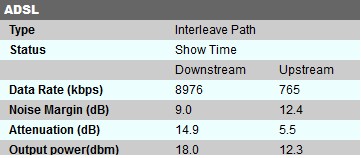
Got splitter put at ETP and Cat5 cabling, should allow for sometime for line to stabilize before noticing improvements?


BreaKer-


NZCrusader
646 posts

Ultimate Geek
+1 received by user: 230


  #835910 12-Jun-2013 16:00
Send private message

Rebooting the router / modem would be the first step to take.


NZ / AU Battlefield 4 Gaming Community
http://www.sonsofvalour.net/forums/forum.php

BreaKer

36 posts

Geek


  #835921 12-Jun-2013 16:12
Send private message

That was the first thing that I did, It has not changed anything?


BreaKer-


webwat
2036 posts

Uber Geek
+1 received by user: 145

Trusted

  #841814 22-Jun-2013 23:34
Send private message

sbiddle: If your alarm company installed an alarm and didn't install a master filter I'd hate to see the quality of their alarm ystem install - this really is just the signs of an inept technician who obviously doesn't care about a quality installation.


Same problem with my alarm, landlord obviously didn't know/want to know why the job was so cheap. Installed a splitter myself, and found one leg was crossed on the in/out ports of the alarm box too. Got an extra 2Mbps out of the ADSL and big improvement in data errors logged by the modem.

Sorry to all the alarm techs out there, but you are welcome to contact me if you want to find out how to install a master filter. Or put an IP alarm into a cupboard shared with a modem, and just run a LAN cable to the computer. Easy to do like this with the filter connected upstream from both the shown ADSL outlet and the alarm wiring.


Time to find a new industry!


1 | 2 
View this topic in a long page with up to 500 replies per page Create new topic


Geekzone Live »

Try automatic live updates from Geekzone directly in your browser, without refreshing the page, with Geekzone Live now.


Are you subscribed to our RSS feed? You can download the latest headlines and summaries from our stories directly to your computer or smartphone by using a feed reader.