Geekzone: technology news, blogs, forums
Guest
Welcome Guest.
You haven't logged in yet. If you don't have an account you can register now.


Filter this topic showing only the reply marked as answer View this topic in a long page with up to 500 replies per page Create new topic
1 | 2 | 3
Oxygen298

62 posts

Master Geek
+1 received by user: 23

ID Verified

  #2919933 29-May-2022 11:43

ply streaming something on youtube gives me a speed test of around 3 - 4 down, with abit of buffering etc but yet the modem says that the attainable rate is 27 down and 7 up, really just makes no sense that even trying a second router has shown the same issue.

So 2Degrees using this to upsell me to a 12 month contract with a new modem because they are saying mine is old, is alittle bit on the nose when the issue doesnt go past the exchange, somehow the line is throttled or capped at less than ADSL speeds.


l43a2
1784 posts

Uber Geek
+1 received by user: 591

ID Verified
Trusted

  #2919999 29-May-2022 14:12
Send private message

are you connected directly into the modem your testing or using a switch etc/wifi 


Oxygen298

62 posts

Master Geek
+1 received by user: 23

ID Verified

  #2920001 29-May-2022 14:14

l43a2:


are you connected directly into the modem your testing or using a switch etc/wifi 


1 pc connected directly to the router showing 1 GBps port and network card. still the same result and wifi turned off


RunningMan
9186 posts

Uber Geek
+1 received by user: 4840


  #2920056 29-May-2022 14:49
Send private message

The varying downstream rates you are seeing from 3-9 (approx) Mb/s suggests pretty strongly this is not a hard limit being set by your ISP. It would be reproducable to within a few % if it was a traffic shaper.


Have you ruled out upstream saturation? A cloud upload/backup using your upstream bandwidth can have a big impact on downstream rates, particularly on low speed asymetric connections like xDSL. Back to real basics, but power off all but one client when testing, and then try each client in turn.


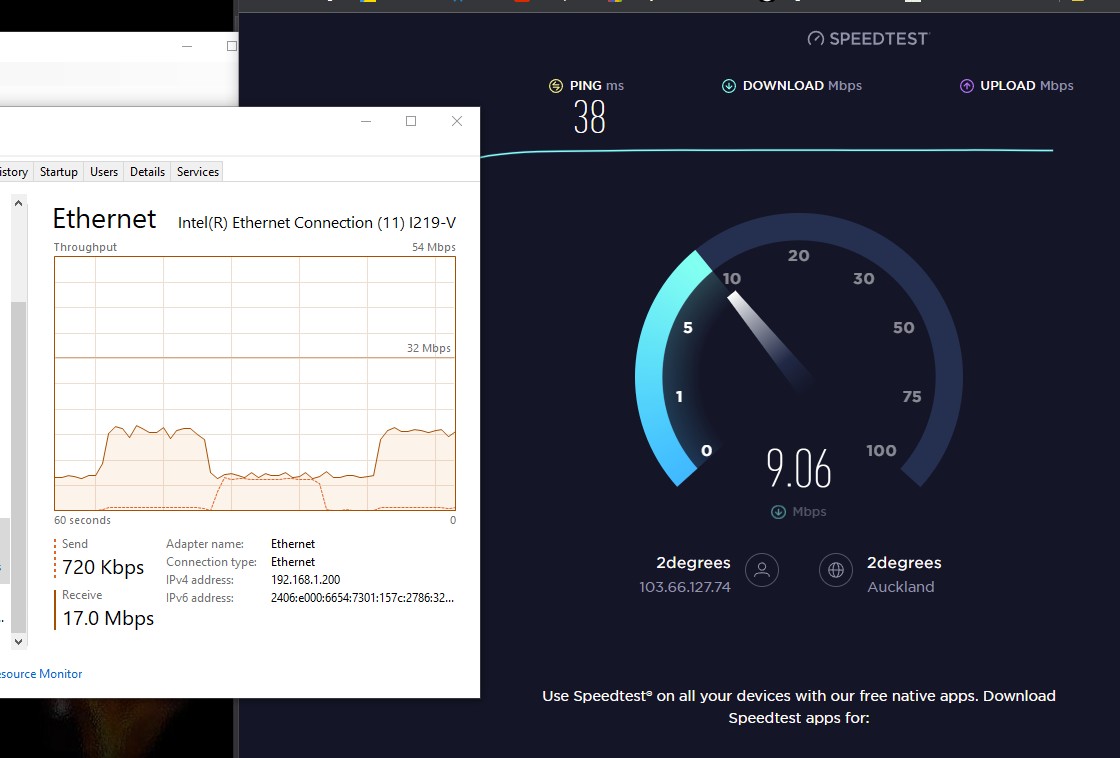
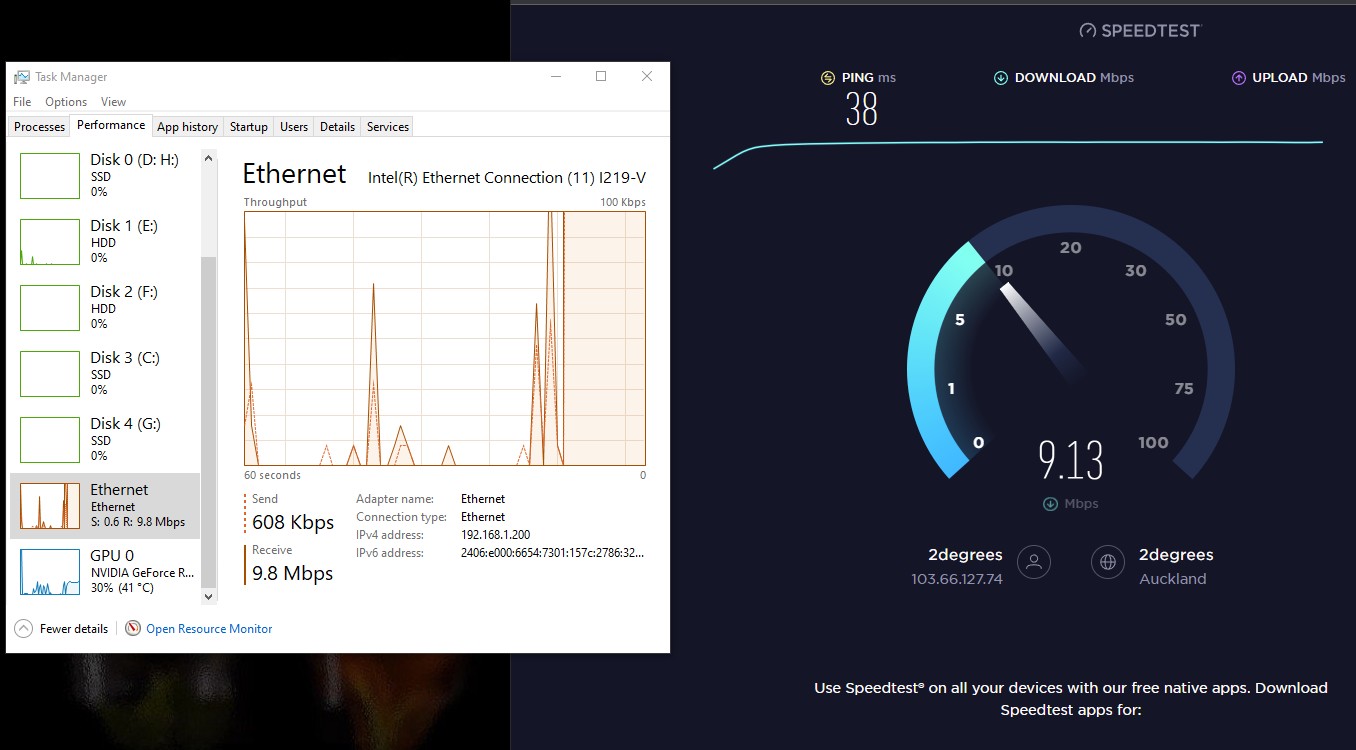
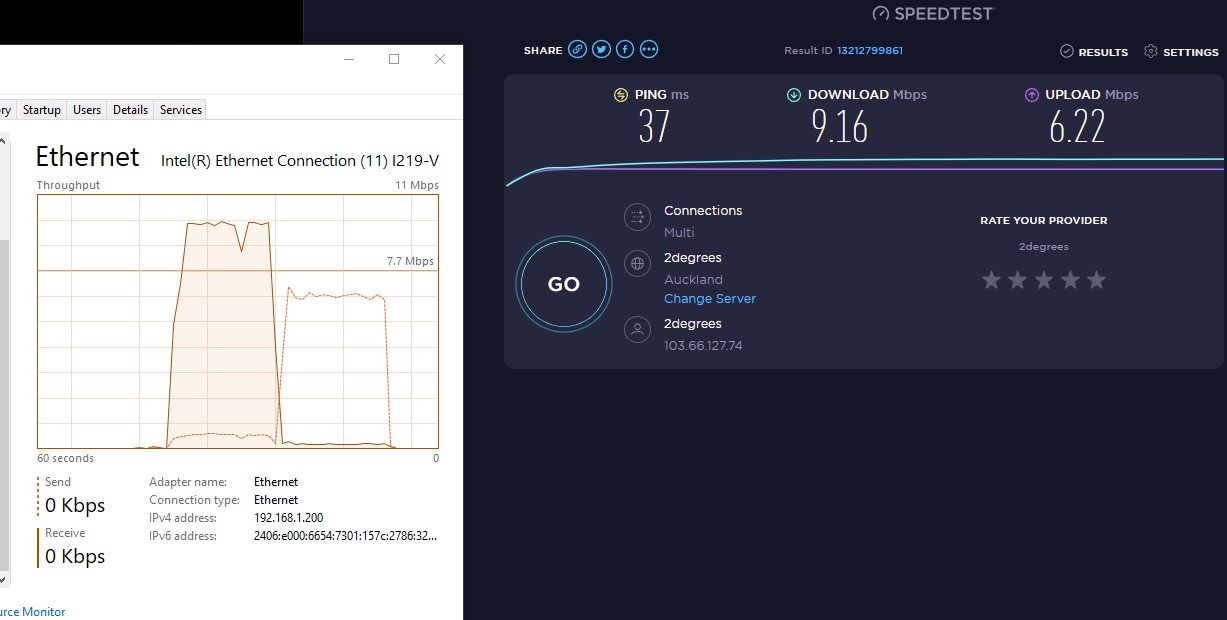
EDIT: If you have a single PC connected check the network throughput in task manager as you do a speedtest to confirm they match.


Oxygen298

62 posts

Master Geek
+1 received by user: 23

ID Verified

  #2920057 29-May-2022 14:53

RunningMan:


The varying downstream rates you are seeing from 3-9 (approx) Mb/s suggests pretty strongly this is not a hard limit being set by your ISP. It would be reproducable to within a few % if it was a traffic shaper.


Have you ruled out upstream saturation? A cloud upload/backup using your upstream bandwidth can have a big impact on downstream rates, particularly on low speed asymetric connections like xDSL. Back to real basics, but power off all but one client when testing, and then try each client in turn.


netstat was load to make sure there was nothing else running upon the testing, tests was done with one pc on a lan port, the router has been factory rest.


the only other thing i can put it down to is the cable outside my place was dug up and repaired due to ufb drillers damaging it, however it is a lead cable and the tech did say the cable was stuffed.. however im not seeing errors on the router.


RunningMan
9186 posts

Uber Geek
+1 received by user: 4840


  #2920058 29-May-2022 15:01
Send private message

Generally a physical line fault will be fairly obvious from the xDSL line stats, with sync rate dropping then noise margin increasing. Yours look fairly reasonable.


It would be interesting to know the backhaul to the cabinet - I guess there's a small chance there's been some reduction, particularly if it's radio fed RBI one.


Shop now at Mighty Ape (affiliate link).
Oxygen298

62 posts

Master Geek
+1 received by user: 23

ID Verified

  #2920059 29-May-2022 15:05

RunningMan:


Generally a physical line fault will be fairly obvious from the xDSL line stats, with sync rate dropping then noise margin increasing. Yours look fairly reasonable.


It would be interesting to know the backhaul to the cabinet - I guess there's a small chance there's been some reduction, particularly if it's radio fed RBI one.


backhaul should be a dual fibre setup with one being for redundancy but this problem might even be within 2degrees management cabinet.

Even so they are sending me a new modem to have the same problem, then they said they will get a chorus tech out to investigate.


RunningMan
9186 posts

Uber Geek
+1 received by user: 4840


  #2920061 29-May-2022 15:22
Send private message

Can you graph throughput with time? I recall there being a failure mode with xDSL linecards that would produce a sawtooth pattern every 15 (ish) seconds but the line would sync perfectly fine. Wasn't obvious from either end what the fault was when testing. It would also show up as a few dropped packets every 15 seconds if you set up a continuous ping.


What happens with non speedtest downloads, what throughput do you get?


BTW, no need to keep quoting the entire previous post each time. It just means everthing appears twice for no reason. Just use the compose or quick reply.


Oxygen298

62 posts

Master Geek
+1 received by user: 23

ID Verified

  #2920065 29-May-2022 15:41

is there throughtput software that could graph it?

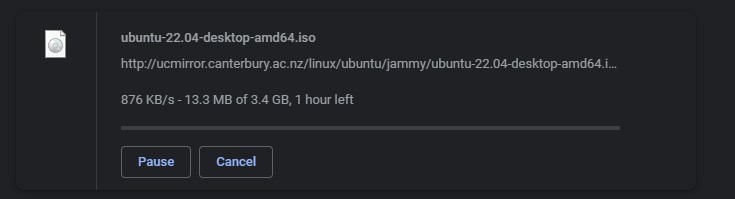
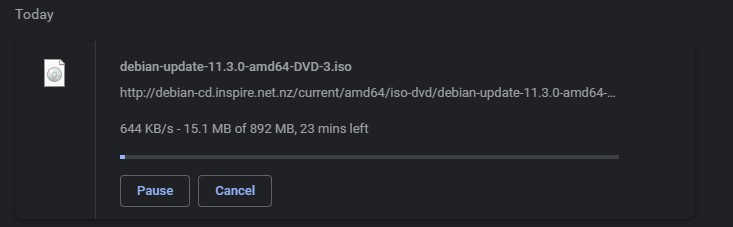
i have tried 2 places to download and get snail downloads.


i have ever only seen 3.0mb/s downloads despite is being a well over 20mb/s connection


michaelmurfy
meow
13580 posts

Uber Geek
+1 received by user: 10911

Moderator
ID Verified
Trusted
Lifetime subscriber

  #2920066 29-May-2022 15:46
Send private message

Where are you based and do you happen to know what cabinet you’re connected to?


Michael Murphy | https://murfy.nz
Referral Links: Quic Broadband (use R122101E7CV7Q for free setup)

Are you happy with what you get from Geekzone? Please consider supporting us by subscribing.
Opinions are my own and not the views of my employer.


Oxygen298

62 posts

Master Geek
+1 received by user: 23

ID Verified

  #2920067 29-May-2022 15:51

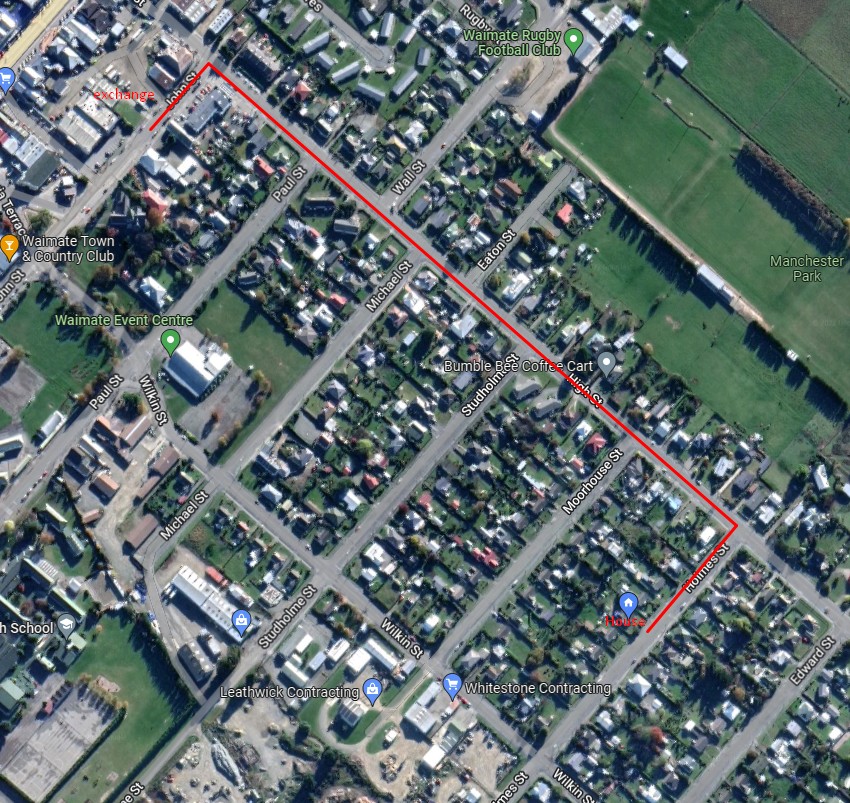
im based in waimate, south island, the exchange is about 900 meters by walking, its 6 blocks over and i can see the exchange out my back door


Shop now on AliExpress (affiliate link).
RunningMan
9186 posts

Uber Geek
+1 received by user: 4840


  #2920072 29-May-2022 16:34
Send private message

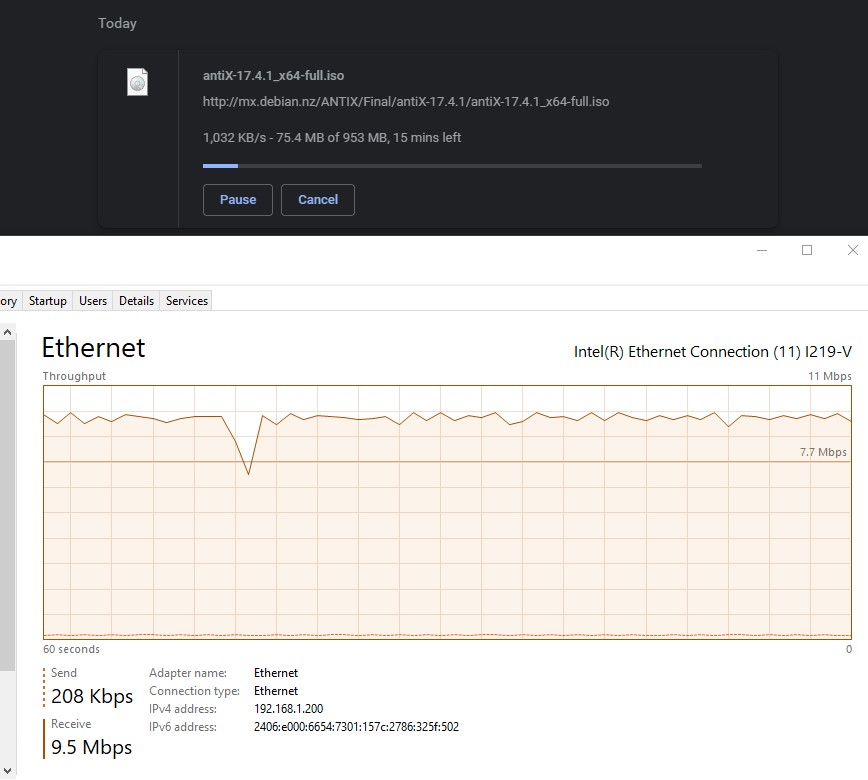
Look like the ISOs are coming down at about the same rate as you are seeing on speedtests. Presume you mean Mb/s not mb/s with your downloads. Task Manager in Windows or Activity Monitor in Mac OS should both have enough resolution to graph a minute or 2 of a reasonably local download - you should see a flat graph with a bit of minor variation, not a sawtooth shape that periodically drops to zero then ramps back up.


Oxygen298

62 posts

Master Geek
+1 received by user: 23

ID Verified

  #2920074 29-May-2022 16:41


RunningMan
9186 posts

Uber Geek
+1 received by user: 4840


  #2920097 29-May-2022 19:54
Send private message

Try graphing an ISO download from a local server. The speedtest is for too short a duration to check.


Oxygen298

62 posts

Master Geek
+1 received by user: 23

ID Verified

  #2920100 29-May-2022 20:06


1 | 2 | 3
Filter this topic showing only the reply marked as answer View this topic in a long page with up to 500 replies per page Create new topic


Geekzone Live »

Try automatic live updates from Geekzone directly in your browser, without refreshing the page, with Geekzone Live now.


Are you subscribed to our RSS feed? You can download the latest headlines and summaries from our stories directly to your computer or smartphone by using a feed reader.