Geekzone: technology news, blogs, forums
Guest
Welcome Guest.
You haven't logged in yet. If you don't have an account you can register now.


View this topic in a long page with up to 500 replies per page Create new topic
1 | 2 
freitasm
BDFL - Memuneh
80652 posts

Uber Geek
+1 received by user: 41042

Administrator
ID Verified
Trusted
Geekzone
Lifetime subscriber

  #3247685 11-Jun-2024 21:57
Send private message

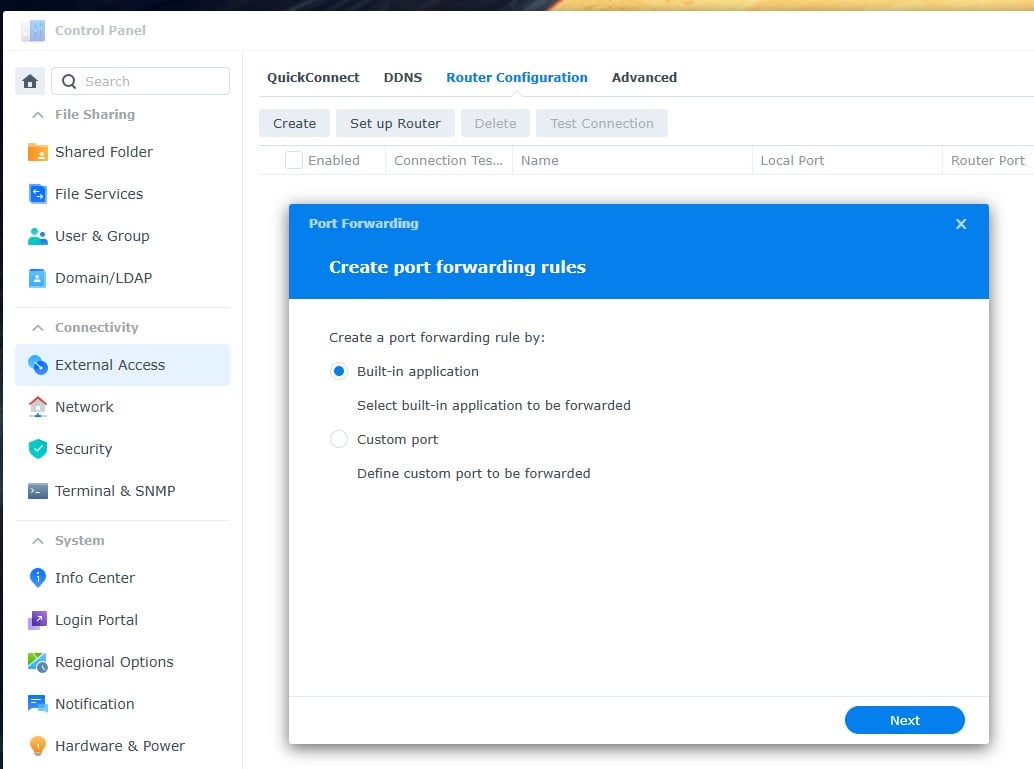
You probably created a rule on your NAS and it automatically tries to add UPnP setup for your router. You shouldn't need any of this.


Referral links: Quic Broadband (free setup code: R587125ERQ6VE) | Samsung | AliExpress | Wise | Sharesies 


Support Geekzone by subscribing (browse ads-free), or making a one-off or recurring donation through PressPatron.



Tatou

244 posts

Master Geek
+1 received by user: 58


  #3247692 11-Jun-2024 22:27
Send private message

freitasm:


You probably created a rule on your NAS and it automatically tries to add UPnP setup for your router. You shouldn't need any of this.


Thanks for this and the pictures. I appreciate your effort to protect me from myself.  


There is nothing set up on this tab in my Synology DSM. It is blank. Quick Connect is enabled though.


1 | 2 
View this topic in a long page with up to 500 replies per page Create new topic


Geekzone Live »

Try automatic live updates from Geekzone directly in your browser, without refreshing the page, with Geekzone Live now.


Are you subscribed to our RSS feed? You can download the latest headlines and summaries from our stories directly to your computer or smartphone by using a feed reader.