Geekzone: technology news, blogs, forums
Guest
Welcome Guest.
You haven't logged in yet. If you don't have an account you can register now.


Filter this topic showing only the reply marked as answer View this topic in a long page with up to 500 replies per page Create new topic
1 | 2 | 3
Linux
12182 posts

Uber Geek
+1 received by user: 8476

Trusted
Lifetime subscriber

  #3448672 1-Jan-2026 15:07
Send private message quote this post

@Cxf I understand you could be on holiday break but just a FYI


Cranach

5 posts

Wannabe Geek
+1 received by user: 1


  #3448706 1-Jan-2026 17:29
Send private message quote this post

cddt:


SomeoneSomewhere:


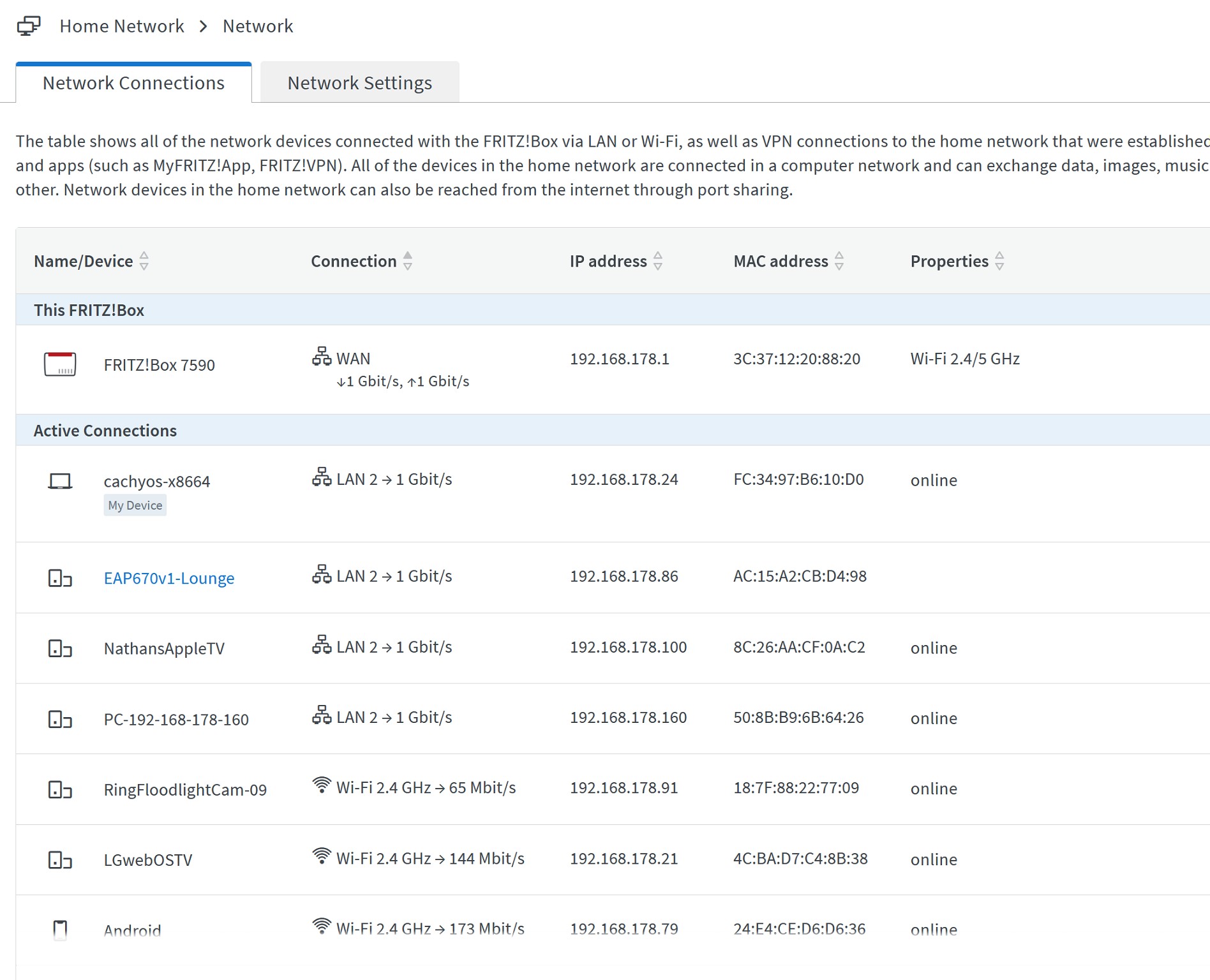
Did the routers clearly indicate that the upstream port was operating at gigabit?


Yeah, can OP share some screenshots from the router of both the WAN and LAN link speeds? 


This would either eliminate or confirm what most of us are suspecting (faulty cable or port causing the link to revert to 100 Mbps). 


Edit: wrote this before OP responded above, disregard. 


aj6828
177 posts

Master Geek
+1 received by user: 47

ID Verified
Trusted

  #3449088 2-Jan-2026 19:15
Send private message quote this post

Check if you dont have any QOS enabled on the router side? also good idea to have Vlan tag removed, plug the pc directly to the ONT run a test too .. 


Exclusive for Geekzone Members!
Dynamic IP & Bring Your Own Device Hyperfibre & Fibre plans & NO Contracts with Hyperline.co.nz powered by ASN 9790 Network


Chrous areas only HYPERLINE.co.nz  


Cxf

Cxf
72 posts

Master Geek
+1 received by user: 52

2degrees

  #3449214 3-Jan-2026 13:31
Send private message quote this post

I'll see what I can find out.


Also HNY :D


Cranach

5 posts

Wannabe Geek
+1 received by user: 1


  #3449352 3-Jan-2026 20:43
Send private message quote this post

Cxf:


I'll see what I can find out.


Also HNY :D


HNY 🚸


If it makes a difference testing today has yielded 110 down, and 300 up consistently all day. I am going to run through the connection wizard thing again and see if that makes a difference.


MaxineN
Max
2049 posts

Uber Geek
+1 received by user: 1663

ID Verified
Trusted
Subscriber

  #3449354 3-Jan-2026 20:45
Send private message quote this post

Cranach:


Cxf:


I'll see what I can find out.


Also HNY :D


HNY 🚸


If it makes a difference testing today has yielded 110 down, and 300 up consistently all day. I am going to run through the connection wizard thing again and see if that makes a difference.


That almost sounds like a broken profile... Or a bad optical...


Are you in a chorus area by chance?


Ramblings from a mysterious lady who's into tech. Warning I may often create zingers.


Shop now on AliExpress (affiliate link).
insane
3324 posts

Uber Geek
+1 received by user: 1006

ID Verified
Trusted
2degrees
Subscriber

  #3449454 3-Jan-2026 23:13
Send private message quote this post

MaxineN:


Cranach:


Cxf:


I'll see what I can find out.


Also HNY :D


HNY 🚸


If it makes a difference testing today has yielded 110 down, and 300 up consistently all day. I am going to run through the connection wizard thing again and see if that makes a difference.


That almost sounds like a broken profile... 


That would be my guess too. @Cranach, flicked you a DM. 


SomeoneSomewhere
1882 posts

Uber Geek
+1 received by user: 1086

Lifetime subscriber

  #3449459 3-Jan-2026 23:27
Send private message quote this post

I'm pretty sure there was a whole spate of these a year or two back. Downstream limited, upstream not. 


ComatoseScud
3 posts

Wannabe Geek
+1 received by user: 1


  #3449515 4-Jan-2026 08:24
Send private message quote this post

Ok so got mine fixed and it's an odd issue. Due to a power cut the timing of the ont router and my router, there was a handshake problem where they don't sync properly. This forces a failsafe where the WAN ports revert to their lowest state in my case 100mbps. The way to fix it was impressively annoying for me as I have a full network with managed switches etc which needs a full factory reset. Had to re provision and re adopt everything. Hours down the tube.   Next time I'll disable the port and re-enable it and see if that resets the handshake sync but the reset is the failsafe way to fix it.  Oh and yes my ports and network were all reading normal. Not port rate limited. They were showing full 2.5gig duplex.


So in short, a factory reset of your router/network should fix it.


richms
29099 posts

Uber Geek
+1 received by user: 10210

Trusted
Lifetime subscriber

  #3449519 4-Jan-2026 08:40
Send private message quote this post

IMO if you have gone to 2degrees support and they say that everything at their end is fine, and its not then just change ISP. They do not deserve your custom if they cant fix their broken product when given the opportunities to do so. Don't reward crap support with continued payment.


You have gone above and beyond with trying to solve the problem and they have been obstructive and wasting your time with repeated escalation avoidance BS steps.


Richard rich.ms

Linux
12182 posts

Uber Geek
+1 received by user: 8476

Trusted
Lifetime subscriber

  #3449521 4-Jan-2026 08:50
Send private message quote this post

@richms the speed issue was actually on the customers network not 2degrees


Shop now on Samsung phones, tablets, TVs and more (affiliate link).
freitasm
BDFL - Memuneh
80652 posts

Uber Geek
+1 received by user: 41045

Administrator
ID Verified
Trusted
Geekzone
Lifetime subscriber

  #3449522 4-Jan-2026 08:51
Send private message quote this post

Linux:


@richms the speed issue was actually on the customers network not 2degrees


Not confirmed for the OP yet, a different user.


Referral links: Quic Broadband (free setup code: R587125ERQ6VE) | Samsung | AliExpress | Wise | Sharesies 


Support Geekzone by subscribing (browse ads-free), or making a one-off or recurring donation through PressPatron.



ComatoseScud
3 posts

Wannabe Geek
+1 received by user: 1


  #3449545 4-Jan-2026 10:47
Send private message quote this post

While I agree it's on my end, well there ont was also reset so was both their and my products. If they knew their systems and product they should know this could be an issue instead of brushing it off. The big problem is outsourcing help desks or not employing locals that know networking. I had to google and use Gemini to get the reasons/solutions for myself. I know how to do this and I am confident in doing this to solve my issues. I do have issue that most customers they have, would not and could not do this without customer support.  So do better 2degrees.


Linux
12182 posts

Uber Geek
+1 received by user: 8476

Trusted
Lifetime subscriber

  #3449546 4-Jan-2026 10:50
Send private message quote this post

The South Africa staff are absolutely useless 😑 


Cranach

5 posts

Wannabe Geek
+1 received by user: 1


  #3450469 6-Jan-2026 21:53
Send private message quote this post

Well I just did a speedtest here and I am back at full speed - I have no idea what happened, but I did have a couple messages from some network engineers(?) from 2 degrees, I think maybe one of them sorted it for me.


Either way it is fixed now.


1 | 2 | 3
Filter this topic showing only the reply marked as answer View this topic in a long page with up to 500 replies per page Create new topic


Geekzone Live »

Try automatic live updates from Geekzone directly in your browser, without refreshing the page, with Geekzone Live now.


Are you subscribed to our RSS feed? You can download the latest headlines and summaries from our stories directly to your computer or smartphone by using a feed reader.