Geekzone: technology news, blogs, forums
Guest
Welcome Guest.
You haven't logged in yet. If you don't have an account you can register now.


Filter this topic showing only the reply marked as answer View this topic in a long page with up to 500 replies per page Create new topic
1 | 2 
pinguNZ

8 posts

Wannabe Geek


  #3448710 1-Jan-2026 17:42
Send private message quote this post

Ive checked and LAN port 5 == connection WAN1


Sorry boosacnoodle I didnt see your post when I messaged last.
I created a new WAN2 and set it to LAN port 4, and plugged that directly into the ONT. Also reassigned LAN4 to WAN1 Same disconnected messages. 


In the process of disabling the VLAN and testing each port on the ONT now. 


Ill try the smart controls and flow control aswell, I assume its not needed at the moment? 



pinguNZ

8 posts

Wannabe Geek


  #3448712 1-Jan-2026 17:48
Send private message quote this post

robertsona:


Bit of a left field suggestion follows:


I have a UDM Pro and are with 2Degrees. We recently moved house and when the fibre connection was installed at the new place, I got some curious internet behaviour. There was a physical connection, I could log into the router remotely (I was out of town at the time), speed tests were good, but the router reported the internet as being offline, WAN was shown as disconnected and those at home certainly couldn't access any internet.


After three days of trouble shooting with 2Degrees tech support, it turned out that for some unknown reason the disconnect of the old address had been cancelled, so there were two addresses trying to access the account and, I guess, the same static IP. Once this was rectified, everything just worked.


Any chance that your old 2degrees connection could still be active?


Thanks for the suggestion, we initially did ask for the connection to be setup in December but found out that Spark needed 30 days notice (annoying), so we had to ask 2Degrees to delay it by a month. In this instance, the 2Degrees connection is brand new. I haven't moved my service to this new address.


I did want to do some troubleshooting over the phone but after I said it was a non-2degrees router they told me to reboot and said there was nothing more they could do. I'm wondering if there was an issue with the switchover as it doesn't make sense to me why it was working on 2degrees and spark previously without any configuration change. Both using DHCP with IPv4.


pinguNZ

8 posts

Wannabe Geek


  #3448870 2-Jan-2026 08:46
Send private message quote this post

Thank you all for your suggestions. I was talking to @insane last night and he was able to validate the ONT connection on the 2D side. 


After leaving it overnight it appeared to come right again on its own using the original config. Still not quite sure what the root cause is, but its all sorted now. 


Martli
4 posts

Wannabe Geek
+1 received by user: 1


  #3457347 30-Jan-2026 21:24
Send private message quote this post

I'm having this exact same issue and my frantic googling has brought me here... 


Switching from my 2Degrees supplied ORBI to a UCG-Fiber. I wonder if the issue is what's described here: https://community.ui.com/questions/UCG-Ultra-Will-Not-Connect-to-ONT-Everything-Else-Will/332d4e94-5bc1-4397-8546-e556a50ac703#answer/9dc5dde2-10d3-438f-b7b9-8b1089654346


In that post the user describes having a WAN IP that is outside the subnet of the ISP's default gateway. Apparently most routers don't care about this but ubiquiti ones do, and won't reconcile it. I checked my ORBI's WAN Assignments and sure enough, the IP is outside the default gateway's subnet...


The solution is to set up a static route. I haven't managed to get it to work yet... I wonder if the solution is to just get a static IP? Keen for people's thoughts (and hi!)


Martli
4 posts

Wannabe Geek
+1 received by user: 1


  #3457478 31-Jan-2026 15:03
Send private message quote this post

Martli:


I'm having this exact same issue and my frantic googling has brought me here... 


Switching from my 2Degrees supplied ORBI to a UCG-Fiber. I wonder if the issue is what's described here: https://community.ui.com/questions/UCG-Ultra-Will-Not-Connect-to-ONT-Everything-Else-Will/332d4e94-5bc1-4397-8546-e556a50ac703#answer/9dc5dde2-10d3-438f-b7b9-8b1089654346


In that post the user describes having a WAN IP that is outside the subnet of the ISP's default gateway. Apparently most routers don't care about this but ubiquiti ones do, and won't reconcile it. I checked my ORBI's WAN Assignments and sure enough, the IP is outside the default gateway's subnet...


The solution is to set up a static route. I haven't managed to get it to work yet... I wonder if the solution is to just get a static IP? Keen for people's thoughts (and hi!)


After a bit more troubleshooting, turns out this is indeed the issue and may have also been the issue for OP. I have solved it for now, so will leave this here for anyone who has the same issue and is looking at ways to fix it. I must have tried about every other solution under the sun!


Basically the Unifi routers can't talk to the ISP's gateway if it's on a different subnet to the WAN IP, whereas others don't have this problem. This seems to be a feature rather than a bug judging by the thread I linked to above. The issue may have fixed itself for OP by refreshing the WAN IP to one on the same subnet as the ISP's gateway? Who knows... 


Anyway, I was able to confirm this by shifting my DHCP settings from Auto to a 'static'. I used the WAN IP assigned via the auto DHCP settings, entering the ISP gateway address which I got while my ORBI was still plugged into the ONT (I also confirmed this by hooking my laptop directly into the ONT), and finally entering a /8 subnet mask so the router thinks it's all on the same subnet. With all that in I suddenly had internet, though it dropped after about 5min...


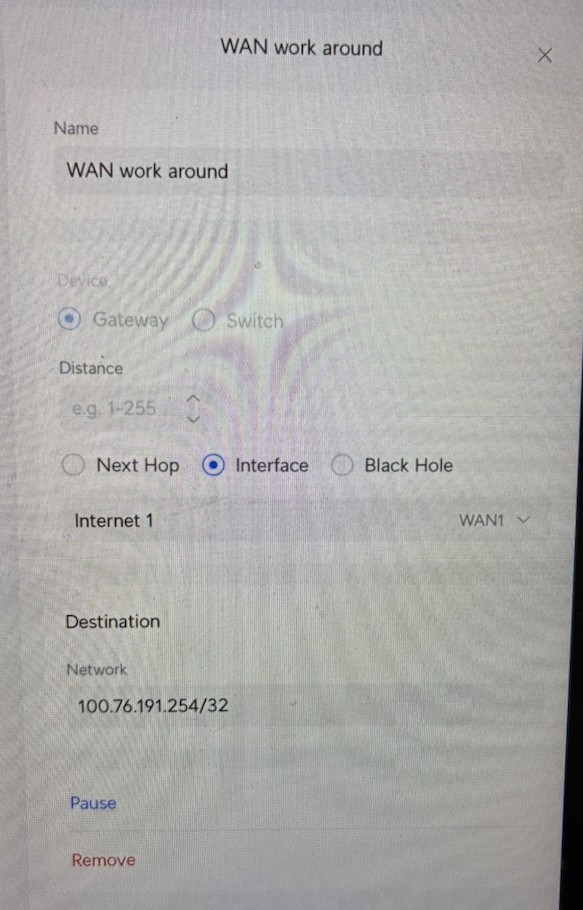
I did a less janky fix by setting up a static route similar to that used in the thread I linked to above. For whatever reason the 'next hop' approach didn't work for me, what I did instead was select 'interface' instead of 'next hop', with the ISP gateway in the destination network. See attached potato-quality screenshot for my settings. Hopefully this is a durable solution, I guess selecting interface instead of next hop means the static route will still be valid when my WAN IP changes.


Hope that helps people in a similar situation... was quite the journey. I haven't put the router into my home network long-term yet, but will be keeping a keen eye on this when I do...


michaelmurfy
meow
13580 posts

Uber Geek
+1 received by user: 10912

Moderator
ID Verified
Trusted
Lifetime subscriber

  #3457484 31-Jan-2026 15:25
Send private message quote this post

Martli:


Basically the Unifi routers can't talk to the ISP's gateway if it's on a different subnet to the WAN IP, whereas others don't have this problem. This seems to be a feature rather than a bug judging by the thread I linked to above. The issue may have fixed itself for OP by refreshing the WAN IP to one on the same subnet as the ISP's gateway? Who knows...


That is most certainly a bug.


Many ISP's do this... I wouldn't ever recommend doing a static route as if you get shifted to a new BNG on 2degrees end then there goes your internet once again.


Perhaps try different firmware? Release candidate firmware for a bit? Or even ensure it is updated / factory reset and set it up again from scratch?


Michael Murphy | https://murfy.nz
Referral Links: Quic Broadband (use R122101E7CV7Q for free setup)

Are you happy with what you get from Geekzone? Please consider supporting us by subscribing.
Opinions are my own and not the views of my employer.


Shop now for Lego sets and other gifts (affiliate link).
Martli
4 posts

Wannabe Geek
+1 received by user: 1


  #3457522 31-Jan-2026 20:12
Send private message quote this post

Yeah it seems ridiculous to have a prosumer product like this lack what seems to be standard behaviour for most routers, and require such a janky work around. In the thread on the ubiquiti forums, the response from the tech support was:


I have reviewed the support file and the previous findings, the behavior you are seeing is expected given the DHCP parameters provided by the ISP, and it is not related to a link or hardware failure.


The WAN interface is receiving a valid DHCP lease, however there is a conflict between the assigned IP subnet and the default gateway. Specifically, the gateway provided by the ISP is outside of the leased subnet, which UniFi gateways do not support. Due to this mismatch, the system correctly declines installing the default route and marks the WAN as down.


Hence why it seems like a feature rather than a bug and potentially not something that will be 'fixed' unless they change their stance on it.


Anyway, I did do several factory resets and tried an earlier firmware version, and all exhibited the same behaviour. Quite strange. Will look into release candidate firmware.


MaxineN
Max
2049 posts

Uber Geek
+1 received by user: 1663

ID Verified
Trusted
Subscriber

  #3457525 31-Jan-2026 20:40
Send private message quote this post

Does 2degrees still have a functioning PPPoE stack or did they kill that?
I wonder if moving to PPPoE would just fix it.


Ramblings from a mysterious lady who's into tech. Warning I may often create zingers.


insane
3324 posts

Uber Geek
+1 received by user: 1006

ID Verified
Trusted
2degrees
Subscriber

  #3457533 31-Jan-2026 21:33
Send private message quote this post

MaxineN:


Does 2degrees still have a functioning PPPoE stack or did they kill that?
I wonder if moving to PPPoE would just fix it.


Yes both DHCP or PPPoE can be used. I have a UCG Ultra, never experienced this issue.


Martli
4 posts

Wannabe Geek
+1 received by user: 1


  #3457539 31-Jan-2026 22:41
Send private message quote this post

Good shout, I'll try PPPoE next time I get the router out for testing.


1 | 2 
Filter this topic showing only the reply marked as answer View this topic in a long page with up to 500 replies per page Create new topic


Geekzone Live »

Try automatic live updates from Geekzone directly in your browser, without refreshing the page, with Geekzone Live now.


Are you subscribed to our RSS feed? You can download the latest headlines and summaries from our stories directly to your computer or smartphone by using a feed reader.